
Kupu Whakataki
The Vivitar 450PZ is a compact 35mm camera designed for ease of use, featuring fully automatic operation. This manual provides essential information for setting up, operating, maintaining, and troubleshooting your camera to ensure optimal performance.
The camera incorporates automatic focusing and exposure, a 38 to 70mm zoom lens, an automatic flash with red-eye reduction, and motorized film handling. An electronic self-timer is also included for convenience.
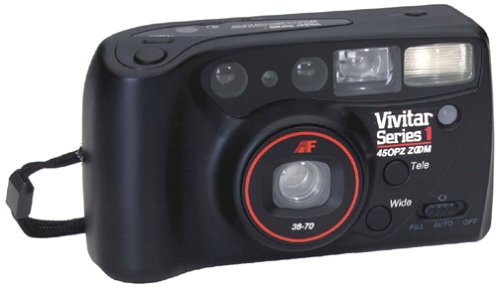
Whakaahua: Mua view of the Vivitar 450PZ 35mm Camera, showcasing tona hoahoa kiato me te arotahi.
Tatūnga
1. Tāuta Pūhiko
- Locate the battery compartment cover on the camera body.
- Open the cover by sliding or lifting it according to the indicator.
- Insert the required CR123A type batteries, ensuring correct polarity (+/-) as indicated inside the compartment.
- Katia kia mau te uhi o te wahanga pākahiko.
2. Te Utaina o te Kiriata
- Open the camera back by sliding the latch.
- Whakatakotoria he kātere kiriata 35mm ki roto i te rūma kiriata.
- Pull the film leader across to the film take-up spool, aligning it with the start mark.
- Close the camera back. The camera will automatically advance the film to the first frame.
3. Wrist Strap Attachment
Attach the provided wrist strap to the designated loop on the camera body. This helps prevent accidental drops and provides a secure grip during use.
Te whakahaere i te kamera
1. Te Hiko / Whakaweto
Locate the power button or switch, typically near the shutter button. Press or slide it to turn the camera on or off.
2. Te tango pikitia
- Titiro ma te viewkairapu hei tito i to kopere.
- Press the shutter button halfway down to activate the autofocus and exposure systems. The camera will automatically set the focus and exposure.
- Pēhia te pātene kati ki raro kia tangohia te pikitia. Ka neke aunoa te kiriata ki te anga e whai ake nei.
3. Mahi Topa
Use the zoom control (usually a lever or buttons near the shutter) to adjust the focal length between 38mm (wide-angle) and 70mm (telephoto). This allows you to bring subjects closer or capture a wider scene.
4. Mahi Flash
- Uira Aunoa: The flash will automatically fire in dimly lit conditions to ensure proper exposure.
- Te Whakaiti i te Kanohi Whero: When activated, the camera emits a series of pre-flashes before the main flash to reduce the red-eye effect in portraits.
- Flash Off Mode: For situations where flash is not desired (e.g., museums, theater), locate the flash mode button and select the 'flash off' setting.
5. Takiwā-whaiaro
To use the self-timer, press the self-timer button. A flashing LED indicator will typically signal the countdown. After a set delay (e.g., 10 seconds), the camera will automatically take the picture, allowing the photographer to be included in the shot.
6. Whakahoki Kiriata
When the film roll is complete, the camera will automatically rewind the film back into the cartridge. A mid-roll rewind function may also be available, allowing you to rewind the film before the roll is finished by pressing a specific button (refer to camera markings if available).
Te tiaki
Te horoi i te kamera
- Use a soft, lint-free cloth to gently wipe the camera body.
- For the lens, use a specialized lens cleaning cloth and lens cleaning solution. Avoid touching the lens surface with your fingers.
- Do not use abrasive cleaners or solvents, as these can damage the camera's finish and optical components.
Rokiroki
- Ki te kore e whakamahia, penapenahia te kaamera ki tetahi waahi makariri, maroke kia matara atu i te ra tika me te wera nui.
- Tangohia ngā pākahiko mēnā kāore te kāmera e whakamahia mō te wā roa hei ārai i te turuturu.
Raparongoā
Kāre te Kāmera i te hiko
- Tirohia mēnā kua tika te whakaurunga o ngā pākahiko, ā, kei roto hoki i te polarity tika.
- Whakakapihia nga pākahiko tawhito, kua pau ranei ki nga pākahiko hou.
- Me whakarite kei te tūranga 'Kā' te pana hiko.
Film Not Advancing
- Verify that the film is correctly loaded and the leader is engaged with the take-up spool.
- Check if the film door is securely closed.
- Ensure there is enough power from the batteries for the motor to operate.
Kāore te uira e mura ana
- Confirm that the flash is not set to 'Flash Off' mode.
- Allow sufficient time for the flash to charge (indicated by a flash ready lamp).
- Ensure ambient light conditions are dark enough for the automatic flash to activate.
Whakatakotoranga
| Āhuahira | Taipitopito |
|---|---|
| Waitohu | Vivitar |
| Ingoa Tauira | 450PZ |
| Momo Hōputu Kiriata | 35mm |
| Arotahi | 38-70mm Zoom |
| Mana Whakaaturanga | Aunoa |
| Pūnaha Arotahi | 14-zone Autofocus |
| kohiko | Automatic with Red-Eye Reduction |
| Te Whakahaere Kiriata | Motorized Loading, Advance, and Rewind |
| Nga waahanga motuhake | Built-In Flash, Compact Design, Electronic Self-Timer |
| Taumaha Tūemi | 15.2 hekere |
| Nga Waahanga kei roto | Te Tinana kamera me te Arotahi |
Pūtāhui me te Tautoko
Nga korero Whakaputanga
The Vivitar 450PZ camera comes with a warranty covering one year on parts and 90 days on labor from the date of purchase. Please retain your proof of purchase for warranty claims.
Tautoko Kiritaki
For technical assistance, service, or further inquiries regarding your Vivitar 450PZ camera, please refer to the contact information provided with your product packaging or visit the official Vivitar webpae mo nga rauemi tautoko.