
1. Kupu Whakataki
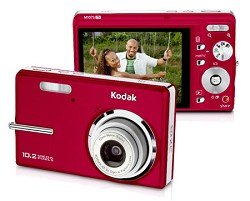
The Kodak EasyShare M1073IS digital camera is designed for capturing still images and videos with ease. It features a 10.2-megapixel CCD sensor and a 3x optical zoom lens with sensor-shift image stabilization to help reduce blur. This camera is part of the Kodak EasyShare system, which simplifies the process of managing and sharing your pictures. This manual provides essential information for setting up, operating, maintaining, and troubleshooting your camera.
2. Ihirangi Pouaka
Please verify that all items listed below are included in your camera package:
- Kodak EasyShare M1073IS Digital Camera
- Kodak Li-Ion Rechargeable Digital Camera Battery KLIC-7001
- AC adapter for in-camera charging
- USB taura
- Te here ringaringa
- Getting Started Guide with Kodak EasyShare Software
- Custom camera insert for optional Kodak EasyShare Camera and Printer Docks
3. Tatūnga
3.1. Tāuta Pūhiko me te Whakatau
Locate the battery compartment door on the bottom of the camera. Open the door and insert the Kodak KLIC-7001 Lithium-Ion battery, ensuring the correct orientation as indicated inside the compartment. Close the door securely. To charge the battery, connect the camera to the AC adapter using the provided USB cable. The camera supports in-camera charging.
3.2. Kōkuhu Kāri Pūmahara
The camera has 32MB of internal memory. For practical usage and to store more photos and videos, it is recommended to use an optional SD or SDHC memory card (up to 32 GB). Locate the memory card slot, typically near the battery compartment. Insert the memory card with the metal contacts facing the correct direction until it clicks into place.
3.3. Te Whakapiri i te Taonga Wrist
Thread the included wrist strap through the strap eyelet on the camera body. Secure the strap to prevent accidental drops.
4. Te Whakahaere i te Kaamera
4.1. Te Whakakaha/Weto
Pehia te Mana button, usually located on the top of the camera, to turn the camera on or off. The 2.7-inch LCD display will illuminate.
4.2. Te tango whakaahua
- Tīpako Aratau: Use the mode dial or button to select the desired shooting mode (e.g., Auto, Program, Scene modes like Landscape, Night Portrait, Sports).
- Tāparehia To Matā: Use the LCD display to compose your image.
- Arotahi: Press the shutter button halfway down to allow the camera to autofocus. The camera uses multi-area, center, contrast detection, and live view autofocus technologies.
- Hopu: Press the shutter button completely down to take the picture. The camera captures images at up to 10.2 megapixels (3680x2760 resolution) in JPEG format.
4.3. Hopu Ataata
- Huri ki te Aratau Ataata: Locate the video recording button or switch the mode dial to video mode.
- Tīmata te tuhi: Press the video record button to begin recording. A red indicator or timer will appear on the LCD.
- Kati te tuhi: Press the video record button again to stop recording. Videos are recorded in QuickTime MOV motion JPEG format at 640x480 resolution at 15 frames per second.
4.4. Using Zoom
Use the zoom lever, typically located around the shutter button, to adjust the focal length. The camera features a 3x optical zoom for clear magnification and a 5x continuous advanced digital zoom for further enlargement.
4.5. Ngā Aratau Kohiko
The built-in flash can be adjusted using the flash mode button. Available modes include Auto, Fill-in (On), Off, and Slow Synch, allowing you to control lighting in various conditions.
4.6. Reviewi nga Whakaahua me nga Ataata
Pehia te Review or Whakahoki pātene ki view your captured photos and videos on the 2.7-inch high-resolution LCD display. Use the directional pad to navigate through your media.
5. Tiaki
5.1. Te horoi i te kamera
- Arotahi: Use a soft, lint-free cloth or a lens brush to gently remove dust and smudges. Avoid harsh chemicals.
- Mata LCD: Wipe the screen with a soft, dry cloth. For stubborn smudges, use a screen cleaner designed for electronics.
- Tinana kāmera: Whakamahia he kakahu ngohengohe, maroke hei muru i te tinana o te kāmera.
5.2. Tiaki Pūhiko
Store the battery in a cool, dry place when not in use. Avoid fully discharging the battery frequently to prolong its lifespan. Use only the specified Kodak KLIC-7001 battery and charger.
5.3. Rokiroki
When not in use, store the camera in a protective case to shield it from dust, moisture, and physical impact. Remove the battery if the camera will not be used for an extended period.
6. Te Raru
6.1. Kaore te Kaamera e Hia
- Me whakarite kia tika te whakaurunga o te pākahiko me te whakakii katoa.
- Whakamātauria te utu i te pākahiko mō te 30 meneti pea.
- Tirohia mehemea he ma nga hoapaki pākahiko.
6.2. Blurry Images
- Ensure the camera has focused correctly before taking the shot (press shutter halfway).
- Hold the camera steady. The sensor-shift image stabilization helps, but excessive movement can still cause blur.
- Check lighting conditions. In low light, use the flash or a higher ISO setting if available.
- Horoia te arotahi kamera.
6.3. Hapa Kāri Mahara
- Me whakarite kia tika te whakauru o te kaari mahara.
- Try reformatting the memory card (this will erase all data).
- Test with a different, compatible SD/SDHC memory card.
6.4. Dark Indoor Photos
- Ensure the flash is set to Auto or On.
- Increase ambient lighting if possible.
- Check if the flash is obstructed.
7. Whakatakotoranga
| Āhuahira | Whakatakotoranga |
|---|---|
| Ingoa Tauira | EasyShare M1073IS |
| Momo Pūoko | 10.2 MP CCD (1/2.33 inches) |
| Topa Optical | 3x |
| Huringa Mamati | 5x |
| Whakapumau Atahanga | Huri-whakaaro |
| Whakaatu | 2.7-inch LCD (230,000 pixels) |
| Whakatau Atahanga Tonu | Up to 10.2 MP (3680x2760) |
| Whakatau Ataata | 640x480 at 15 fps (MOV) |
| Mahara o roto | 32 MB |
| Mahara Hototahi | SD/SDHC card (up to 32 GB) |
| Momo Pūhiko | Kodak KLIC-7001 Lithium-Ion |
| Hononga | USB 2.0 |
| Nga Ahinga (D x W x H) | 0.9" x 3.6" x 2.2" |
| Taumaha | 5.92 hekere |
8. Pūtāhui me te Tautoko
Your Kodak EasyShare M1073IS Digital Camera is covered by a limited warranty. Please refer to the warranty card included in your original packaging for specific terms and conditions. For technical support, service, or additional product information, please visit the official Kodak support website or the Kodak brand store.
Ka kitea e koe etahi atu korero me nga rauemi tautoko i te Toa KODAK i runga i a Amazon.