
VTech 80-109744
VTech Schulstart Laptop E Instruction Manual
Tauira: 80-109744
1. Kupu Whakataki
This manual provides essential information for the safe and effective use of your VTech Schulstart Laptop E. This learning computer is designed for children aged 6 and up, offering 160 educational games in both German and English. It covers subjects such as letters, words, mathematics, nature, science, and creativity.
Tena koa panuihia tenei pukapuka i mua i te whakahaere i te taputapu ka pupuri tonu hei tohutoro a meake nei.
2. Nga korero haumaru
WHAKATŪPATO: Choking hazard due to small parts that can be swallowed. Not suitable for children under 36 months.
WHAKATŪPATO: Strangulation hazard. Keep packaging materials away from children.
- Mataki i nga tamariki i nga wa katoa e whakamahi ana.
- Kaua e tukuna te taputapu ki te wera nui, ki te ra tika ranei.
- Puritia te pūrere kia maroke. Kaua e rumakina ki te wai, ki ētahi atu wai rānei.
- Horoia te taputapu ki te kakahu ngohengohe, maroke. Kaua e whakamahia he mea horoi whakakoi.
- Me whakarite kia tika te whakauru i ngā pākahiko kia rite ki ngā tohu polarity.
- Kia tere te tango i nga pākahiko kua ruha.
- Kaua e hanumi nga pākahiko tawhito me nga pākahiko hou, nga momo pākahiko rereke ranei.
- Ko nga pākahiko kore-recharge e kore e taea te whakakii ano.
- Ko nga pākahiko ka taea te utu me utu noa i raro i te mataki pakeke.
- Tango pākahiko rechargeable i te takawairore i mua i te utu.
- Ko nga tauranga tuku kia kaua e porotiti poto.
3. Ihirangi mokete
The VTech Schulstart Laptop E package includes:
- 1 x VTech Schulstart Laptop E
- 1 x Cursor Mouse
- 3 x AA Demonstration Batteries (for test purposes only)
Note: A VTech power adapter and VTech laptop bag are sold separately and are not included.
4. Tatūnga
4.1 Tāuta Pūhiko
The device requires 3 AA batteries. The included demonstration batteries are for testing purposes only and should be replaced with new batteries for regular use.
- Rapua te wahanga pākahiko kei raro o te pona.
- Ma te whakamahi i te huriwiri, whakatuwherahia te uhi o te wahanga pākahiko.
- Remove the old demonstration batteries (if present).
- Whakauruhia kia 3 nga pākahiko AA hou, kia tika te polarity (+/-) e tohuhia ana ki roto i te waahanga.
- Whakakapia te uhi o te wahanga pākahiko ka mau ki te huri.

Figure 4.1: Battery installation guide. Replace demonstration batteries with new ones for extended play.
4.2 Connecting the Cursor Mouse
The VTech Schulstart Laptop E comes with a wired cursor mouse for interactive play.
- Locate the mouse port on the side of the laptop.
- Carefully insert the mouse connector into the port.
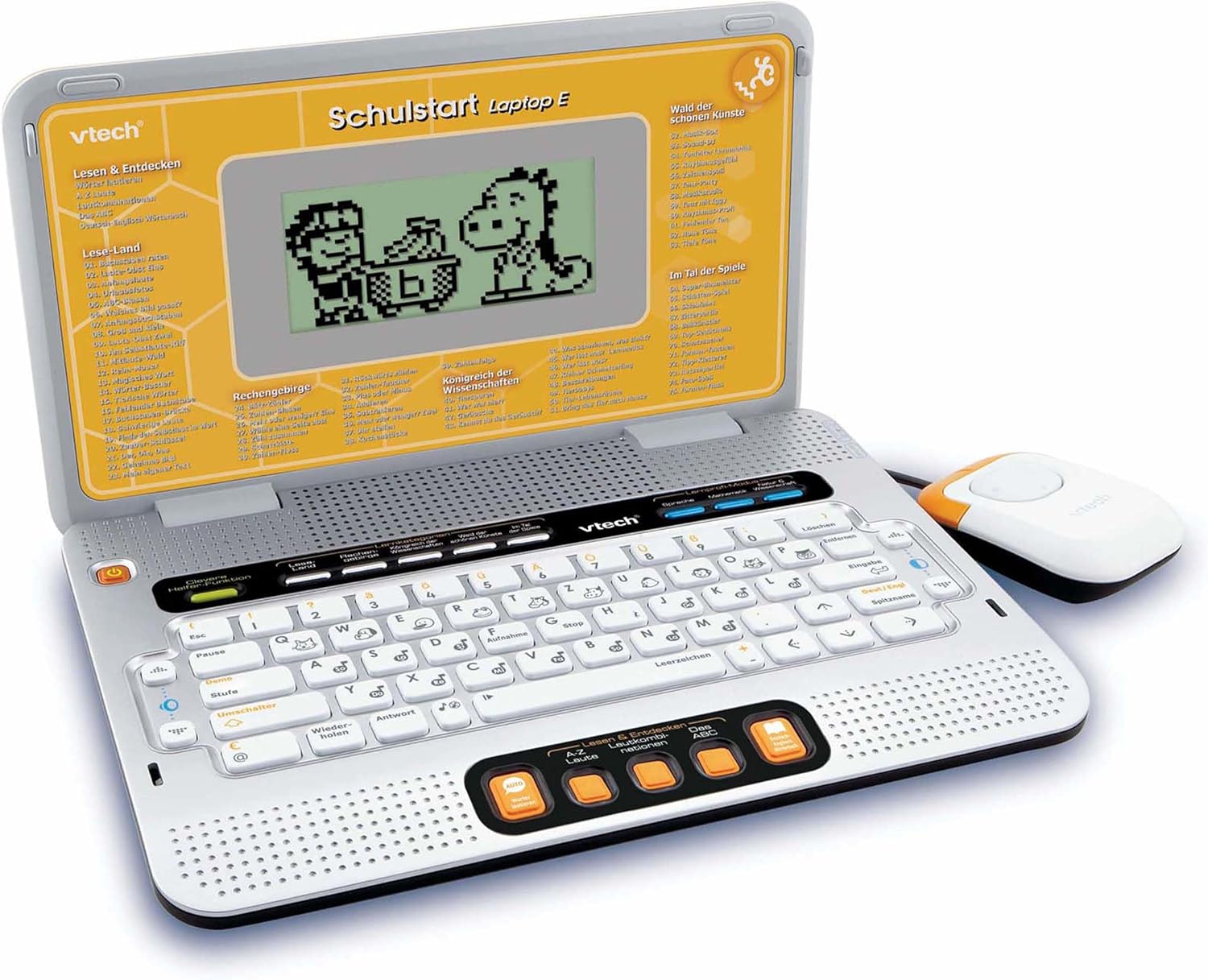
Figure 4.2: VTech Schulstart Laptop E with connected cursor mouse.
5. Nga Tohutohu Whakahaere
5.1 Hiko / Whakaweto
To turn on the laptop, press the Mana button, usually located on the top left of the keyboard area. To turn off, press the Mana button again or the laptop will automatically shut down after a period of inactivity to conserve battery life.
5.2 Te Kōwhiringa Reo
The VTech Schulstart Laptop E supports both German and English. You can switch between languages using the dedicated language selection button or through the settings menu, if available. Refer to the on-screen prompts for initial setup.
5.3 Game Categories and Selection
The laptop features 160 educational games categorized as follows:
- Language Tools: 5 nga kaupapa
- Letters & Words: 23 nga kaupapa
- Mathematics: 16 nga kaupapa
- Nature & Science: 12 nga kaupapa
- Waihanga: 12 nga kaupapa
- Logic & Games: 12 nga kaupapa
Use the arrow keys and the Enter button on the keyboard, or the cursor mouse, to navigate through the menu and select a game.

Figure 5.1: Navigating game categories on the VTech Schulstart Laptop E.
5.4 Tutor Function and Learning Modes
The laptop includes a Tutor function and a Learning Pro mode to enhance the learning experience:
- Tutor Function: Features 5 direct-dial keys for language tools (sounds, phonics, sound combinations, ABC with example words, German-English dictionary). These programs assist with letter pronunciation and reading.
- Learning Pro Mode: Offers progressive learning through increasing difficulty levels, adapting to the child's progress.
- Smart Helper Function: Provides additional hints and tips in many educational games upon request.

Figure 5.2: Child using the VTech Schulstart Laptop E's interactive learning features.
6. Tiaki
6.1 Te horoi
To clean the VTech Schulstart Laptop E, use a soft, slightly damp cloth. Do not use harsh chemicals or abrasive cleaners. Ensure the device is powered off and disconnected from any power source before cleaning.
6.2 Rokiroki
Store the laptop in a cool, dry place away from direct sunlight and extreme temperatures. If the device will not be used for an extended period, remove the batteries to prevent leakage.

Figure 6.1: Optional VTech laptop bag for storage and transport (sold separately).
7. Te Raru
| Raruraru | Take pea | Rongoā |
|---|---|---|
| Kaore e tahuna te taputapu. |
|
|
| He pātea te mata, he kemo rānei. |
|
|
| Keys or mouse not responding. |
|
|
| Sound is distorted or absent. |
|
|
8. Whakatakotoranga
- Tau tauira: 80-109744
- Ahu (L x W x H): 4 x 28 x 20 cm (1.57 x 11.02 x 7.87 inihi)
- Taumaha: 1.29 kg (2.84 lbs)
- Reanga Manakohia: 6 tau ki runga ake
- Pūhiko: 3 x AA (not included for regular use)
- Reo: Tiamana, Ingarihi
- Te maha o nga keemu: 160
- Rā Tuku: Hōngongoi 31, 2010
9. Pūtāhui me te Tautoko
Mō ngā mōhiohio pūtāhui me te tautoko kiritaki, tirohia te paetukutuku mana o VTech webpaetukutuku, whakapā atu rānei ki tō kaituku VTech ā-rohe. Puritia tō rīhiti hoko hei tohu hoko.
VTech Official Webpae: www.vtech.com
Ask a question about this manual
Ask about setup, troubleshooting, compatibility, parts, safety, or missing instructions. Manuals+ will review the question and use this page’s manual context to help answer it.