
1. Kupu Whakataki
This manual provides detailed instructions for the installation, operation, and maintenance of your Comelit HFX700M Color Hands Free Video Intercom Kit. This system is designed to enhance security by allowing visual and audio communication with visitors at your door or gate before granting access. It is suitable for both residential and commercial applications requiring reliable access control.
2. Hua Neke Atuview
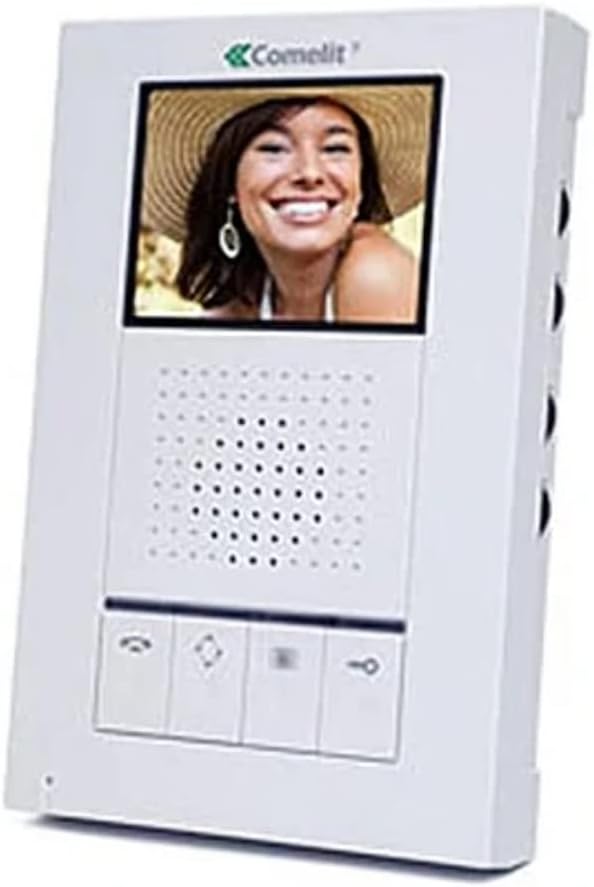
The Comelit HFX700M system includes a hands-free indoor monitor and an outdoor doorbell station. The indoor monitor features a 3.5-inch LCD screen for clear video display, while the outdoor unit is equipped with a 3.6mm wide-angle lens for comprehensive viewing.

Whakaahua 2.1: Comelit HFX700M Indoor Monitor Unit. This image shows the white indoor monitor with a color display at the top, a speaker grille in the middle, and control buttons at the bottom.
Whakaahua 2.2: Comelit HFX700M Outdoor Doorbell Station. This image displays the bronze-colored outdoor unit with a camera lens at the top, a speaker/microphone grille, and a doorbell button with an illuminated bell icon.
3. Nga korero haumaru
- Āta pānuihia ngā tohutohu katoa i mua i te tāutanga me te mahi.
- Ensure power is disconnected before performing any wiring or maintenance.
- Me mahi te tāutanga e te tohunga whai tohu mēnā kāore koe i te tino mōhio ki te waea hiko.
- Kaua e tukuna te waahanga o waho ki te wera nui, ki te rehu wai ranei i tua atu i tana tohu IP54.
- Keep the indoor monitor away from moisture and direct sunlight.
4. Ihirangi mokete
Verify that all components are present in your kit:
- 1 x Comelit HFX700M Indoor Monitor Unit
- 1 x Outdoor Doorbell Station with 3.6mm Wide-Angle Lens
- Whakaeke Taiapa me nga Tiu
- Power Supply Unit (AC/DC adapter)
- Pukapuka Kaiwhakamahi (tenei tuhinga)
5. Tatūnga me te Tāuta
The Comelit HFX700M system features a simple 2-wire installation, compatible with Cat 5e or 18/2 multi-conductor cable. You may be able to utilize existing doorbell wiring.
5.1 Waea Whakahoahoa
- Ensure all power to the installation area is turned off at the circuit breaker.
- Connect the two main wires from the outdoor doorbell station to the designated terminals on the indoor monitor. Refer to the wiring diagram provided in the separate installation guide for specific terminal assignments.
- Connect the power supply to the indoor monitor and a suitable power outlet.
5.2 Whakapiki
- Mount the outdoor doorbell station at a height that allows for optimal viewing of visitors (typically chest height for adults).
- Secure the indoor monitor to a wall using the provided mounting bracket and screws.
5.3 Roha Pūnaha
The HFX700M system is expandable. You can add up to 4 total indoor stations (monitors or audio stations) and 2 outdoor camera units to your system. Consult your dealer for compatible expansion units and their specific installation instructions.
6. Nga Tohutohu Whakahaere
The Comelit HFX700M provides hands-free communication and video monitoring capabilities.
6.1 Te Whakautu Waea
- When a visitor presses the doorbell button, the indoor monitor will chime and display live video from the outdoor station.
- Pehia te Whakautu button (typically a telephone icon) on the monitor to establish two-way, hands-free audio communication.
- Hei whakamutu i te korerorero, pehia te Whakamutua te Waea button (often a red telephone icon or similar).
6.2 Initiating Live Viewing
Ka taea e koe view the outdoor area at any time, even without a doorbell press.
- Pehia te Aroturuki button (often an eye or camera icon) on the indoor unit to activate live video feed from the outdoor station.
- Press the button again to cycle through multiple outdoor stations if installed, or to turn off the live view.
6.3 Remote Door/Gate Release
If connected to an electronic door strike or gate opener, you can remotely grant access.
- During an active call or live viewing, pehia te Wewete button (often a key icon) on the indoor monitor.
- The door or gate will momentarily unlock.
6.4 Volume and Brightness Adjustment
The indoor monitor typically includes controls for adjusting speaker volume, chime volume, and screen brightness. Refer to the specific buttons or menu options on your monitor for these adjustments.
7. Tiaki
- Te horoi: Whakamahia he kakahu ngohengohe, maroke hei horoi i te aroturuki o roto me te teihana o waho. Kaua e whakamahi i nga kai horoi me nga whakarewa.
- Hononga: Takitaki i ia wa i nga hononga waea katoa kia mau ai.
- Wae Waho: Ensure the camera lens on the outdoor unit is clean and free from obstructions for optimal video quality.
8. Te Raru
| Raruraru | Take pea | Rongoā |
|---|---|---|
| Kāore he ataata, kāore hoki he oro i runga i te mata | Power supply disconnected; loose wiring; faulty unit. | Check power connection; verify all wiring is secure; contact support if issue persists. |
| Doorbell rings constantly or randomly | Wiring issue; interference; faulty doorbell button. | Inspect doorbell wiring for shorts or damage; ensure proper grounding; if problem continues, disconnect the unit and contact technical support. |
| Te kounga ataata kino | Dirty camera lens; insufficient lighting; wiring issue. | Clean camera lens; ensure adequate lighting at the outdoor station; check wiring connections. |
| No remote door/gate release | Incorrect wiring to door strike/gate opener; incompatible strike/opener. | Verify wiring to the door strike/gate opener according to installation guide; ensure the strike/opener is compatible with the system. |
9. Whakatakotoranga
- Tau tauira: HFX-700M
- Hangarau Hononga: Wired (2-wire installation)
- Te Whakanuia: Up to 4 indoor monitors/audio stations, 2 outdoor camera units
- Kaupane Roo: Whakaaturanga LCD 3.5-inihi
- Outdoor Doorbell Lens: 3.6mm wide-angle
- Puna Hiko: AC/DC, 9 watts
- Matakitenga po: Night Color capability
- Whakatauranga parewai: IP54 (Wāhanga o Waho)
- Te rahi o te mea: 18 x 12 x 6 īnihi (tākai/kete katoa)
- Taumaha Tūemi: 0.01 Ounces (individual component, refer to packaging for total weight)
10. Pūtāhui me te Tautoko
For warranty information and technical support, please refer to the documentation provided with your purchase or contact Comelit customer service directly. Keep your purchase receipt as proof of purchase for warranty claims.
Comelit Contact Information: Please visit the official Comelit webpae mo nga taipitopito whakapā tautoko o naianei.