
1. Kupu Whakataki
This manual provides instructions for the VTech ATT-CL80100 DECT 6.0 accessory handset. This handset is designed to expand your existing compatible VTech/ATT DECT 6.0 cordless phone system. It is compatible with ATT models CL81100, CL81200, CL81300, CL82100, CL82200, CL82300, CL82350, CL82400, CL82500, CL82600, CL84100, and CL84200. Please read this manual thoroughly before using your new accessory handset.
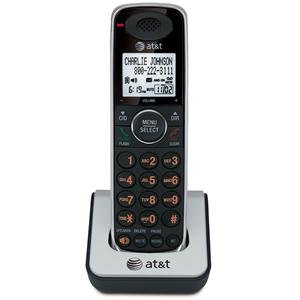
Image 1.1: The VTech ATT-CL80100 accessory handset. This image shows the front view of the cordless handset, typically including the display, keypad, and speaker.
2. Tatūnga
Before using your new accessory handset, it must be registered to your existing compatible base unit and its battery must be charged.
2.1 Ihirangi mokete
Me mohio kei roto i to kete nga mea e whai ake nei:
- ATT-CL80100 Accessory Handset
- Handset Battery Pack
- Handset Charger with Power Adapter
- Pukapuka Kaiwhakamahi (tenei tuhinga)
2.2 Tāuta Pūhiko
- Whakatuwheratia te uhi o te wahanga pākahiko kei muri o te ringaringa.
- Honoa mau te hononga pākahiko ki roto i te kōhao i roto i te wāhanga.
- Whakanohoia te putea pākahiko ki roto i te waahanga.
- Slide the battery compartment cover back into place until it clicks.
2.3 Te Whakautu i te Waea Pūkoro
- Plug the small end of the charger's power adapter into the back of the handset charger.
- Monohia te pito nui o te urutau hiko ki tētahi putanga hiko noa.
- Place the handset face forward into the charger cradle. The charge indicator light on the handset should illuminate, indicating proper charging.
- Allow the handset to charge for at least 12 hours before initial use. A full charge ensures optimal battery performance.
2.4 Registering the Handset
This accessory handset must be registered to your existing base unit to function. Refer to your main system's user manual for specific registration instructions, as procedures may vary slightly between base models (CL81xxx, CL82xxx, CL84xxx series). Generally, the process involves:
- Placing the accessory handset in its charger.
- Initiating a registration sequence on the base unit (often by pressing and holding a "PAGE" or "HANDSET LOCATOR" button).
- Confirming registration on the accessory handset.
If registration is successful, the handset display will show "Registered" or a similar confirmation message.
3. Te Whakahaere i te Waea Pūkoro
Once registered and charged, your accessory handset operates similarly to your primary handsets.
3.1 Te Waea me te Whiwhi Waea
- Hei Waea: Perehi KORERO / MAHI or KORERO, ka waeahia te nama waea.
- Hei Whakautu Waea: Press any key (Any Key Answer feature) or press KORERO / MAHI or KORERO.
- Hei Whakamutu Waea: Perehi MATE/MAMA whakahokia ranei te ringaringa ki roto i te rihi.
3.2 Using the Directory
The handset shares the main system's 50-name/number directory. To access:
- Perehi MENU/KORERO.
- Scroll to "Directory" and press MENU/KORERO.
- Scroll through entries or use the keypad to search by name.
- Perehi KORERO / MAHI to dial a selected entry.
3.3 Waea ano
The handset stores the last 20 numbers dialed. To redial:
- Perehi WHAKATAHI/TAHI.
- Scroll through the list of recent calls.
- Perehi KORERO / MAHI ki te waea i te tau kua tohua.
3.4 Handset Settings
You can customize various settings on your handset, including selectable ringer tones and menu language (English/Spanish/French setup menu). Access these options via the MENU/KORERO button and navigate to the "Settings" or "Handset Setup" menu.
4. Tiaki
Proper care ensures the longevity of your accessory handset.
- Te horoi: Wipe the handset and charger with a soft, damp kakahu. Kaua e whakamahi i ngā rehu horoi, i ngā matū kino rānei.
- Tiaki Pūhiko: Replace the battery pack when its performance significantly degrades. Use only the specified replacement battery.
- Taiao: Keep the handset away from excessive heat, direct sunlight, and moisture.
5. Te Raru
If you experience issues with your accessory handset, try the following solutions:
5.1 No Dial Tone or Cannot Make/Receive Calls
- Ensure the handset is properly registered to the base unit.
- Check that the handset battery is charged.
- Verify the main base unit is powered on and connected to the telephone line.
5.2 Handset Display is Blank or Not Working
- Place the handset in its charger to ensure it is charging.
- Check the battery connection inside the handset.
- Mena ka mau tonu te take, me whakakapi pea te pākahiko.
5.3 Kounga Ororongo Kino
- Neke atu ki te waeine turanga hei whakapai ake i te kaha o te tohu.
- Kia tino mohio kāore he mea whakarewa nunui, he taputapu hiko rānei e whakararuraru ana i te tohu.
- Check for any physical damage to the handset or base unit.
5.4 Handset Not Registering
- Ensure you are following the registration steps outlined in your main system's user manual.
- Try resetting the base unit by unplugging its power for a few minutes, then plugging it back in.
- Ensure the accessory handset is within range of the base unit during registration.
6. Whakatakotoranga
| Āhuahira | Whakatakotoranga |
|---|---|
| Waitohu | VTech |
| Tauira | ATT-CL80100 |
| Puna Mana | Waea Hiko (mo te rihi) |
| Momo Waea | Papatuhi Kotahi |
| Rahi Tūemi (L x W x H) | 2.36 x 4.96 x 7.08 inihi |
| Momo Pūnaha Whakautu | Digital (system dependent) |
| Taumaha Tūemi | 1 Kirokaramu |
| Tohu Kaiwaea | No (as per product specifications, system dependent) |
| UPC | 172302632910, 132017996028, 168141379444, 650530020506 |
7. Nga Korero Whakaputanga
VTech products are manufactured with high-quality components and are designed to provide years of trouble-free operation. For specific warranty details, including duration and coverage, please refer to the warranty card included with your original base unit purchase or visit the official VTech support webpae. Puritia to riiki hoko hei tohu mo te hoko.
8. Tautoko Kiritaki
For technical assistance, product registration, or to order replacement parts, please contact VTech customer support. You can typically find contact information (phone numbers, website, email) on the VTech official website or in the documentation provided with your main phone system.
Kei roto pea nga rauemi ipurangi:
- Pātai Auau (FAQs)
- Product Support Documents
- Software/Firmware Updates (if applicable)
When contacting support, please have your product model number (ATT-CL80100) and purchase date available.