
Kupu Whakataki
This manual provides comprehensive instructions for the setup, operation, and maintenance of your VTech CS6829-2 2-Handset Cordless Phone with Answering System. This system is designed for home use, offering features such as caller ID, a digital answering machine, backlit keypad, and a full duplex speakerphone for enhanced communication.
He aha kei roto i te Pouaka
Manatokona kei roto katoa nga taonga ki to kete:
- Waeine turanga
- 2 nga waea kore aho
- Kaitohu
- 2 urutau
- 2 mōkihi pūhiko
- Te taura waea
- Taiapa whakairi pakitara
- He aratohu timata tere
Tatūnga
Follow these steps to set up your VTech CS6829-2 phone system:
- Honoa te Waeine turanga:
Plug one end of the telephone line cord into the TEL LINE jack on the back of the base unit. Plug the other end into a telephone wall jack. Plug the small end of the power adapter into the POWER jack on the back of the base unit. Plug the large end of the power adapter into a wall outlet not controlled by a wall switch.
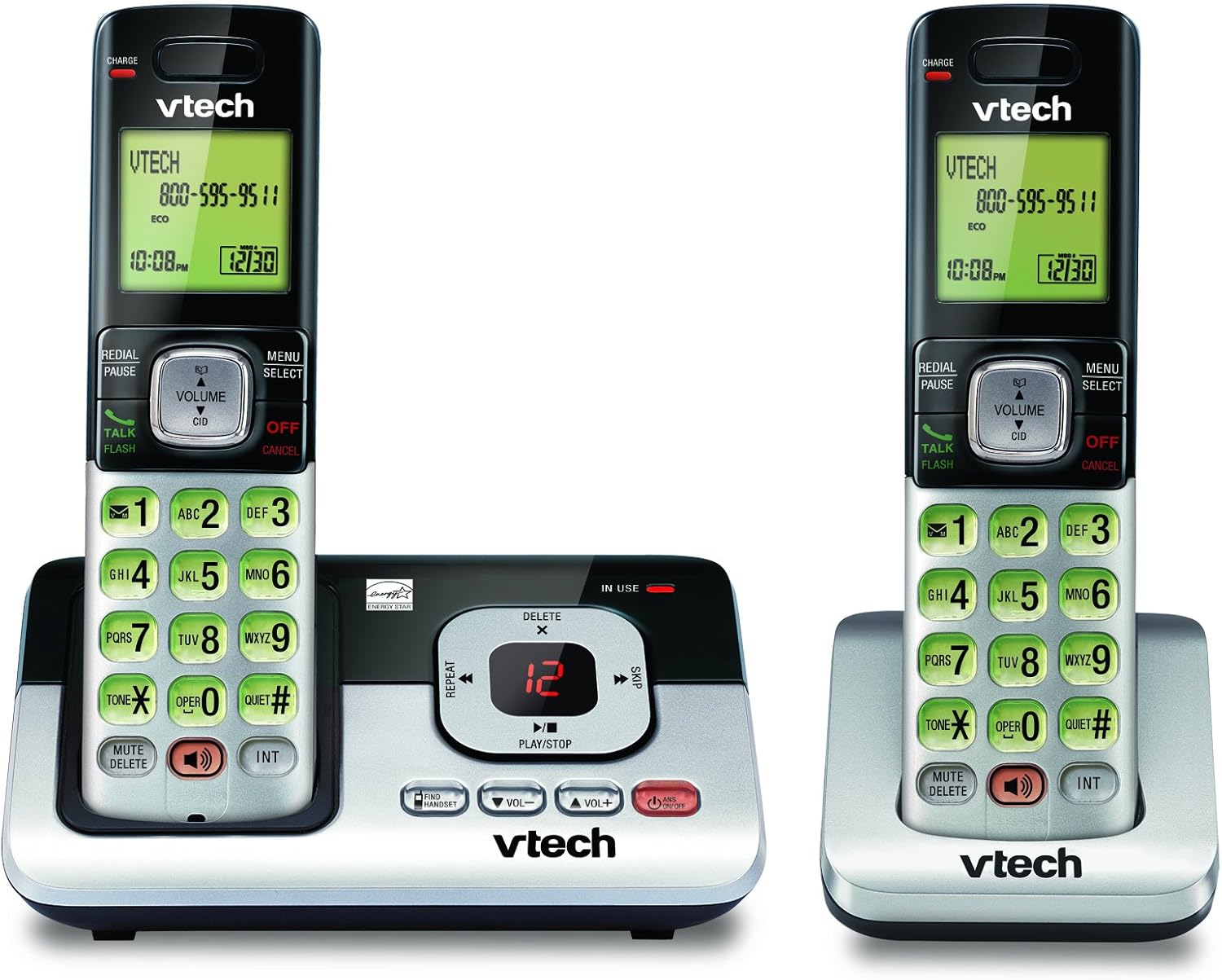
Image: The VTech CS6829-2 base unit with one handset docked, and a second handset with its charging cradle. This illustrates the main components of the phone system.
- Tāuta Pūhiko Pukoro:
Open the battery compartment cover on the back of each handset. Connect the battery pack connector securely into the jack inside the compartment. Place the battery pack with the label facing up and tuck the wires inside the compartment. Close the battery compartment cover.
- Utu Pukoro:
Place each handset in the base unit or charger with the display facing up. The CHARGE light on the handset will illuminate, indicating proper charging. Allow the handsets to charge for at least 16 hours before initial use for optimal battery performance.

Whakaahua: He koki view of the VTech CS6829-2 base unit with one handset docked, and the second handset in its separate charging cradle. This shows how the handsets are placed for charging.
- Tautuhi Rā me te Wā:
After the handsets are charged, follow the on-screen prompts or refer to the quick start guide to set the date and time. This is important for accurate caller ID and answering system timestamps.
Nga Tohutohu Whakahaere
Waea Ana me te Whakautu
- Hei Waea: Perehi KORERO / MAHI or any dialing key to get a dial tone, then dial the phone number.
- Hei Whakautu Waea: Ka tangi ana te waea, pehi KORERO / MAHI tetahi kī waea ranei.
- Hei Whakamutu Waea: Perehi WHAKATOA/Whakakore or place the handset back in the base unit/charger.
Pūnaha Whakautu Mamati
- Purei Karere: I runga i te waahanga turanga, pehia TAKARO/TATA. On a handset, press MENU/KORERO, scroll to "Answering System", then select "Play Messages".
- Te Tuhi i tētahi Pānui Whakamutunga: On the base unit or handset, navigate to the answering system menu and select "Record OGM" (Outgoing Message).
- Muku Karere: I te wā e purei ana tētahi karere, pēhia MUMU on the base unit or handset.
Mahi Waeaorooro
- To Use Speakerphone: I te wa e piihia ana, paatohia te KORERO button on the handset. Press it again to switch back to the handset earpiece.
Nga waahanga matua
- Digital Answering System with LED Indicator and Volume Control: This system records up to 14 minutes of messages, announcements, and memos. An LED indicator notifies you of new messages. Volume control keys on the base allow easy adjustment of message playback volume.
- Caller ID / Call Waiting — Stores up to 50 Calls: Displays the name, number, time, and date of incoming calls, helping you identify callers before answering.
- Waea Tukuoro Matarua Katoa: The handset features a full duplex speakerphone, enabling natural two-way conversations where both parties can speak and be heard simultaneously.
- Papapātuhi Whakamuri me te Whakaaturanga: The entire keypad and LCD screen on the handset illuminate, ensuring clear visibility and easy dialing even in low-light conditions.
- Hangarau Tiaki-Mana Aratau ECO: This technology optimizes power consumption for extended battery performance and energy efficiency.
- Aratau Ataahua: Allows you to silence the ringer on both the handset and base unit immediately or for a set period, providing peace and quiet when needed.
Te tiaki
- Te horoi: Horoia te waea me te waeine turanga ki te wai ngohengohe,amp kakahu. Kaua e whakamahia he rehu horoi, he wai horoi rānei.
- Tiaki Pūhiko: Replace batteries when they no longer hold a charge. Use only the specified battery type. Dispose of old batteries responsibly according to local regulations.
- Nga Tikanga Taiao: Kaua e waiho te waea ki te rā tika, ki te taha o ngā pūtake wera, ki ngā wāhi rānei e nui ana te makuku.
Raparongoā
Mena ka raru koe ki to waea, whakamatau i nga otinga e whai ake nei:
| Raruraru | Rongoā |
|---|---|
| Kaore he reo waea. | Ensure the telephone line cord is securely plugged into both the base unit and the wall jack. Check that the power adapter is plugged into a working electrical outlet. |
| Karekau te ringaringa e utu ana. | Ensure the handset is properly seated in the base unit or charger. Clean the charging contacts on both the handset and base/charger with a dry cloth. Verify the power adapter is connected. |
| He kino te kounga oro / Static. | Move the handset closer to the base unit. Avoid placing the phone near other electronic devices (e.g., microwaves, computers) that may cause interference. Check the telephone line cord for damage. |
| Ko te punaha whakautu kaore i te tuhi i nga karere. | Ensure the answering system is turned ON. Check if the memory is full; delete old messages if necessary. |
Whakatakotoranga
| Āhuahira | Taipitopito |
|---|---|
| Tau tauira | CS6829-2 |
| Hunga Hua | 5.77 x 3.41 x 6.77 inihi |
| Taumaha Tūemi | 1.41 pauna |
| Pūhiko | 2 Hua Nga pākahiko motuhake e hiahiatia ana (kei roto) |
| Momo Pūnaha Whakautu | Mamati |
| Mahara Waea Waea | Up to 50 calls |
| Te Whakahoki i te Waa Hopu Pūnaha | Tae atu ki te 14 meneti |
| Tae | Pango/Hiwawa |
| Momo Waea | Ahokore |
Pūtāhui me te Tautoko
Mō ngā mōhiohio pūtāhui me te tautoko hangarau, tirohia te kāri pūtāhui kei roto i tō hua, tirohia rānei te paetukutuku mana o VTech webpae. Puritia to riirii hoko hei tohu mo te hoko mo nga kereme whakamana.
Ka taea hoki e koe te toro ki te Toa VTech i runga i a Amazon mo etahi atu korero hua me nga rauemi tautoko.