
SPYCLOPS SPY-MINIDOMEW2P
Pukapuka Kaiwhakamahi mō te Kāmera Dome Iti CCD SPYCLOPS SPY-MINIDOMEW2P
Model: SPY-MINIDOMEW2P | Brand: SPYCLOPS
1. Kupu Whakataki me Nekeview
This manual provides comprehensive instructions for the installation, operation, and maintenance of your SPYCLOPS SPY-MINIDOMEW2P CCD Mini Dome Camera. Designed for indoor surveillance, this camera offers reliable monitoring with its CCD sensor and 720p video resolution. Please read this manual thoroughly before using the product to ensure proper setup and functionality.
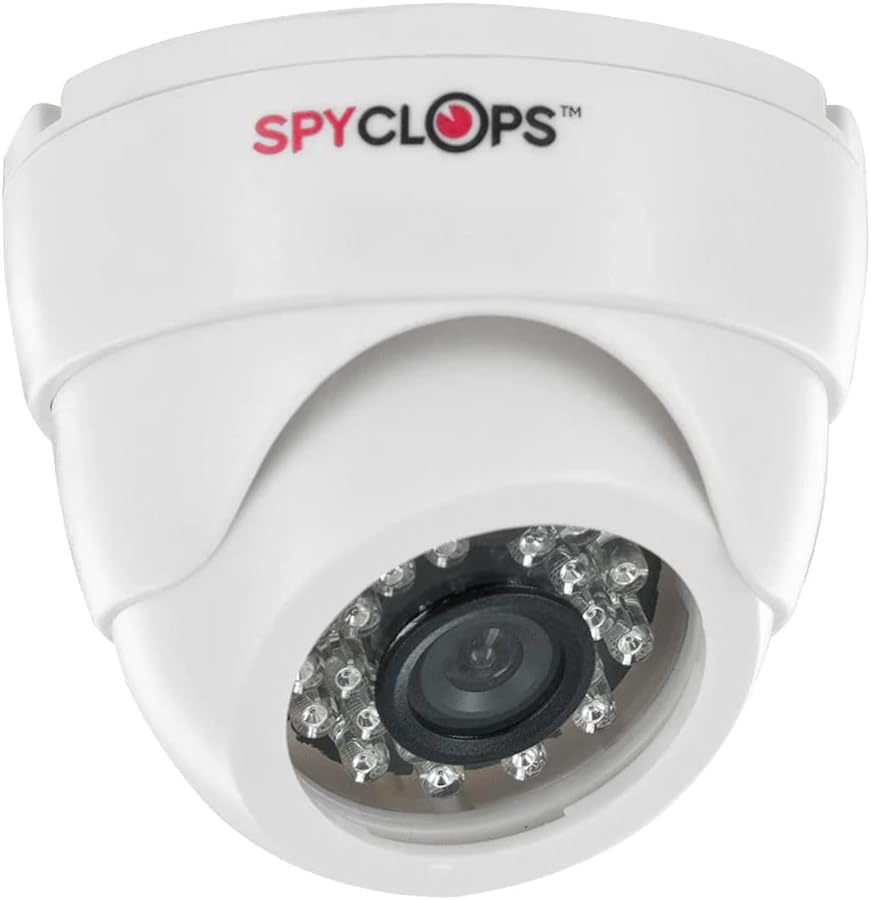
Figure 1: SPYCLOPS SPY-MINIDOMEW2P CCD Mini Dome Camera
The SPY-MINIDOMEW2P is a compact, white plastic dome camera featuring a CCD photo sensor for clear image capture. It supports Wi-Fi for wireless communication and is designed for wall mounting in various indoor environments such as offices, kitchens, living rooms, and classrooms. Its IP54 rating indicates protection against dust ingress and splashing water, making it suitable for typical indoor conditions.
2. Nga Hua o te Hua
- Taumira Ataata: 720p for clear video capture.
- Hangarau Pūoko Whakaahua: CCD (Charge-Coupled Device) for enhanced image quality.
- Hononga Ahokore: Wi-Fi for network integration and Bluetooth for specific accessory connections.
- Whakamahi Roto: Specifically designed for indoor surveillance applications.
- Tauwehe Puka: Discreet dome design.
- Whakapiki: Wall mountable for flexible placement.
- Puna Hiko: AC/DC compatible for versatile power options.
- Whakatauranga Tiaki: IP54, offering protection against dust and splashing water.
- Rauemi: Hanga kirihou roa.
- Āhuahira Motuhake: Portable design for ease of relocation within indoor spaces.
3. Ihirangi mokete
Me manatoko kei roto i te kete ngā taonga katoa i mua i te tāutanga:
- SPYCLOPS SPY-MINIDOMEW2P CCD Mini Dome Camera
- Whakamaunga taputapu (tuukiri, punga pakitara)
- Pūurutau Hiko (AC/DC)
- Pukapuka Kaiwhakamahi (tenei tuhinga)
If any items are missing or damaged, please contact your retailer or SPYCLOPS customer support.
4. Tatūnga me te Tāuta
4.1 Te Kōwhiri Tauwāhi
Kōwhiria he wāhi o roto e whakarato ana i te wāhi e hiahiatia ana viewing angle and is within range of your Wi-Fi network. Ensure the surface is suitable for wall mounting. Avoid placing the camera near heat sources, direct sunlight, or areas with high humidity.
4.2 Whakauru i te Kamera
- Carefully unpack the camera and mounting hardware.
- Position the camera at the desired mounting location on a wall.
- Tohua ngā kōhao keri mā te whakamahi i te turanga o te kāmera hei tauira.
- Drill pilot holes at the marked positions. Insert wall anchors if necessary.
- Whakapaia te turanga o te kamera ki te pakitara ma te whakamahi i nga wiri kua whakaratohia.
- Whakatikatikahia te koki o te kāmera kia kapi i te wāhi tirotiro e hiahiatia ana.
4.3 Hononga Hiko
Connect the provided power adapter to the camera's power input port. Plug the adapter into a standard AC power outlet. Ensure the power source is stable and meets the camera's requirements.
4.4 Whirihoranga Whatunga (Wi-Fi)
- Once powered on, the camera will enter setup mode (indicated by an LED status light, refer to camera's LED guide if available).
- Download the official SPYCLOPS surveillance application on your smartphone or tablet (check product packaging or manufacturer's webpaetukutuku mō ngā taipitopito o te taupānga).
- Follow the in-app instructions to add your new camera. This typically involves scanning a QR code on the camera or connecting to a temporary Wi-Fi hotspot created by the camera.
- Select your home/office Wi-Fi network and enter the password when prompted.
- Wait for the camera to connect to your network. The LED status light will change to indicate a successful connection.
5. Te Whakahaere i te Kaamera
5.1 Accessing Live Feed
Open the SPYCLOPS surveillance application on your device. Select your camera from the device list to view the live video feed. You can monitor your designated area in real-time.
5.2 Te Rekoata me te Purei
The application typically allows for manual recording of video footage. Depending on the camera's features and app settings, you may also configure motion-activated recording. Recorded footage can be accessed and played back through the app's history or gallery section.
5.3 Tautuhinga Kamera
Within the application, you can adjust various camera settings, including video resolution (if multiple options are available), motion detection sensitivity, notification preferences, and potentially other advanced features. Refer to the in-app help or the manufacturer's website for detailed explanations of each setting.
6. Tiaki
6.1 Te horoi
To maintain optimal performance, regularly clean the camera lens and body. Use a soft, dry, lint-free cloth to wipe away dust. For stubborn smudges on the lens, slightly dampen the cloth with a lens cleaning solution. Do not use harsh chemicals or abrasive materials, as they can damage the plastic and lens coating.
6.2 Whakahoutanga Firmware
Periodically check the SPYCLOPS application or manufacturer's website for available firmware updates. Keeping your camera's firmware up-to-date ensures you have the latest features, security patches, and performance improvements. Follow the provided instructions carefully when performing updates.
6.3 Nga Whakaaro Taiao
The SPY-MINIDOMEW2P is designed for indoor use. Avoid exposing the camera to extreme temperatures, direct water spray, or high humidity, as this can damage internal components. Ensure proper ventilation around the camera if installed in an enclosed space.
7. Te Raru
If you encounter issues with your SPYCLOPS SPY-MINIDOMEW2P camera, refer to the following common problems and solutions:
- Kore Mana:
- Me whakarite kia mau te mono o te urutau hiko ki te kāmera me te putanga hiko e mahi ana.
- Tirohia mehemea kei te whiwhi hiko te putanga ma te hono atu ki tetahi atu taputapu.
- No Video Feed / Offline:
- Verify that your Wi-Fi router is on and functioning correctly.
- Check the camera's LED status light for network connection status (refer to camera's LED guide).
- Tīmataria anō te kāmera mā te wetewete me te mono anō i te pūurutau hiko.
- Ensure the camera is within range of your Wi-Fi router. Obstacles like thick walls can weaken the signal.
- If the issue persists, try re-configuring the network connection through the app.
- Kounga Atahanga Kino:
- Horoia te arotahi o te kamera ki te kakahu ngohengohe, kore-rara.
- Kia tino mohio kāore he mea e arai ana i mua i te arotahi.
- Check lighting conditions in the surveillance area.
- Verify the video resolution setting in the app.
- App Not Connecting to Camera:
- Ensure your smartphone/tablet is connected to the same Wi-Fi network as the camera.
- Update the SPYCLOPS app to the latest version.
- Restart your smartphone/tablet.
For issues not covered here, or if troubleshooting steps do not resolve the problem, please contact SPYCLOPS customer support.
8. Whakatakotoranga
| Āhuahira | Whakatakotoranga |
|---|---|
| Tau tauira | SPY-MINIDOMEW2P |
| Waitohu | NGA RANGATIRA |
| Tae | Mā |
| Rauemi | Kirihou |
| Tauwehe Puka | Dome |
| Hangarau Pūoko Whakaahua | CCD |
| Whakataunga Hopu Ataata | 720p |
| Hōputu Hopu Ataata | MPEG-4 |
| Hangarau Whakawhitiwhiti Ahokore | Wi-Fi |
| Kawa Hononga | Nihokikorangi |
| Momo Whakaeke | Maunga Taiepa |
| Mahinga o roto/waho | Roo-roto |
| Whakamahinga Manakohia mo te Hua | Haumarutanga o roto |
| Puna Mana | AC/DC |
| Whakatauranga Tiaki o te Ao | IP54 |
| Taumaha Tūemi | 10.6 Pauna |
| Te Ra Tuatahi Wātea | Oketopa 10, 2014 |
9. Pūtāhui me te Tautoko
Specific warranty details for the SPYCLOPS SPY-MINIDOMEW2P camera are not provided within this manual. Please refer to the product packaging, the original purchase documentation, or the official SPYCLOPS webpaetukutuku mō ngā mōhiohio whānui mō te pūtāhui.
For technical support, product inquiries, or assistance with troubleshooting beyond the scope of this manual, please visit the SPYCLOPS official website or contact their customer service department using the contact information provided with your product or on their webpae.
Ask a question about this manual
Ask about setup, troubleshooting, compatibility, parts, safety, or missing instructions. Manuals+ will review the question and use this page’s manual context to help answer it.