
1. Kupu Whakataki
This manual provides comprehensive instructions for the installation, operation, and maintenance of your Speco Technologies HT5941T Intense IR HD TVI Dome Camera. This camera is designed to deliver high-definition surveillance with advanced features such as True WDR, Intense IR, and day/night operation. Please read this manual thoroughly before installation and use to ensure proper functionality and safety.
2. Nga korero haumaru
- Tuku Hiko: Use only the specified 12VDC or 24VAC power supply. Incorrect voltage may damage the camera.
- Tāutatanga: Ensure the camera is securely mounted to prevent accidental falls. Professional installation is recommended.
- Taiao: Do not expose the camera to extreme temperatures, humidity, or corrosive environments beyond its specified operating conditions.
- Te horoi: Momotuhia te hiko i mua i te horoinga. Whakamahia he kakahu ngohengohe, maroke. Āta karohia ngā matū kino.
- Ratonga: Do not attempt to disassemble or service the camera yourself. Refer all servicing to qualified personnel.
3. Ihirangi mokete
Manatokona kei roto katoa nga mea kei roto i to kete:
- HT5941T Dome Camera
- Chameleon Cover
- Whakamaunga taputapu (tuukiri, punga)
- Aratohu Timata Tere (mehemea e tika ana)
4. Tatūnga me te Tāuta
4.1 Whakauru i te Kamera
The HT5941T camera supports 3-axis adjustment for both wall and ceiling mounting. Ensure the mounting surface is strong enough to support the camera's weight.
- Tīpakohia he waahi whakauru tika.
- Use the provided mounting template (if included) or the camera base to mark drilling points.
- Porohia nga rua pairati me te whakauru i nga punga pakitara mehemea e tika ana.
- Whakamauhia te turanga kāmera ki te mata whakairi mā te whakamahi i ngā tīwiri kua whakaratohia.
- Whakatikatikahia te koki o te kāmera kia tino pai viewing.
4.2 Te Waea me te Hononga Hiko
The HT5941T is an HD-TVI output only camera, providing full HD resolution over coaxial cable.
- Connect a coaxial cable (RG59 or similar) from the camera's BNC output to your HD-TVI DVR or monitor.
- Connect the power cable to the camera's power input. The camera supports dual voltage operation (12VDC or 24VAC). Ensure the power supply matches the camera's requirements.
- Manatokohia he haumaru nga hononga katoa i mua i te tono mana.
4.3 Chameleon Cover Installation
The included Chameleon Cover can be painted to match your décor.
- If desired, paint the Chameleon Cover before installation. Allow it to dry completely.
- Align the cover with the camera body and snap it into place.
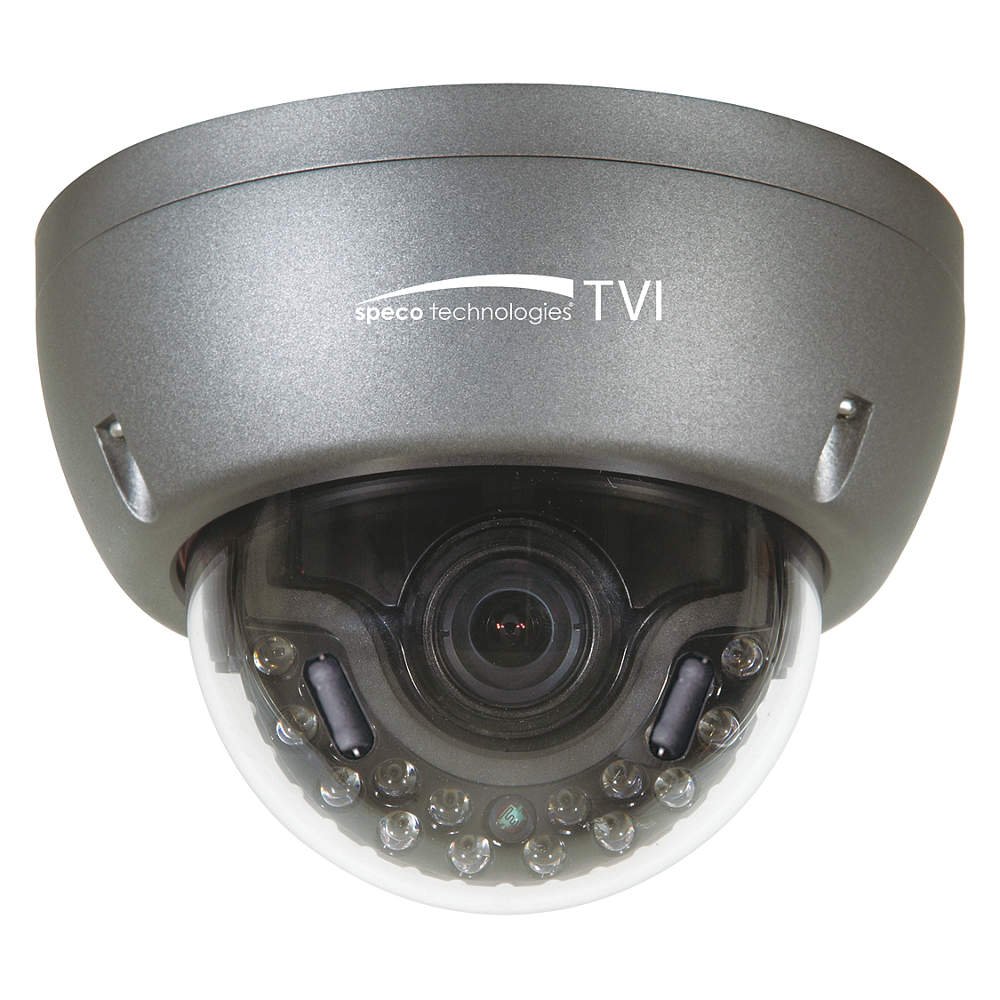
Figure 1: Speco Technologies HT5941T Dome Camera with its dark gray housing and dome design.
5. Nga Tohutohu Whakahaere
5.1 Powering On and Initial View
Once the camera is properly wired and powered, it will automatically begin transmitting video. Connect your HD-TVI DVR or monitor to view te kai ora.
5.2 Tahua Whakaatu Ma-Mata (OSD).
The camera features a full OSD menu for configuration, accessible via on-board controls or UTC (Up The Coax) control from a compatible DVR.
- Te urunga atu ki te OSD: Use the joystick or buttons on the camera (if present) or the UTC control function on your DVR to bring up the OSD menu.
- Whakaterenga: Use the directional controls to navigate through menu options. Select options to adjust settings such as exposure, white balance, and image enhancements.
- Āhuatanga matua:
- WDR Pono: Wide Dynamic Range for clear images in high-contrast lighting.
- Intense IR: Adapts IR intensity to the subject, preventing saturation and providing vivid night vision.
- Day/Night Operation: Mechanical IR cut filter automatically switches between color (day) and monochrome (night) modes for optimal image quality.
6. Tiaki
6.1 Te horoi
Mā te horoi auau ka āwhina i te pupuri i te kounga pai o te ahua.
- Gently wipe the camera lens and housing with a soft, lint-free cloth.
- Mo te paru maro, paku dampen the cloth with water or a mild lens cleaning solution. Avoid abrasive cleaners.
- Me whakaweto te kāmera i mua i te horoinga.
6.2 Nga Whakaaro Taiao
The HT5941T features heater circuitry and anti-moisture glass to reduce fog or condensation in various weather conditions. No specific user maintenance is required for these features, but ensure the camera's power supply is stable to allow these functions to operate effectively.
7. Te Raru
| Raruraru | Take pea | Rongoā |
|---|---|---|
| Kaore he putanga ataata | No power; Loose cable connection; Incorrect video format (not HD-TVI compatible DVR) | Check power supply and connections; Ensure DVR supports HD-TVI input. |
| He pai te ahua o te ahua (pouriuri, kerekere) | Dirty lens; Improper focus; Cable interference; Insufficient lighting | Clean the lens; Adjust focus via OSD; Use shielded coaxial cable; Verify adequate lighting or IR function. |
| Kāore te IR e mahi i te pō | Insufficient power; Day/Night setting incorrect; IR sensor blocked | Check power supply; Verify Day/Night mode in OSD; Ensure nothing obstructs the IR LEDs or sensor. |
| OSD menu not appearing | Incorrect control method; DVR not compatible with UTC | Try on-board controls if available; Consult DVR manual for UTC compatibility and operation. |
8. Whakatakotoranga
| Āhuahira | Whakatakotoranga |
|---|---|
| Tau tauira | HT5941T |
| Waitohu | Hangarau Hangarau |
| Whakataunga Hopu Ataata | 1080p (Katoa HD) |
| Auau anga | 30 fps |
| Hangarau Hononga | HD-TVI (Coaxial) |
| Puna Mana | 12VDC & 24VAC Dual Voltage |
| Momo Whakaeke | Wall Mount (3-axis adjustment) |
| Tauwehe Puka | Dome |
| Hangarau Maama iti | Day/Night, Intense IR |
| Nga waahanga motuhake | True WDR, Heater circuitry, Anti-moisture glass, Chameleon Cover |
| Whakatauranga Tiaki o te Ao | IP67 |
| Ahu (L x W x H) | 5.12 x 4.84 x 3.66 inihi |
| Taumaha Tūemi | 1.5 Pauna |
| Rauemi | Glass (lens) |
9. Pūtāhui me te Tautoko
For warranty information and technical support, please refer to the official Speco Technologies webpaetukutuku, whakapā atu ranei ki ta raatau tari ratonga kaihoko. Puritia to riirii hoko hei tohu mo te hoko mo nga kereme whakamana.
Speco Technologies Official Webpae: www.specotech.com