
1. Kupu Whakataki
The Sony SBH54 is a versatile Stereo Bluetooth Headset designed for wireless communication and audio playback. It offers both handset and headset functionalities, allowing you to take and make calls, view messages, listen to music, and tune into FM radio directly from its display. Crafted from premium metal with a splash-proof design, it combines elegance with durability.
Key features include Bluetooth Wireless 3.0, NFC technology for easy pairing, an OLED display, and built-in noise cancellation for clear audio during calls. The headset supports A2DP profile and can connect to two devices simultaneously.
2. Hua Neke Atuview
The SBH54 features a compact design that fits comfortably in your hand. It includes an OLED display for information at a glance and physical controls for media and call management.
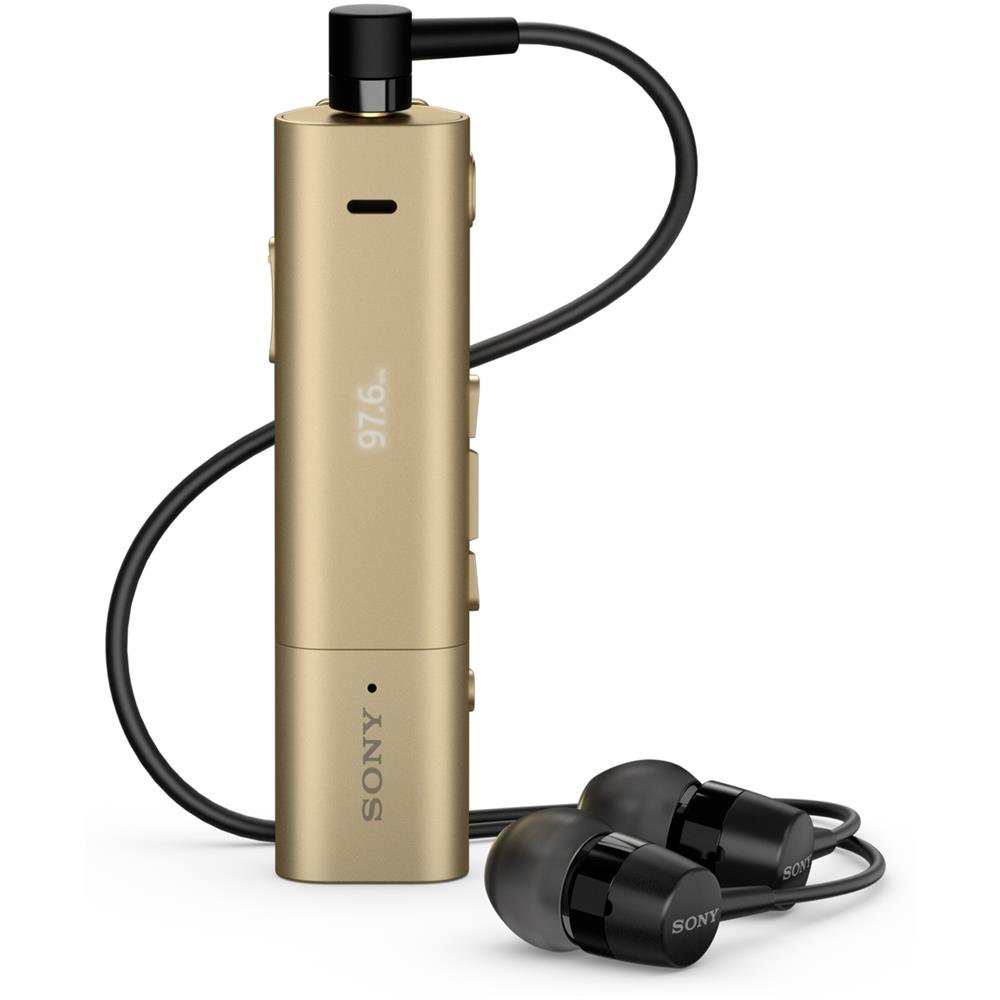
Image: Sony SBH54 Gold Stereo Bluetooth Headset. This image displays the compact, gold-colored headset with its integrated clip and display screen.
Nga Mana me nga Tohu:
- Whakaatu OLED: Shows caller ID, messages, music track information, and FM radio frequency.
- Pātene Mahi-maha: For call answering/ending, play/pause music.
- Pātene Rōrahi: Whakaritehia te reo ororongo.
- Patene Whakaterenga: For menu navigation and track skipping.
- hopuoro: Integrated for voice calls.
- Tihakihihi 3.5mm port for connecting the included premium headphones.
- Tauranga Whakatau: Tauranga USB moroiti mo te utu i te taputapu.
3. Tatūnga
3.1 Te Whakataki i te Paneoro
- Connect the supplied USB cable to the headset's charging port and to a USB power adapter or a computer's USB port.
- Ko te tohu o te pākahiko kei runga i te whakaaturanga ka whakaatu i te mana utu.
- Me utu katoa te pane i mua i te whakamahinga tuatahi.
3.2 Pairing with a Device (Bluetooth)
- Me whakarite kua utua te pane whakarongo, ā, kua whakawetohia.
- Press and hold the power button until the headset enters pairing mode (indicated by a specific light pattern or message on the display).
- I runga i tō waea atamai, i tētahi atu pūrere rānei e whakahohea ana e te Nihokikorangi, whakahohea te Nihokikorangi, ka rapu i ngā pūrere e wātea ana.
- Select "SBH54" from the list of found devices.
- If prompted, enter the passcode "0000" (four zeros).
- Kia takirua, ka tohu te pane pane he hononga angitu.
3.3 Pairing with a Device (NFC)
For devices with NFC (Near Field Communication):
- Ensure NFC is enabled on your smartphone and the screen is unlocked.
- Touch the NFC detection area of your smartphone to the NFC detection area on the SBH54 headset.
- A pee i nga tohu o runga-mata hei whakaoti i te tukanga takirua.
4. Te whakahaere i te Paneoro
4.1 Hiko / Whakaweto
- Hei Whakahiko: Patohia me te pupuri i te paatene hiko kia whiti te whakaaturanga.
- Hei Whakaweto: Patohia me te pupuri i te paatene hiko kia weto te whakaaturanga.
4.2 Te Waea me te Whiwhi Waea
- Whakautu i te Karanga: When a call comes in, press the multi-function button.
- Whakamutua te Waea: During a call, press the multi-function button.
- Te Whakakahore i tetahi Waea: Press and hold the multi-function button when a call comes in.
- Te Waea: Dial the number on your phone. The call will automatically route to the headset. You can also use voice commands if supported by your phone.
- Taumahi Pukoro: The compact SBH54 can be used as an unobtrusive handset for calls.
- Whakakorea Noise: The headset features echo, wind, and noise cancellation for clear voice transmission.
- Reo HD: Enhances voice clarity for both parties during a call.
4.3 Purei Waiata
- Purei/Tatari: Pēhia te pātene mahi-maha.
- Riu Panuku: Press the forward navigation button.
- Riu o mua: Press the backward navigation button.
- Mana Rōrahi: Whakamahia nga patene whakarunga/whakararo.
4.4 FM Radio
- Whakahohehia te reo irirangi FM: Navigate through the headset menu to select the FM Radio function.
- Nga Teihana Tune: Use the navigation buttons to scan or manually tune to FM frequencies.
- Tiaki Tatūkē: The headset may allow saving favorite stations (refer to on-screen prompts).
5. Tiaki
- Te horoi: Horoia te pane ki te kakahu ngohengohe, maroke. A ape i te whakamahi i nga matū kino, i nga taonga abrasive ranei.
- Ātete wai: The SBH54 has a splash-proof design. This means it can withstand light splashes of water but should not be submerged or exposed to heavy rain. Ensure the charging port cover is securely closed.
- Rokiroki: Whakaorangia te pane ki te waahi makariri, maroke atu i te ra tika me te wera nui.
- Tiaki Pūhiko: Hei whakaroa i te ora o te pākahiko, kaua e whakawetohia te pākahiko i ngā wā katoa. Whakautuhia i ia wā.
6. Te Raru
Nga take me nga otinga noa:
- Karekau te paneoro i te hiko: Me whakarite kua utaina te pākahiko. Tūhono ki tētahi puna hiko ka ngana anō.
- Cannot pair with a device:
- Me whakarite kei te aratau takirua te pane.
- Me mohio kei te whakahohea te Nihokikorangi i runga i to taputapu.
- Nekehia te pane kia tata atu ki to taputapu.
- Tīmataria anō te pane pane me tō pūrere.
- Whakawetohia nga hononga Nihokikorangi o mua i runga i to taputapu ka ngana ki te hono ano.
- Karekau he ororongo, he kino te kounga ororongo:
- Tirohia nga taumata oro i runga i te pane me to taputapu hono.
- Ensure the headset is within range of your device.
- Momotu ka hono ano i te hononga Nihokikorangi.
- Ensure the headphones are properly plugged into the 3.5mm jack.
- Kāore te Reo Irirangi FM e mahi ana: Ensure you are in an area with good FM signal reception.
7. Whakatakotoranga
| Āhuahira | Taipitopito |
|---|---|
| Waitohu | Sony |
| Tau tauira | SBH54GD |
| Tae | Koura |
| Te Whakanoho Taringa | I te Taringa |
| Tauwehe Puka | I te Taringa |
| Mana Haruru | Whakakore Haruru Hohe |
| Taumaha Tūemi | 0.1 Kirokaramu |
| Momo Atekōkiri Ororongo | Atekōkiri Hihiko |
| Awhe Auautanga | 20 Hz - 20,000 Hz |
| Rauemi Whakapiri | Te whakarewa |
| Pūrere Hototahi | Smartphones, Laptops, Tablets, Bluetooth-enabled Devices |
| Taumata Atete Wai | Ātete Wai (Ātete-Pākūkū) |
| Hangarau Hononga | Nihokikorangi, NFC |
| Hangarau Ahokore | Nihokikorangi, NFC |
| Putanga Nihokikorangi | 3.0 |
| Momo Mana | Mana Media |
| Tikanga Mana | Mamao |
8. Pūtāhui me te Tautoko
For warranty information and customer support, please refer to the documentation included with your purchase or visit the official Sony support webpae. Tērā pea ka rerekē ngā tikanga motuhake o te pūtāhui i runga i te rohe me te kaihokohoko.
Tautoko Aipurangi: www.sony.com/electronics/support