
1. Kupu Whakataki
The AVerMedia AW330 Wireless Voice Amplifier is a portable audio system designed to enhance vocal clarity and projection in various settings such as classrooms, training sessions, meetings, and public speaking events. Its lightweight design, wireless microphone, and powerful speaker ensure your voice is heard clearly and effortlessly.
Āhuatanga matua:
- Hoahoa Kawe: Lightweight and compact for easy transport and use.
- Waeaoro Ahokore: 2.4 GHz wireless lavalier microphone for stable 360° transmission.
- Oro kaha: Built-in 20W speaker delivers loud, clear audio.
- Roa te Ora o te Pūhiko: Rechargeable lithium polymer battery provides 4 to 5 hours of use, or up to 8 hours of continuous use (depending on volume and usage).
- Multimedia Connectivity: Audio input port for connecting smartphones, tablets, or laptops.
- Quick Smart Pairing: Automatic microphone-to-speaker pairing for simple setup.
2. He aha kei roto i te Pouaka
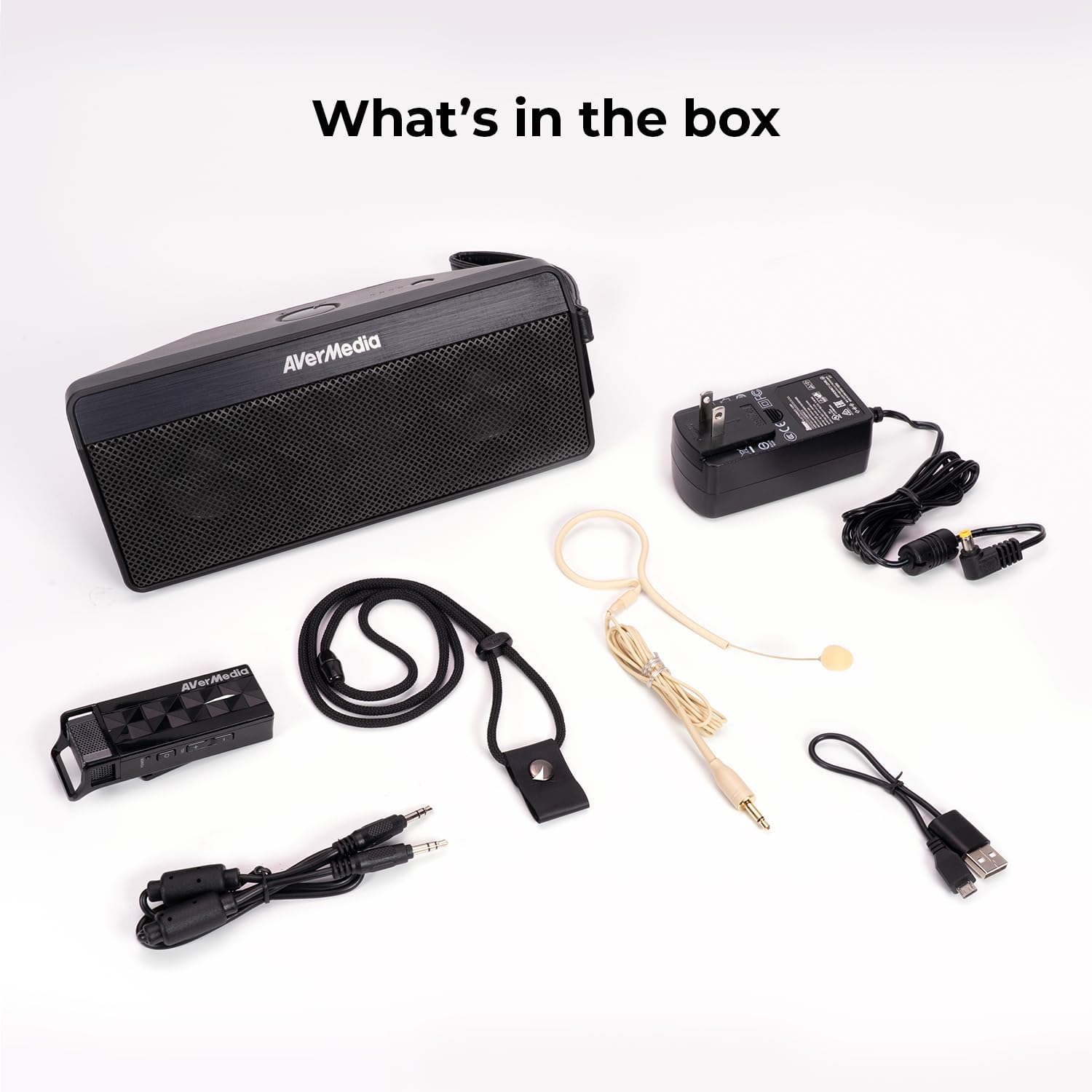
- Microphone & Headset Mic
- Kaikōrero
- AC Power Adapter & USB Power Cable
- 3.5 mm Whakaputa Ororongo
- Lanyard & Buckle
3. Hua Neke Atuview
Waenga Kaikōrero

The main speaker unit features a power button, volume controls, and an audio input port for connecting external devices. It also includes a clip for attaching to clothing or a strap.
Waea Ahokore
The wireless microphone includes a flexible gooseneck boom with a windscreen, volume controls, and a power button. It can be worn as a headset or clipped onto clothing.

4. Tatūnga
- Utuhia ngā Pūrere: Before first use, fully charge both the speaker unit and the wireless microphone using the provided AC power adapter and USB power cable. The microphone uses a USB-C connection.
- Honoa te Hopuoro: Plug the headset microphone into the wireless microphone unit.
- Whakahiko: Turn on the speaker unit by pressing its power button. Turn on the wireless microphone unit by pressing its power button.
- Takirua: The speaker microphone system features automatic microphone-to-speaker pairing for hassle-free setup. They should pair automatically upon powering on.
- Whakaritea Rōrahi: Adjust the volume on both the speaker and the microphone to your desired level.
5. Nga Tohutohu Whakahaere
- Reo Ampwhakarangatira: Once paired, speak into the microphone. Your voice will be amplified through the speaker. Adjust volume as needed.
- Tāuru Ororongo o Waho: To play multimedia audio alongside your voice, connect your smartphone, tablet, or laptop to the speaker unit's Audio In port using the 3.5 mm audio cable.
- Kōwhiringa mau: Utilize the clip on the speaker to attach it to your clothing, or use the lanyard and buckle for hands-free operation. The microphone can be worn as a headset or clipped directly.
- Tiaki Hiko: If the microphone is turned off, the speaker will automatically turn off after five minutes to conserve battery.

6. Tiaki
- Te horoi: Use a soft, dry cloth to clean the surfaces of the speaker and microphone. Do not use liquid cleaners or aerosols.
- Rokiroki: Whakaorangia te taputapu ki te waahi makariri, maroke atu i te ra tika me te wera nui.
- Tiaki Pūhiko: Hei whakaroa i te ora o te pākahiko, kaua e whakawetohia te pākahiko i ngā wā katoa. Whakakīia anō te pūrere i ngā wā katoa, ahakoa kāore e whakamahia ana mō ngā wā roa.
- A ape i te wai: The device is not waterproof. Keep it away from water and moisture.
7. Te Raru
- Kore Oro:
- Ensure both the speaker and microphone are powered on and fully charged.
- Check that the microphone and speaker are successfully paired.
- Increase the volume on both the speaker and the microphone.
- Feedback/Squealing Sound:
- Reduce the volume on the speaker or microphone.
- Whakanuia te tawhiti i waenga i te hopuoro me te korero.
- Ensure the microphone is not pointing directly at the speaker.
- Kounga oro kino:
- Check for obstructions between the microphone and speaker.
- Me whakarite kei te tika te tūnga o te hopuoro tata ki tō waha.
- Verify that the microphone windscreen is properly attached.
- Kāore te Pūrere i te utu:
- Ensure the charging cables are securely connected to both the device and the power source.
- Whakamātauria tētahi putanga hiko rerekē, tētahi tauranga USB rānei.
8. Whakatakotoranga
| Āhuahira | Whakatakotoranga |
|---|---|
| Waitohu | AVerMedia |
| Tau tauira | AW330 |
| Kaikorero Te Mana Putanga Morahi | 20 Watts |
| Hangarau Hononga | Nihokikorangi, Wi-Fi |
| Aratau Putanga Ororongo | Mono |
| Momo Whakaeke | Maunga Ripanga |
| Nga waahanga taapiri | Mana Rōrahi |
| Momo Kaiwhakahaere | Kua kaha te pākahiko |
| Pūhiko Wawaenga Te Ora | 4 Hours (up to 8 hours continuous use) |
| Awhe Morahi | 60 Puawai |
| Tikanga Mana | Paa |
| Taumaha Tūemi | 2.6 Pauna |
| Nga Whakamahinga Motuhake mo te Hua | Educational/Classroom |
9. Pūtāhui me te Tautoko
The AVerMedia AW330 Wireless Voice Ampka tae mai te riipene me te 3 tau te whakamana a te kaiwhakanao. For technical support, troubleshooting, or warranty claims, please contact AVerMedia customer service.
10. Hua Ataata
AVerMedia AW330 Pūnaha Ororongo Akoranga Ahokore
Video: An official product video from AVerMedia showcasing the AW330 Wireless Classroom Audio System. It highlights its features and benefits in a classroom environment, demonstrating how teachers can use it to project their voice clearly and effectively to students.