
1. Kupu Whakataki
This manual provides detailed instructions for the installation, operation, and maintenance of your Night Owl WM-8HD10L-4720 8-Channel Wired Security System. This system is designed to provide reliable surveillance with high-definition video quality, motion detection, and night vision capabilities. Please read this manual thoroughly before setting up and operating your system to ensure proper functionality and safety.
The Night Owl WM-8HD10L-4720 system includes an 8-channel Digital Video Recorder (DVR) and four wired security cameras, offering comprehensive coverage for your property.
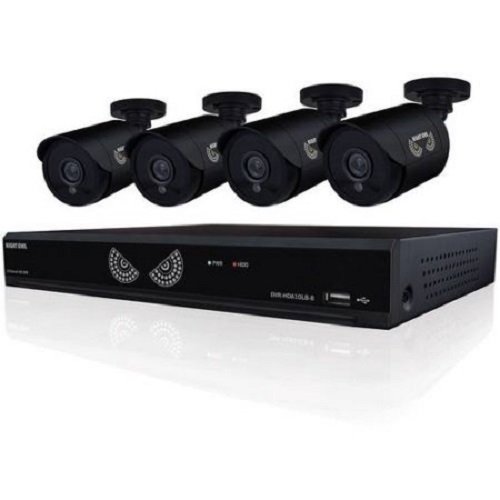
Figure 1: Night Owl WM-8HD10L-4720 8-Channel Wired Security System components, including the DVR and cameras.
2. Nga korero haumaru
Me whai tonu i nga tikanga tiaki haumaru ina whakamahi i tenei hua hei whakaiti i te tupono o te ahi, te wiri hiko, me te whara o te tangata.
- Pānuihia nga tohutohu katoa i mua i te whakahaere i te punaha.
- Keep the system away from water and moisture.
- Kaua e tarai ki te mahi i tenei hua maau ake. Tirohia nga ratonga katoa ki nga kaimahi tohu tohu.
- Use only the power adapter supplied with the system.
- Ensure proper ventilation for the DVR to prevent overheating.
California Proposition 65 Whakatupato:
ATTN CA RESIDENTS: WARNING: This product can expose you to Polybrominated biphenyls, which is known to the State of California to cause Cancer and birth defects or other reproductive harm. For more information go to www.whakarite.ca.gov.
3. Tatūnga
Follow these steps to set up your Night Owl security system.
3.1 Te Wetewete me te Tirotiro
- Kia ata tangohia nga waahanga katoa mai i te kete.
- Me manatoko kei te wātea ngā tūemi katoa kua whakarārangihia i roto i ngā ihirangi o te hua.
- Inspect all components for any signs of damage. Do not use damaged components.
3.2 Te hono i te DVR
- Connect a monitor to the DVR's video output port (VGA or HDMI, if available).
- Connect a USB mouse to the DVR's USB port for navigation.
- Connect the DVR to your network router using an Ethernet cable (optional, for remote viewing).
3.3 Te hono i nga kamera
Each camera connects to the DVR using a wired connection. The system supports up to 8 cameras, and comes with 4.
- Mount each camera in your desired location, ensuring a clear field of view.
- Run the camera's video/power cable to the DVR.
- Connect the video connector from the camera cable to an available video input port on the back of the DVR.
- Connect the power connector from the camera cable to the power splitter, and then connect the splitter to the camera power adapter.
3.4 Te Whakakaha
- Once all connections are secure, connect the DVR power adapter to the DVR and then to a power outlet.
- The system will power on automatically. Follow the on-screen prompts for initial setup, including setting the date, time, and creating a password.
4. Whakahaere i te Pūnaha
This section covers the basic operation of your Night Owl security system.
4.1 Ora View
After powering on, the DVR will display the live view from all connected cameras on the monitor. You can switch between single-camera view and multi-camera view mā te whakamahi i ngā mana whakahaere i runga i te mata, i te kiore rānei.
4.2 Aratau Tuhituhi
The system supports various recording modes, including continuous recording and motion-activated recording.
- Motion Sensor Recording: The system is equipped with motion sensors. When motion is detected in a camera's field of view, the DVR will automatically begin recording. You can configure motion detection zones and sensitivity settings in the DVR's menu.
- Hopu Tono: Set specific times for the DVR to record continuously or based on motion.
4.3 Matakite Po
The cameras are equipped with low light technology for night vision. In low-light conditions, the cameras automatically switch to infrared (IR) mode, providing clear black and white video surveillance.
4.4 Mamao Viewing (Kōwhiringa)
If your DVR is connected to the internet, you may be able to access live camera feeds and recorded footage remotely via a compatible mobile application. Refer to the Night Owl website or app store for specific instructions on setting up remote access.
5. Tiaki
Mā te tiaki tika ka roa te ora me te mahi tino pai o tō pūnaha haumarutanga.
- Te horoi: Regularly clean the camera lenses with a soft, dry cloth to remove dust and smudges. Ensure the DVR is free from dust buildup, especially around ventilation areas.
- Whakahōu Firmware: Periodically check the Night Owl official website for available firmware updates for your DVR. Firmware updates can improve system performance, add new features, and enhance security.
- Hauora Puku Maama: The DVR's hard drive stores all recorded footage. Monitor its health through the DVR's system settings and ensure there is sufficient space for recordings.
6. Te Raru
This section addresses common issues you might encounter with your security system.
- No Video Signal from Camera:
- Check all cable connections between the camera and the DVR.
- Me whakarite kei te whiwhi mana te kamera.
- Test the camera with a different cable or DVR port if available.
- Kaore te DVR i te hiko:
- Verify the power adapter is securely connected to the DVR and a working power outlet.
- Me mohio kei te mahi te putanga hiko.
- Remote App Password Error:
- The password for the mobile app may be different from the DVR's local password. Refer to the app's specific setup instructions or the Night Owl support resources for remote access password management.
- Ensure your DVR has an active internet connection.
- Te Kounga Ataata Poihara:
- Me mohio kei te ma te arotahi kamera me te kore e aukati.
- Tirohia mēnā he kaha ngā pūtake mārama e tata ana ki te kāmera, ka whakararuraru pea i te māramatanga IR.
7. Whakatakotoranga
Technical specifications for the Night Owl WM-8HD10L-4720 security system.
| Āhuahira | Whakaahuatanga |
|---|---|
| Tau tauira | WM-8HD10L-4720 |
| Waitohu | Po ruru |
| Hangarau Hononga | Waea |
| Whakataunga Hopu Ataata | 720p |
| Nga waahanga motuhake | Pūoko Nekehanga, Tirohanga Pō |
| Te maha o nga hongere | 8 |
| Tae | Pango |
| Puna Mana | Hiko Hiko |
| Whakamahi Manakohia | Tirotiro |
| Hangarau Maama iti | Matakitenga Po |
| Auau anga | 30 fps |
| Aratau tuhi | Pūoko Motini |
| Momo Arotahi | Momo |
| Hunga Hua | 18.3 x 8.7 x 12.2 inihi |
| Taumaha Tūemi | 2 pauna |
| Nga Pikohiko e hiahiatia ana | 1 Lithium Polymer (for internal clock/memory backup) |
| UPC | 810830023137 |
8. Nga Korero Whakaputanga
Night Owl products typically come with a limited manufacturer's warranty. For specific details regarding the warranty period, coverage, and terms for your WM-8HD10L-4720 system, please refer to the warranty card included with your product or visit the official Night Owl webpae. Puritia to tohu hoko mo nga kereme whakamana.
9. Tautoko
For technical assistance, customer service, or additional resources, please visit the official Night Owl support website or contact their customer service department. You can often find FAQs, video tutorials, and downloadable software/firmware updates on their support portal.
Tautoko Aipurangi: Visit the Night Owl official webpae mo nga rauemi tautoko.
Mōhiohio Whakapā: Refer to the Night Owl webpaetukutuku mō ngā nama waea o nāianei me ngā hāora mahi.