
Kupu Whakataki
This manual provides detailed instructions for the installation, operation, and maintenance of your Thule TH100090 Bicycle Rack. This robust rack is designed for carrying luggage on bicycles, suitable for various frame materials and terrains.
Nga waahanga matua
- Works on rear seat stays and front fork.
- Compatible with any frame material type.
- Robust structure for use on rough terrain.
- Silent and vibration-free operation.
- Includes rails for mounting bags.
Ihirangi mokete
The Thule TH100090 Bicycle Rack package includes the following components:
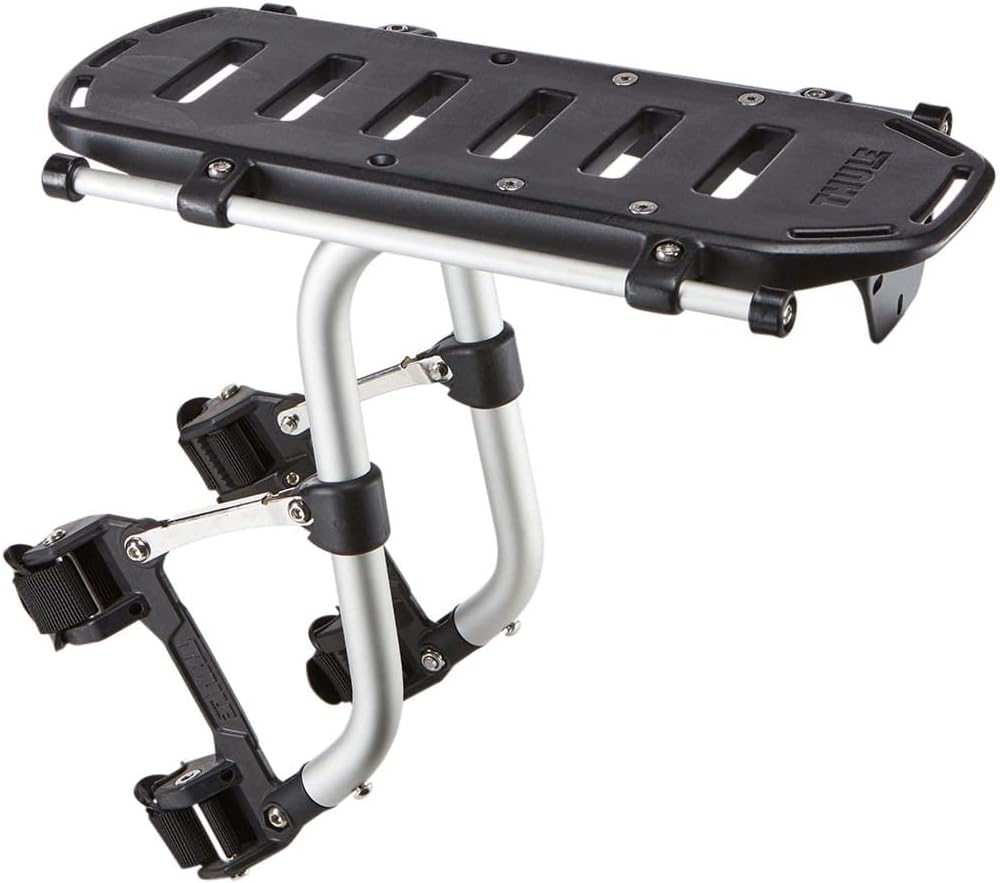
Image: All components included with the Thule TH100090 Bicycle Rack, laid out for assembly.
- 1 x Main Bicycle Rack Body
- 6 x Whakanuia Pounamu
- 6 x Tohu
- 6 x Kaihoroi
- 4 x Rubber Pads (for seat post attachment)
- 1 x Allen Key
- 1 x Red Reflector
- 1 x Elastic Cord/Strap
- 2 x W-shaped Side Bars
- 2 x Adjustable Support Rods
Tatūnga me te Tāuta
Follow these steps for proper installation of your bicycle rack. It is recommended to use the rubber gaskets provided to protect your bicycle frame.
Main Rack Installation
Video: Step-by-step guide on installing the bicycle rack onto the seat post and attaching support bars.
- Install the Rack Body: Attach the main body of the rack to the bicycle's seat post. Ensure the quick-release mechanism is securely fastened. Use the provided rubber pads to prevent scratching and ensure a snug fit.
- Adjust Rack Position: Loosen or tighten the three screws on the rack body to adjust its horizontal position and angle for optimal balance and clearance. Once adjusted, ensure all screws are firmly tightened.
- Tāutahia ngā Rakau Tautoko: Attach the adjustable support rods from the rack to the bicycle's rear frame. Use the appropriate bolts and washers, ensuring a secure connection.
- Install Side Bars: Secure the W-shaped side bars to the rack using the designated mounting points. These bars provide additional support and a wider platform for luggage.
- Tāuta Whakaata: Attach the red reflector to the designated slot at the rear end of the rack for increased visibility and safety.

Image: The Thule TH100090 Bicycle Rack securely mounted to a bicycle's seat post, showing the attachment mechanism.

Image: The Thule TH100090 Bicycle Rack installed on a road bicycle, demonstrating its integration and profile.
Attaching a Basket (Optional)
Video: Demonstration of attaching a bicycle basket to the rack using a quick-release mounting plate.
- Prepare Basket: If using a compatible basket, ensure its mounting plate is correctly attached to the basket's base.
- Paheke me te Haumaru: Align the basket's mounting plate with the rack's grooves and slide it into place. Engage the locking mechanism on the basket's plate to secure it firmly to the rack.
Nga Tohutohu Whakahaere
Once installed, the Thule TH100090 Bicycle Rack is ready for use.
Attaching Luggage
Use the provided elastic cord or other suitable straps to secure your bags, baskets, or other items to the rack. Ensure all items are firmly attached to prevent movement during transit. The integrated rails are designed for secure bag mounting.

Image: A person riding a bicycle with the rack installed, demonstrating its practical use for carrying items.
Taumaha Taumaha
The rack has a maximum load capacity of 11.02 kg (24.29 lbs). Do not exceed this weight limit to ensure safety and prevent damage to the rack or bicycle.
Tiaki me te Tiaki
Regular maintenance ensures the longevity and safe operation of your Thule bicycle rack.
- Te horoi: Horoia te whatanga ki te hopi ngawari me te wai. A ape i nga kai horoi me nga whakarewa ka taea te pakaru i te mutunga.
- Tirotiro: Periodically check all bolts, nuts, and attachment points for tightness. Re-tighten as necessary to maintain stability.
- Taki Tukino: Inspect the rack for any signs of damage, cracks, or wear. Replace any damaged components immediately to ensure safe operation.
- Rokiroki: When not in use, store the rack in a dry place to prevent corrosion and extend its lifespan.
Raparongoā
This section addresses common issues you might encounter with your bicycle rack.
| Putanga | Take pea | Rongoā |
|---|---|---|
| Rack feels loose or unstable | Mounting bolts are not tight enough; incorrect installation of support rods. | Re-tighten all mounting bolts. Ensure support rods are correctly positioned and secured to the bicycle frame. Refer to the installation guide. |
| Items fall off the rack | Luggage not properly secured. | Always use elastic cords or straps to firmly secure all items to the rack. Ensure no items protrude excessively. |
| Rack interferes with bicycle operation | Te tūnga hē i te wā e tāuta ana. | Adjust the rack's position on the seat post to ensure it does not interfere with pedaling, braking, or wheel movement. |
Whakatakotoranga Hua
| Āhuahira | Taipitopito |
|---|---|
| Tau tauira | 100090 |
| Waitohu | Thule |
| Rauemi | Konumohe |
| Rahi Hua (L x W x H) | 35.5 x 17 x 31 cm (13.98 x 6.69 x 12.2 inihi) |
| Taumaha Hua | 1.1 kg (2.42 lbs) |
| Momo Whakaeke | Combined mounting (front and rear) |
| Raukaha Uta | 11.02 kg (24.29 lbs) |
| Takotoranga | Whakamuri |
| Hototahi Rahi Wira | Tae atu ki te 73.66 henemita (29 inihi) |
| Tae | Pango |
| UPC | 091021049567 |
| Whenua Taketake | Haina |
Pūtāhui me te Tautoko Kiritaki
Pūtāhui: This product is covered by a warranty in accordance with legal provisions. For specific warranty details and terms, please refer to the official Thule webpae, whakapā atu ranei ki to kaihoko.
Tautoko Kiritaki: For further assistance, technical support, or inquiries, please visit the official Thule webpaetukutuku, whakapā atu ranei ki ta raatau tari ratonga kaihoko.
You can also visit the official Thule store on Amazon: Toa o Thule.