
Kupu Whakataki
The Audeze iSINE10 In-Ear Semi-Open Headphones deliver a unique audio experience through advanced planar magnetic technology. Designed for clarity and wide soundstage, these headphones are lightweight and offer versatile connectivity options for various devices. This manual provides essential information for setting up, operating, maintaining, and troubleshooting your iSINE10 headphones.

Image: Audeze iSINE10 headphones showcasing their semi-open design.
Tatūnga
1. Wewete pouaka me nga Waahanga
Your Audeze iSINE10 headphones typically include:
- Audeze iSINE10 In-Ear Headphones
- Cipher Lightning Cable (with in-line amplifier and DAC)
- Standard 3.5mm Audio Cable
- Various Eartips for optimal fit
- Ear Hooks for secure placement
- Nylon Carrying Case
2. Fitting the Headphones
The iSINE10 offers two primary methods for secure and comfortable wear:
- Ear Clips: These hooks fit over your ear, similar to sunglasses, providing stability.
- Rubber Pieces: These inserts fit inside the ear, resting at the entrance of the ear canal, without deep insertion.
Experiment with the included eartips and ear hooks to find the most comfortable and secure fit for extended listening. Proper fit is crucial for both comfort and sound quality.
3. Te hono ki nga Pūrere
The iSINE10 headphones offer versatile connectivity:
- iOS Devices (Lightning Port): Use the included Cipher Lightning Cable. This cable features a built-in amplifier and 24-bit Digital-to-Analog Converter (DAC) for enhanced audio performance and allows access to the Audeze iOS app for customization.
- Standard Devices (3.5mm Audio Jack): Use the included 3.5mm audio cable to connect to any device with a standard headphone jack. Note that the sound characteristics may differ without the Cipher cable's built-in DSP/EQ.
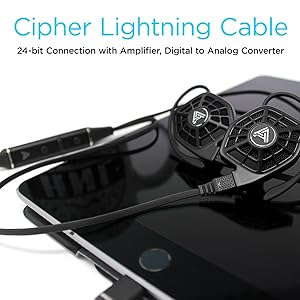
Image: iSINE10 headphones connected to an iPhone, demonstrating Lightning cable use.
Nga Tohutohu Whakahaere
1. Te Purei Oro Taketake
Once connected, simply play audio from your device. Adjust the volume using your device's controls or the in-line controls on the Cipher Lightning Cable.
2. Using the Cipher Lightning Cable (for iOS Devices)
The Cipher Lightning Cable is designed to optimize the iSINE10's performance with iOS devices. It includes:
- I-raina Amplifier and DAC: Provides high-quality digital-to-analog conversion and ampwhakarangatira.
- DSP (Digital Signal Processing): Applies an automatic, built-in frequency response correction for a balanced sound profile.
- Siri-Compatible Microphone: Allows for voice commands and hands-free communication.
- Mana Raina: Manage playback, volume, and calls.
Tuhipoka Nui:
- When using the Cipher Lightning Cable, you cannot charge your iOS device simultaneously through the same Lightning port.
- Some users may experience a faint noise with the V1 Lightning cable when no audio is playing. This typically disappears once audio playback begins.
3. Audeze iOS App for Customization
Download the official Audeze iOS app to unlock advanced audio customization features:
- 10-Rohe Whakairite: Fine-tune the sound profile ki to hiahia.
- Saveable EQ Presets: Store up to two custom equalizer settings for quick access.
Tuhipoka mo nga Kaiwhakamahi Android:
Currently, there is no official Android app available for firmware updates or EQ customization. These features require an iOS device.
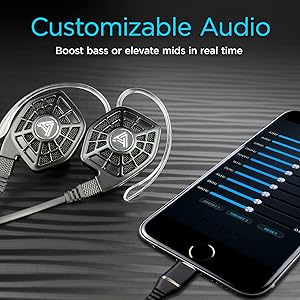
Image: iPhone screen showing the Audeze EQ app interface for audio customization.
4. Optional Bluetooth Cable
An optional Bluetooth cable is available directly from Audeze, allowing wireless connectivity to various devices while maintaining the intended sound profile (with appropriate DSP/EQ).
Ataata: Kua mutuview of the Audeze iSINE10 In-Ear Semi-Open Headphones, highlighting key features and design elements.
Te tiaki
1. Te horoi
- Gently wipe the headphone bodies and cables with a soft, dry, lint-free cloth.
- Tangohia ngā pito taringa, ā, horoia ki te hopi ngawari me te wai mēnā e tika ana. Me whakarite kia maroke rawa i mua i te tāpiri anō.
- A ape i te whakamahi i nga matū kino, nga whakarewa, me nga mea awhiowhio.
2. Te Tiaki Taura
- A ape i nga piko koi, te toia nui ranei o nga taura kia kore ai e pakaru o roto.
- Store cables neatly to prevent tangling.
3. Rokiroki
When not in use, store your iSINE10 headphones in the provided nylon carrying case to protect them from dust, moisture, and physical damage.
4. Matau Taringa
The plastic ear hooks, while designed for comfort, may not be highly durable. Handle them with care during attachment and removal to prolong their lifespan.
Raparongoā
Karekau he oro, he iti ranei te reo
- Ensure the cable is securely connected to both the headphones and your audio source.
- Check the volume levels on your device and any in-line controls.
- Test with a different audio source or cable if possible to isolate the issue.
Ororongo Koretake
- If using the 3.5mm cable, ensure your audio source is providing a clean signal. The iSINE10 is designed to benefit from the DSP/EQ of the Cipher cable.
- Reduce the volume on your device to check if distortion is due to overdriving the headphones.
- If using the Cipher cable, check the Audeze iOS app for any extreme EQ settings that might cause distortion.
Discomfort During Wear
- Experiment with different sizes and types of eartips. Foam tips, if available, can sometimes improve comfort by distributing pressure more evenly.
- Adjust the ear hooks or rubber pieces to find a less intrusive position.
- Take breaks during long listening sessions.
iOS App Issues
- Ensure your iOS device is running a compatible version of iOS.
- Restart the app or your iOS device.
- Ensure the Cipher Lightning Cable is properly connected.
Whakatakotoranga
| Āhuahira | Taipitopito |
|---|---|
| Tau tauira | 110-IE-1000-00 |
| Momo Atekōkiri Ororongo | Atekōkiri autō Mahere |
| Rahi Atekōkiri Ororongo | 30 Mirimita |
| Whakautu auau | 10Hz - 50kHz |
| Te aukati | 16 Ohm |
| Te tairongo | 110 dB/1mW |
| Te Mana Whakahaerenga Morahi | 500mW RMS |
| Hangarau Hononga | Wired (Lightning, 3.5mm Audio) |
| Whakawhitiwhiti Ahokore | Bluetooth (via optional cable) |
| Momo Mana | Media Control, App |
| hopuoro | Siri-compatible (on Cipher cable) |
| Rauemi | Kirihou |
| Taumaha Tūemi | 20 Grams (per pair) / 0.705 ounces |
| Hunga Hua | 1.38 x 0.79 x 1.22 inihi |
| Taumata Atete Wai | Ehara i te wai ātete |
| Te Kawe i nga Rawa Take | Nylon |
Nga korero Whakaputanga
Audeze products are covered by a manufacturer's warranty. For detailed information regarding the warranty period, coverage, and terms and conditions, please refer to the official Audeze webte waahi, te kaari whakamana ranei kei roto i to hua. Puritia to tohu hoko mo nga kereme whakamana.
Tautoko
For technical assistance, product inquiries, or customer service, please visit the official Audeze support page on their website. You can typically find FAQs, troubleshooting guides, and contact information for their support team there.
Audeze Official Webpae: www.audeze.com