
Ka mutu te huaview
The VTech KidiZoom Smartwatch DX2 is a kid-friendly, reliable smartwatch designed for children aged 4-12 years. It allows kids to capture quality photos and videos, play engaging games, and learn to tell time. Its stylish and durable design is sized for children's wrists.
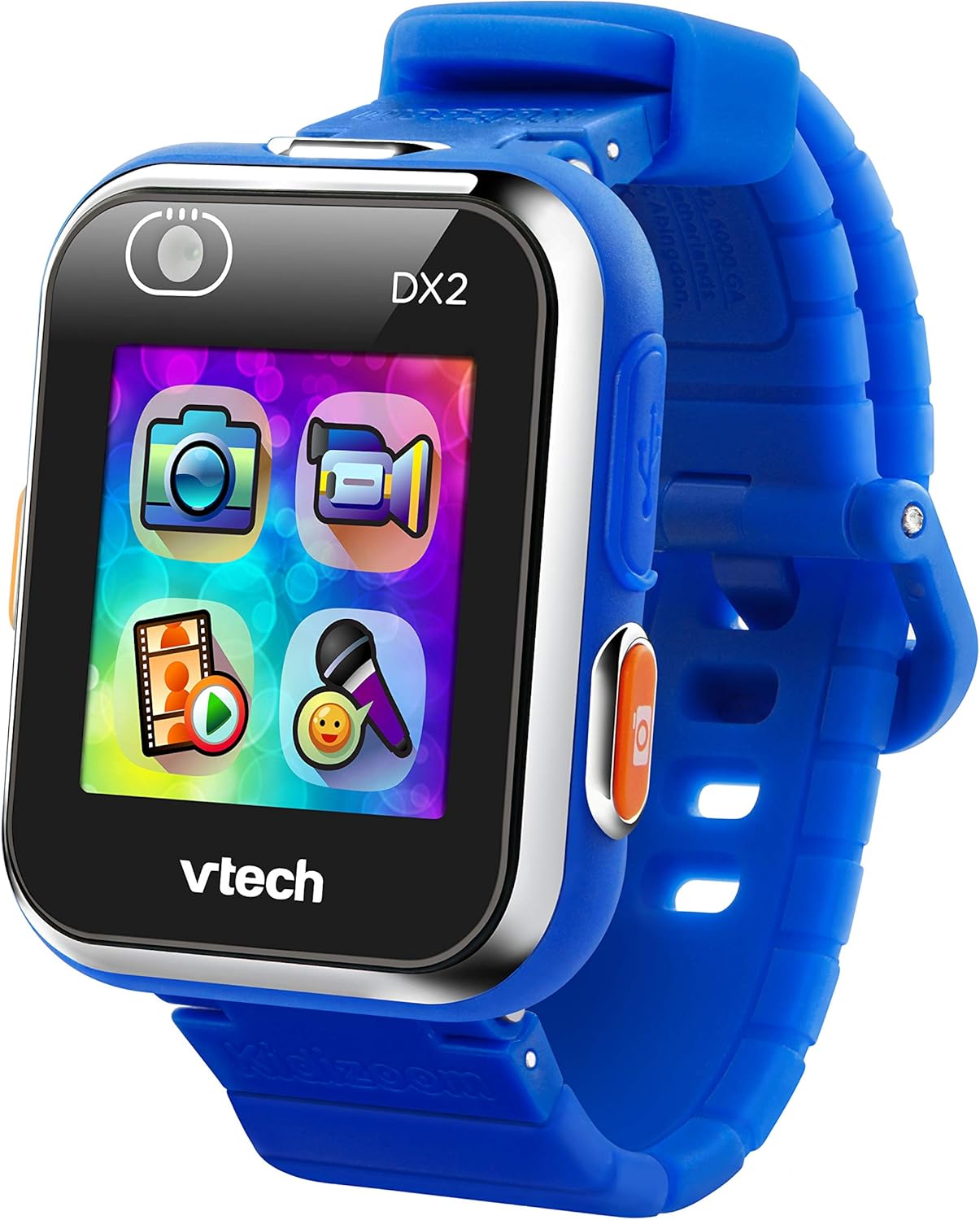
Mua view of the VTech KidiZoom Smartwatch DX2, highlighting its vibrant display and intuitive app icons for camera, video, and games.
He aha kei roto
- KidiZoom Smartwatch DX2
- Ahuru Micro-USB
- Aratohu a te Mātua
Tohutohu Tatūnga
- Kei te utu i te Smartwatch: Connect the included Micro-USB cable to the smartwatch and a computer's USB port. The device should only be charged using a computer; avoid third-party adapters.
- Hiko Tuatahi: Press and hold the power button (usually on the side) until the VTech logo appears.
- Te whakarite i te Wa me te Ra: Follow the on-screen prompts to set the current time and date.
- Whakaritenga: Explore the settings to choose from 55 digital and analog watch faces.
Te whakahaere i te Smartwatch
Camera and Video Features
The KidiZoom Smartwatch DX2 features two cameras, allowing for photos, selfies, and action videos.

The smartwatch features dual cameras, one for forward-facing shots and another for selfies, indicated by the camera icons on the screen.
Customize photos and videos with funny filters using the "Silly Me" app.

A child's hand demonstrates interacting with the camera application on the VTech KidiZoom Smartwatch DX2, highlighting its user-friendly interface.
Note: No official seller videos were found for embedding based on the provided criteria.
Ngā Kēmu me ngā Mahi
The smartwatch includes high-tech games like "Monster Detector," which uses the camera and augmented reality (AR) to find and capture virtual monsters in the real world.

A young boy expresses excitement while looking at his VTech KidiZoom Smartwatch DX2, likely engaged in one of its interactive games or activities.
The motion sensor enables active play challenges and step tracking (pedometer).

A close-up of the smartwatch screen showcasing a variety of colorful app icons, representing different games, creative activities, and utility functions available on the device.
Time-Telling and Customization
Choose from 55 digital and analog watch faces to help kids learn to tell time.
Parents can safely share photos and videos by uploading them to a computer using the micro-USB cable.
Free games, watch faces, and camera effects are available from Learning Lodge.
Tiaki me te Tiaki
- Te horoi: Wipe the smartwatch with a slightly damp kakahu. Kaua e whakamahi i nga matū kino me nga horoi horoi.
- Ātete wai: The watch features a splash-proof band. However, it is not fully waterproof and should not be submerged in water.
- Tiaki Pūhiko: Only charge the device using the included Micro-USB cable connected to a computer. Do not charge using a third-party adapter.
- Rokiroki: Whakaorangia te maataki atamai ki te waahi matao, maroke ka kore e whakamahia.
Raparongoā
| Raruraru | Rongoa pea |
|---|---|
| Kaore te taputapu e ka ana | Ensure the battery is charged. Connect to a computer using the USB cable. |
| Karekau te mata i te aro | Restart the device by holding the power button. If unresponsive, allow the battery to fully drain and then recharge. |
| Kaore e taea te hono atu ki te rorohiko | Ensure the Micro-USB cable is securely connected to both the smartwatch and a working USB port on the computer. Try a different USB port. |
| Games/Apps not loading | Check available memory. Ensure the device software is up to date via Learning Lodge. |
Whakatakotoranga Hua
- Rahi Hua: 8.83 x 0.68 x 1.73 inihi
- Taumaha Tūemi: 0.352 hekere
- Tauira Tūemi: 193800
- Tau Manakohia e te Kaihanga: 4 - 12 tau
- Pūhiko: 1 nga pākahiko Lithium Polymer e hiahiatia ana (kei roto)
- Te Rokiroki Mahara: 256 MB
- Pūnaha Mahi: uC/OS-II
- Rahi Mata: 1.4 Inihi
- Hangarau Hononga: USB
- Paerewa Whakawhitiwhiti Ahokore: Nihokikorangi
- Nga waahanga motuhake: Video Playback, Voice Recorder, Side Camera and Selfie Camera, Splash Proof, 3D Effects, Funny Face Studio, Photo Clock Faces Maker, Wallpaper, Pedometer, Smart Wake Up, Alarm clock, Games, Timer, Calendar
Pūtāhui me te Tautoko
For detailed warranty information and customer support, please refer to the included Parent's Guide or visit the official VTech webpae.