
1. Kupu Whakataki
Mauruuru koe mo te hokoasing the BLOW BT910 Portable Bluetooth Speaker. This manual provides essential information for the safe and efficient operation of your device. Please read it thoroughly before use and keep it for future reference.
2. Nga korero haumaru
- Kaua e tukuna te taputapu ki te wera nui, te ra tika, te makuku nui ranei.
- Puritia te kaikōrero i te wai me ētahi atu wai.
- Kaua e ngana ki te wetewete, ki te whakatika ranei i te taputapu. Tukuna atu nga ratonga katoa ki nga kaimahi whai tohu.
- Whakamahia anake te taura utu me te urutau.
- Kaua e taea e nga tamariki.
- Kaua e whakarongo roa ki ngā oro teitei hei ārai i te kino o te whakarongo.
3. Ihirangi mokete
Me mohio kei roto katoa nga mea kei roto i te kete:
- BLOW Bazooka 30-331 Speaker (Black)
- Uera Whakatau
- Waea Ororongo
- Pukapuka Kaiwhakamahi
4. Hua Neke Atuview
Familiarize yourself with the components of your BLOW BT910 speaker.
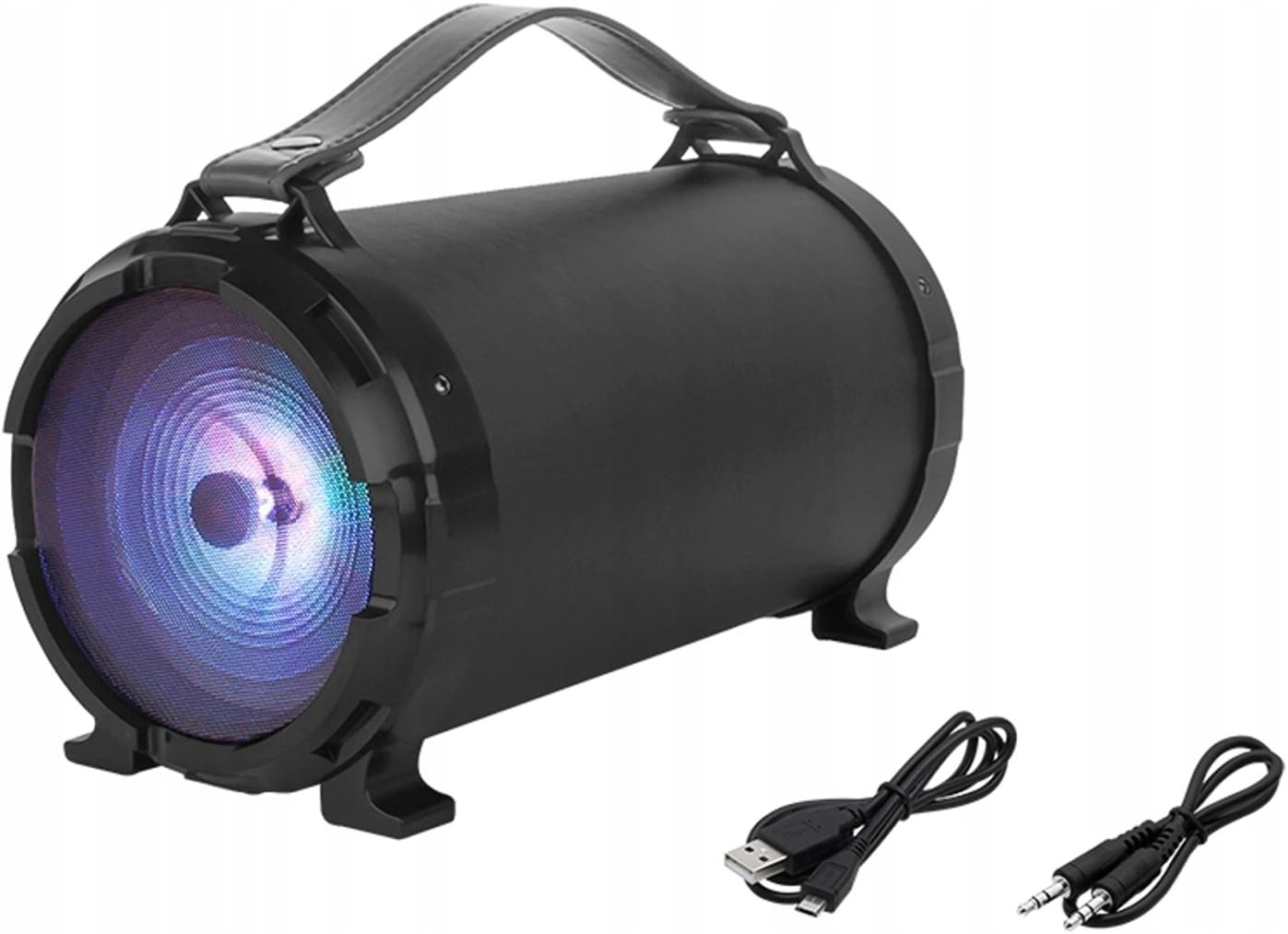
Whakaahua 1: Mua view of the BLOW BT910 Portable Bluetooth Speaker, showing the main speaker grille and included charging and audio cables.

Whakaahua 2: Whakamuri view of the BLOW BT910 Portable Bluetooth Speaker, highlighting the BLOW brand logo.

Whakaahua 3: The BLOW BT910 Portable Bluetooth Speaker shown within its retail packaging, displaying key features.

Whakaahua 4: Diagram illustrating the dimensions of the BLOW BT910 Portable Bluetooth Speaker: 34cm length, 17cm width, and 18cm height.
Mana me Tauranga:
- Pātene Hiko: Ka whakakā/whakaweto i te kaikōrero.
- Pātene Aratau (M): Switches between Bluetooth, FM Radio, USB, SD, and AUX modes.
- Pātene Purei/Tatari: Plays or pauses audio. Also answers/ends calls in Bluetooth mode.
- Whakanuia te Rōrahi (+)/Riu Panuku: Pehi poto mo te rōrahi ake, pehi roa mo te riu e whai ake nei.
- Whakaitihia te Rōrahi (-)/Riu o Mua: Pihi poto mo te ruri whakaheke, pehi roa mo te riu o mua.
- Paatene Rama Maama: Controls LED lighting modes.
- Tauranga USB: Mō te purei anō i te puku kohiko USB.
- Mokamoka Kaari SD: Mō te purei anō i te kāri SD.
- Tāuru AUX: For connecting external audio devices via 3.5mm audio cable.
- Whakauru Whakaoho: For karaoke function.
- Tauranga Whakatau: Mo te utu i te pākahiko o roto o te kaikōrero.
5. Tatūnga
5.1 Te Whakataki i te Kaikorero
- Honoa te taura utu ki te tauranga utu o te kaikorero.
- Monohia tetahi pito o te taura utu ki tētahi urutau hiko USB hototahi (kāore i roto) ki tētahi tauranga USB rānei.
- Ka whakaatuhia te tūnga utu e te tohu LED. Ka mate, ka huri rānei te tae ina utua katoatia.
5.2 Hiko / Whakaweto
- Hei Whakahiko: Press and hold the Power button for a few seconds until you hear an audible prompt or see the LED indicators light up.
- Hei Whakaweto: Press and hold the Power button again for a few seconds until you hear an audible prompt or the LED indicators turn off.
6. Nga Tohutohu Whakahaere
6.1 Takirua Nihokikorangi
- Me whakarite kei te whakakā te kaikorero, ā, kei roto i te aratau Nihokikorangi (e tohuhia ana e te rama LED kikorangi e kanapa ana). Ki te kore, pēhia te pātene Aratau hei huri ki te aratau Nihokikorangi.
- Whakahohehia te Nihokikorangi i runga i to waea atamai, papa, etahi atu taputapu Bluetooth-whakahohea ranei.
- Rapua available Bluetooth devices and select "BT910" from the list.
- Kia honoa, ka tukuna he oro whakaū e te kaikorero, ā, ka mutu te kanapa o te rama LED kikorangi, ka noho pūmau tonu.
- Ka taea e koe te purei ororongo mai i to taputapu ma te kaikorero.
6.2 FM Radio Aratau
- Pēhia te pātene Aratau hei huri ki te aratau Reo Irirangi FM.
- Pēhia te pātene Purei/Whakamutu kotahi hei matawai aunoa me te tiaki i ngā teihana FM e wātea ana.
- Use the Next Track/Previous Track buttons to navigate between saved stations.
6.3 USB/Kari SD Purei
- Whakauruhia he puku kohiko USB, he kāri SD rānei (me te MP3) files) ki roto i te tauranga/mokamoka e tika ana.
- The speaker will automatically switch to USB or SD mode and begin playing music. If not, press the Mode button to select the correct mode.
- Whakamahia ngā pātene Purei/Whakamutu, te Ara Panuku, me te Ara O Mua hei whakahaere i te purei anō.
6.4 Aratau Whakauru AUX
- Connect one end of a 3.5mm audio cable (AUX cable) to the speaker's AUX input port.
- Connect the other end of the audio cable to the audio output jack of your external device.
- Press the Mode button to switch to AUX mode.
- Whakahaerehia te purei oro mai i tō pūrere o waho.
6.5 Mahi Karaoke
- Connect a microphone (not included) to the microphone input port.
- Adjust the microphone volume and echo effects using the dedicated controls on the speaker (if available).
- Play music through any of the available modes and sing along.
6.6 Mana rama rama
- Press the LED Light button to cycle through different lighting modes or to turn the lights off.
6.7 Rōrahi me te Mana Aroturuki
- Runga Runga: Patohia poto te paatene '+'.
- Raro Raro: Patohia poto te paatene '-'.
- Riu Panuku: Pēhia roa te pātene '+'.
- Riu o mua: Pēhia roa te pātene '-'.
6.8 Ngā Whakaaturanga Ataata
No relevant product videos from the seller were found for the BLOW BT910 speaker (ASIN: B07FPH955W).
7. Tiaki
- Horoia te kaikorero ki te kakahu ngohengohe, maroke. Kaua e whakamahi i nga kai horoi me nga whakarewa.
- Whakaorangia te kaikorero ki te waahi makariri, maroke ina kore e whakamahia.
- A ape i te tuku i te kaikorero, te tuku ranei ki nga paanga kaha.
8. Te Raru
| Raruraru | Rongoa pea |
|---|---|
| Karekau te kaikorero e kaha ana. | Kia tino utua te pākahiko. Honoa te kaikorero ki tētahi pūtake hiko ka ngana anō. |
| Kaore e taea te hono ma te Nihokikorangi. | Make sure the speaker is in Bluetooth pairing mode. Ensure your device's Bluetooth is on and within range. Forget previous pairings on your device and try again. |
| Karekau he oro mai i te kaikorero. | Tirohia te taumata oro o te kaikorero me tō pūrere hono. Me whakarite kua tīpakohia te aratau whakauru tika. |
| He kino te tango i te reo irirangi FM. | Extend the antenna (if available) or reposition the speaker for better signal. |
9. Whakatakotoranga
| Āhuahira | Taipitopito |
|---|---|
| Waitohu | Pupuhi |
| Tau tauira | IN-ACT-AKGBLOGLO0016 |
| Momo Kaikorero | Kawe |
| Hangarau Hononga | Tautoko, Nihokikorangi, USB |
| Te Mana Huaputa Tukuoro Morahi | 50 Watts |
| Aratau Putanga Ororongo | Tirooro |
| Pūrere Hototahi | Waea Pukoro |
| Whirihoranga Hongere oro a tawhio noa | 2.0 |
| Tae | Tae maha |
| Hunga Hua | 10f. x 48an. x 50al. centimeters (2.79 x 24.64 x 16.51 cm; 2 kg) |
| Taumaha Tūemi | 2 Kirokaramu |
| Te aukati | 4 Ohm |
| parewai | He teka |
| Awhe Morahi | 10 Mita |
| Tikanga Mana | Patene Pana, Pa |
| Hangarau Whakawhitiwhiti Ahokore | Wi-Fi (Note: Bluetooth is the primary wireless audio connection) |
| Rahi Kaioro | 5 Inihi |
| Puna Mana | Battery (1 Lithium Ion battery required) |
| Āhuahira Motuhake | Whakarei Pao, Nihokikorangi |
| Nga Whakamahinga Manakohia | Mo nga waea atamai papa ranei |
10. Pūtāhui me te Tautoko
This product comes with a standard return policy of 30 days for refund/replacement. For specific warranty details and support, please refer to the documentation included in your product packaging or contact the seller directly. The manufacturer is BLOW.