
Kupu Whakataki
The TOZO T12 Wireless Earbuds offer a high-quality audio experience with advanced features designed for convenience and durability. This manual provides essential information for setting up, operating, and maintaining your earbuds to ensure optimal performance.
He aha kei roto i te Pouaka
- TOZO Wireless Earbuds
- Puhi Whakatau Ahokore
- Eartips (5 pairs in various sizes)
- USB-C Uira Whakatau
- Pukapuka Kaiwhakamahi
Ka mutu te huaview
The TOZO T12 earbuds feature a 10mm dynamic driver system for premium sound, Bluetooth 5.3 for stable connectivity, and IPX8 waterproofing. The charging case includes an LED digital display for battery status.
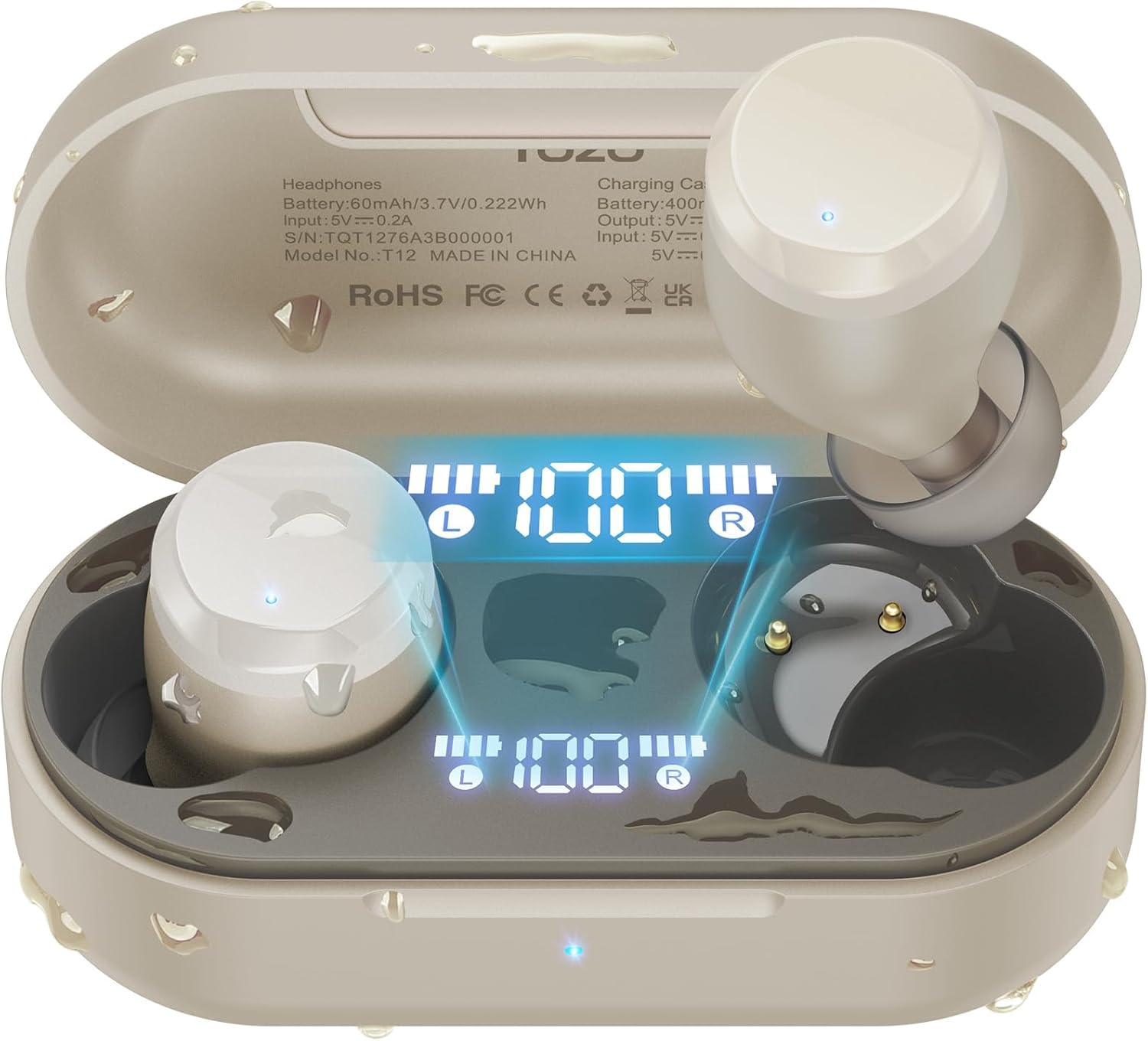
Figure 1: TOZO T12 Wireless Earbuds and Charging Case in Champtae agne.
Whakaatu Mamati LED
The charging case is equipped with a built-in LED digital display that provides real-time information on the battery status of both the charging case and the individual earbuds.

Figure 2: The LED digital display on the charging case shows battery levels for the case and each earbud.
Te Kounga Oro Whakarei
The T12 earbuds feature newly upgraded 10mm dynamic drivers, offering a 56.3% increase in vibration area compared to standard drivers. This design aims to deliver powerful bass and detailed sound reproduction.

Figure 3: Illustration of the 10mm dynamic driver with an enlarged diaphragm for improved sound.
Hoahoa parewai
With advanced IPX8 waterproofing, the TOZO T12 earbuds are protected against sweat and rain, making them suitable for various activities including outdoor exercise and swimming.

Figure 4: The earbuds are shown in water, highlighting their IPX8 waterproof rating.
Official Product Video: TOZO T12 Features
Ataata 1: Ka whakaratohia e tēnei ataata he tirohanga whānuiview of the TOZO T12 Wireless Earbuds, showcasing their design and key features such as sound quality and comfort.
Tatūnga
Initial Pairing and Auto Reconnection
- Whakatuwherahia te putea utu. Ka uru aunoa nga taringa ki te aratau takirua.
- On your device (smartphone, tablet, etc.), go to Bluetooth settings and select "TOZO T12" from the list of available devices.
- Kia honoa, ka hono anō aunoa ngā pane taringa ki tō pūrere ina whakatuwheratia te pouaka mō ngā whakamahinga e whai ake nei.

Whakaahua 5: Example of one-step pairing with a smartphone, showing the earbuds connected.
Whakaritenga Taupānga TOZO
Enhance your audio experience by downloading the official TOZO App. The app allows you to:
- Explore 16 preset EQ modes to match your music style.
- Customize the EQ settings to your personal preferences.
- Access white noise options for relaxation.

Figure 6: The TOZO App interface displaying various EQ settings and white noise tracks.
Nga Tohutohu Whakahaere
Mana Pa
The TOZO T12 earbuds feature touch-sensitive controls for managing playback, calls, and voice assistants. Refer to the quick start guide included in the packaging for specific tap functions.
Te Whakataki i nga Pukarongo me te Puhi
The charging case provides up to 55 hours of total playtime with multiple charges, while the earbuds offer 15 hours on a single charge.
- USB-C te utu: Honoa te taura USB-C kua whakaratohia ki te tauranga utu i runga i te pouaka me te pūtake hiko.
- Whakataunga Ahokore: Place the charging case on a compatible wireless charging pad (not included).
Figure 7: The charging case supports both wireless and USB-C cable charging.
Official Product Video: TOZO T12 Unboxing and Features
Video 2: This video provides an unboxing experience and highlights various features of the TOZO T12 earbuds, including their design and functionality.
Te tiaki
Te horoi
Regularly clean the earbuds and charging case to maintain optimal performance and hygiene. Use a soft, dry cloth to wipe surfaces. For the eartips, remove them and clean with a mild soap solution, then rinse and dry thoroughly before reattaching.
Ātete wai
The IPX8 rating means the earbuds can withstand submersion in water up to 1 meter for 30 minutes. However, it is recommended to dry the earbuds completely before placing them back in the charging case to prevent damage to the charging contacts.
Raparongoā
- Karekau e honoa nga taringa: Ensure both earbuds are in the charging case, then open the lid. Check your device's Bluetooth settings to ensure "TOZO T12" is selected. If issues persist, try resetting the earbuds (refer to the quick start guide for specific reset instructions).
- Kotahi te taringa kaore e mahi: Whakahokia ngā pane taringa e rua ki roto i te pouaka utu, katia te taupoki, kātahi ka whakatuwherahia anō. He maha ngā wā ka tukutahi anō tēnei i a rāua.
- Nga take utu: Ensure the USB-C cable is securely connected or the wireless charging pad is properly aligned. Clean the charging contacts on both the earbuds and the case.
- He pai te kounga oro: Ensure the eartips provide a good seal in your ear canal. Try different sized eartips for a better fit. Clean any debris from the earbud speakers.
Official Product Video: TOZO T12 Ergonomic Edition Overview
Ataata 3: Ka whakaratohia e tēnei ataata he tirohanga whānuiview of the TOZO T12 Ergonomic Edition, detailing its features and benefits for users.
Whakatakotoranga
| Āhuahira | Whakatakotoranga |
|---|---|
| Waitohu | TOZO |
| Tau tauira | T12 |
| Tae | Champagne |
| Te Whakanoho Taringa | I te Taringa |
| Hangarau Hononga | Ahokore (Nihokikorangi) |
| Putanga Nihokikorangi | 5.3 |
| Awhe Nihokikorangi | 10 Mita |
| Taumata Atete Wai | IPX8 parewai |
| Battery Average Life (Earbuds) | 15 Hāora (utu kotahi) |
| Battery Average Life (with Case) | 55 haora |
| Wā Utu Pūhiko | 1.5 haora |
| Mana Haruru | Call ENC Noise Cancelling Mic |
| Momo Atekōkiri Ororongo | Atekōkiri Hihiko |
| Rahi Atekōkiri Ororongo | 10 Mirimita |
| Tikanga Mana | App, Touch Control |
| Taumaha Tūemi (Pukarongo) | 4.6 karamu (ia ia) |
| Taumaha Kee Kawe | 37 Karamu |
Pūtāhui me te Tautoko
TOZO products are covered by a manufacturer's warranty. For detailed warranty information, product support, or to contact customer service, please visit the official TOZO webpaetukutuku, tirohia ranei ki te kaari whakamana kei roto i to putunga hua.
TOZO Whaimana Webpae: www.tozostore.com