
Kupu Whakataki
This manual provides essential information for the safe and effective use of the uxcell KW4-3Z-3 Micro Limit Switch. It covers product specifications, installation guidelines, operating principles, and general maintenance advice. Please read this manual thoroughly before installation and operation.
Nga korero haumaru
- Momotuhia i nga wa katoa te hiko i mua i te whakauru, te waea, te mahi tiaki ranei i te whakawhiti.
- Ensure wiring is performed by a qualified individual in accordance with local electrical codes and regulations.
- Do not exceed the specified electrical ratings (5A/250VAC).
- Avoid exposing the switch to environments outside its operating temperature range (-25°C to +80°C) or to excessive moisture, as its IP40 rating indicates protection against solid objects greater than 1mm, but not liquids.
- Verify correct terminal connections (Common, Normally Open, Normally Closed) before applying power.
Ka mutu te huaview
The uxcell KW4-3Z-3 is a momentary micro limit switch featuring a Short Straight Lever actuator and SPDT (Single Pole Double Throw) contacts, providing both Normally Open (NO) and Normally Closed (NC) functionality. It is designed for precise detection of mechanical movement in various applications.

Whakaahua: He hēnerara view of the uxcell KW4-3Z-3 Micro Limit Switch, showing its green housing and metal lever.
Āhuatanga matua:
- Rating Load: 5A/250VAC
- Momo Whakapā: SPDT NO+NC (3 pins)
- Mahi: Momentary Mechanical
- Tohu Tiaki: IP40 (protection against solid objects >1mm)
- Te Waahi Mahi: -25°C ki te +80°C
- Te ora: 100,000 operations min. (Electrical); 10,000,000 operations min. (Mechanical)
Whakatakotoranga
| Whakatakotoranga | Uara |
|---|---|
| Tau tauira | a18113000ux0408 |
| Rahi Taha (L x W x H) | 20 x 18 x 7 mm (0.79 x 0.71 x 0.28 inihi) |
| Rating Load | 5A/250VAC |
| Tere Mahi | 0.1mm-1m/s |
| Whakaaetanga Whakaaetanga | 15m Ohm max. (initial) |
| Ātete Wehenga | 100m Ohm min. (at DC500V) |
| Te Ora Hiko | 100,000 operations min. (full load) |
| Te Ora Miihini | 10,000,000 mahi min. |
| Te Waahi Mahi | -25°C ki te +80°C |
| Puka Whakapā | SPDT NO+NC |
| Tau Pin | 3 |
| Rauemi | Plastic (housing), Metal (lever) |
| Whakatauranga Tiaki o te Ao | IP40 |
| Momo Whakaoho | Hinge Lever |
| Momo Whakaeke | Panel Mount, Surface Mount |
Tatūnga me te Tāuta
The KW4-3Z-3 micro limit switch is designed for integration into various electrical circuits to detect mechanical position. Proper installation ensures reliable operation.
Whakapiki:
The switch can be mounted using its integrated mounting holes. Ensure the mounting surface is stable and the switch is securely fastened to prevent movement during operation. The actuator lever should be positioned to interact reliably with the moving part it is intended to detect.
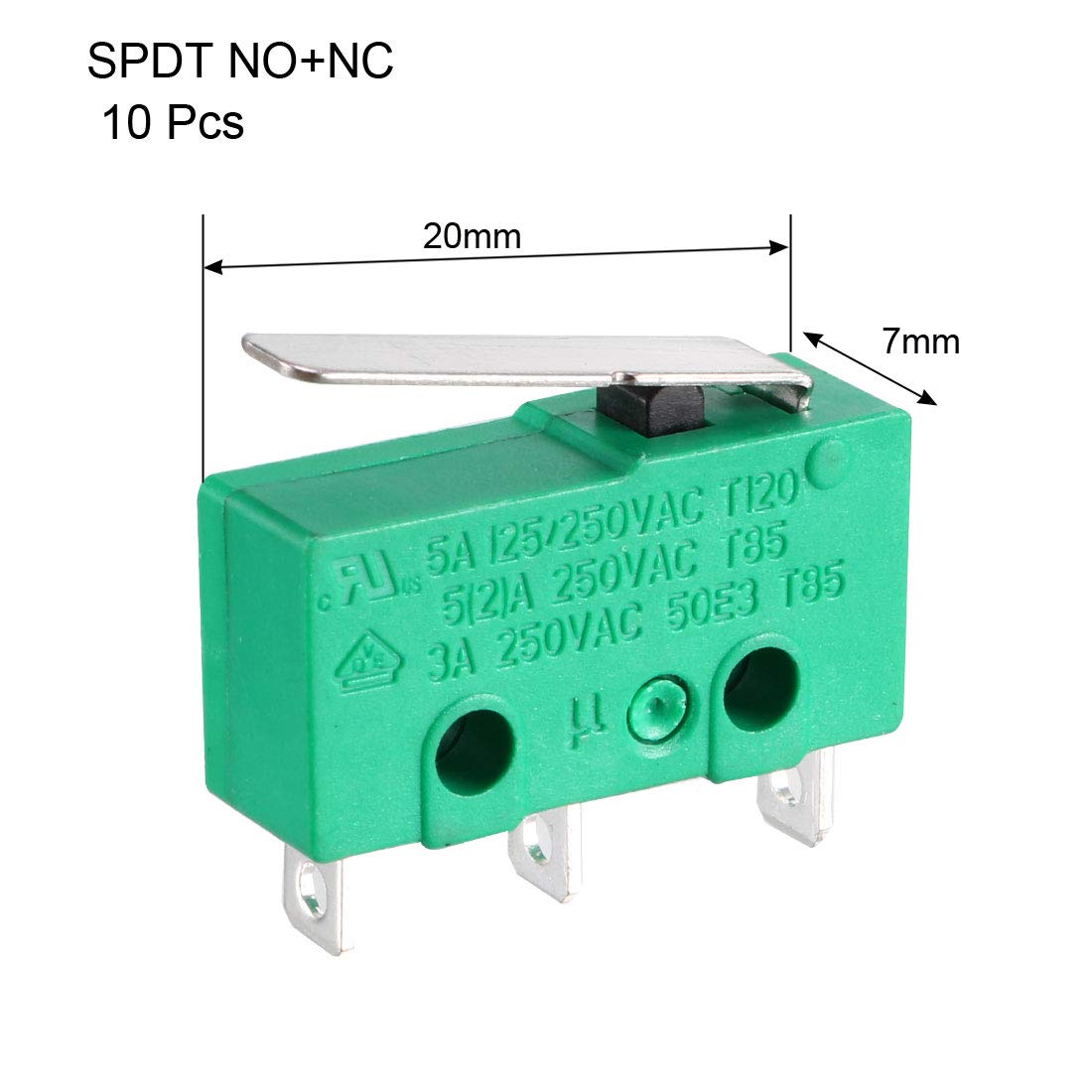
Image: Detailed dimensions of the micro limit switch, showing length, width, and height for precise installation planning.
Waea waea:
The switch features three terminals: Common (C), Normally Open (NO), and Normally Closed (NC). These terminals are typically marked on the switch body. Refer to the image below for terminal identification.

Whakaahua: Kati-ake view of the micro limit switch showing the 'C', 'NO', and 'NC' markings for terminal identification.
- Common (C): This is the input terminal for the electrical signal.
- Tuwhera noa (KORE): When the switch actuator is in its relaxed (unpressed) state, there is no electrical connection between C and NO. When the actuator is pressed, C and NO become connected.
- Kua Kati Noa (NC): When the switch actuator is in its relaxed (unpressed) state, there is an electrical connection between C and NC. When the actuator is pressed, the connection between C and NC is broken.
Connect your circuit wires to the appropriate terminals based on whether you require a signal when the switch is pressed (NO) or when it is released (NC).

Whakaahua: Raro view of the micro limit switch, clearly showing the three metal terminals for electrical connections.
Nga Tikanga Whakahaere
The KW4-3Z-3 is a momentary action switch. This means that the switch contacts change state only while the actuator lever is physically pressed. Once the pressure on the lever is removed, the contacts return to their original state.
The short straight lever acts as the sensing element. When a mechanical force or object presses against this lever, it actuates the internal switch mechanism, causing the SPDT contacts to switch their state. This makes it ideal for applications requiring detection of presence, position, or end-of-travel.
Video: Demonstration of a micro limit switch application, showing how the switch operates when its lever is pressed, triggering an electrical response.
Video: A close-up demonstration of a micro touch button momentary switch, illustrating the physical actuation and immediate response of the switch mechanism.
Te tiaki
The uxcell KW4-3Z-3 Micro Limit Switch is designed for long-term reliability with minimal maintenance. However, periodic inspection can help ensure optimal performance.
- Te horoi: Puritia te pana kia ma i te puehu, te paru, me ngā otaota. Whakamahia he kakahu maroke, ngohengohe hei horoi. Kaua e whakamahi i ngā whakarewa, i ngā kaihoroi whakakoi rānei.
- Tirotiro: Regularly check the actuator lever for any signs of wear, bending, or damage. Ensure it moves freely without obstruction.
- Waea waea: Verify that all electrical connections remain secure and free from corrosion. Loose connections can lead to intermittent operation or electrical hazards.
- Nga Tikanga Taiao: Confirm that the operating environment continues to meet the specified temperature and humidity ranges.
Raparongoā
If you encounter issues with your micro limit switch, consider the following troubleshooting steps:
- Kore Whakautu:
- Check if power is supplied to the circuit.
- Verify all wiring connections are correct and secure (Common, NO, NC).
- Ensure the actuator lever is being fully pressed and released.
- Test the switch continuity with a multimeter if possible, to confirm internal contact operation.
- Mahi Mokowhiti:
- Tirotiro mo nga hononga waea korekore.
- Check for debris or obstructions affecting the actuator lever's movement.
- Ensure the mechanical part actuating the switch is consistent in its movement and pressure.
- Switch Stuck On/Off:
- Examine the actuator lever for physical damage or deformation.
- Check for internal damage if the switch has been subjected to excessive force. Replacement may be necessary.
Pūtāhui me te Tautoko
Specific warranty details for the uxcell KW4-3Z-3 Micro Limit Switch are not provided in this manual. For warranty claims, technical support, or further assistance, please refer to the product packaging or contact your point of purchase or the manufacturer directly.