
Jectse Jectseh4tnewb30y-03
Jectse Timer Soft Starter Instruction Manual
Model: Jectseh4tnewb30y-03
1. Hua Neke Atuview
The Jectse Timer Soft Starter is a versatile delay relay motor starter designed for efficient motor start control. It features adjustable delay ranges and wide working voltage compatibility, making it suitable for various industrial and scientific applications.

Whakaahua 1: Mua view of the Jectse Timer Soft Starter, showing the control knobs and indicator lights.
2. Nga waahanga matua
- Adjustable Start Delay (T1): Range from 0.1 seconds to 10 minutes, set via knob.
- Adjustable Conversion Time (T2): Range from 0.1 seconds to 1 second, set via knob.
- Puawai Mahi Whanuitage: Supports AC/DC 12V to 240V.
- Tohu LED: Clearly shows the working status of the relay.
- Hoahoa Kiato: Super small size, only 18mm wide, designed for 35mm rail mounting.

Figure 2: The soft starter unit highlighting its compact size and adjustable settings.
3. Nga korero haumaru
Please read and understand all safety instructions before installing or operating this device. Failure to follow these instructions may result in electrical shock, fire, or serious injury.
- Me whakarite kia momotu te hiko i mua i te tāutanga, i te waea rānei.
- Ko te whakaurunga me mahi e nga kaimahi mohio anake.
- Manatoko tika voltage and current ratings before connecting to a power source.
- Kaua e tukuna te taputapu ki te makuku, ki te wera nui ranei.
- Me whakarite kia tika te whenua ina hiahiatia.
4. Ihirangi mokete
Kei roto i te mōkihi:
- 1 x Jectse Timer Soft Starter
5. Tatūnga me te Tāuta
The Jectse Timer Soft Starter is designed for 35mm DIN rail mounting. Follow these steps for proper installation:
- Ensure all power to the circuit is turned off at the main breaker.
- Mount the soft starter securely onto a standard 35mm DIN rail. The red clips on the side facilitate easy mounting and removal.
- Connect the power supply to terminals A1 and A2. The device supports AC/DC 12-240V.
- Connect the motor control wiring to the output terminals (15, 16, 18, 25, 26, 28) as per your application's wiring diagram. Refer to the diagram on the side of the unit for specific connections.
- Ensure all wiring connections are secure and meet the specified wiring capacity (1x2.5mm² or 2x 1.5mm²).
- Takiruatia nga hononga katoa i mua i te whakaora hiko.
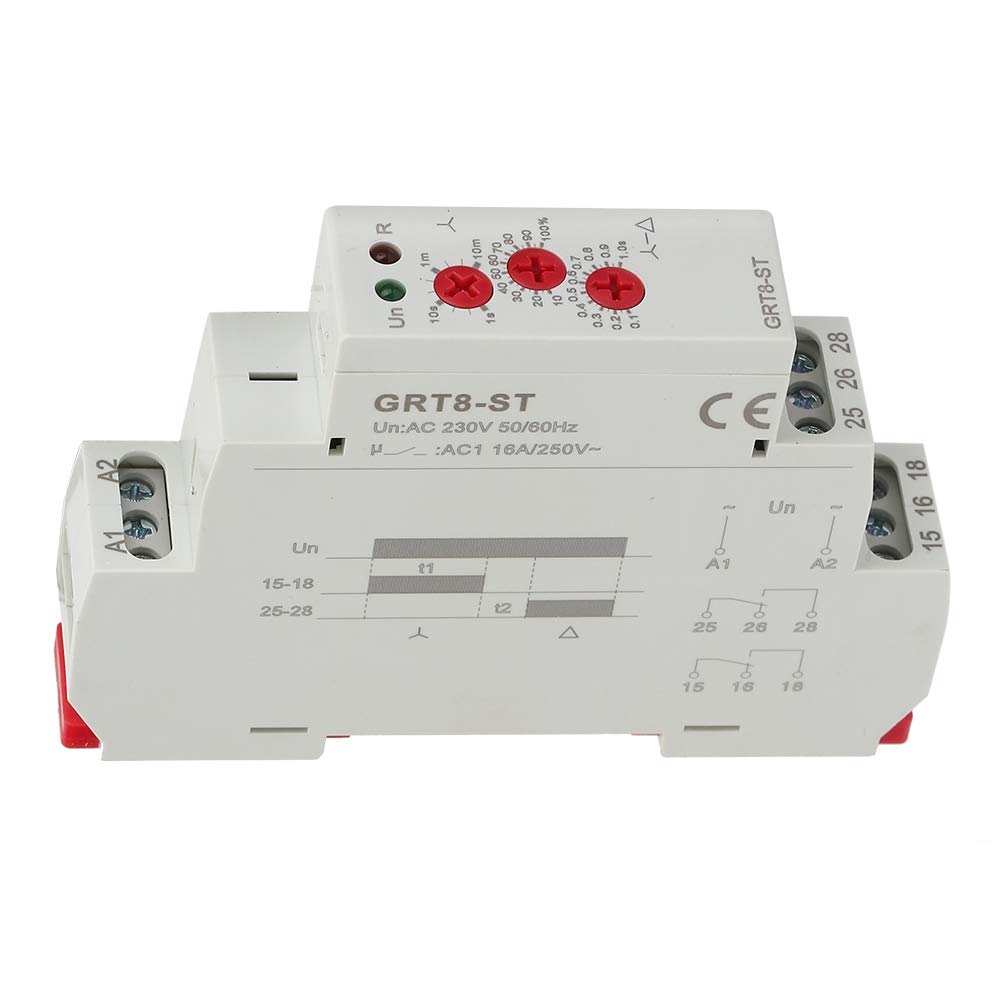
Whakaahua 3: Whakatata view of the wiring terminals and the integrated wiring diagram on the unit.

Whakaahua 4: Taha view illustrating the red clips for DIN rail mounting.
6. Nga Tohutohu Whakahaere
Once installed and powered, the Timer Soft Starter operates based on its configured delay settings.
- Setting Start Delay (T1): Use the knob labeled 'T1' to adjust the initial start delay from 0.1 seconds to 10 minutes. This delay determines how long the soft starter waits before initiating the motor start sequence.
- Setting Conversion Time (T2): Use the knob labeled 'T2' to set the conversion time from 0.1 seconds to 1 second. This time is crucial for the smooth transition during the motor's soft start phase.
- Tohu LED:
- A green LED indicates the power status (Un).
- A red LED indicates the relay's working status (R).
Ataata 1: Kua mutuview of the Jectse Timer Soft Starter, demonstrating its features and appearance.
7. Tiaki
The Jectse Timer Soft Starter is designed for long-term reliability with minimal maintenance. However, regular checks can ensure optimal performance:
- Tirotirohia nga hononga waea mo te piri me nga tohu o te kakahu, te waikura ranei.
- Keep the unit clean and free from dust and debris. Use a dry, soft cloth for cleaning.
- Me whakarite kia noho tonu te taiao whakahaere i roto i nga awhe pāmahana me te haumākū kua tohua.
- Kaua e whakatuwhera, e whakatika rānei i te waeine māu ake. Me whakapā atu ki ngā kaimahi ratonga whai tohu.
8. Te Raru
If you encounter issues with your Timer Soft Starter, consider the following common problems and solutions:
| Raruraru | Take pea | Rongoā |
|---|---|---|
| Unit not powering on (Green LED off) | No power supply; Incorrect wiring; Faulty unit. | Check power source; Verify A1/A2 wiring; Contact support if power is present and wired correctly. |
| Motor not starting after delay | Incorrect output wiring; Relay not activating; Motor issue. | Check output terminals (15, 16, 18, 25, 26, 28) connections; Observe red LED for relay status; Test motor independently. |
| Delay times are inaccurate | Knob settings incorrect; Environmental factors. | Re-adjust T1 and T2 knobs carefully; Ensure stable operating environment. |
If the problem persists after attempting these solutions, please contact Jectse customer support.
9. Whakatakotoranga
| Tawhā | Uara |
|---|---|
| Momo | AC/DC 12V~240V |
| Rated Control Power Supply Voltage | AC/DC 12-240V (50/60Hz) |
| Whakamahi Hiko | AC 0.7-3VA / DC 0.5-1.7W |
| Starting Delay (T1) | 0.1s - 10min |
| Conversion Delay (T2) | 0.1 - 1 |
| Tautuhi Tika | 5% |
| Tukurua Tika | 0.2% |
| Putanga | Two sets of conversion contacts 16A/AC250VAC |
| Minimum Switching Power | 500mW |
| Te Ora Miihini | 1 x 10,000,000 huringa |
| Electrical Life (Load) | 1,000,000 huringa |
| Tautuhi Wā | 200ms mōrahi |
| Te Mahana Taiao Mahi | -20°C ~ 55°C |
| Rokiroki me te Whakawera Waka | -35°C ~ 75°C |
| Tāutatanga | 35mm te reera whakapuru |
| Taumata Tiaki | IP20 |
| Tapanga whakaurunga | 2000 mita |
| Taumata Parahanga | 2 |
| Te Waea Waea | 1x2.5mm² or 2x 1.5mm² |
| Ahu | 90 x 18 x 64mm (3.5 x 0.7 x 2.5in) |
| E rite ana ki te Paerewa | GB14048.5.IEC/EN 60255-1 |
| Taumaha | Whakatata 96g (3.4oz) |
10. Pūtāhui me te Tautoko
For warranty information or technical support, please contact Jectse customer service. Keep your purchase receipt for any warranty claims.
Kaihanga: Jectse
Tau tauira: Jectseh4tnewb30y-03
Te Ra Tuatahi Wātea: Haratua 4, 2019
Ask a question about this manual
Ask about setup, troubleshooting, compatibility, parts, safety, or missing instructions. Manuals+ will review the question and use this page’s manual context to help answer it.