Geekee G350

Geekee G350 True Wireless Earbuds Instruction Manual

Tauira: G350

1. Kupu Whakataki

The Geekee G350 True Wireless Earbuds offer a high-fidelity audio experience with advanced Bluetooth 5.0 technology. Designed for comfort and versatility, these in-ear headphones feature deep bass, crystal clear treble, and noise-cancelling capabilities. They are sweatproof with an IPX5 rating, making them suitable for sports and active use. The earbuds provide a stable connection, instant pairing, and extended battery life with their portable charging case.

Geekee G350 True Wireless Earbuds in charging case

Image 1: Geekee G350 True Wireless Earbuds in their charging case.

2. Ihirangi mokete

Tena koa tirohia kei roto katoa nga taonga kei roto i to kete:

  • Geekee G350 Earphone x 2 (Left and Right Earbuds)
  • Puhi utu x 1
  • Regular Ear Tips (Sizes S, M, L, XL) x 4 Pairs
  • Rubber Ear Pieces x 2 Pairs
  • Taura Whakatau x 1
  • Pukapuka Kaiwhakamahi x 1
Contents of the Geekee G350 Earbuds package

Image 2: All items included in the Geekee G350 package.

3. Tatūnga

3.1 Takirua Tuatahi

For the first-time use, follow these steps to pair your Geekee G350 earbuds:

  1. Tango Kiriata Tiaki: Before charging or first use, remove the plastic protective film from the charging contact points located on the bottom of each earbud.
  2. Ngā Taringa Whakautu: Place both earbuds back into the charging case and allow them to charge for a short period.
  3. Automatic Power On & Pairing Mode: Tangohia nga pukoro taringa e rua mai i te pukoro utu. Ka whakakaha aunoa, ka uru ki te aratau takirua.
  4. Tūhono mā Nihokikorangi: On your smartphone or Bluetooth-enabled device, go to the Bluetooth settings menu and select "Geekee G350" to connect.

After the initial connection, the earbuds will automatically turn on and connect to your smartphone when removed from the case, and automatically turn off and charge when placed back in the case.

Steps for instant pairing of Geekee G350 earbuds

Image 3: Visual guide for initial pairing of the earbuds.

3.2 Te utu

The earbuds and charging case have separate battery capacities and charging times:

  • Pūhiko Pūhiko Pūhiko: 50mAh/3.7V per earbud.
  • Wa Whakamaa Earbud: Tata ki te 1.5 haora mo te utu katoa.
  • Whakapaa Putea Raukaha Raukaha: 500mAh/3.7V.
  • Te Waa Whakataunga Puhi: Tata ki te 2.5 haora mo te utu katoa.

The charging case provides additional power, extending the total playtime. A fully charged case can boost the earbuds' playtime from 3-3.5 hours to 15 hours. In mono mode, using one earbud while the other charges, playtime can be extended up to 28 hours.

Battery life and charging times for Geekee G350 earbuds

Whakaahua 4: Ka mutuview of battery life and charging specifications.

4. Nga Tohutohu Whakahaere

4.1 Mana Pupuri

Each earbud features a multi-function button and an LED indicator. Refer to the diagram below for control functions:

Geekee G350 earbud function button and LED indicator guide

Image 5: Detailed functions of the earbud button and LED indicator.

  • Purei/Tatari: Patohia te paatene mahi kotahi.
  • Riu Panuku: Press the function button for 2 seconds (Right earbud).
  • Riu o mua: Press the function button for 2 seconds (Left earbud).
  • Whakahohehia te Kaiawhina Reo (Siri): Patohia rua te paatene mahi.
  • Whakautu/Whakamutu Waea: Patohia te paatene mahi kotahi.
  • Whakakore Waea: Patohia te paatene mahi mo te 2 hēkona.

The LED indicator displays charging status and Bluetooth connection status.

4.2 Listening Modes

The Geekee G350 earbuds support two listening modes:

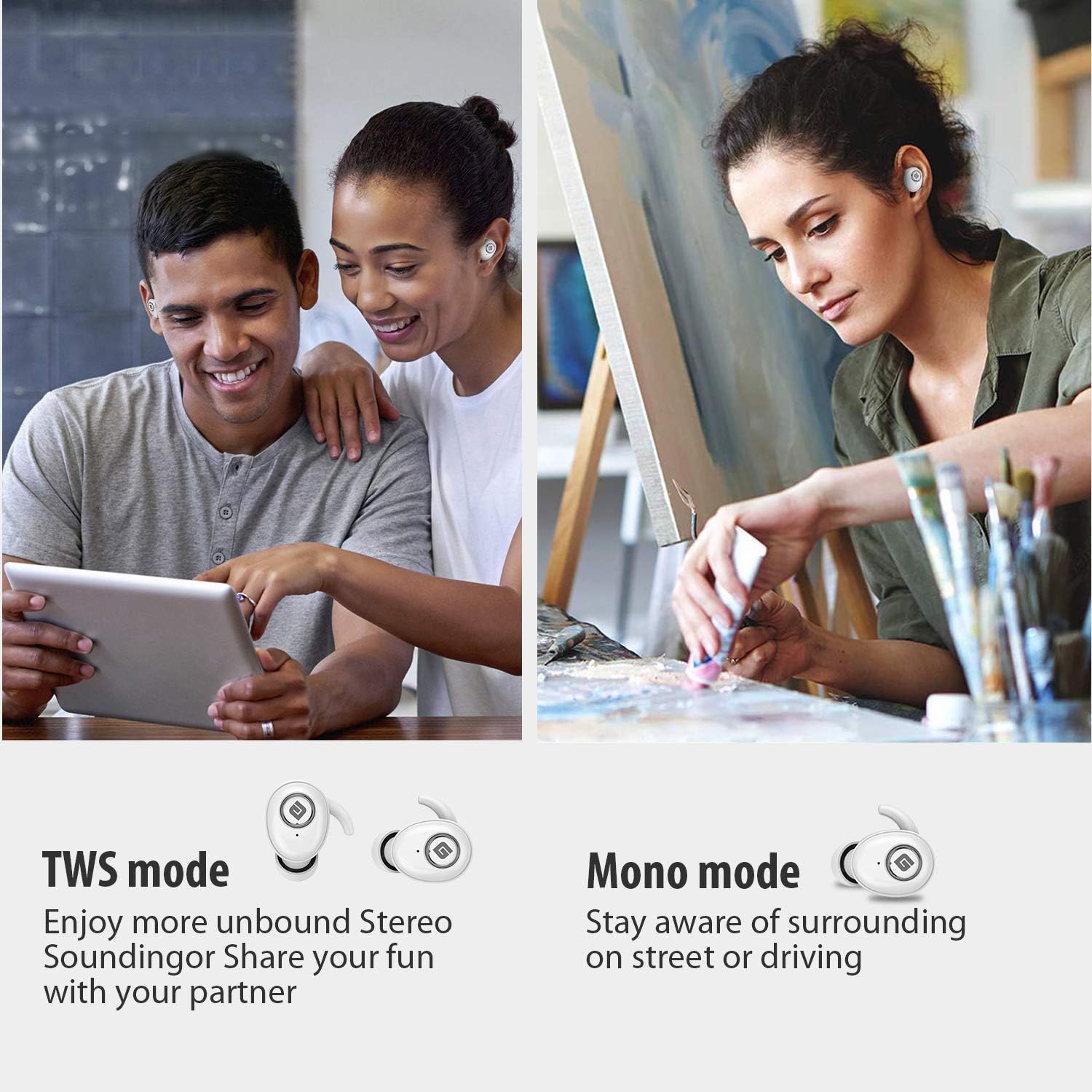
  • TWS (True Wireless Stereo) Aratau: Use both earbuds simultaneously for a full stereo sound experience. This mode is ideal for immersive audio.
  • Aratau Mono: Use a single earbud (only the Right earbud supports mono mode) to stay aware of your surroundings, such as when driving or walking in public.
Illustration of TWS and Mono listening modes for earbuds

Image 6: Comparison of TWS and Mono listening modes.

5. Tiaki

  • Tiaki Pūhiko: Keep your headphones charged when the battery life is low to ensure optimal Bluetooth connection and protect the battery's longevity.
  • Kōwhiringa o te pito taringa: Choose suitable ear tips and wear your headphones snugly, especially during physical activities like running or cycling. This helps reduce wind noise and ensures a secure fit.
  • Te horoi: Regularly clean the earbuds and charging case with a soft, dry cloth to prevent dust and debris buildup. Avoid using harsh chemicals or abrasive materials.
  • Rokiroki: Mena karekau e whakamahia, penapenahia nga purongo ki roto i to pukoro hei tiaki kia mau tonu te utu. Whakaorangia ki te waahi makariri, maroke atu i nga wera nui.
  • Ātete wai: The earbuds are IPX5 sweatproof, meaning they can resist a sustained, low-pressure water jet spray. They are not designed for submersion in water.

6. Te Raru

If you encounter issues with your Geekee G350 earbuds, please refer to the following common solutions:

  • Karekau e Whakatakihia nga taringa:
    • Ensure the plastic protective film has been removed from the charging contacts on the earbuds.
    • Me manatoko kei te hono tika te taura utu ki te pouaka me te pūtake hiko.
    • Check if the charging case itself has sufficient battery charge.
  • Kāore ngā Taringa e Honohono/E Hono Ana:
    • Me mohio kei te whakahohea te Nihokikorangi i runga i to taputapu.
    • Ensure the earbuds are fully charged and out of the charging case.
    • Forget "Geekee G350" from your device's Bluetooth settings and attempt to pair again.
    • Try restarting your device and the earbuds.
  • Sound Issues (Low Volume, Distortion):
    • Whakatikatikahia te oro o tō pūrere hono me ngā pane taringa hoki.
    • Ensure ear tips are correctly sized and provide a snug fit to optimize sound quality and noise isolation.
    • Horoia nga otaota mai i nga kaikorero taringa.
  • Kotahi anake te Taringa e Mahi ana:
    • Me whakarite kia utu nga purongo e rua.
    • Place both earbuds back into the charging case, close the lid, wait a few seconds, then take them out again to re-establish the stereo connection.
    • If the issue persists, try resetting the earbuds (refer to the full user manual for specific reset instructions if available).

7. Whakatakotoranga

Āhuahira Taipitopito
Paerewa Nihokikorangi V5.0
Pro Ahokorefile HFP, HSP, A2DP, AVRCP
Awhe Mahi 10m (33ft)
Whakapae Voltage DC 5V 1A
Wā tūtatari 160 haora
Talk / Playing Time 2~3 hours (single charge), up to 15 hours with charging case, up to 28 hours in mono mode
Wā Utu (Paneoro) 1.5 haora
Wā Whakataki (Kei te Whakataki) 2.5 haora
Battery Capacity (Headset) 50mAh/3.7V
Te Raahiko Pūhiko (Kei Te Katoa) 500mAh/3.7V
Taumaha Tūemi 1.76 hekere (tata ki te 50g)
Hunga Hua 0.8 x 0.4 x 0.4 inches (per earbud)
Ātete wai IPX5 Te werawera
Mana Haruru Whakakore Haruru Hohe
hopuoro Kei roto

8. Raihana me te Tautoko

Geekee is committed to providing high-quality service and professional support for its products. For any technical assistance or inquiries, please contact our support team.

  • Tautoko Hangarau: Lifetime technical help is available.
  • Wā Whakautu: Inquiries are typically responded to within 24 hours.
  • Īmēra Whakapā: support@getgeekee.com
Geekee customer support contact information

Image 7: Geekee customer support details.

Ataata Hua Whaimana

Ataata 1: Kua mutu te rangatiraview of the Geekee G350 True Wireless Earbuds, highlighting key features and design.

Tuhinga e pa ana - G350

Preview Geekee G450 True Wireless Earbuds User Manual
User manual for Geekee G450 True Wireless Earbuds, covering package contents, product specifications, charging, pairing, usage, controls, FAQs, disposal, and warranty.
Preview Geekee G02 True Wireless Earbuds: User Manual, Features, and Specifications
Official user manual for Geekee G02 True Wireless Earbuds. Get detailed information on pairing, controls, charging, product specifications, tips, and important warnings. Enhance your audio experience with G02.
Preview Smart Battery Camera Operation Instructions and Setup Guide
Comprehensive guide for setting up and operating the Smart Battery Camera, including product appearance, quick start, setup procedures, troubleshooting, and specifications.
Preview Avaya Aura Communication Manager System Capacities Table
This document details the system capacities for Avaya Aura Communication Manager, covering various releases and configurations. It includes information on IP endpoints, trunks, call center features, and platform specifications, providing a comprehensive overview for system planning and deployment.
Preview Aratohu Tīmatanga Tere mō te Tāutanga Taputapu Avaya G350 Media Gateway
Kei roto i tēnei aratohu ngā mōhiohio nui mō te tāutanga taputapu o te Avaya G350 Media Gateway, tae atu ki te whakarite, te wetewete i ngā mea, te whakamau, te tāutanga o te kōwae, te hononga hiko, me ngā mahi whirihoranga tuatahi.
Preview Hitachi Virtual Storage Platform G350 & G370 Hardware Reference Guide | Hitachi Vantara
Comprehensive hardware reference for Hitachi Virtual Storage Platform G350 and G370 storage systems, detailing components, mechanical, environmental specifications, and operational guidelines.

Ask a question about this manual

Ask about setup, troubleshooting, compatibility, parts, safety, or missing instructions. Manuals+ will review the question and use this page’s manual context to help answer it.