
1. Kupu Whakataki
This manual provides essential information for setting up, operating, and maintaining your Tracfone Samsung Galaxy A10e smartphone. Please read this guide thoroughly to ensure proper usage and to maximize your device's capabilities.
The Samsung Galaxy A10e is a 4G LTE prepaid smartphone designed for reliable communication and everyday tasks. It features a 5.83-inch Infinity Display, 32GB of internal storage, and an 8MP rear camera.
2. He aha kei roto i te Pouaka
- Tracfone Samsung Galaxy A10e Smartphone
- Kaitohu
- Pukapuka Kaiwhakamahi (tenei tuhinga)
- Kaari SIM (i mua i te whakauru, kua whakauruhia motuhake ranei)
3. Pūrere Neke Atuview
Familiarize yourself with the physical components of your Samsung Galaxy A10e.
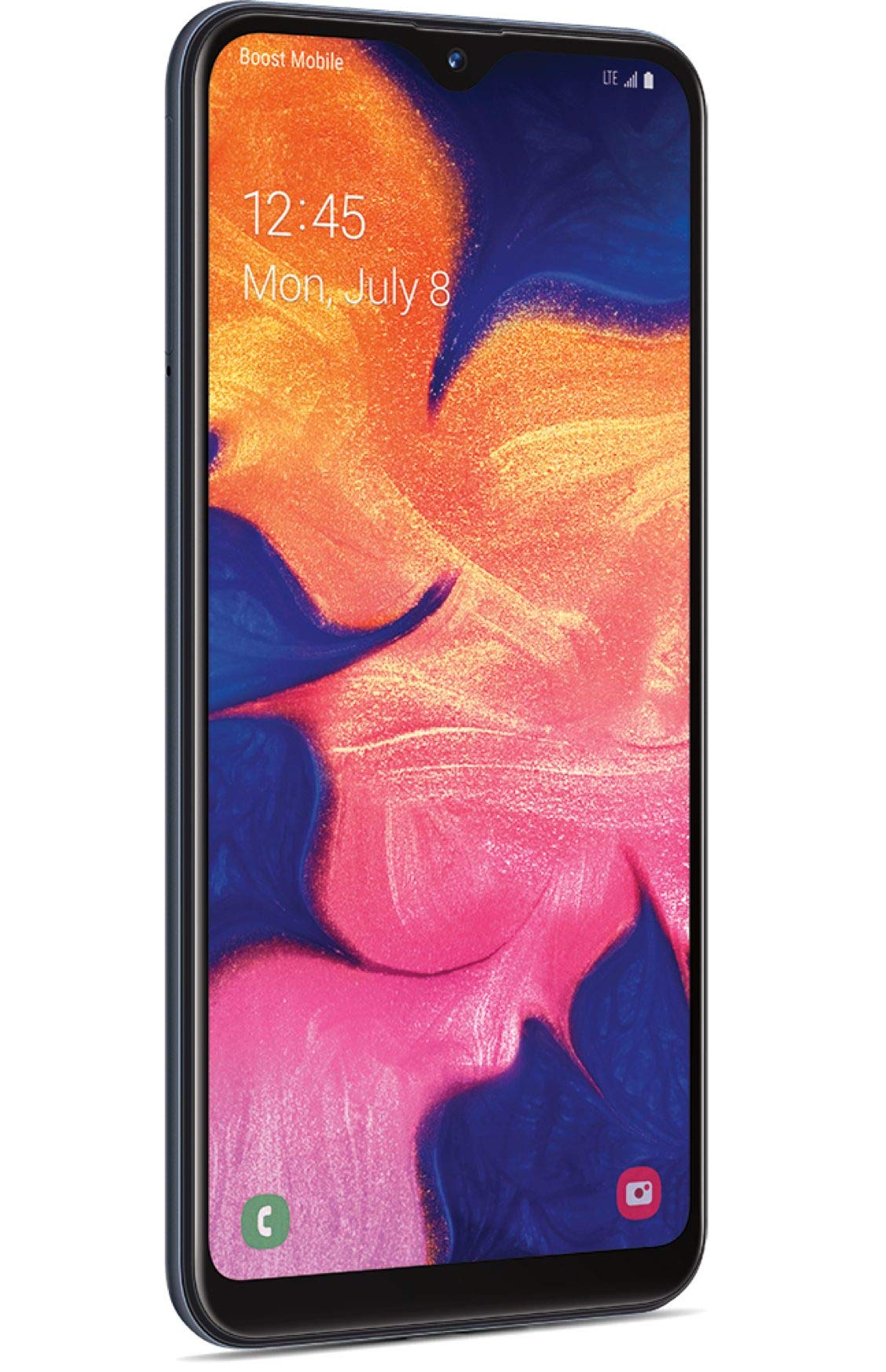
Whakaahua 1: Mua view of the Tracfone Samsung Galaxy A10e smartphone.
- Kāmera Mua: Located at the top of the display, used for selfies and video calls.
- Whakaatu: 5.83-inch HD+ Infinity Display for clear visuals.
- Pātene Rōrahi: On the side, for adjusting media and call volume.
- Pātene Hiko/Makati: On the side, to turn the device on/off or lock/unlock the screen.
- Tauranga USB-C: Kei raro, mō te utu me te whakawhiti raraunga.
- 3.5mm Jack Paneoro: Kei raro, mō te hono i ngā paneoro waea.
- Kaikōrero: Kei raro, mō te putanga oro.
- Kāmera Whakamuri: 8MP camera on the back for capturing photos and videos.
- Kohiko: Next to the rear camera, for low-light photography.
- Paepae Kaari SIM/MicroSD: On the side, for inserting your SIM card and an optional microSD card for expanded storage.
4. Tatūnga
4.1. Te whakauru i te Kaari SIM me te Kaari MicroSD
- Locate the SIM/microSD card tray on the side of your phone.
- Whakauruhia te taputapu tango SIM (mehemea ka whakaratohia) ki roto i te kohao iti i runga i te paepae hei peha.
- Place your Tracfone SIM card into the SIM slot. Ensure the gold contacts face down and the notched corner aligns with the tray.
- (Optional) If using a microSD card for additional storage, place it into the designated microSD slot on the tray.
- Me ata whakauru ano te paepae ki roto i te waea kia pao noa ki tona waahi.
4.2. Te Whakataki i te Pūhiko
- Honoa te taura USB-C ki te tauranga utu kei raro o to waea.
- Plug the other end of the USB-C cable into the provided wall adapter.
- Monohia te urutau pakitara ki te putanga hiko.
- Allow the phone to charge until the battery is full before initial use.
4.3. Initial Power On and Activation
- Press and hold the Power/Lock button until the Samsung logo appears.
- Whaia nga tohu i runga-mata hei whakaoti i te tatūnga tuatahi, tae atu ki te kowhiringa reo, hononga Wi-Fi, me te tatūnga pūkete Google.
- For Tracfone service activation, visit tracfone.com/activate or call Tracfone customer service.
5. Te whakahaere i to Waea atamai
5.1. Whakaterenga Taketake
- Mata Kāinga: Swipe mauī, matau rānei hei uru atu ki ngā panera mata kāinga rerekē.
- Kaituhi Taupānga: Swipe ake i te mata o te kāinga ki view nga tono whakauru katoa.
- Paepae Whakamōhiotanga: Swipe whakararo mai i runga o te mata ki te view whakamohiotanga me nga tautuhinga tere.
- Pātene Whakamuri: Tap the back button (left arrow) to return to the previous screen.
- Pātene Kāinga: Tap the home button (circle) to return to the home screen.
- Pātene Taupānga Hou: Tap the recent apps button (square) to view me te whakawhiti i waenga i nga tono kua whakamahia tata nei.
5.2. Te Waea me te Tuku Karere
- Waea: Whakatuwheratia te taupānga Waea, whakauruhia te nama, ka paato i te tohu waea.
- Karere: Whakatuwheratia te taupānga Karere, patohia te ata karere hou, tāuruhia te nama waea o te kaiwhiwhi, tīpakohia rānei mai i ngā hoapā, ka pato i tō karere.
5.3. Te whakamahi i te Kamera
Your Samsung Galaxy A10e features an 8MP rear camera and a 5MP front camera.
- Whakatuwheratia te taupānga Camera.
- Patohia te paatene kati hei tango whakaahua.
- Pāwhiritia te ata ataata hei hopu i tētahi ataata.
- Patohia te ata whakawhiti kamera hei takahuri i waenga i nga kamera o mua me muri.
Ataata 1: Kua mutuview of the Tracfone Samsung Galaxy A10e, demonstrating its features and design. This video is provided by Verizon Value, Inc.
6. Tiaki
- Whakahōu Pūmanawa: Takitaki me te whakauru i nga whakahōu rorohiko i ia wa kia pai ai te mahi me te haumarutanga. Haere ki Tautuhinga > Whakahoutanga Pūmanawa.
- Tiaki Pūhiko: Hei whakaroa i te ora o te pākahiko, karohia ngā pāmahana tino wera, ā, kaua e waiho te waea kia utua katoatia, kia kore rānei e pau te hiko mō te wā roa.
- Te horoi: Whakamahia he kakahu ngohengohe, kore-miro hei horoi i te mata me te tinana o te waea. Āta karohia ngā matū kino.
- Whakahaere Rokiroki: Ūkui i ia wā me te kore e tika files and apps to free up storage space. You can expand storage with a microSD card up to 512GB.
7. Te Raru
- Kaore te Waea i te Whakaka: Me whakarite kua utaina te pākahiko. Honoa te rihi ka tatari mo etahi meneti i mua i te ngana ki te hiko ano.
- Taupānga e takataka ana/tio ana: Close the app and reopen it. If the issue persists, restart the phone. Consider clearing the app's cache or reinstalling it.
- Poor Signal/No Service: Check if your SIM card is properly inserted. Ensure you are in an area with network coverage. Restart your phone.
- Tere Whakaheke Pūhiko: Reduce screen brightness, close unused apps, and disable unnecessary features like Bluetooth or Wi-Fi when not in use.
- Kore Whakautu Mata: Restart the phone by holding down the Power/Lock button for about 10-15 seconds.
8. Whakatakotoranga
| Āhuahira | Taipitopito |
|---|---|
| Ingoa Tauira | tupuni A10e |
| Whakaatu | 5.83 Inches, 720 x 1560 Resolution, 60Hz Refresh Rate |
| Tukatuka | 1.6 GHz Octa-Core (CPU Model: A6-6310) |
| RAM | 2 GB |
| Rokiroki Roto | 32 GB (Expandable up to 512GB with Micro SD) |
| Kāmera Whakamuri | 8 MP |
| Kāmera Mua | 5 MP |
| Pūhiko Raukaha | 3000 mah |
| Pūnaha Mahi | Android 9.0 |
| Hononga | 4G LTE, Wi-Fi, Bluetooth 5.0, GPS |
| Jack Ororongo | 3.5 mm |
| Ahu | 7.25 x 1.65 x 10.25 inihi |
| Taumaha | 5 hekere |
9. Pūtāhui me te Tautoko
For warranty information and customer support, please refer to the documentation included in your product packaging or visit the official Tracfone website. Tracfone utilizes the network with the most first place rankings in RootMetrics® 2H 2022 5G reliability assessments of 125 metros. Results may vary. Not an endorsement. Service must be active and in use within any six-month period.
Tracfone Customer Service: For assistance with activation, plans, or technical support, please contact Tracfone directly.