
Kupu Whakataki
Mauruuru koe mo te hokoasing the Muse M-1935 DJ Bluetooth Party Speaker. This powerful audio system is designed to deliver high-quality sound with dynamic light effects, perfect for any gathering. Featuring Bluetooth connectivity, USB playback, AUX input, and a microphone jack, it offers versatile entertainment options. Please read this manual carefully before using the device to ensure proper operation and to maximize its performance.
Nga Tohutohu Haumaru Nui
- Pānuihia enei tohutohu.
- Kia mau ki enei tohutohu.
- Whakarongo ki nga whakatupato katoa.
- Whaia nga tohutohu katoa.
- Kaua e whakamahia tenei taputapu tata ki te wai.
- Horoia ki te kakahu maroke anake.
- Kaua e araia nga whakatuwheratanga o te hau. Tāutahia kia rite ki nga tohutohu a te kaihanga.
- Kaua e whakauruhia ki te taha o nga puna wera penei i nga radiators, nga rehita wera, nga umu, me etahi atu taputapu (tae atu ki ampkaiwhakaora) e whakaputa ana i te wera.
- Tiakihia te taura hiko kia kaua e hikoi, ka kowhakina mai ranei, ina koa ki nga moko, nga waahi waatea, me te waahi ka puta mai i te taputapu.
- Me whakamahi noa i nga taapiri / taputapu kua tohua e te kaiwhakanao.
- Wewetehia tenei taputapu i te wa e uira ana te tupuhi, i te kore ranei e whakamahia mo te wa roa.
- Tukuna nga ratonga katoa ki nga kaimahi ratonga whai tohu. Ka hiahiatia he ratonga ina kua pakaru nga taputapu i tetahi huarahi, penei i te taura hiko, te mono ranei kua pakaru, kua maringi te wai, kua taka ranei nga taonga ki roto i te taputapu, kua kitea te taputapu ki te ua, ki te makuku ranei, kaore e mahi noa. , kua tukuna ranei.
Ihirangi mokete
Tena koa tirohia ko nga mea katoa kei raro nei kei roto i to kete:
- Muse M-1935 DJ Party Speaker
- Mana Mamao
- AUX IN Cable (3.5mm)
- Hopuoro waea
- Waea Hiko
- Pukapuka Kaiwhakamahi

Image showing the Muse M-1935 DJ Party Speaker along with its standard accessories: a remote control, a 3.5mm AUX input cable, and a wired microphone. These components are essential for full functionality and versatile use of the speaker system.
Ka mutu te huaview
The Muse M-1935 DJ is a tower-type party speaker featuring a robust design and multiple connectivity options. It includes an amber LED display for clear information, integrated color lights and flash effects for dynamic visuals, and various input ports for audio playback.
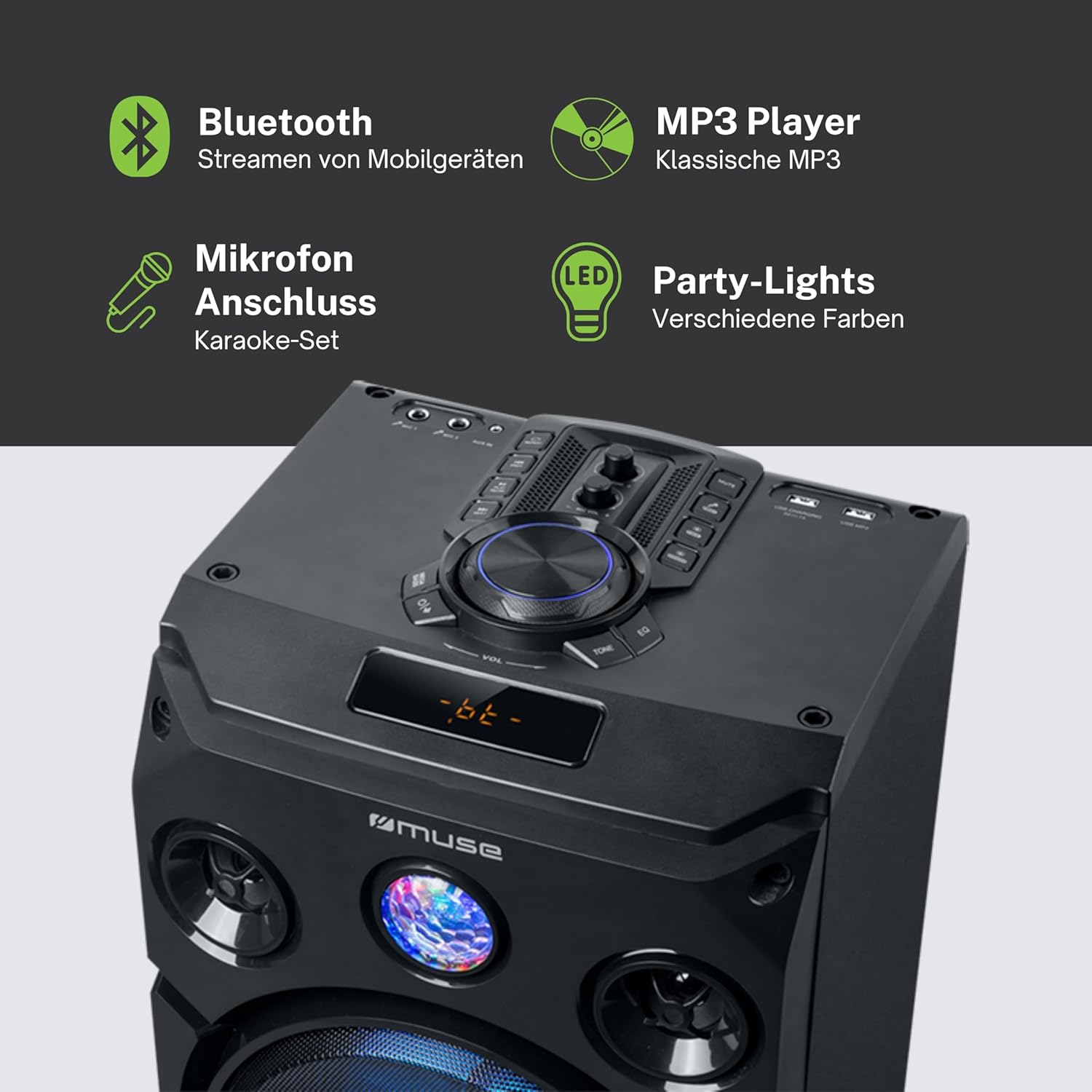
Ko tenei whakaahua e whakarato ana i nga korero taipitopito view of the speaker's key features, including the control panel at the top, the amber LED display, and the integrated party lights. Icons indicate support for Bluetooth streaming, MP3 playback via USB, microphone connection for karaoke, and dynamic party light effects.
Tatūnga
1. Hononga Mana
- Me whakarite kia whakatakotoria te kaikorero ki runga i tētahi mata pumau, papatahi.
- Connect the power cable to the AC IN port on the back of the speaker.
- Plug the other end of the power cable into a standard wall outlet (AC 100-240V, 50/60Hz).
2. Audio Connections (Optional)
- Tāuru AUX: For connecting external audio devices (e.g., smartphone, tablet, MP3 player) via a 3.5mm audio cable. Insert one end of the AUX cable into the AUX IN port on the speaker and the other end into your device's headphone jack.
- Purei Whakahoki USB: Whakauruhia he puku kohiko USB kei roto te ororongo MP3 files into the USB port. The speaker will automatically detect and begin playing compatible files.
3. Microphone Connection (Optional)
- Connect the wired microphone to the MIC IN jack on the speaker. Adjust the microphone volume using the dedicated control on the speaker's panel.
Nga Tohutohu Whakahaere
1. Te Whakakaha/Weto
- Pehia te MANA pēhi i te pātene i te papa whakahaere, i te mana mamao rānei hei whakakā, hei whakaweto rānei i te kaikorero.
2. Takirua Nihokikorangi
- Whakakāhia te kaikorero. Mā te mata LED e whakaatu te aratau o nāianei.
- Pehia te MODE button to select Bluetooth mode. The display will show "BT" and an indicator will flash, signifying it's ready for pairing.
- I runga i to taputapu Bluetooth-whakahohea (waea atamai, papa, me etahi atu), whakaahei i a Nihokikorangi me te rapu mo nga taputapu e waatea ana.
- Select "MUSE M-1935 DJ" from the list. Once paired, the speaker will emit a confirmation sound, and the Bluetooth indicator will stop flashing.
- Ka taea e koe te rere ahokore ororongo mai i to taputapu ki te kaikorero.
3. Whakahoki USB
- Insert a USB flash drive into the USB port. The speaker will automatically switch to USB mode and begin playing MP3 files.
- Whakamahia te TAKARO/PAUSE, KAUPAPA, a O MUA nga paatene hei whakahaere i te purei ano.
4. AUX Whakauru
- Connect your external audio device to the AUX IN port using the provided 3.5mm cable.
- Pehia te MODE button to select AUX mode. Audio will now play through the speaker.
5. Mahi Irirangi FM
- Pehia te MODE ki te kowhiri i te aratau Irirangi FM.
- Patohia me te pupuri i te TAKARO/PAUSE button to initiate an automatic scan for FM stations. The speaker will save found stations as presets (up to 60 presets).
- Whakamahia te KAUPAPA a O MUA patene hei whakatere ma nga teihana kua tiakina.
6. Whakamahinga Waorooro
- Ensure the microphone is connected to the MIC IN jack.
- Adjust the microphone volume using the dedicated MIC VOL puku i runga i te paewhiri mana.
7. Mana Whakahaere Pānga Mārama
- The speaker features integrated color lights and flash effects. Use the KAMARAMA button on the control panel or remote to cycle through different light modes or turn them off.
8. Te Whakahaere i te Oro me te Oro
- Whakaritea te rōrahi matua mā te whakamahi i te rahi ROTO puku.
- Whakamahia te Bass a Tuhinga controls (if available) to fine-tune the audio output.

This diagram visually represents the diverse functionalities of the speaker, such as dynamic color and flash lighting, the clear amber LED display, USB connectivity for MP3 playback and charging, built-in FM radio with extensive preset memory, and a versatile AUX input for external devices.
Te tiaki
- Te horoi: Disconnect the power before cleaning. Use a soft, dry cloth to wipe the exterior of the speaker. Do not use liquid cleaners or aerosol sprays.
- Rokiroki: Ki te kore e whakamahia mo te wa roa, penapena te kaikorero ki te waahi makariri, maroke, kia matara atu i te ra me te wera nui.
- Tiaki Pūhiko: The speaker contains a Lithium-ion battery. For optimal battery life, avoid fully discharging the battery frequently and store the unit with a partial charge if not used for long periods.
Raparongoā
| Raruraru | Take pea | Rongoā |
|---|---|---|
| Karekau he kaha | Power cable not connected; Power outlet faulty; Speaker turned off. | Ensure power cable is securely connected. Try a different power outlet. Press the POWER button to turn on the speaker. |
| Karekau he tangi | Volume too low; Incorrect input mode selected; Audio cable not connected properly (AUX); Bluetooth not paired. | Increase volume. Select the correct input mode (Bluetooth, AUX, USB, FM). Check audio cable connections. Re-pair Bluetooth device. |
| Ka rahua te takirua Nihokikorangi | Karekau te kaikorero i te aratau takirua; He tawhiti rawa te taputapu; Te pokanoa. | Ensure speaker is in Bluetooth pairing mode. Move device closer to speaker (within 10m). Avoid obstacles and other wireless devices. |
| Ko te purei USB kaore e mahi | Kāore i te tika te hōputu o te puku USB; Kāore e hototahi file types; USB drive damaged. | Ensure USB drive is FAT32 formatted. Only MP3 files e tautokona ana. Whakamātauria he puku USB rerekē. |
| Kaore e mahi ana te hopuoro | Microphone not connected; MIC VOL too low. | Ensure microphone is securely plugged into MIC IN. Increase the MIC VOL knob. |
Whakatakotoranga
| Āhuahira | Whakatakotoranga |
|---|---|
| Tau tauira | M-1935 DJ |
| Te Mana Putanga | 400 Watts |
| Momo Kaikorero | Pourewa |
| Hangarau Hononga | Nihokikorangi, USB, AUX |
| Whakauru Ororongo | Microphone jacks, AUX IN (3.5mm) |
| Nga waahanga motuhake | Bluetooth, Color Lights, Flash Effects, Amber LED Display, FM Radio (60 presets), USB Charging |
| Puna Mana | Electric Cable, Built-in Lithium-ion Battery |
| Rauemi | Kirihou |
| Tae | Pango |
| Rahi Hua (L x W x H) | 83.5 x 26.5 x 28.7 cm |
| Taumaha Tūemi | 9.05 Kirokaramu |
| Kaihanga | MUSE |
| Whenua Taketake | Belgium |

This technical drawing provides precise measurements of the Muse M-1935 DJ speaker, indicating its height (835mm), width (287mm), and depth (265mm). These dimensions are crucial for planning placement and transportation.
Pūtāhui me te Tautoko
Pūtāhui Kaihanga
The Muse M-1935 DJ Party Speaker comes with a three-year warranty against manufacturing defects. Please retain your proof of purchase for warranty claims. This warranty covers defects in materials and workmanship under normal use. It does not cover damage caused by misuse, accidents, unauthorized modifications, or normal wear and tear.
Nga waahanga e waatea ana
Spare parts for this product are guaranteed to be available for 2 years from the date of purchase within the EU.
Tautoko Kiritaki
For technical assistance, warranty service, or general inquiries, please contact Muse customer support. Refer to the official Muse webte paetukutuku, to tuhinga hoko ranei mo nga korero whakapiri tino hou.