
1. Kupu Whakataki
This manual provides essential instructions for the installation, operation, and maintenance of your Comelit ET5001 Extra Series 4+N Audio Outdoor Panel. Please read this manual carefully before installation and use to ensure proper function and safety. Keep this manual for future reference.
2. Nga korero haumaru
- Haumaru Hiko: Installation must be performed by qualified personnel in accordance with local electrical codes and regulations. Disconnect power before performing any wiring or maintenance.
- Nga Tikanga Taiao: The outdoor panel is designed for outdoor use. Ensure it is installed in a location protected from extreme weather conditions if possible, and within its specified operating temperature range.
- Te whakahaere: Handle the unit with care to avoid damage. Do not expose to excessive force or impact.
- Te horoi: Whakamahia he ngohengohe, damp kakahu mo te horoi. Kaua e whakamahi i nga kai horoi me nga whakarewa.
3. Ihirangi mokete
Manatokona kei roto katoa nga mea kei roto i te kete:
- Comelit ET5001 Extra Series 4+N Audio Outdoor Panel (1-button)
- Mounting screws and wall plugs (may vary)
- Pukapuka Kaiwhakamahi (tenei tuhinga)
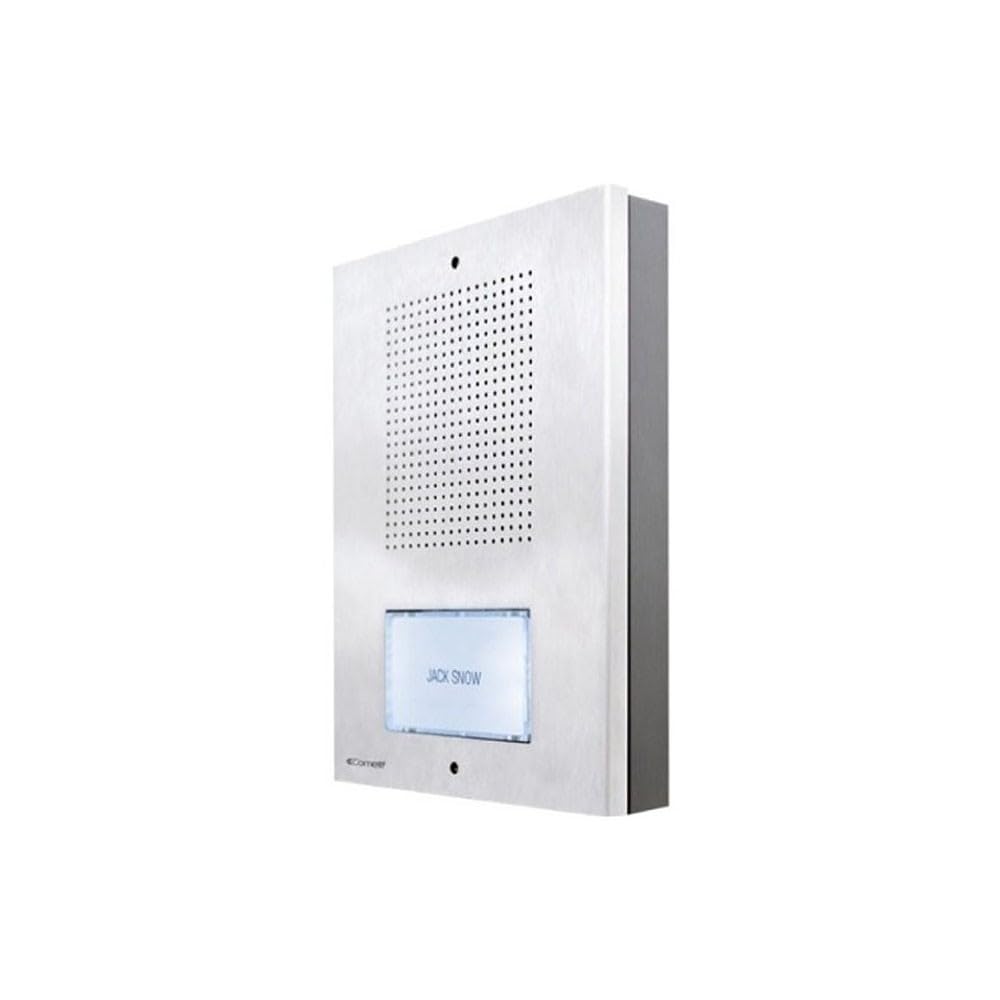
Whakaahua e whakaatu ana i te taha mua view of the Comelit ET5001 Extra Series 4+N audio outdoor panel, featuring a single call button and speaker grille.
4. Tatūnga me te Tāuta
This section outlines the general steps for installing the ET5001 outdoor panel. Refer to the detailed wiring diagrams provided with your complete intercom system for specific connections.
4.1 Mounting the Outdoor Panel
- Kōwhiri Tauwāhi: Select a suitable location near the entrance, ensuring it is at an appropriate height for users and protected from direct heavy rain if possible.
- Whakaritea Waea: Ensure the necessary 4+N wiring (4 common wires + N call wires, where N is the number of buttons) is routed to the installation point.
- Tohua nga Tohu Keri: Use the panel as a template to mark the drilling points on the wall.
- Rua rua: Drill holes for the mounting screws and insert wall plugs if necessary.
- Paewhiri Haumaru: Mount the panel securely to the wall using the provided screws.
4.2 Wiring Connections (4+N System)
The ET5001 panel operates on a 4+N wiring system. This typically involves:
- Common Wires (4): These typically include audio common, speech common, power supply, and lock release common.
- Call Wire (N=1 for ET5001): A dedicated wire for the call button, connecting to the corresponding indoor unit.
Hiranga: Always refer to the specific wiring diagram supplied with your Comelit intercom system for accurate connection details. Incorrect wiring can damage the unit or the entire system.
5. Nga Tohutohu Whakahaere
The Comelit ET5001 is designed for simple and intuitive operation.
- Te Waea: To call the indoor unit, press the single call button located on the front of the outdoor panel.
- Whakawhitinga Korero: Once the indoor unit answers, you can communicate hands-free through the speaker and microphone integrated into the outdoor panel.
- Tukunga o te Kūaha: If connected to a door lock release system, the indoor unit operator can activate the door release function.
6. Tiaki
Regular maintenance ensures the longevity and optimal performance of your outdoor panel.
- Te horoi: Periodically clean the exterior of the panel with a soft, slightly damp cloth. Do not use harsh chemicals, abrasive cleaners, or solvents, as these can damage the finish or electronic components.
- Tirotiro: Occasionally check for any visible damage to the panel or wiring. If damage is found, contact a qualified technician for repair.
- Taki Taumahi: Test the call button and audio communication periodically to ensure proper operation.
7. Te Raru
If you encounter issues with your ET5001 outdoor panel, refer to the following common problems and solutions:
| Raruraru | Take pea | Rongoā |
|---|---|---|
| No audio from outdoor panel | Incorrect wiring; faulty speaker/microphone; power issue. | Check wiring connections (refer to system diagram). Ensure power supply is active. Contact support if problem persists. |
| Call button not working | Incorrect wiring; faulty button; indoor unit not powered. | Verify call button wiring. Check power to indoor unit. Test button continuity if possible. |
| He kino te kounga ororongo | Interference; damaged wiring; faulty components. | Check for sources of electrical interference. Inspect wiring for damage. Contact support. |
For issues not listed here or if solutions do not resolve the problem, please contact Comelit technical support.
8. Whakatakotoranga
- Waitohu: Komeiti
- Tauira: ET5001
- Momo: Audio Outdoor Panel
- Pūnaha: Extra Series 4+N
- Pātene: 1
- Tohutoro Kaihanga: ET5001
- ASIN: B083ZNSP14
- Te waatea o nga waahanga e manawapa ana: Kaore i te waatea nga korero
- Ko nga whakahōu rorohiko whai mana kia: Kaore i te waatea nga korero
- Date first available on Amazon.com.be: Hanuere 18, 2020
9. Pūtāhui me te Tautoko
For warranty information, please refer to the warranty card included with your product or visit the official Comelit website. For technical support, service, or spare parts, please contact your local Comelit distributor or customer service department.
Mana Whakahaere o Comelit Webpae: www.comelitgroup.com