
1. Kupu Whakataki
This manual provides detailed instructions for the installation, operation, and maintenance of your ANRAN 1080P Security Camera System. This system includes a 13-inch LCD DVR and four 1080P indoor/outdoor surveillance cameras, designed to provide reliable home security with features like night vision, motion detection, and remote access.
2. Ihirangi mokete
I mua i te tiimata o te whakaurunga, tirohia koa kei roto i to kete nga waahanga katoa kei raro nei:

This image displays all components included in the ANRAN 1080P Security Camera System package. It includes the AHD DVR with a 13-inch LCD, four AHD cameras, a 1TB hard drive, screws for mounting, BNC cables, 1-to-4 power cables, a USB mouse, and power adapters.
- 1 x 13-inch LCD DVR (with pre-installed 1TB HDD)
- 4 x 1080P AHD Surveillance Cameras
- 4 x BNC Video/Power Cables
- 1 x 1-to-4 Power Splitter Cable
- 2 x Power Adapters (one for DVR, one for cameras)
- 1 x Tihihiore
- Ngā tīwiri me ngā mono whakamau
- 1 x Pukapuka Kaiwhakamahi
3. Hua Neke Atuview
3.1 Digital Video Recorder (DVR)
The DVR unit features an integrated 13-inch LCD monitor for direct viewing and playback. It includes various ports for connectivity and control.
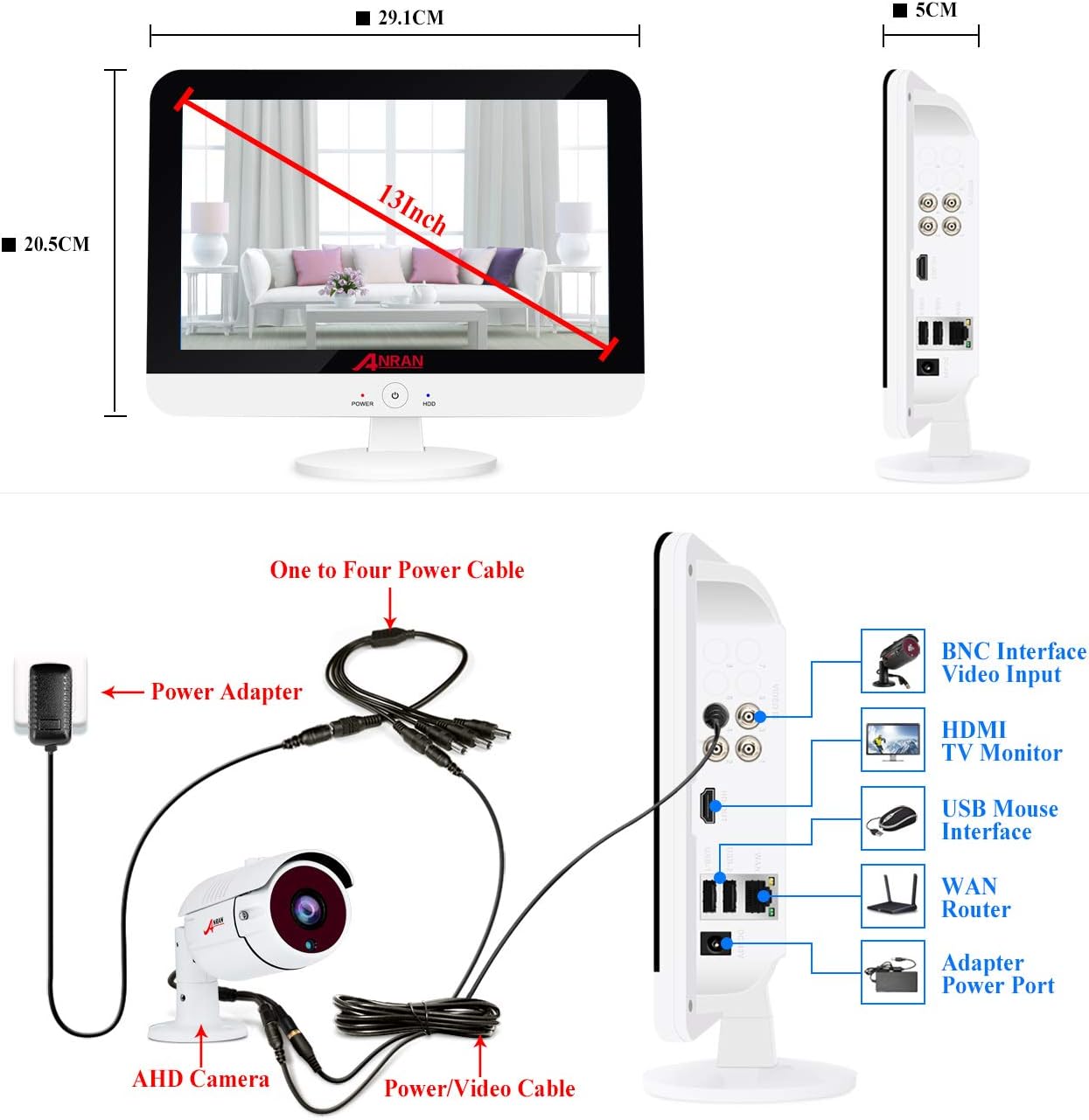
This image shows the ANRAN 13-inch LCD DVR from the front and side. The front view indicates a 13-inch screen with approximate dimensions of 29.1cm width and 20.5cm height. The side view highlights various ports: BNC Interface Video Input, HDMI TV Monitor, USB Mouse Interface, WAN Router, and Adapter Power Port.
3.2 Te Kamera Tirotiro
The cameras are designed for both indoor and outdoor use, featuring robust construction and essential surveillance capabilities.

This diagram illustrates the key features of the ANRAN security camera, including 36PCS IR LEDs for night vision, an IIR-CUT Filter, a waterproof case, a mounting bracket, a power port, and an HD lens.
4. Tohutohu Tatūnga
4.1 Waea Pūnaha
Follow the diagram below to connect your cameras to the DVR and power supply.

This image provides a wiring diagram for the ANRAN security camera system. It shows how the AHD camera connects to the DVR via a power/video cable, and how the DVR is powered by a power adapter and a one-to-four power cable. The DVR's side ports for BNC video input, HDMI, USB mouse, WAN router, and power adapter are also visible.
- Connect each camera to a BNC video/power cable.
- Connect the BNC end of each cable to the corresponding BNC video input port on the DVR.
- Connect the power end of the camera cables to the 1-to-4 power splitter cable.
- Plug one power adapter into the 1-to-4 power splitter cable and then into a power outlet.
- Connect the second power adapter to the DVR's power port and then into a power outlet.
- Connect the USB mouse to the DVR's USB port for navigation.
- For remote access, connect the DVR's WAN port to your router using an Ethernet cable.
4.2 Te Whakanohonga Kaimera
Consider optimal viewing angles and security for camera installation.

This image demonstrates flexible mounting options for the ANRAN security cameras, showing one camera wall-mountable on an outdoor patio and another ceiling-mountable in an indoor living room.
- Mount cameras in locations that provide a clear view of critical areas.
- Ensure cameras are securely fastened using the provided mounting screws.
- Adjust the camera angle to cover the desired surveillance zone.
5. Nga Tohutohu Whakahaere
5.1 Te Whakakā me te Tatūnga Tuatahi
Once all connections are made, power on the DVR. The system will boot up and display the live camera feeds on the integrated 13-inch LCD monitor. Follow any on-screen prompts for initial setup, including setting a password.
Ko tenei ataata e whakarato ana i te mutungaview of the ANRAN wired security camera system with a 13-inch monitor DVR, demonstrating its components and basic functionality.
This video showcases the ANRAN 1080P wired home camera system, highlighting its features and the integrated 13-inch monitor.
5.2 Uru Mamao
Access your camera feeds from anywhere using the mobile application.

This image illustrates the three steps for mobile access: 1. Simple Connection (DVR connected to router), 2. Download the free Danale APP, and 3. Enjoy Live View i runga i to waea atamai.
- Ensure your DVR is connected to your home router via an Ethernet cable.
- Download the official ANRAN mobile application (e.g., Danale App) from your smartphone's app store.
- Register an account and add your DVR device by scanning the QR code on the DVR or entering its serial number.
- Ka taea e koe inaianei view live feeds, playback recordings, and receive alerts on your mobile device.
5.3 Te Motini Te Motini
Whirihorahia ngā tautuhinga kite nekehanga hei whiwhi matohi me te whakahohe i ngā rekoata ina kitea he mahi.

This image demonstrates the customizable motion detection feature, showing a person triggering a recording and an email alert being sent to a smartphone. The DVR screen also displays the detected motion.
- Navigate to the DVR's menu and select 'Motion Detection' settings.
- Tautuhia nga waahanga motuhake i roto i te kamera view where motion should be detected.
- Set up alert preferences, such as email notifications or app push alerts.
5.4 Matakite Po
The cameras automatically switch to night vision mode in low-light conditions.

This image illustrates the night vision feature, showing a camera view transitioning from daytime to a clear black and white night view.
- The integrated IR LEDs provide clear black and white video footage i roto i te pouri tino.
- Me whakarite karekau he arai e arai ana i te kamera view, especially at night, to maximize night vision effectiveness.
6. Tiaki
Mā te tiaki auau ka tino pai te mahi me te roa o te ora o tō pūnaha haumarutanga.
This image highlights the camera's IP66 waterproof rating, indicating its ability to withstand rain, snow, and other outdoor elements within a temperature range of -10°C to +50°C.
- Arotahi Ma: Horoia ngā karāhe kāmera i ia wā ki te wai ngohengohe,amp he kakahu hei tango i te puehu me te para.
- Tirohia nga taura: Inspect all cables for wear, damage, or loose connections. Secure or replace as needed.
- Whakahōu Pūmanawa: Check the ANRAN website or app for any available firmware updates for your DVR to ensure the latest features and security patches.
- Whakahaere Puku Maama: Ko te 1TB HDD e whakarato ana ample storage. Regularly review me te hoki ki runga foo nuitage. The system typically overwrites the oldest footage ka ki tonu te kōpae.
- Tiaki Taiao: While cameras are IP66 rated for outdoor use, avoid direct exposure to extreme conditions if possible to extend their lifespan.
7. Te Raru
Tirohia nga take me nga otinga e whai ake nei i mua i te whakapiri atu ki te tautoko.
- Kāore he Whakaaturanga Ataata:
- Ensure all power adapters are securely plugged in and receiving power.
- Check BNC cable connections between cameras and DVR.
- Verify the DVR is powered on (check power indicator light).
- Kounga Atahanga Kino:
- Horoia ngā karāhe kāmera.
- Ensure cameras are within their effective range and not obstructed.
- Check cable integrity for any damage that might affect signal quality.
- Kaore i te Mahi te Motini:
- Review motion detection settings in the DVR menu to ensure zones are correctly configured and sensitivity is appropriate.
- Verify alert settings (email, push notifications) are correctly set up and tested.
- Te Rahunga o te Uru Mamao:
- Confirm the DVR is connected to the internet via an Ethernet cable to your router.
- Tirohia te hononga ipurangi o to pouara.
- Ensure the mobile app is updated to the latest version.
- Verify device registration in the app.
8. Whakatakotoranga
| Āhuahira | Taipitopito |
|---|---|
| Waitohu | ANARAN |
| Hangarau Hononga | Waea |
| Whakataunga Hopu Ataata | 1080p |
| Nga waahanga motuhake | Pūoko Nekehanga, Tirohanga Pō |
| Te maha o nga hongere | 4 |
| Te Rokiroki Mahara | 1 TB |
| Puna Mana | Hiko Hiko |
| Pūrere Hototahi | Cameras, Personal Computers, Smartphones, Tablets |
| Hangarau Maama iti | Tae pō |
| Taumaha Tūemi | 11.44 pauna |
| Te Ra Tuatahi Wātea | Akuhata 12, 2020 |
9. Pūtāhui me te Tautoko
ANRAN products come with a standard manufacturer's warranty. Please refer to the warranty card included in your package for specific terms and conditions.
For technical support, customer service, or warranty claims, please contact ANRAN through the following channels:
- Tautoko imeera
- Tautoko waea
- Live chat (available during stated business hours)
Contact details are typically provided in the user manual included with your product or on the official ANRAN webpae.