
1. Nga korero haumaru
Read all safety instructions carefully before installing and operating the PNI SP2000W Voltage Inverter. Failure to follow these instructions may result in electric shock, fire, or serious injury.
- Haumaru Hiko: Ka mahi tenei taputapu me te voli teiteitage. Do not open the inverter casing. All servicing must be performed by qualified personnel.
- Whakahau: Ensure adequate ventilation around the inverter. Do not block the cooling fans or place the inverter in an enclosed space. Overheating can cause damage or fire.
- Taiao: Do not expose the inverter to water, rain, snow, spray, or dust. Operate in a dry, cool, and well-ventilated area.
- Hononga Pūhiko: Connect the inverter directly to a 12V car battery. Do not connect to other voltage sources or attempt to use with solar panels, as special inverters are required for solar systems.
- Uta Hototahi: This inverter is designed for resistive loads such as TVs, lighting lamps, radios, fans, and mini-refrigerators. Avoid connecting inductive loads with high starting currents unless within the inverter's surge capacity.
- Parenga taumaha: The inverter includes overload protection. Do not exceed the continuous output power of 2000W.
2. Hua Neke Atuview
The PNI SP2000W is a pure sinusoid voltage inverter designed to convert 12V DC power from a car battery into 230V AC power, suitable for powering various electrical appliances. It features a continuous output of 2000W and active cooling for efficient operation.
2.1. Nga waahanga matua
- Mana Putanga: 2000W continuous, 4000W peak.
- Whakauru Voltage: 12V DC.
- Putanga Voltage: 220V / 230V AC.
- Ngawera Putanga: Pure Sinusoid.
- Auautanga: 50 Hz.
- Matao: Active cooling with two built-in fans and aluminum housing.
- Parenga: Overload, thermal, short circuit.
2.2. Ihirangi mokete
- PNI SP2000W Voltage Kaihurihuri
- Power connection cables (red for positive, black for negative)
- Wrench for terminal connections
- pukapuka kaiwhakamahi
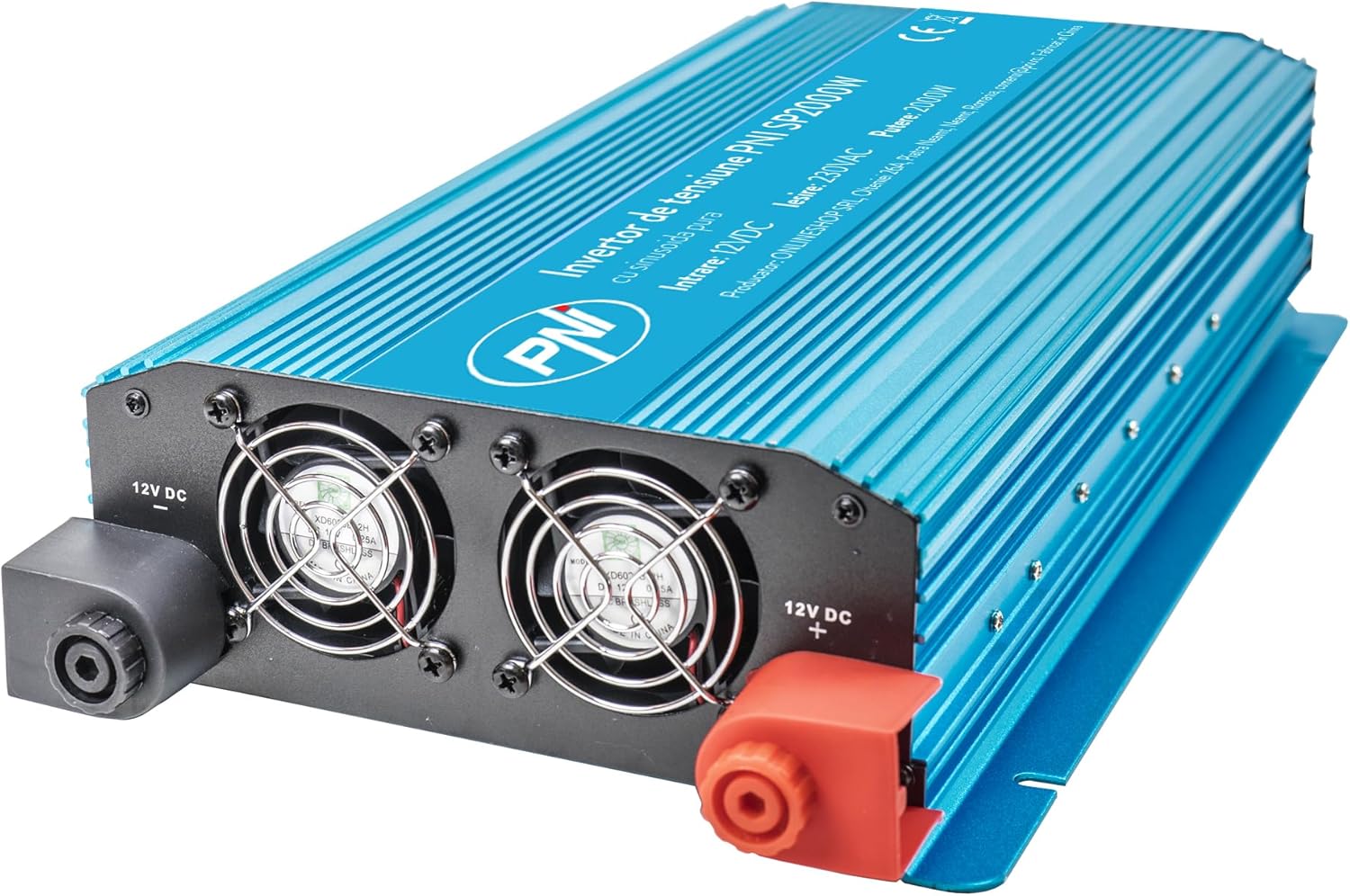
Whakaahua 1: Mua view of the PNI SP2000W Voltage Inverter, showing the blue casing and the PNI logo.

Whakaahua 2: Runga view of the PNI SP2000W Voltage Inverter, displaying the product label with model information and specifications.

Figure 3: The PNI SP2000W Voltage Inverter shown with its included accessories: power connection cables (red and black) and a wrench for securing terminals.
3. Tatūnga
Proper setup is crucial for the safe and efficient operation of your inverter.
3.1. Whakanoho
- Place the inverter on a flat, stable surface.
- Ensure there is at least 15 cm (6 inches) of clear space around the inverter for proper ventilation.
- Avoid direct sunlight, heat sources, and areas with high humidity or dust.
3.2. Connecting to a 12V Battery
The inverter must be connected directly to a 12V DC battery. Use the provided cables for connection.
- Me whakarite kei te "OFF" te whakakā hiko o te kaihurihuri.
- Connect the red cable to the positive (+) terminal of the inverter and then to the positive (+) terminal of the 12V battery.
- Connect the black cable to the negative (-) terminal of the inverter and then to the negative (-) terminal of the 12V battery.
- Tighten all connections securely using the provided wrench to prevent loose connections, which can cause overheating and damage.
- Verify that all connections are correct and secure before proceeding.

Figure 4: Input side of the inverter, showing the 12V DC positive (+) and negative (-) terminals for battery connection, along with the cooling fans.

Figure 5: Output side of the inverter, featuring two 230V AC sockets, the main power switch, and indicator lights for power and fault status.
4. Nga Tohutohu Whakahaere
Follow these steps to operate your PNI SP2000W Voltage Inverter safely.
- Whakahiko: After ensuring all connections are secure and correct, switch the inverter's power button to the "ON" position. The green "POWER" indicator light should illuminate.
- Hononga taputapu: Plug your 230V AC appliances into the inverter's output sockets. Ensure the total wattage of all connected appliances does not exceed 2000W.
- Aroturuki: Observe the inverter's indicator lights. If the red "FAULT" light illuminates, refer to the Troubleshooting section.
- Weto Whakakore: When you are finished using the inverter, first turn off and unplug all connected appliances. Then, switch the inverter's power button to the "OFF" position.
5. Tiaki
Regular maintenance helps ensure the longevity and reliable performance of your inverter.
- Te horoi: Periodically clean the exterior of the inverter with a soft, dry cloth. Do not use liquid cleaners or solvents. Ensure the cooling vents are free from dust and debris.
- Whakahau: Regularly check that the cooling fans are not obstructed and are operating correctly. Good airflow is essential to prevent overheating.
- Hononga taura: Periodically inspect the battery connection cables for any signs of wear, damage, or corrosion. Ensure connections remain tight.
- Rokiroki: If storing the inverter for an extended period, disconnect it from the battery and store it in a cool, dry place away from direct sunlight.
6. Te Raru
If you encounter issues with your PNI SP2000W Inverter, refer to the following common problems and solutions.
| Raruraru | Take pea | Rongoā |
|---|---|---|
| No power output / Inverter does not turn on | Nga hononga pākahiko wetekina Puhiko pūhiko ititage Kua OFF te pana hurihanga | Tirohia me te whakau i ngā taura pākahiko Whakahouhia te whakakapi ranei i te papahiko Me whakarite kei te ON te pana whakawhiti |
| Red "FAULT" light is on | Te taumahatanga Te werawera Porowhita poto He iti/Teitei puo whakaurutage | Whakaitihia te kawenga hono Allow inverter to cool, ensure ventilation Check for short circuits in connected appliances/cables Tirohia te puhiko voltage |
| Kāore ngā taputapu e mahi tika ana | Appliance wattage teitei rawa Appliance type incompatible (e.g., high inductive load) | Ensure total load is within 2000W continuous Consult appliance manual for compatibility with pure sine wave inverters |
| Fans are constantly running loudly | High internal temperature due to heavy load or poor ventilation | Reduce load or improve ventilation around the inverter |
Mena ka mau tonu te raru i muri i te whakamatau i enei otinga, whakapaa atu ki te tautoko a te kaihoko.
7. Whakatakotoranga
| Āhuahira | Whakatakotoranga |
|---|---|
| Tauira | PNI-SP2000W |
| Mana Huaputa Tonu | 2000 W |
| Maximum Output Power (Peak) | 4000 W |
| Whakauru Voltage | 12 V DC |
| Putanga Voltage | 220 V / 230 V AC |
| Auau Mahi | 50 Hz |
| Puka Ngaru Huaputa | Pure Sinusoid |
| Te kaha | > 88% |
| Consumption in Stand-by | 10-15 W |
| Whakamaoho Hohe | With fan |
| Ahu (L x W x H) | 440 x 220 x 100 mm |
| Taumaha | 4.27 Kg |
| Te roa o te taura | 44 cm |
| Te Waahi Mahi | -10 °C ~ +40 °C |
| Paemahana Rokiroki | -20 °C ~ +55 °C |
| Te haumākū | 90% (kaore i te whakapouri) |
| Te Kaha Rawa | > 120% |
| Parenga | Overload, Thermal, Short Circuit, Over-voltage, Under-voltage |
| Puawai Putanga | 2 x 230 V AC sockets |
8. Pūtāhui me te Tautoko
PNI products are manufactured to high-quality standards. This product is covered by a manufacturer's warranty against defects in materials and workmanship. Please retain your proof of purchase for warranty claims.
For technical support or warranty inquiries, please refer to the contact information provided with your purchase documentation or visit the official PNI webpae.