
1. Kupu Whakataki
The OttLite Entertain LED Speaker Lamp (Model S83WGW) is a versatile lighting and audio solution designed for various indoor environments. This device integrates an LED lamp with adjustable brightness and color modes, a Bluetooth speaker for wireless audio streaming, and a detachable emergency light feature. This manual provides detailed instructions for the proper setup, operation, and maintenance of your lamp.

Image 1.1: The OttLite Entertain LED Speaker Lamp, whakaatucasintōna hoahoa whakauru.
2. Ihirangi mokete
Manatokona kei roto katoa nga mea kei roto i te kete:
- Kaikōrero LED OttLite Entertain Lamp (S83WGW)
- Waea Hiko
3. Tatūnga
- Wewete ana: Kia ata tangohia nga waahanga katoa mai i te kete.
- Turanga: Whakanohoia te lamp i runga i te mata papatahi.
- Hononga Hiko: Connect the provided power cable to the lamp's power input port and then plug it into a standard 120V AC wall outlet. The lamp's internal battery will begin charging automatically.
4. Nga Tohutohu Whakahaere
4.1. Nga Mahi Maama
Kei teamp features touch-activated controls located on the top of the shade for easy adjustment of light settings.
- Hiko Whakaka/Weto: Lightly touch the metallic button on the top center of the lamp shade to turn the light on or off.
- Whakaritea te Tirohanga: With the light on, repeatedly touch the metallic button to cycle through three brightness levels.
- Huri Aratau Tae: Press and hold the metallic button for approximately 2 seconds to switch between the three color temperature modes: warm white, bright white, and natural daylight. Release the button when the desired mode is active.
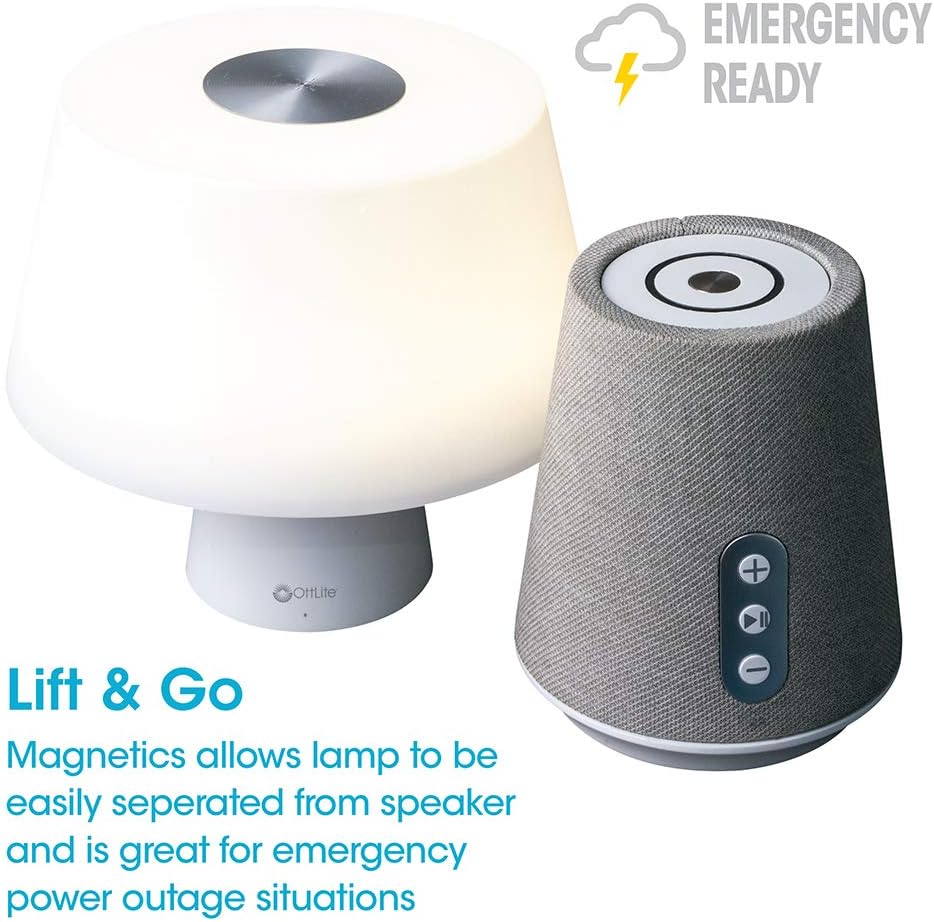
Image 4.1: Activating the lamp's light functions via the touch control on top of the shade.

Whakaahua 4.2: Ko te lamp offers three distinct color temperature modes for varied lighting needs.
4.2. Kaikorero Nihokikorangi
The integrated Bluetooth speaker allows for wireless audio playback from compatible devices.
- Te Mana Whakaoho: Press the Play/Pause button on the front of the speaker base to turn the speaker on. A tone will indicate it is ready for pairing.
- Takirua: On your audio device (e.g., smartphone, tablet), enable Bluetooth and search for available devices. Select "OttLite Entertain" from the list. A confirmation tone will sound upon successful pairing.
- Mana Ororongo:
- Pehia te + pātene hei whakanui ake i te rōrahi.
- Pehia te - paatene hei whakaiti i te rahinga.
- Pehia te Purei/Tatari paatene ki te purei, ki te okioki ranei i te oro.
- Power Off Speaker: Press and hold the Play/Pause button for approximately 3 seconds to turn the speaker off.

Image 4.3: The speaker base with clearly labeled controls for volume and playback.

Image 4.4: The speaker base highlights its Bluetooth connectivity feature.
4.3. Emergency Light Feature (Lift & Go)
Kei teamp portion can be detached from the speaker base to function as a portable emergency light.
- Detaching the Light: Hikina marietia te lamp shade portion straight up from the speaker base. It is held in place by magnets.
- Using the Emergency Light: The detached light will operate on its internal rechargeable battery. Use the touch control on top of the shade to turn it on/off and adjust brightness as described in Section 4.1. The light can provide illumination for 5 to 30+ hours depending on the brightness setting.
- Kei te utu: To recharge the emergency light, simply place it back onto the speaker base. Ensure it is properly seated for charging to commence.

Image 4.5: The 'Lift & Go' feature allows the lamp to be used as a portable emergency light.
5. Tiaki
To ensure the longevity and optimal performance of your OttLite Entertain LED Speaker Lamp, whai i enei aratohu tiaki:
- Te horoi: Momotuhia te lamp from the power source before cleaning. Use a soft, dry cloth to wipe down the exterior surfaces. Do not use abrasive cleaners, solvents, or harsh chemicals, as these may damage the finish.
- Rokiroki: Ki te kore e whakamahia mo te wa roa, penapena te lamp i te waahi hauhautanga, maroke atu i te ra tika me te wera nui.
- Tiaki Pūhiko: For the internal rechargeable battery, avoid fully discharging it frequently. Recharge the lamp regularly, even if not in constant use, to maintain battery health.
6. Te Raru
Mena ka raru koe ki to lamp, tirohia nga mahi rapurongoā e whai ake nei:
| Raruraru | Take pea | Rongoā |
|---|---|---|
| Lamp e kore te rama e mura. | Kaore i whakauruhia; mana outage; internal battery depleted; faulty connection. | Ensure power cable is securely plugged in. Check power outlet. Recharge the lamp by placing it on the base. |
| Bluetooth speaker does not connect. | Speaker not in pairing mode; device Bluetooth off; already connected to another device. | Ensure speaker is on and in pairing mode. Turn Bluetooth on your device. Disconnect from other devices. |
| Emergency light does not work when detached. | Internal battery depleted. | Place the light back on the speaker base to recharge its internal battery. |
| Poor audio quality from speaker. | Device too far from speaker; interference; low battery. | Move device closer to speaker. Avoid obstacles. Ensure speaker is charged. |
7. Whakatakotoranga
| Āhuahira | Taipitopito |
|---|---|
| Tau tauira | S83WGW |
| Waitohu | OTarua |
| Hunga Hua | 3.12"D x 3.12"W x 10.87"H |
| Taumaha Tūemi | 2.6 Pauna |
| Momo Puna Maama | LED |
| Wattage | 3 watts |
| Tirohanga | 337 Rumeni |
| Te Paemahana Tae | 5000 Kelvin (Awatea) |
| Tikanga Mana | Paa |
| Puna Mana | Corded Electric (with rechargeable battery for emergency light) |
| Pūhiko | 1 pākahiko Lithium Ion (kei roto) |
| Rauemi | Kirihou |
| UPC | 761712019116 |
8. Pūtāhui me te Tautoko
For warranty information or technical support, please refer to the official OttLite webpaetukutuku, whakapā atu ranei ki ta raatau tari ratonga kaihoko. Puritia to riirii hoko hei tohu mo te hoko mo nga kereme whakamana.
Mōhiohio Whakapā: Tena tirohia OttLite's official store page for current support options and contact details.