
Goshyda KX-T6001CID
Goshyda KX-T6001CID Big Button Corded Telephone User Manual
Model: KX-T6001CID | Brand: Goshyda
Kupu Whakataki
Thank you for choosing the Goshyda KX-T6001CID Big Button Corded Telephone. This manual provides detailed instructions to help you set up, operate, and maintain your new telephone. Please read this manual thoroughly before use to ensure proper functionality and to take full advantage o ona ahuatanga.
Nga korero haumaru
- Do not expose the telephone to water or moisture.
- Kaua e waiho te waea ki te taha o te rā tika, ki ngā pūtake wera rānei.
- Whakamahia anake te taura waea kua whakaratohia.
- Do not attempt to open or repair the telephone yourself. Refer all servicing to qualified personnel.
- Kaua e taea e nga tamariki.
Ihirangi mokete
Manatokona kei roto katoa nga mea kei roto i te kete:
- 1 x Ringa
- 1 x Telephone Base Unit
- 1 x Handset Cord
- 1 x Taura Waea
- 1 x Pukapuka Kaiwhakamahi

Image: The Goshyda KX-T6001CID telephone, showing the base unit, handset, and coiled cord.
Ka mutu te huaview
Familiarize yourself with the main components and controls of your telephone.

Whakaahua: Mua view of the telephone, highlighting the LCD display, large numeric keypad, and function buttons.
Keypad and Display:
- Papapātuhi Tau (0-9, *, #): Hei waea atu ki ngā nama waea.
- Whakaaturanga LCD: Shows caller ID, time, date, and menu options.
- Pātene M1/M2: One-touch memory dialing keys.
- SET/STORE Button: Used for entering settings menu and saving entries.
- Pātene RUNGA/RARO: Navigate through menu options or adjust volume.
- RING Button: Adjust ringer volume.
- Pātene VOL: Adjust earpiece/speaker volume.
- FL/BRT (Flash/Brightness) Button: Flash function for call waiting, also adjusts LCD brightness.
- REDIAL Button: Ka waea anō i te nama whakamutunga i waeatia.
- H.F (Hands-Free) Button: Activates speakerphone mode.

Whakaahua: He tata view of the large, easy-to-read buttons on the telephone's keypad.
Tatūnga
1. Connecting the Telephone:
- Connect one end of the coiled handset cord to the handset and the other end to the handset jack on the left side of the telephone base unit.
- Connect one end of the telephone line cord to the LINE jack on the back of the telephone base unit.
- Honoa te pito kē atu o te taura waea ki tō hononga waea pakitara.
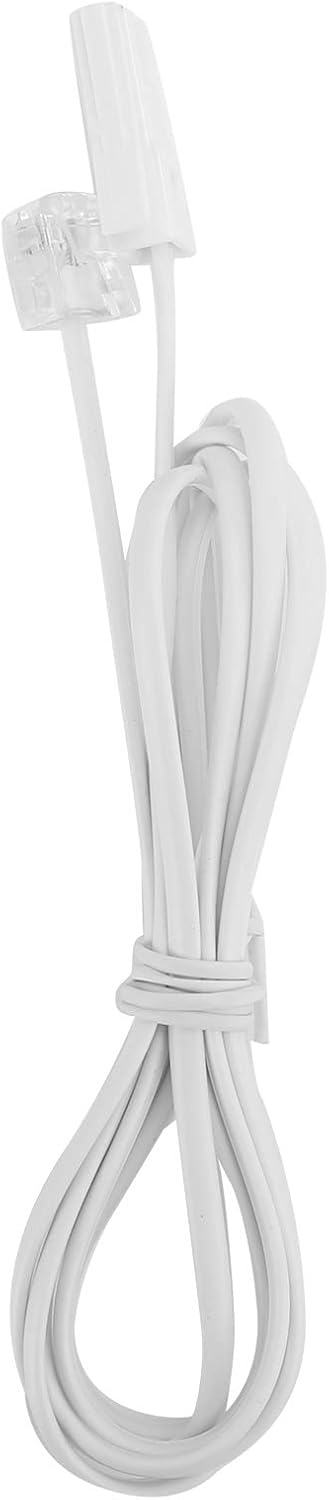
Image: The telephone line cord, used to connect the phone to the wall jack.
2. Initial Settings:
Upon initial connection, the LCD display may prompt you to set the date and time. Follow the on-screen instructions using the UP a RARO buttons to adjust values and the WHAKATAUTANGA pātene hei whakaū.
Nga Tohutohu Whakahaere
Te Waea:
- Hikitia te ringaringa, pehia ranei te HF pātene mō te kaikorero waea.
- Waeahia te tau waea e hiahiatia ana ma te whakamahi i te papapātuhi tau.
- Tatari kia hono te waea.
- Hei whakamutu i te waea, whakakapihia te ringaringa, pehia ranei te HF pātene ano.
Whakautu i te Karanga:
Ka tangi te waea, whakaarahia te ringaringa, pehia ranei te HF pātene hei whakautu.
Waea ano:
Hikina te ringaringa ka tohi ranei HF, ka pehi i te PANUI pātene hei waea i te tau waea whakamutunga.
Using Memory Keys (M1/M2):
Storing a Number:
- Hikina te ringaringa ka tohi ranei HF.
- Perehi WHAKATAUTANGA.
- Waea atu ki te nama waea e hiahia ana koe ki te penapena.
- Perehi WHAKATAUTANGA ano.
- Pēhia rānei M1 or M2 to save the number to that memory key.
Dialing from Memory:
Hikina te ringaringa ka tohi ranei HF, kātahi ka pēhi i tētahi o M1 or M2 to dial the stored number.
Ngā āhuatanga
- DTMF/FSK Dual System Caller ID: Supports both DTMF and FSK caller ID systems for displaying incoming call information.

Image: The telephone's display, showing its capability for DTMF/FSK dual system caller ID function.
- FLASH Time Adjustment: Adjustable FLASH time (90/95/100/120/180/300/600/1000ms) for compatibility with various PBX systems or call waiting services.
- 16 Ringtone Options: Choose from 16 different ringtones.

Image: The telephone with graphic elements suggesting a choice of 16 ringtones.
- Adjustable LCD Brightness: Five levels of LCD screen brightness adjustment for optimal viewing.
- 3 Alarm Clock Functions: Set up to 3 different alarm clocks, each with unique alarm sounds.
- 10 Groups of Dual Key Memory: Store up to 10 frequently called numbers using dual-key memory functions.
- 1-99 Hours Do Not Disturb Function: Set a "Do Not Disturb" period from 1 to 99 hours.
Te tiaki
- Clean the telephone with a soft, damp kakahu. Kaua e whakamahi i nga kai horoi me nga whakarewa.
- Keep the telephone away from dust and extreme temperatures.
- Ensure cords are not tangled or pinched to prevent damage.
Raparongoā
| Raruraru | Take pea | Rongoā |
|---|---|---|
| Karekau he oro waea | Kua momotu, kua hē rānei te taura waea. | Check all cable connections. Try a different telephone line cord. Test the wall jack with another phone. |
| Kaore e taea te waea, te whiwhi waea ranei | Line issue, or phone is in "Do Not Disturb" mode. | Verify phone line service. Check if "Do Not Disturb" is active and disable it. |
| Kāore i whakaaturia te ID Kaikaranga | Caller ID service not subscribed or incompatible system. | Whakapā atu ki tō kaiwhakarato ratonga waea kia mōhio ai kei te whakahohehia te ratonga Caller ID. |
| He atarua, he putea ranei te whakaaturanga | LCD brightness setting is too low. | Adjust the LCD brightness using the FL/BRT button or menu settings. |
Whakatakotoranga
| Āhuahira | Taipitopito |
|---|---|
| Tauira | KX-T6001CID |
| Waitohu | Goshyda |
| Rauemi | Acrylonitrile Butadiene Styrene (ABS) |
| Tae | Mā |
| Momo | Waea Taura |
| Momo Waea | Papatuhi Kotahi |
| ID Kaiwaea | Yes (DTMF/FSK Dual System) |
| Wae Flash | 90/95/100/120/180/300/600/1000ms |
| Ringtones | 16 kōwhiringa |
| Maama LCD | 5 nga taumata ka taea te whakarite |
| Nga Mahi Whakaoho | 3 roopu |
| Mahi Mahara | 10 groups of dual key memory |
| Kaua e Whakararuraru | 1-99 haora |
| Taumaha Tūemi | 481 Karamu |
| Ahu (L x W x H) | 10 x 10 x 10 mirimita (tata) |
| Puna Mana | Battery Powered (likely referring to LCD/memory backup, as corded phones are line-powered for basic functions) |
Pūtāhui me te Tautoko
This Goshyda product is covered by a standard manufacturer's warranty. For specific warranty details, please refer to the documentation included with your purchase or contact Goshyda customer support.
For technical assistance or further inquiries, please contact Goshyda customer service through their official webpae, nga korero whakapā ranei e whakaratohia ana me to hua.
Ask a question about this manual
Ask about setup, troubleshooting, compatibility, parts, safety, or missing instructions. Manuals+ will review the question and use this page’s manual context to help answer it.