
1. Kupu Whakataki
Thank you for choosing the Sanag A5S Open Ear Headphones. These headphones utilize advanced air conduction technology to deliver sound while keeping your ears open to ambient surroundings, ensuring safety during outdoor activities. Designed for comfort and durability, the A5S features Bluetooth 5.0 connectivity, IP67 water resistance, and a lightweight design, making them ideal for sports, work, and daily use.
2. Ihirangi mokete
Tena koa tirohia te kete mo nga mea e whai ake nei:
- Sanag A5S Sports Headset x1
- Taura Whakatau USB Micro x1
- Pukapuka Kaiwhakamahi x1
3. Hua Neke Atuview
Familiarize yourself with the various parts and controls of your Sanag A5S headphones.
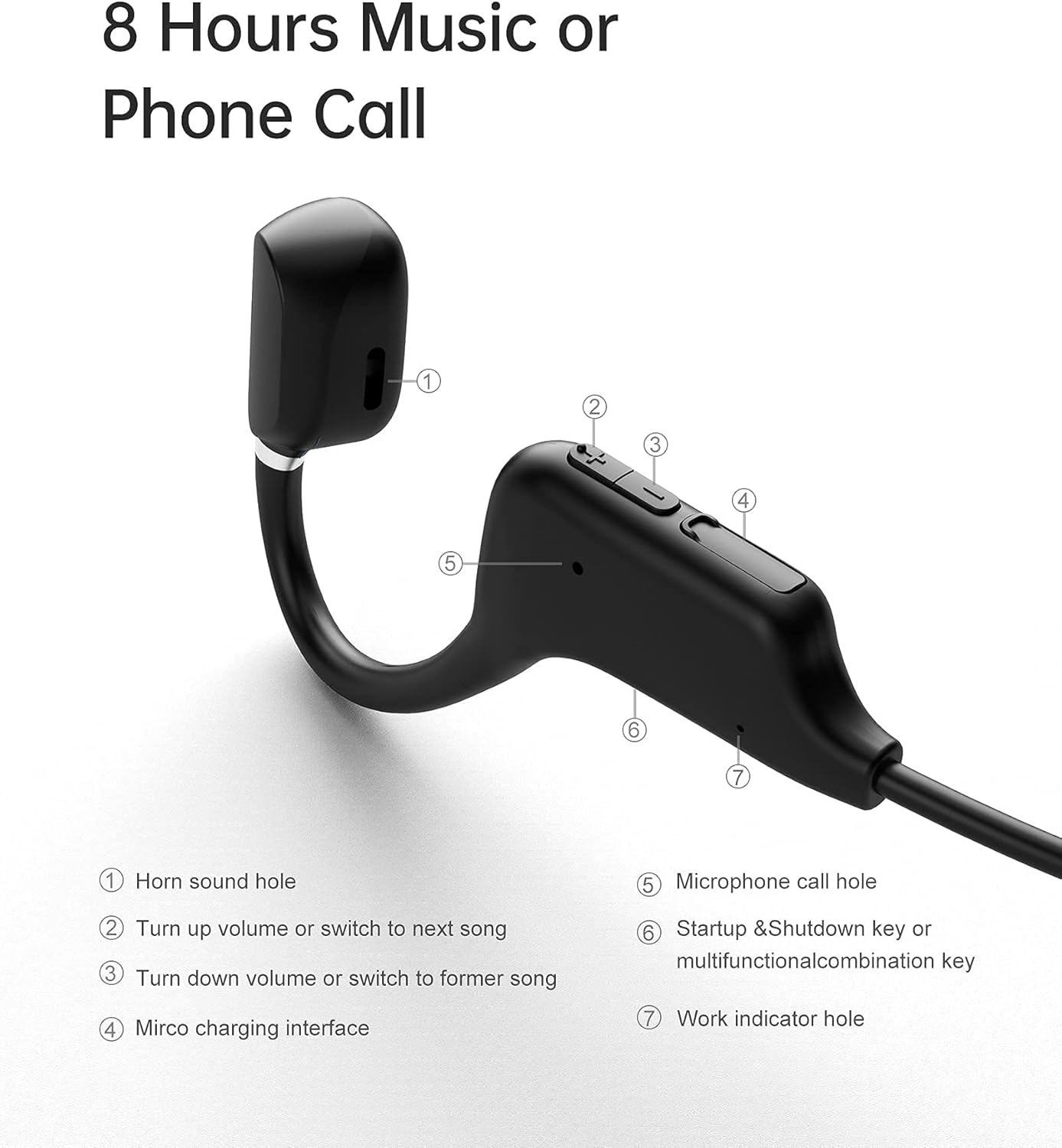
Whakaahua 3.1: Sanag A5S Headset Components
- Horn sound hole
- Volume Up / Next Song button
- Volume Down / Previous Song button
- Atanga utu moroiti USB
- Microphone call hole
- Power On/Off / Multifunction button
- Work indicator hole

Whakaahua 3.2: Key Features of Sanag A5S Headphones
4. Tatūnga
4.1 Te Whakataki i nga Waea
Before first use, fully charge your Sanag A5S headphones.
- Connect the Micro USB charging cable to the charging interface (4) on the headphones.
- Honoa te pito o te taura ki te puna hiko USB (hei tauira, rorohiko, urutau pakitara).
- The indicator light (7) will show charging status. A full charge takes approximately 2 hours.
A fully charged battery provides up to 8 hours of continuous use or 300 hours of standby time.

Whakaahua 4.1: Charging the Sanag A5S Headphones
4.2 Te hono ki te Pūrere Nihokikorangi
Follow these steps to connect your headphones to your smartphone, tablet, or other Bluetooth-enabled device:
- Whakahiko: Press and hold the Multifunction button (6) for 3 seconds until the indicator light (7) flashes, indicating the headphones are in pairing mode.
- Whakahohe Nihokikorangi: I tō pūrere, haere ki ngā tautuhinga Nihokikorangi, ā, kia mōhio kei te whakahohea te Nihokikorangi.
- Tūhono: In the list of available devices, select "A5S". Once connected, the indicator light will stop flashing or change color (refer to specific light patterns in troubleshooting if needed).
Ka ngana aunoa nga taringa ki te hono ano ki te taputapu takirua whakamutunga ina ka ana.

Whakaahua 4.2: Nihokikorangi 5.0 Hononga
5. Nga Tohutohu Whakahaere
5.1 Hiko / Whakaweto
- Whakahiko: Pēhia me te pupuri i te paatene Multifunction (6) mo te 3 hēkona.
- Weto Whakakore: Pēhia me te pupuri i te paatene Multifunction (6) mo te 3 hēkona.
5.2 Purei Waiata
- Purei/Tatari: Short press the Multifunction button (6).
- Waiata Panuku: Short press the Volume Up button (2).
- Waiata o mua: Short press the Volume Down button (3).
5.3 Mana Rōrahi
- Whakanuia te Volume: Pēhia roa te pātene Whakaara Oro (2).
- Whakaheke Rahi: Pēhia roa te pātene Whakaiti i te Oro (3).
5.4 Whakahaere Waea
- Whakautu Waea: Short press the Multifunction button (6) when a call comes in.
- Whakamutu Waea: Short press the Multifunction button (6) during a call.
- Whakakore Waea: Long press the Multifunction button (6) when a call comes in.
- Kaiawhina Reo: Double-press the Multifunction button (6) to activate your device's voice assistant (if supported).
6. Tiaki
6.1 Te horoi
Regularly clean your headphones to ensure optimal performance and hygiene.
- Wipe the headphones with a soft, dry, or slightly damp kakahu.
- Kaua e whakamahi i nga matū kino, i nga whakarewa horoi, i nga horoi kaha ranei.
- Me whakarite kua maroke te tauranga utu i mua i te utu.
6.2 Rokiroki
When not in use, store the headphones in a cool, dry place away from direct sunlight and extreme temperatures.
6.3 Atete Wai
The Sanag A5S headphones are IP67 rated, meaning they are resistant to dust and can withstand immersion in water up to 1 meter for 30 minutes. While they are sweat and light rain resistant, avoid prolonged exposure to water or using them during swimming.

Whakaahua 6.1: Open Ear Design for Awareness

Whakaahua 6.2: Flexible and Durable Design
7. Te Raru
Mena ka pā mai he raruraru ki ō paneoro, tirohia ngā raruraru me ngā otinga e whai ake nei:
- Kāore ngā paneoro e whakakā:
Ensure the headphones are fully charged. Connect them to a power source using the Micro USB cable. - Kaore e taea te hono ki te taputapu:
Make sure Bluetooth is enabled on your device. Ensure the headphones are in pairing mode (indicator light flashing). Move the headphones closer to your device (within 10 meters). Turn off and on both the headphones and your device's Bluetooth. - Karekau he oro, he iti te reo:
Check the volume levels on both the headphones and your connected device. Ensure the headphones are properly paired. Try playing different audio sources. - Hononga mokowhiti:
Ensure there are no obstructions between the headphones and your device. Move away from other wireless devices that might cause interference. - Kaore e mahi ana te hopuoro:
Ensure the headphones are properly connected and selected as the audio input device on your phone/computer. Check for any mute settings on your device.
Mena kei te haere tonu te raru, me waea atu ki te tautoko a nga kaihoko.
8. Whakatakotoranga
| Āhuahira | Whakatakotoranga |
|---|---|
| Ingoa Tauira | A5S Sports Headset |
| Hangarau Hononga | Ahokore (Nihokikorangi) |
| Hangarau Whakawhitiwhiti Ahokore | Nihokikorangi 5.0 |
| Awhe Nihokikorangi | Tae atu ki te 10m (30 putu) |
| Taumata Atete Wai | IP67 (Waterproof and Sweat-proof) |
| Ora Pūhiko | Up to 8 Hours (continuous use) |
| Wā tūtatari | Tae atu ki te 300 haora |
| Waa Whakatau | Approx. 2 haora |
| Pūhiko Raukaha | 120mAh |
| Taumaha Tūemi | 18g (0.63 hekere) |
| Rauemi | Hikaona |
| Momo Atekōkiri Ororongo | Air Conduction Driver |
| Momo Mana | Volume Control, Multifunction Button |
| Pūrere Hototahi | Waea atamai, Pona rorohiko, Papa, Kaikōrero atamai |
9. Pūtāhui me te Tautoko
9.1 Nga Korero Whakaputanga
Sanag products are designed and manufactured to the highest quality standards. This product is covered by a limited warranty from the date of purchase. Please refer to the warranty card included in your package or visit the official Sanag webpae mo nga tikanga me nga tikanga whakamana.
9.2 Tautoko Kiritaki
If you have any questions, require technical assistance, or need to report an issue with your Sanag A5S headphones, please contact our customer support team. Contact information can typically be found on the Sanag official webpae, ma to kaihokohoko ranei.