
1. Kupu Whakataki
Mauruuru koe mo te hokoasing the MAXDONE A4 Laminator. This device is designed to protect your documents and photos from wear, tear, and moisture using both hot and cold lamination processes. Please read this manual carefully before operating the laminator to ensure safe and efficient use. Keep this manual for future reference.
2. Nga Tohutohu Haumaru
- Me hono tonu te laminator ki tētahi putanga hiko kua honoa ki te whenua.
- Kaua e whakahaerehia te laminator ina mākū ngā ringaringa, ina tata rānei ki te wai.
- Keep children and pets away from the laminator during operation.
- Do not insert objects other than laminating pouches into the machine.
- Wewetehia te laminator ka kore e whakamahia, i mua ranei i te horoi.
- Me whakarite kia tika te hau huri noa i te miihini i te wa e whakamahia ana.
- Do not attempt to open or repair the laminator yourself. Contact qualified service personnel.
- Avoid laminating heat-sensitive materials in hot lamination mode.
3. Ihirangi mokete
Tena koa tirohia te kete mo nga mea e whai ake nei:
- MAXDONE A4 Laminator (Model FN333)
- Waea hiko
- 10 Laminating Pouches (various sizes: A4, A5, A6)
- Tapahi Pepa
- Porowhita Kokonga
- Pukapuka Kaiwhakamahi
4. Hua Neke Atuview
Kia mōhio koe ki ngā wāhanga o tō laminator:
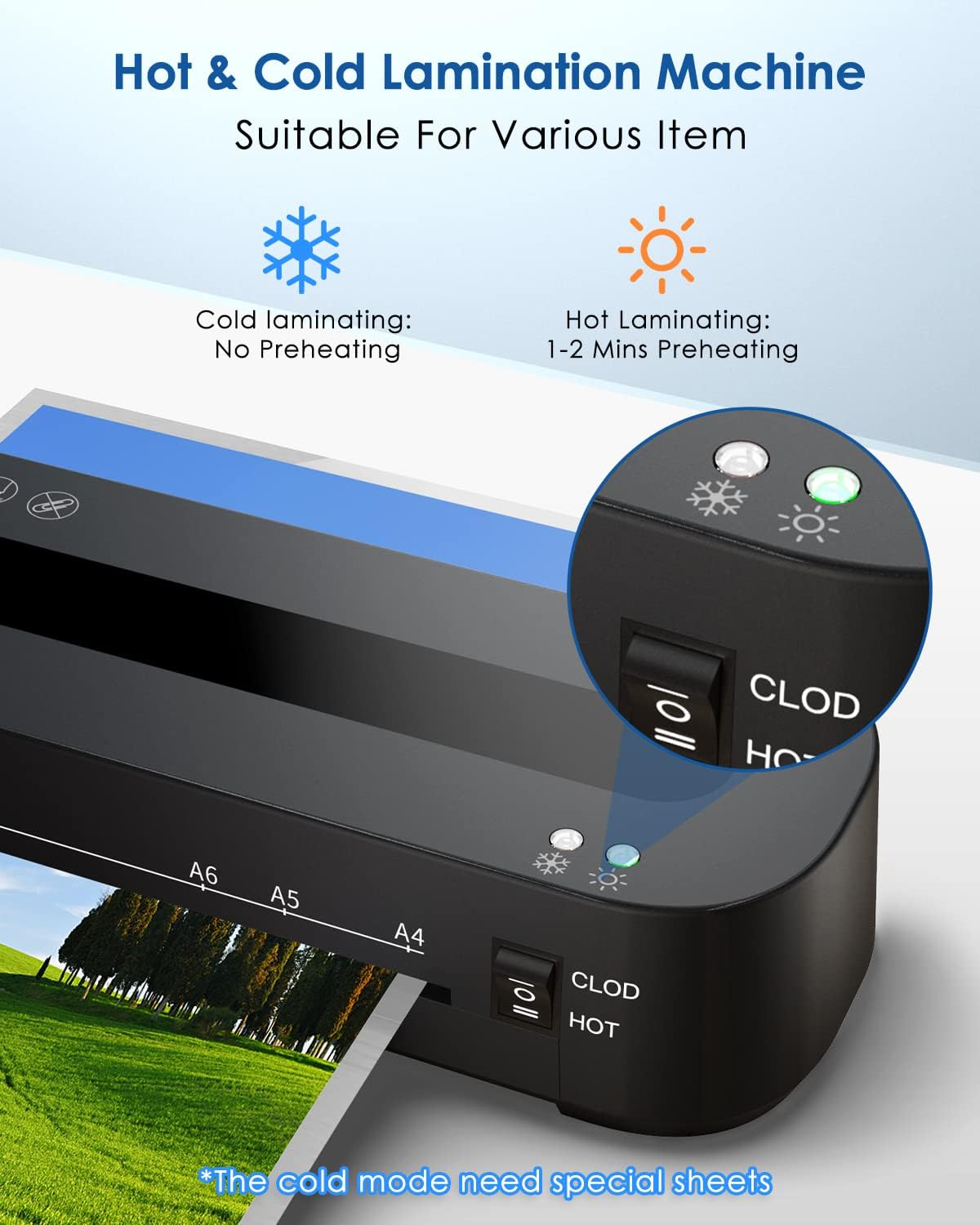
Image: Control panel showing the 'CLOD' (Cold) and 'HOT' mode switch, and indicator lights for power and readiness.

Whakaahua: Taha view of the laminator highlighting the 'ABS' button for jam release.
- Whakawhiti Kaha: Turns the laminator on and off.
- Mode Switch (CLOD/HOT): Selects between cold lamination and hot lamination modes.
- Rama Tohu: Show power status and readiness for lamination (green for ready).
- Entry Slot: Te wāhi e whakauruhia ai ngā pēke whakakikorua.
- Wāhi Putanga: Te wāhi e puta mai ai ngā tuhinga kua whakapirihia.
- ABS Button: Used to release jammed documents.
5. Tatūnga
- Unpack the laminator and all accessories.
- Place the laminator on a stable, flat surface with adequate space for document entry and exit.
- Me whakarite kei te 'OFF' te whakakā hiko.
- Plug the power cord into the laminator and then into a suitable electrical outlet.
6. Nga Tohutohu Whakahaere
6.1 Whakapiringa Wera

Image: Visual guide for hot lamination steps, including turning on, waiting for green light, inserting pouch, and switching off.
- Whakakāhia te laminator mā te whakamahi i te pana hiko.
- Switch the mode selector to 'HOT'. The red indicator light will illuminate.
- Wait approximately 1-2 minutes for the laminator to preheat. The green 'Ready' indicator light will turn on when the machine is ready for use.
- Place your document inside a laminating pouch, ensuring it is centered and there is an even border around the document.
- Insert the sealed edge of the laminating pouch squarely into the entry slot. The laminator will automatically feed the pouch through.
- Once the laminated document exits the machine, place it on a flat surface to cool.
- After completing lamination, switch the mode selector to 'OFF' and unplug the device.
Tuhipoka: This laminator supports pouch thicknesses between 80 and 125 microns.
6.2 Whakapiringa Matao
Cold lamination does not require preheating. It uses pressure-sensitive pouches.
- Whakakāhia te laminator mā te whakamahi i te pana hiko.
- Switch the mode selector to 'CLOD' (Cold).
- Place your document inside a special cold laminating pouch.
- Insert the sealed edge of the cold laminating pouch squarely into the entry slot.
- Once the laminated document exits the machine, it is ready for use.
- After completing lamination, switch the mode selector to 'OFF' and unplug the device.
6.3 Jam Release
In case of a paper jam:
- Immediately switch off the laminator.
- Press and hold the 'ABS' (Anti-Blocking System) button located on the side of the machine.
- Gently pull the jammed pouch out of the entry or exit slot.
- Release the 'ABS' button.
- Check the pouch for damage. If damaged, discard it.
7. Tiaki
- Te horoi: Ensure the laminator is unplugged and cool before cleaning. Wipe the exterior with a soft, dry cloth. Do not use abrasive cleaners or solvents.
- Roera horoi: Periodically run a folded sheet of paper through the laminator to clean the rollers of any adhesive residue.
- Rokiroki: Penapenahia te laminator ki te wāhi maroke, kore puehu ina kore e whakamahia.
8. Te Raru
| Raruraru | Take pea | Rongoā |
|---|---|---|
| Laminator does not turn on. | Karekau he hiko. | Tirohia te hononga taura hiko me te putanga hiko i te pakitara. |
| Laminator not heating up (Hot mode). | Incorrect mode selected or insufficient warm-up time. | Ensure 'HOT' mode is selected and wait for the green 'Ready' light. |
| Document jams. | Pouch inserted incorrectly or too quickly; pouch too thick. | Press the 'ABS' button to release the jam. Ensure pouches are inserted straight and within recommended thickness (80-125 microns). |
| Te kounga whakanikoniko ngoikore (ngā mirumiru, ngā kapua). | Insufficient heat or incorrect pouch thickness. | Ensure laminator is fully preheated. Use appropriate pouch thickness for hot lamination. |
| Laminated document is wavy. | Pouch too thin for temperature or document not flat. | Use a slightly thicker pouch or ensure the document is completely flat before lamination. |
9. Whakatakotoranga
| Āhuahira | Whakatakotoranga |
|---|---|
| Waitohu | MAXDONE |
| Tau tauira | FN333 |
| Lamination Type | Te wera me te makariri |
| Max. Whanui Raina | 210 mm (A4) |
| Supported Pouch Thickness | 80-125 Micron |
| Te wa whakamahana | 1-2 meneti |
| Tere Raina | 1.05 feet per minute (approx. 32 cm/min) |
| Te maha o nga Roera | 2 |
| Rahi Hua (L x W x H) | 32 x 10 x 6.2 cm |
| Taumaha Hua | 900 g |
| Tae | Pango |
10. Pūtāhui me te Tautoko
This product comes with a standard manufacturer's warranty. For specific warranty details, please refer to the documentation included with your purchase or contact the seller directly. If you encounter any issues or require technical assistance, please reach out to MAXDONE customer support or your retailer.