
SPYCLOPS SPY-MNBLT3WIP8
Spyclops SPY-MNBLT3WIP8 4K 8.0-Megapixel Outdoor Fixed Lens Mini Bullet IP PoE Camera
Model: SPY-MNBLT3WIP8
Kupu Whakataki
This manual provides comprehensive instructions for the installation, operation, and maintenance of your Spyclops SPY-MNBLT3WIP8 4K 8.0-Megapixel Outdoor Fixed Lens Mini Bullet IP PoE Camera. Please read this manual thoroughly before using the product to ensure proper functionality and safety.
Nga korero haumaru
Kia mau ki nga whakaritenga haumaru e whai ake nei hei aukati i te kino o te hua, i te whara ranei ki a koe ano:
- Ensure the power source meets the camera's requirements (PoE).
- Kaua e ngana ki te wetewete, ki te whakarereke ranei i te kamera.
- Install the camera in a secure location to prevent unauthorized access or tamppaenga.
- Kaua e anga tika te kāmera ki ngā pūtake mārama kaha mō te wā roa.
- Whakamahia anake nga taputapu kua whakaaetia e te kaihanga.
Ihirangi mokete
Manatokona kei roto katoa nga mea kei roto i te kete:
- Spyclops SPY-MNBLT3WIP8 Camera
- Mounting Hardware (screws, wall anchors, hex key)
- Kete Hononga Ārai Wai
- Pukapuka Tohutohu

Ka mutu te huaview
The Spyclops SPY-MNBLT3WIP8 is a 4K 8.0-Megapixel Outdoor Fixed Lens Mini Bullet IP PoE Camera designed for robust surveillance. It features an advanced CMOS sensor for high-resolution video capture and supports both color night vision in low light and black and white in total darkness using smart IR LEDs. The camera includes a built-in microphone for audio recording and utilizes H.265+ video compression to optimize storage and bandwidth.

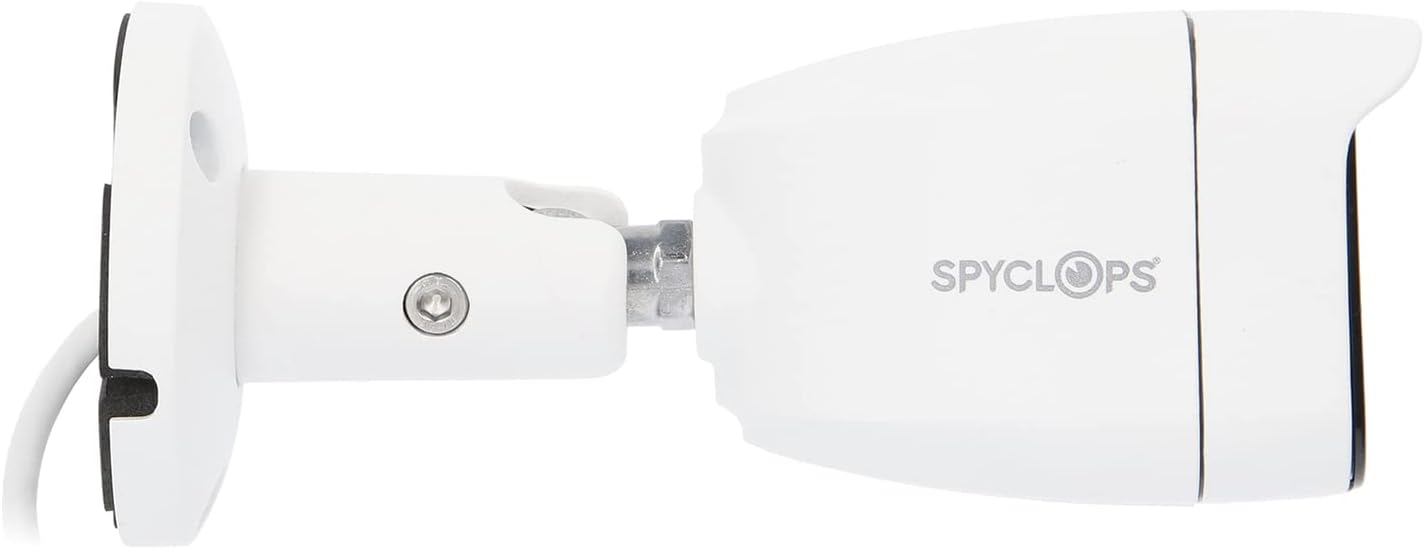

Tatūnga
1. Tāutanga Tinana
- Kōwhiria he Tauwāhi Whakapuru: Tīpakohia he waahi o waho e whakarato ana i te hiahia viewing angle and is within reach of your network cable. The camera is water-resistant (IP67).
- Maunga te Kamera:
- Whakamahia te tauira whakaurunga whakauru (mehemea ka whakaratohia) hei tohu i nga rua keri.
- Drill pilot holes and insert wall anchors if mounting on drywall or masonry.
- Whakamauhia te turanga o te kāmera ki te mata mā te whakamahi i ngā tīwiri kua whakaratohia.
- Adjust the camera's angle and orientation using the adjustable arm and hex key.
- Honoa Taura Whatunga: Connect an Ethernet cable from your PoE switch or NVR to the camera's RJ45 port. Ensure the connection is secure and use the waterproof connector kit for outdoor installations to protect the connection from moisture.
2. Whirihoranga Whatunga
The camera is designed to work with IP/PoE systems. It will typically obtain an IP address automatically via DHCP from your network. For initial setup and advanced configuration, you will need to access the camera's web interface or use compatible NVR software.
- Discover the Camera: Use a network scanner tool or your NVR's discovery function to find the camera's IP address on your network.
- Urunga Web Atanga: Tuwhera a web browser and enter the camera's IP address. Log in using the default credentials (refer to specific documentation or contact support if unknown).
- Whirihoranga Tuatahi: Change default passwords, set time zones, and configure network settings as required.
Nga Tohutohu Whakahaere
1. Ora View me te tuhi
Kia oti te whirihora, ka taea e koe view the live feed and manage recordings through your NVR or the camera's web atanga.
- Aroturuki Ora: Access the live video stream to monitor the surveillance area in real-time.
- Huringa Tuhipoka: Configure continuous recording, motion-detection recording, or scheduled recording based on your security needs.
- Purei: Review tuhia footage using the NVR or software interface.
2. Āhuatanga Arā
- 4K Taumira: The 8.0-megapixel CMOS sensor provides high-definition 4K video, capturing detailed images.
- Tirohanga Po Tae: In low-light conditions, the camera can utilize ambient light to provide color video.
- Maamaa IR LED: In total darkness, the camera automatically switches to black and white mode, using smart IR LEDs to illuminate the scene without overexposure.
- Hopu Ororongo: The built-in microphone captures audio within the camera's vicinity.
- H.265+ Kōpeketanga: This advanced video compression technology reduces file sizes and bandwidth usage while maintaining video quality.
Te tiaki
- Te horoi: Me horoi i ia wa te arotahi kamera me te whare ki te ngohengohe, damp kakahu. Kaua e whakamahi i nga kai horoi me nga whakarewa.
- Whakahōu Firmware: Tirohia te kaihanga website for available firmware updates to ensure optimal performance and security. Follow the provided instructions carefully when updating firmware.
- Tirohanga taura: Tirohia ngā taura me ngā hononga katoa i ia wā mō ngā tohu o te pakaru, te pakaru rānei, inā koa mō ngā whakaurunga o waho.
Raparongoā
| Raruraru | Take pea | Rongoā |
|---|---|---|
| Karekau he kai ataata | No power (PoE), network cable disconnected, incorrect IP address. | Verify PoE connection, check network cable, ensure correct IP configuration. |
| Te kounga whakaahua kounga | Dirty lens, environmental factors, low bandwidth. | Clean the lens, ensure adequate lighting, check network bandwidth. |
| Ko te tirohanga o te po kaore e mahi | IR LEDs obstructed, camera settings. | Clear any obstructions, check night vision settings in the camera's interface. |
| Kaore e taea te uru web atanga | Incorrect IP address, network issue, firewall blocking access. | Confirm IP address, check network connectivity, temporarily disable firewall for testing. |
Whakatakotoranga
| Āhuahira | Taipitopito |
|---|---|
| Ingoa Tauira | SPY-MNBLT3WIP8 |
| Whakataunga Tonu Whaihua | 8.0 Megapixels (4K) |
| Pūoko Whakaahua | CMOS |
| Arotahi | 2.8 mm arotahi pūmau |
| Kōpeketanga Ataata | H.265 + |
| Kawa Hononga | Wi-Fi |
| Puna Mana | AC DC |
| Mahinga o roto/waho | Waho |
| Whakatauranga Tiaki o te Ao | IP67 (Water-resistant) |
| Nga waahanga motuhake | Color Night Vision, Smart IR LEDs, Built-in Microphone |
| Ahu (L x W x H) | 8.27 x 6.3 x 3.54 inihi |
| Taumaha Tūemi | 1.29 pauna |
| Tae | Mā |
Pūtāhui me te Tautoko
For warranty information, technical support, or service inquiries, please refer to the official Spyclops webpaetukutuku, whakapā atu ranei ki ta raatau tari ratonga kaihoko. Puritia to riiki hoko hei tohu mo te hoko.
Kaihanga: METRA-ETHEREAL
Tau tauira: SPY-MNBLT3WIP8
Ask a question about this manual
Ask about setup, troubleshooting, compatibility, parts, safety, or missing instructions. Manuals+ will review the question and use this page’s manual context to help answer it.