
Kupu Whakataki
Thank you for choosing the Optex 990047 Indoor/Outdoor Wireless Digital Thermometer. This device provides accurate temperature readings for both your indoor environment and an outdoor location via a wireless sensor. Please read this manual carefully before use to ensure proper operation and to maximize the lifespan of your thermometer.
Ihirangi mokete
- 1 x Optex 990047 Main Display Unit
- 1 x Ahokore Pūoko waho
- 1 x Pukapuka Kaiwhakamahi
- (Batteries not included, typically requires AAA or AA batteries for both units)
Ka mutu te huaview
Familiarize yourself with the components of your Optex thermometer.
Main Display Unit (Front)

Atahanga: Mua view of the Optex 990047 main display unit. The digital screen shows indoor and outdoor temperatures, along with high/low records and trend indicators. Below the screen are three buttons: 'CH', '°C/°F', and 'CLEAR'.
- Whakaaturanga Mamati: Shows indoor temperature (top) and outdoor temperature (bottom), along with HI/LO records and temperature trend arrows.
- Pihi CH: Selects the wireless channel (if multiple sensors are used) or initiates sensor search.
- Patene °C/°F: Whakawhiti i waenga i ngā waeine pāmahana Celsius me Fahrenheit.
- PATU MAA: Clears the recorded HI/LO temperatures.
Main Display Unit (Back)

Atahanga: Whakamuri view of the Optex 990047 main display unit. It features a battery compartment cover and an integrated kickstand for tabletop placement, as well as a hanging hole.
- Wāhanga Pūhiko: Houses the batteries for the main unit.
- Tuoro: Allows the unit to stand upright on a flat surface.
- Pūaha Maunga Pakitara: For hanging the unit on a wall.
Panui Ahokore Ahokore
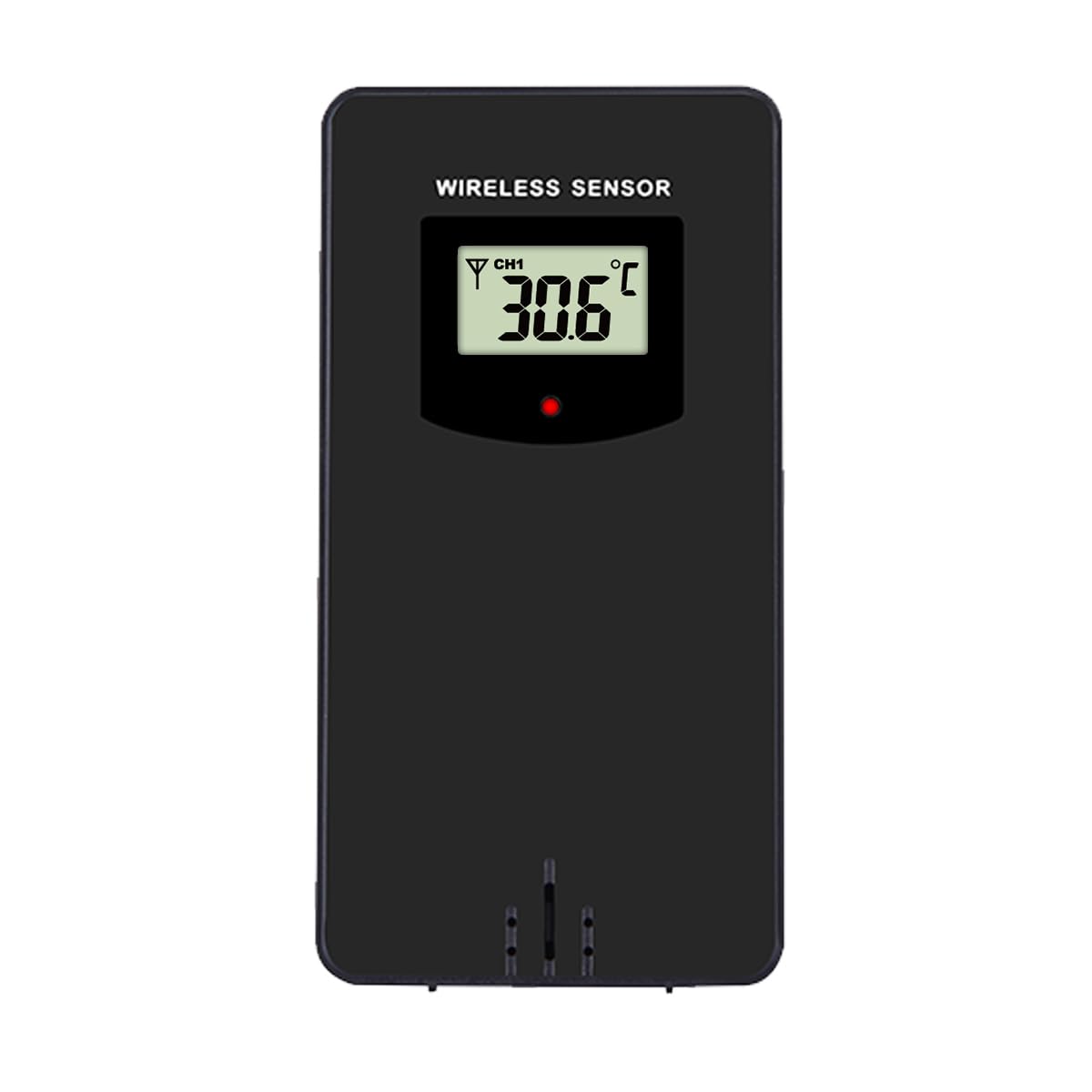
Atahanga: Mua view of the Optex wireless outdoor temperature sensor. It has a small digital display showing the current temperature and channel, along with a red indicator light and a battery compartment on the back.
- Pūoko pāmahana: Measures the outdoor temperature.
- Tohu Whakawhiti: A small LED light that flashes when data is transmitted.
- Wāhanga Pūhiko: Houses the batteries for the outdoor sensor.
- Whakawhiti Hongere: (Typically inside the battery compartment) Allows selection of a specific channel (1, 2, or 3) if using multiple sensors.
Tatūnga
- Install Batteries in the Outdoor Sensor:
- Whakatuwheratia te wahanga pākahiko kei muri o te pukoro ahokore.
- Insert 2 x AAA batteries (not included) according to the polarity markings (+/-).
- Katia te wahanga pākahiko.
- Note: If there is a channel switch inside the compartment, ensure it is set to Channel 1 for initial setup.
- Install Batteries in the Main Display Unit:
- Open the battery compartment on the back of the main display unit.
- Insert 2 x AAA batteries (not included) according to the polarity markings (+/-).
- Katia te wahanga pākahiko.
- The display will light up and begin searching for the outdoor sensor.
- Whakahoahoa i te Pūoko:
- Place the outdoor sensor and the main display unit close to each other during the initial setup.
- The main unit should automatically detect and connect to the outdoor sensor within a few minutes. The outdoor temperature will appear on the display.
- If the outdoor temperature does not appear, press and hold the "CH" button on the main unit for 3 seconds to initiate a manual search for the sensor.
- Te whakanoho i te Panui o waho:
- Choose a shaded location for the outdoor sensor, away from direct sunlight and rain, to ensure accurate readings.
- Avoid placing it near heat sources (e.g., vents, appliances) or metal objects that could interfere with the wireless signal.
- The maximum wireless range is approximately 30 meters (100 feet) in open air. Walls and obstacles will reduce this range.
Mahi
Ngā Pāmahana Pānui
The main display unit shows the indoor temperature at the top and the outdoor temperature (from the wireless sensor) at the bottom. Both displays show the current temperature, along with the recorded high (HI) and low (LO) temperatures for the day, and a trend indicator.
Ngā Wāhanga Pāmahana Whakawhiti (°C/°F)
Pehia te ° C / ° F. button once to switch between Celsius and Fahrenheit temperature units.
Clearing HI/LO Records
The thermometer automatically records the highest and lowest temperatures since the last reset. To clear these records and start new ones, press the MAMAMA button once. The HI/LO values will reset to the current temperature.
Channel Selection (for multiple sensors)
If you are using multiple outdoor sensors (sold separately), you can switch between their readings by pressing the CH button. Each press will cycle through the available channels (e.g., CH1, CH2, CH3). Ensure each sensor is set to a unique channel via its internal switch.
Te tiaki
- Te horoi: Horoia ngā waeine ki te wai ngohengohe,amp kakahu. Kaua e whakamahi i nga kai horoi me nga whakarewa.
- Whakakapinga Pūhiko: Replace batteries in both the main unit and the outdoor sensor when the low battery indicator appears on the display. Always replace all batteries at the same time with new ones of the same type.
- Rokiroki: If storing the thermometer for an extended period, remove all batteries to prevent leakage. Store in a cool, dry place.
Raparongoā
| Raruraru | Rongoā |
|---|---|
| No outdoor temperature reading / "---" displayed. |
|
| Ko nga panui pāmahana hē. |
|
| He atarua, he putea ranei te whakaaturanga. |
|
Whakatakotoranga
- Tauira: Optex 990047
- Momo Whakaatu: Pepa Matapihi
- Awhe Pawera o Roto: -10°C ki te 50°C (14°F ki te 122°F) (Estimated, based on typical indoor thermometers)
- Awhe Pawera o waho: -40°C ki te 60°C (-40°F ki te 140°F) (Estimated, based on typical outdoor sensors)
- Tikanga o te Pamahana: +/- 1°C (+/- 2°F) (Whakatau tata)
- Awhe Ahokore: Tae atu ki te 30 mita (100 putu) i te rangi tuwhera (Whakatau tata)
- Pūtake Hiko (Wāhanga Matua): 2 x AAA 1.5V Batteries (not included)
- Pūtake Mana (Pūoko o Waho): 2 x AAA 1.5V Batteries (not included)
- Rauemi: Kirihou
- Tae: Pango
Nga korero haumaru
- Kaua e whakaatuhia te waeine matua, te pūoko rānei ki ngā pāmahana tino wera, ki te rā tika, ki te makuku nui rānei.
- Do not immerse the units in water. The outdoor sensor is weather-resistant but not waterproof.
- Do not attempt to disassemble or repair the units. This will void the warranty.
- Makahia nga pākahiko tawhito kia rite ki nga ture o te rohe.
- Puritia nga pākahiko kei taea e nga tamariki.
Pūtāhui me te Tautoko
Optex products are designed for reliability and performance. For warranty information or technical support, please refer to the contact details provided with your purchase or visit the official Optex webpae. Kia rite tō nama tauira (990047) ina whakapā atu koe ki te tautoko.