1. Hua Neke Atuview
The Wittime 2079 is a wireless indoor/outdoor thermometer and humidity monitor designed to provide accurate environmental data. It features a 5-inch full-color LCD screen for clear display of indoor and outdoor temperature and humidity, trend arrows, daily high/low readings, time, and calendar. The system includes a main display unit and one WT-2022A remote sensor.

Whakaahua 1: Wittime 2079 Main Display Unit. This image shows the front view of the main display unit, featuring a large, colorful LCD screen that displays various environmental data and time.
2. Ihirangi mokete
- 1 x Wittime 2079 Main Display Unit
- 1 x WT-2022A Wireless Outdoor Sensor
- 1 x 5.0V AC Pūurutau Mana
- 3 x AAA Batteries (for main unit backup)
- 2 x AA Batteries (for outdoor sensor)
- 1 x Pukapuka Tohutohu
3. Waenga Hua
Familiarize yourself with the main display unit and the wireless outdoor sensor.

Whakaahua 2: Wittime 2079 Display and Sensor with Callouts. This image highlights key features of the main unit and the outdoor sensor, including outdoor temperature, low voltage icon, weather forecast, time/alarm clock, touch controls, indoor temperature and humidity, and the sensor's LED indicator.
Nga waahanga Whakaaturanga Matua:
- Full-Color LCD Screen: Displays indoor/outdoor temperature and humidity, time, date, and weather forecast icons.
- Patene Mana: MODE, UP (▲), DOWN (▼), CHANNEL buttons for settings and adjustments.
- Kōwhiringa Hiko: Primarily powered by a 5.0V AC adapter for full functionality and constant backlight. Battery backup (3 x AAA) maintains settings during power outages.
Wireless Outdoor Sensor (WT-2022A) Features:
- Temperature and Humidity Sensing: Measures outdoor temperature and humidity.
- Awhe Whakawhiti: Up to 328 feet (100 meters) in an open area.
- Puna Hiko: 2 x AA pākahiko.
- IP44 Ātete Wai: Designed for outdoor use, protected against splashing water.
4. Tohutohu Tatūnga
Follow these steps for initial setup to ensure proper operation.
- Tāutahia ngā Pūhiko ki te Pūoko o Waho: Open the battery compartment on the WT-2022A outdoor sensor. Insert 2 x AA batteries, observing the correct polarity (+/-). Close the compartment securely.
- Install Batteries in Main Display Unit: Open the battery compartment on the back of the main unit. Insert 3 x AAA batteries, observing the correct polarity (+/-). These batteries serve as a backup.
- Connect AC Power Adapter: Plug the 5.0V AC power adapter into the main display unit and then into a standard electrical outlet. The display will light up and begin searching for the outdoor sensor.
- Te Hononga Pūoko: The main unit will automatically attempt to connect with the outdoor sensor. This process may take a few minutes. Once connected, the outdoor temperature and humidity will appear on the display. If connection fails, press and hold the 'CHANNEL' button on the main unit for 3 seconds to initiate a manual search.
- Placement of Outdoor Sensor: Place the outdoor sensor in a shaded, dry location, protected from direct sunlight and precipitation, to ensure accurate readings. Ensure it is within the 328-foot transmission range of the main unit.

Whakaahua 3: Wittime 2079 Power Options. This image illustrates that the main unit requires a 5.0V AC power adapter for full functionality, including constant backlight and adjustable settings, with 3 AAA alkaline batteries serving as backup power.
5. Nga Tohutohu Whakahaere
Whakaatu Mōhiohio:
- Te Mamahana/Mamaama o waho: Kei te tihi o te whakaaturanga.
- Indoor Temperature/Humidity: Located in the middle of the display.
- Trend Arrows: Indicate rising, stable, or falling temperature/humidity.
- Matapae huarere: Icons predict upcoming weather conditions.
- Wā/Rā: Located at the bottom of the display.
Nga Mahi Patene:
- AHUNGA: Press to cycle through display modes (e.g., time, alarm settings). Hold to enter setting mode.
- KI RUNGA (▲): Adjusts values upwards in setting mode.
- IHO (▼): Adjusts values downwards in setting mode.
- WANANGA: Cycles through multiple outdoor sensors (if more than one is connected). Hold to manually search for sensors.
Setting Time, Date, and Alarm:
- Press and hold the 'MODE' button for 3 seconds to enter time setting mode. The hour digit will flash.
- Use the 'UP' or 'DOWN' buttons to adjust the hour. Press 'MODE' to confirm and move to the next setting (minutes, year, month, day, 12/24-hour format, temperature unit °F/°C).
- Repeat step 2 for each setting. Press 'MODE' to exit setting mode.
- To set the alarm, press 'MODE' repeatedly until the alarm time is displayed. Hold 'MODE' to enter alarm setting mode and adjust using 'UP'/'DOWN' buttons.
Adding Additional Sensors:
The main unit supports up to three WT-2022A outdoor sensors. To add an additional sensor:
- Ensure the new sensor has batteries installed.
- On the main unit, press the 'CHANNEL' button to select an unused channel (e.g., CH2 or CH3).
- Hold the 'CHANNEL' button for 3 seconds to initiate a search for the new sensor.
- Once connected, the new sensor's data will display on the selected channel.
6. Tiaki
- Te horoi: Horoia te waeine whakaaturanga me te pūoko ki te wai ngohengohe,amp kakahu. Kaua e whakamahi i nga kai horoi me nga whakarewa.
- Whakakapinga Pūhiko: Replace batteries in the outdoor sensor (2 x AA) and the main unit (3 x AAA backup) when the low battery indicator appears on the display. Ensure correct polarity.
- Whakanohonga Pūoko: Periodically check the outdoor sensor's placement to ensure it remains protected from direct elements and maintains optimal signal strength.
7. Te Raru
| Raruraru | Take pea | Rongoā |
|---|---|---|
| Karekau he panui pāmahana/makuku o waho. | Sensor not paired, out of range, or low batteries. | Ensure sensor batteries are fresh and correctly installed. Move sensor closer to the main unit. Hold 'CHANNEL' button on main unit to re-pair. |
| Ko nga panui kore tika. | He pūoko e pāngia ana e te rā tika, e ngā pūtake wera rānei. | Relocate the outdoor sensor to a shaded, well-ventilated area away from direct heat or cold sources. |
| Display is dim or off (when not plugged in). | Kua iti, kua pau rānei ngā pākahiko o te wae matua. | Replace the 3 x AAA backup batteries. For constant backlight and full functionality, ensure the AC adapter is connected. |
| Time/Date settings are lost. | Mana outage and backup batteries are depleted. | Replace backup batteries and reset time/date as per operating instructions. |
8. Whakatakotoranga
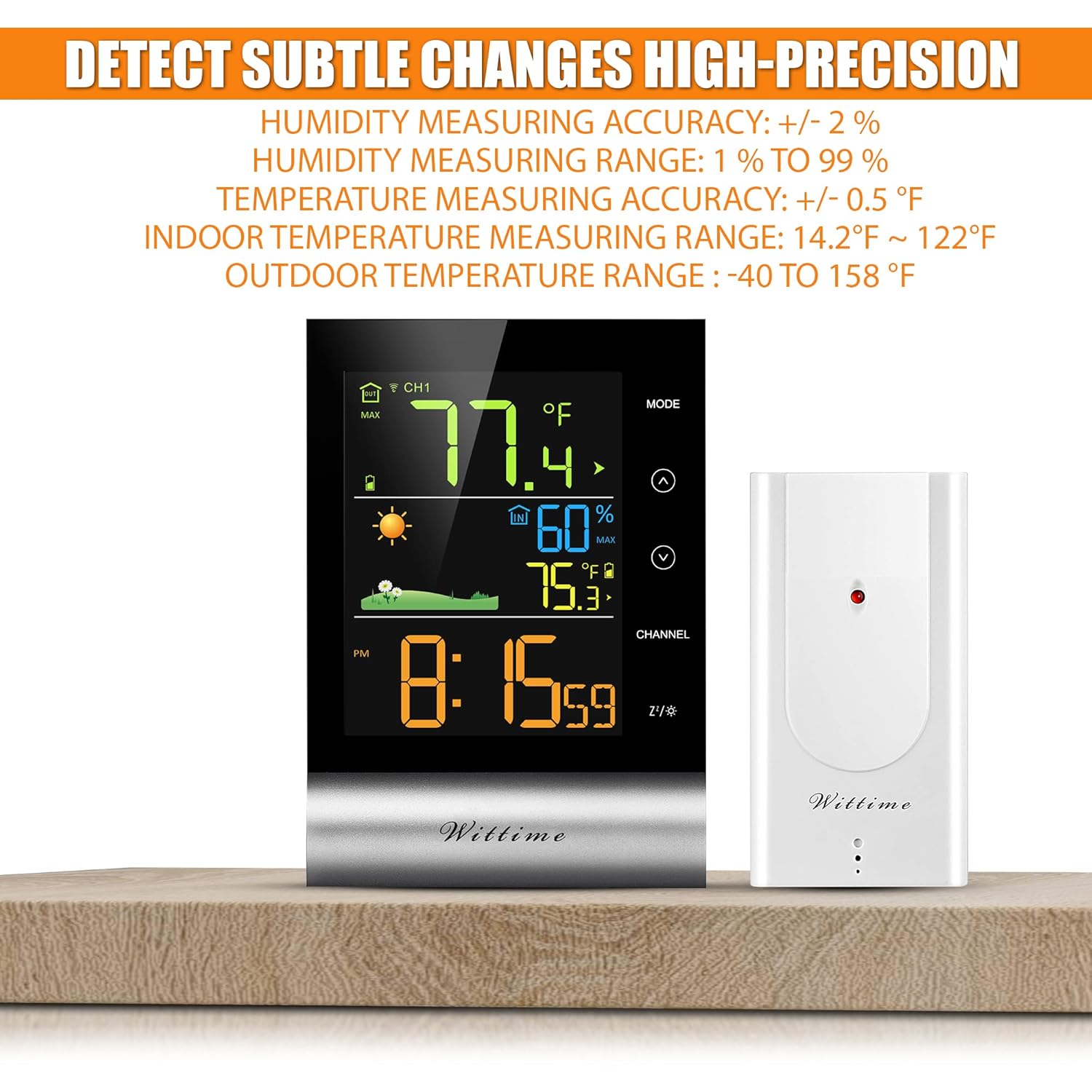
Whakaahua 4: Wittime 2079 High-Precision Accuracy. This image details the humidity and temperature measuring accuracy and ranges for both indoor and outdoor environments.
| Āhuahira | Taipitopito |
|---|---|
| Tauira | Wittime 2079 |
| Momo Whakaatu | 5-inch Full-Color LCD |
| Awhe Temperature Roto | 14.2°F ki te 122°F (-9.9°C ki te 50°C) |
| Awhe Temperature Waho | -40°F ki te 158°F (-40°C ki te 70°C) |
| Te Tikanga o te Pamahana | ± 0.5 ° F (± 0.3 ° C) |
| Taumata Humidity | 1% ki te 99% RH |
| Te tika o te haumākū | ±2% RH |
| Awhe Whakawhiti Ahokore | Tae atu ki te 328 putu (100 mita) ki te waahi tuwhera |
| Ātete Wai o te Pūoko o Waho | IP44 |
| Te Mana Waeine Matua | 5.0V AC Adapter (primary), 3 x AAA Batteries (backup) |
| Mana Pūoko o Waho | 2 x Paehiko AA |
| Ahu (Waeine Matua) | Tata ki te 9.06 x 6.5 x 2.28 inihi |
9. Pūtāhui me te Tautoko
Wittime provides a 12-marama whakamana kaihanga for this product. If you encounter any questions or require technical support, please contact us directly via Amazon message. Our support team aims to reply within 12 hours to assist you.
10. Nga Korero Haumaru Nui
- Kaua e whakaatuhia te waeine matua ki ngā pāmahana tino kino, ki te rā tika, ki te makuku rānei.
- Kia tika te polarity o te whakauru i ngā pākahiko. Kaua e whakaranua ngā pākahiko tawhito me ngā pākahiko hou, ngā momo pākahiko rerekē rānei.
- Makahia nga pākahiko kua whakamahia kia rite ki nga ture a rohe.
- Kaua e ngana ki te wetewete, ki te whakatika ranei i te taputapu. Whakapa atu ki te tautoko mo te awhina.
- Kaua e taea e nga tamariki.