1. Nga Tohutohu Haumaru Nui
Me ata panui nga tohutohu katoa i mua i te whakamahi i te taputapu. Puritia tenei pukapuka hei tohutoro a meake nei.
Haumaru Whānui
- Kaua e ngana ki te whakahaere i tenei oumu me te tuwhera te kuaha na te mea ka puta he kino ki te hiko ngaruiti.
- Kaua e waiho he ahanoa i waenganui i te mata o mua o te oumu me te kuaha, kaua ranei e waiho te oneone, te toenga pokekore ranei kia whakaemi ki runga i nga mata hiri.
- Kaua e whakahaere i te oumu mena kua pakaru. He mea nui kia kati te tatau o te oumu kia kore he kino o te: (1) Te tatau (piko), (2) Nga hiri me nga here (kua pakaru, kua wetekina ranei), (3) Nga hiri kuaha me nga papa hiri.
- Kaua e whakatikaia, e whakatika ranei te oumu ma tetahi atu engari ko nga kaimahi ratonga e tika ana.
- Ko tenei taputapu he mea mo te kainga anake.
- Kaua e whakamahia nga matū pirau me nga kohu i roto i tenei taputapu.
- Kaua e rongoa tenei taputapu ki waho. Kaua e whakamahia tenei hua ki te taha o te wai.
- Kaua e rukuhia te taura me te mono ki te wai.
- Kia matara atu te taura mai i nga mata wera.
- Kaua e tukua te taura ki runga i te taha o te teepu, te porotiti ranei.
- Hei whakaiti i te tupono o te ahi i roto i te kohao oumu:
- Kaua e tunu kai.
- Tangohia nga here whiri waea mai i te pepa, i nga peeke kirihou ranei i mua i te whakatakoto peeke ki te oumu.
- Mena ka mura nga taonga o roto o te oumu, kati tonu te tatau o te oumu, whakawetohia te oumu, ka momotuhia te taura hiko, whakawetohia ranei te hiko i te kopa, i te paearu ara iahiko ranei.
Haumaru Hiko
- Me whakarite kia rite te toha hiko ki te voltage kua tohua ki te tapanga whakatauranga o te taputapu.
- Mono tonu te taputapu ki te putanga whenua.
- Do not use extension cords unless absolutely necessary and ensure they are rated for the appliance's power consumption.
- Tangohia te taputapu mai i te putanga ka kore e whakamahia ana, i mua hoki i te horoi.
2. Hua Neke Atuview
Familiarize yourself with the components and control panel of your SHARP YC-PS204AE-S microwave oven.
Waehanga
- Kohanga Umu: Te wāhi o roto e tunua ai te kai.
- Papamahi: He paepae karaihe e huri ana kia rite te tunu kai.
- Mowhiti Ripanga: Ka tautoko i te tepu hurihuri.
- Kuaha: Kua rite rawa ki te pūnaha raka haumaru.
- Paewhiri Mana: Contains the display, buttons, and dial for operation.
- Marama o roto LED: Ka whakamārama i te kōhao o te oumu i te wā e mahi ana.
Paewhiri Mana me te Whakaaturanga
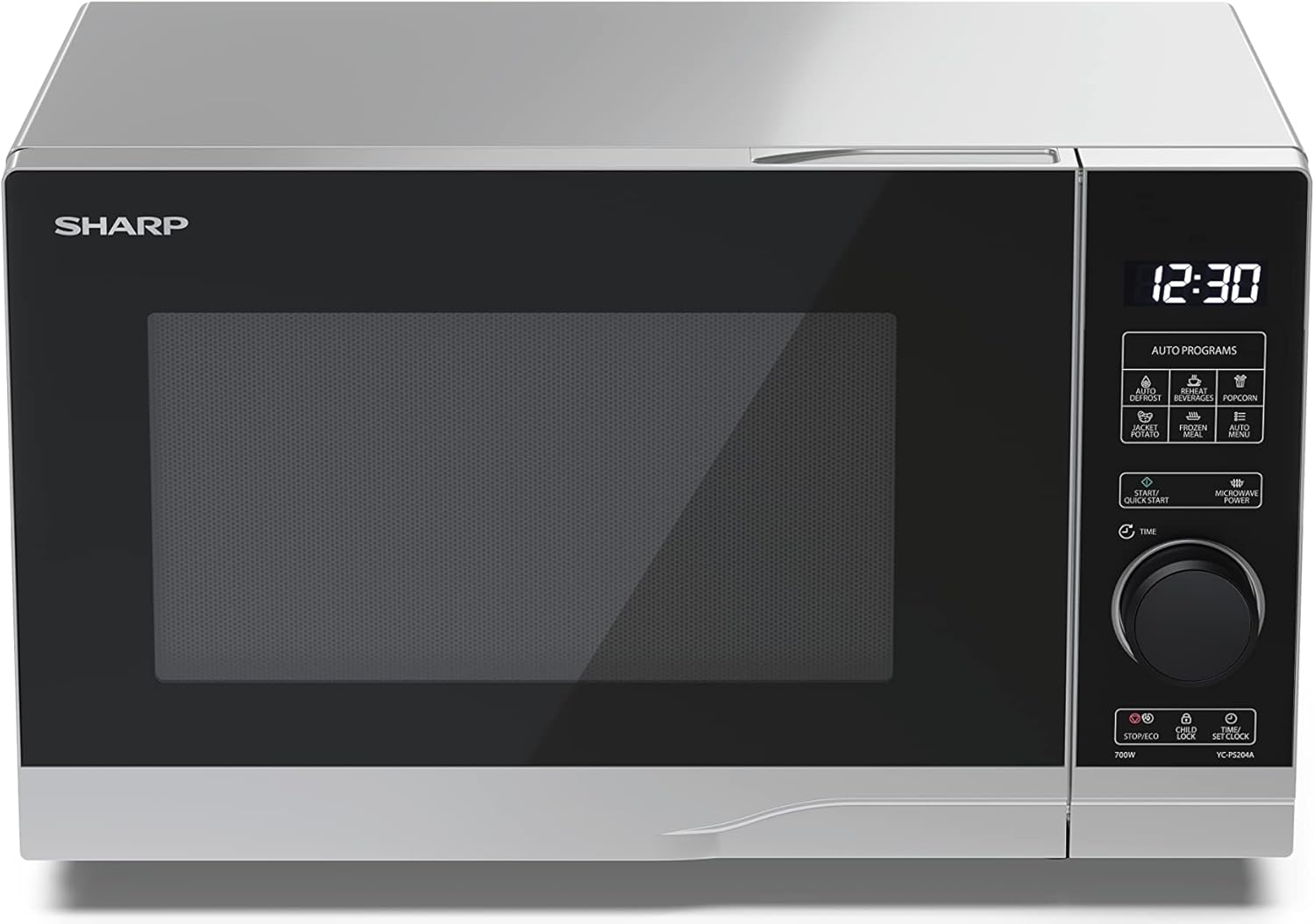
Atahanga: Mua view of the Sharp YC-PS204AE-S microwave oven, highlighting the semi-digital control panel on the right side. The display shows "88:88" and various auto program icons are visible above the main dial.
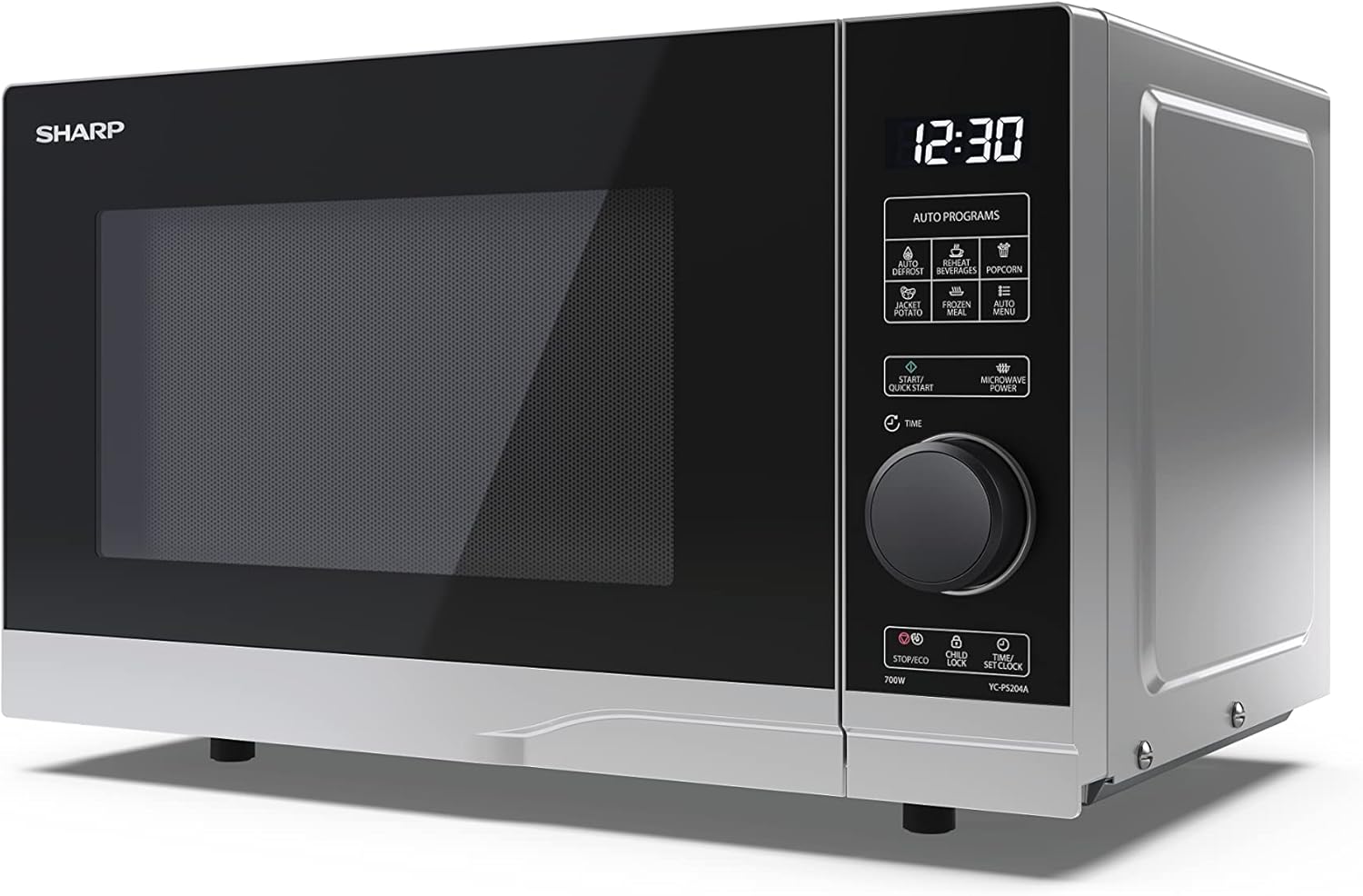
Atahanga: Koki mua view of the Sharp YC-PS204AE-S microwave, showing the sleek silver and black design. The control panel is clearly visible with its digital display and rotary knob.
The control panel features a digital display, a rotary dial for setting time and power, and several touch buttons for various functions and automatic programs.
- Whakaatu: E whakaatu ana i te wā, ngā tautuhinga tunu kai, me ngā tohu hōtaka.
- Waea Hurihuri: Used to set cooking time, weight, and adjust clock.
- Papatono Aunoa: Icons for Defrost, Reheat, Popcorn, Jacket Potato, Frozen Meal, Beverages, and Auto Menu.
- Pātene Tīmata/Tīmata Tere: Initiates cooking or starts quick cooking.
- Microwave Power Button: Selects power levels.
- Pātene Mutu/Taiao: Stops cooking or activates ECO mode.
- Patene Maukati Tamariki: Whakahohe/whakawetohia te raka tamariki.
- Time/Set Clock Button: Sets the clock or adjusts time.
3. Tatūnga
Te wetewete
- Me ata tango i te oumu ngaruiti me nga mea whakakakahu katoa mai i te kaata.
- Tirohia te oumu mo te kino, penei i te pakaru, i te kuaha hee ranei. Kaua e whakahaere i te oumu mena kua pakaru.
- Tangohia tetahi kiriata tiaki i te mata o te kāpata.
- Ensure all accessories are present: glass turntable, turntable ring, and instruction manual.

Atahanga: The interior of the Sharp YC-PS204AE-S microwave oven with the door open, showing the glass turntable and the stainless steel interior. This view is useful for understanding how to place food and clean the cavity.
Whakanoho
- Whakatakotoria te oumu ki runga i tētahi mata papatahi, pumau e taea ai te tautoko i tōna taumaha me te kai taumaha rawa atu ka tunua ki roto.
- Ensure adequate ventilation: leave a minimum of 20 cm (8 inches) of space above the oven, 10 cm (4 inches) at the rear, and 5 cm (2 inches) on each side.
- Kaua e araia nga whakatuwheratanga hau.
- Kaua e waiho te oumu ki te taha o nga puna wera penei i nga radiators me nga umu.
- Keep the oven away from radio and TV sets to avoid interference.

Atahanga: A diagram showing the dimensions of the Sharp YC-PS204AE-S microwave oven, with measurements for height (273 mm), width (455 mm), and depth (334 mm). This helps users ensure proper placement and ventilation space.
Tatūnga Tuatahi
- Plug the power cord into a standard grounded electrical outlet (230V, 50Hz).
- The display will show "0:00" or "12:00".
- Whakaritea te Karaka:
- Press the "Time/Set Clock" button once. The hour digits will flash.
- Turn the rotary dial to set the hour (0-23 for 24-hour format).
- Press "Time/Set Clock" again. The minute digits will flash.
- Turn the rotary dial to set the minutes (0-59).
- Press "Time/Set Clock" a third time to confirm. The clock is now set.
4. Nga Tohutohu Whakahaere
Tunu Ngaruiti Taketake
- Whakanohoia he kai ki roto i te ipu haumaru ngaruiti i runga i te tepu hurihuri.
- Katia te tatau umu.
- Press the "Microwave Power" button repeatedly to select the desired power level (e.g., P100 for 100% power, P80 for 80%, etc. There are 10 levels).
- Tahurihia te porowhita hurihuri hei whakarite i te wā tunu (tae atu ki te 95 meneti).
- Press the "Start/Quick Start" button to begin cooking.
Mahi Tere Tere
- Press the "Start/Quick Start" button repeatedly to cook at 100% power for 30-second intervals. Each press adds 30 seconds.
- The maximum quick start time is 10 minutes.
Mahinga Taakapa
This function allows you to defrost food by weight.
- Whakanohoia te kai tio ki runga i te tepu hurihuri.
- Press the "Defrost" button (usually indicated by a snowflake icon). The display will show "dEF1" or "dEF2" depending on the defrost mode.
- Turn the rotary dial to select the weight of the food (e.g., 100g to 2000g).
- Pēhia te "Tīmata/Tīmata Tere" hei tīmata i te whakarewa.
Automatic Programs (Auto Menu)
The microwave has 8 pre-set automatic programs for common food items.
- Press the "Auto Menu" button (often labeled with "Auto Programs" or specific icons).
- Turn the rotary dial to select the desired program (e.g., Popcorn, Potato, Pizza, Beverage, etc.). The display will show the program number (e.g., A-1, A-2).
- Press "Auto Menu" again to confirm the program.
- Turn the rotary dial to select the weight or quantity (if applicable for the program).
- Pēhia te "Tīmata/Tīmata Tere" hei tīmata.
Mahi Maukati Tamariki
To prevent unintended operation, especially by children.
- Hei whakahohe: Press and hold the "Child Lock" button (often combined with "Stop/Eco") for 3 seconds. A lock icon will appear on the display.
- Hei whakaweto: Press and hold the "Child Lock" button for 3 seconds again. The lock icon will disappear.
Aratau ECO
To save energy, the display can be turned off when the oven is not in use.
- Hei whakahohe: In standby mode, press the "Stop/Eco" button once. The display will turn off.
- Hei whakaweto: Press any button or open the door to reactivate the display.
5. Tiaki me te Whakapai
Ma te horoi me te tiaki i nga wa katoa ka mau te roa me te tino mahi o to oumu ngaruiti.
Te horoi o roto o te umu
- Wewetehia te oumu i mua i te horoi.
- Horoia te kōhao o roto i muri i ia whakamahinga ki te adamp kakahu me te horoi ngawari.
- For stubborn stains, place a bowl of water with lemon juice inside and heat for 2-3 minutes. The steam will loosen the residue.
- Do not use abrasive cleaners or metal brushes, as they can damage the interior surface.
Cleaning the Turntable and Ring
- Ka taea te tango i te karaihe hurihuri me te mowhiti hurihuri mo te horoi.
- Horoia ki te wai mahana, hopipi, ki roto ranei i te horoi rihi.
- Me whakarite kua maroke katoa i mua i te whakahoki ano ki te oumu.
Te horoi i waho
- Horoia nga mata o waho ki te ngohengohe, damp kakahu.
- Āta karohia te wai e tomo ki roto i ngā pūaha hauhautanga.
- Horoia nga kuaha me nga hiri o nga kuaha i nga wa katoa kia pai ai te kati me te aukati i te rerenga ngaruiti.
6. Te Raru
Mena ka raru koe ki to oumu ngaruiti, tirohia nga raru me nga otinga e whai ake nei.
| Raruraru | Take pea | Rongoā |
|---|---|---|
| Kare te umu e timata. | Kāore anō kia monohia te taura hiko; Kua pakaru te fiusi, kua motumotu rānei te ara iahiko; Kāore anō kia kati tika te tatau. | Mono ki te putanga hiko; Whakakapia te fiusi, tautuhia anō rānei te kaiwawao hiko; Katia te tatau kia mau. |
| Ko nga kai kaore e rite te tunu. | Ko te kai kaore i oho, ka hurihia ranei; Karekau te tepu hurihuri e huri. | Stir or turn food halfway through cooking; Ensure turntable and ring are correctly placed and clean. |
| Te pupuhi i roto i te oumu. | Metal or foil in the oven; Dish not microwave-safe; Food residue. | Remove any metal; Use microwave-safe dishes; Clean oven cavity thoroughly. |
| Ko te whakaaturanga e whakaatu ana i te waehere hapa. | He kino o roto. | Momotuhia te oumu mō ētahi meneti, kātahi ka mono anō. Ki te mau tonu te hapa, whakapā atu ki te ratonga kiritaki. |
| Ko te rama oumu e kore e mahi. | Me whakakapi te rama. | Whakapa atu ki nga kaimahi ratonga whai mana mo te whakakapinga rama. |
If the problem persists after trying these solutions, please contact SHARP customer support.
7. Whakatakotoranga
Technical specifications for the SHARP YC-PS204AE-S Microwave Oven.
| Āhuahira | Taipitopito |
|---|---|
| Tau tauira | YC-PS204AE-S |
| Te kaha | 20 rita |
| Putanga Mana Ngaruiti | 700 Watts |
| Taumata Mana | 10 |
| Momo Mana | Semi-digital |
| Nga Ruri Hua (W x H x D) | 45.5 cm x 27.4 cm x 33.4 cm |
| Taumaha | 10.5 Kirokaramu |
| Tae | Hiriwa |
| Rauemi o roto | Kowiri tira |
| Te Taahi Tahuri | 245 mm |
| Nga waahanga motuhake | Child Lock, ECO Function, Defrost System, LED Interior Lighting, 8 Auto Programs |
| Tuku Hiko | 230 Volts |
| Nga Waahanga kei roto | 1x Microwave SHARP YC-PS204AE-S, Glass Turntable, Multilingual Operating Instructions, Warranty Card |
8. Pūtāhui me te Tautoko
SHARP provides a warranty for this product. Please refer to the warranty card included in the packaging for specific terms and conditions.
Tautoko Kiritaki
For technical assistance, troubleshooting beyond this manual, or warranty claims, please contact SHARP customer service.
- Tirohia te paetukutuku SHARP mana website for support contact information in your region.
- Have your model number (YC-PS204AE-S) and purchase date ready when contacting support.