
BANIGIPA A-G2 Black
BANIGIPA Open Ear Headphones User Manual
Model: A-G2 Black
Kupu Whakataki
Thank you for choosing the BANIGIPA Open Ear Headphones. These air conduction headphones are designed to provide a comfortable listening experience while keeping you aware of your surroundings. With advanced Bluetooth 5.4 technology and a noise-canceling boom microphone, they are ideal for various activities including office work, sports, and daily use.
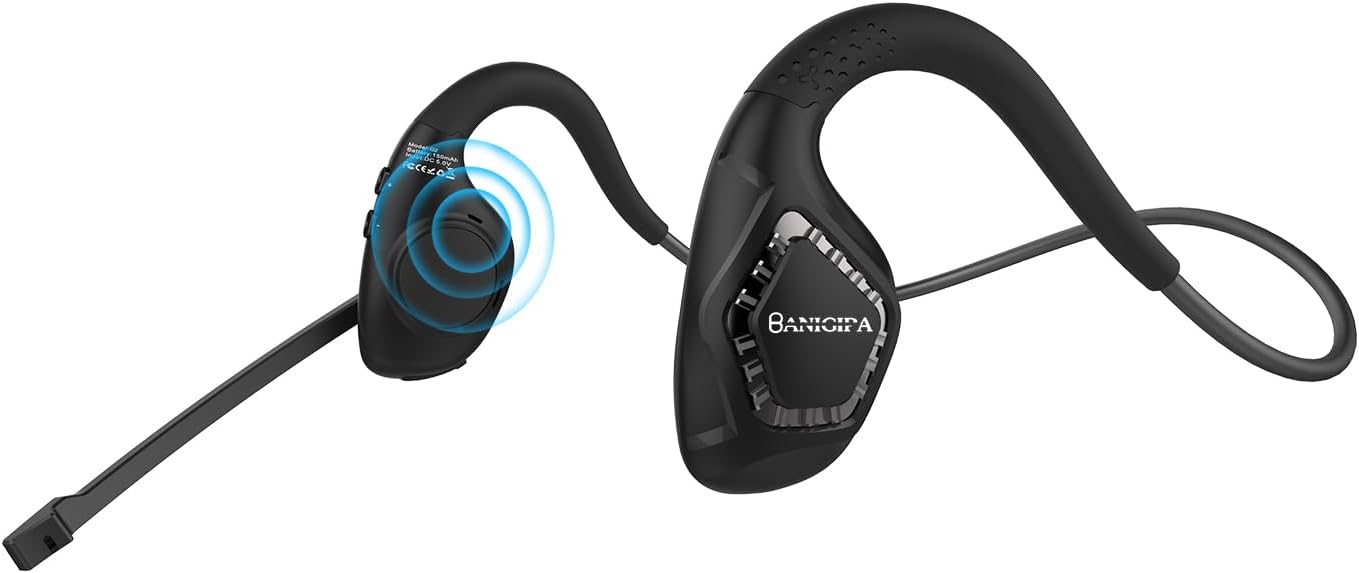
Image: The BANIGIPA A-G2 Black Open Ear Headphones, showcasing their design with the boom microphone.
He aha kei roto i te Pouaka?
- 1 x G2 Air Conduction Headset
- 1 x USB Utaura Whakatau
- 1 x Pukapuka Kaiwhakamahi

Image: A visual representation of the items included in the product packaging: the G2 headset, a USB charging cable, and the user manual.
Nga waahanga matua
- Open-Ear Air Conduction Design: Sound is conducted through the air, avoiding discomfort from in-ear or over-ear headphones. This design keeps the ear canal healthy and clean, and ensures situational awareness by allowing you to hear your surroundings.
- Upgraded Bluetooth 5.4: Features the latest Bluetooth 5.4 technology for stable and fast connections up to 10m/33ft. Supports dual audio decoding (AAC and SBC) for enhanced sound quality.
- 270° Rotatable Boom Microphone: Equipped with a noise-canceling boom microphone that uses a single-mark algorithm for noise reduction, filtering out up to 95% of background noise. The flexible boom can be rotated 270° to optimize voice pickup for clear calls.
- Roa te Ora o te Pūhiko: Built-in 165mAh rechargeable lithium-ion battery provides up to 10 hours of uninterrupted music/calls and 150 hours of standby time. Fully charges in approximately 1.5 hours via Type-C USB.
- Māmā me te hāneanea: Weighing only 28g, these headphones are designed for long-term wear without ear pain. Made with skin-friendly, soft silicone and high-resilience titanium alloy memory for 360° bending without deformation.

Image: Illustrates the comfort of open-ear headphones compared to traditional headphones, highlighting health and safety benefits.

Image: A graphic depicting the advanced Bluetooth 5.4 chip, emphasizing fast and stable connection capabilities.

Image: A man wearing the headset in an office setting, illustrating the effectiveness of the DSP noise-canceling microphone for HD calling.

Image: A visual guide demonstrating the 270° rotatable boom microphone and its mute function.

Image: An infographic detailing the durable and long battery life, showing 165mAh capacity, 2 hours charging time, 10 hours working time, and USB-C charging port.

Image: A man wearing the headphones while working on a laptop, illustrating the light and comfortable design for all-day wear.
Tatūnga
Te Whakataki i te Paneoro
Before first use, fully charge your BANIGIPA G2 headphones. Connect the included USB charging cable to the Type-C port on the headset and to a compatible USB power source. A full charge takes approximately 1.5 hours.
Tauira Nihokikorangi
- Kia mahara kei te whakaweto te pane.
- Press and hold the multi-function button until the LED indicator flashes blue and red, indicating pairing mode.
- On your device (phone, laptop, tablet), enable Bluetooth and search for available devices.
- Select "BANIGIPA G2" from the list. Once connected, the LED indicator will turn solid blue or off, depending on the model.
The headset supports simultaneous connection to two devices. To connect a second device, ensure the first device is connected, then put the headset back into pairing mode and connect to the second device. The headset will intelligently switch between devices.

Image: Shows the headphones simultaneously connected to a smartphone and a laptop, demonstrating multi-device compatibility.
Te mau i te Paneoro
- Place the headphones on your head, ensuring the ear hooks rest comfortably over your ears.
- Adjust the ear hang to a comfortable and secure position.
- Rotate the boom microphone up to 270° to the most suitable position for clear voice pickup.

Image: A three-step diagram illustrating how to properly wear the headphones, adjust the ear hang, and position the microphone.
Nga Tohutohu Whakahaere
The BANIGIPA G2 headphones feature multi-function buttons for easy control of your audio and calls.

Image: A detailed diagram showing the location and function of each button on the headset, including power, volume, track control, call management, mute, and voice assistant activation.
- Hiko Whakaka/Weto: Patohia me te pupuri i te paatene maha-mahi.
- Purei/Tatari Puoro: Pēhi kotahi i te pātene maha-mahi.
- Waiata Panuku: Press the 'Volume +' button.
- Waiata o mua: Press the 'Volume -' button.
- Runga Runga: Press and hold the 'Volume +' button.
- Raro Raro: Press and hold the 'Volume -' button.
- Whakautu/Tauhia Waea: Pēhia kotahi te pātene maha-mahi i te wā e waea mai ana.
- Whakakore Waea: Pēhia me te pupuri i te paatene mahi-maha i te wa o te waea taumai.
- Whakahohe i te Kaiawhina Reo: Pēhia rua te pātene maha-mahi.
- Whakawhiti Aratau Puoro/Kēmu: Triple press the multi-function button. (Note: Gaming mode has approximately 70ms audio delay.)
- Mahi Wahangu: Use the dedicated mute button on the boom microphone.
Te tiaki
- Te horoi: Horoia te pane ki te kakahu ngohengohe, maroke. A ape i te whakamahi i nga matū kino, i nga taonga abrasive ranei.
- Rokiroki: Whakaorangia nga taringa ki te waahi makariri, maroke atu i te ra tika me te wera nui.
- Tiaki Pūhiko: Hei whakaroa i te ora o te pākahiko, karohia te tuku katoa i te pākahiko. Me utu te pane i nga wa katoa, ahakoa kaore i te whakamahia mo nga wa roa.
- Ātete wai: The headset is waterproof, but avoid prolonged submersion in water. Dry thoroughly if exposed to moisture.
Raparongoā
| Raruraru | Take pea | Rongoā |
|---|---|---|
| Karekau te paneoro i te hiko. | He iti te pākahiko. | Charge the headset fully using the provided USB cable. |
| Kaore e taea te hono ki te taputapu. | Kāore te pane whakarongo i te aratau takirua; kua weto te Nihokikorangi i runga i te pūrere; kua tawhiti rawa te pūrere. | Ensure headset is in pairing mode (flashing blue/red LED). Turn on Bluetooth on your device. Move device closer to headset (within 10m/33ft). Restart both devices. |
| Karekau he oro, he kino te kounga oro. | He iti rawa te rōrahi; kua he te whakaputanga ororongo kua tohua; pokanoa. | Increase volume on headset and device. Check audio output settings on your device. Move away from sources of strong electromagnetic interference. |
| Ko te hopuoro kaore i te mahi, i te marama ranei. | Microphone muted; incorrect microphone input selected; microphone not positioned correctly. | Ensure microphone is not muted. Check microphone input settings on your device. Rotate the boom microphone to be closer to your mouth. |
| Audio delay in gaming mode. | Normal operation for gaming mode. | The headset has an approximate 70ms audio delay in gaming mode, which is typical for this feature. |
| Headset is uncomfortable or causes ear pain. | He pai te pai. | Adjust the ear hooks and headset position for a comfortable fit. The open-ear design is intended to prevent ear pain from prolonged use. |
Note: This is an air conduction headset, not a bone conduction headset. It is not recommended for people with hearing impairments.
Whakatakotoranga
| Āhuahira | Taipitopito |
|---|---|
| Ingoa Tauira | G2 Pango |
| Hangarau Hononga | Nihokikorangi, Ahokore |
| Hangarau Whakawhitiwhiti Ahokore | Nihokikorangi |
| Putanga Nihokikorangi | 5.4 |
| Awhe Nihokikorangi | 10 Mita (33ft) |
| Te Whakanoho Taringa | Taringa tuwhera |
| Tauwehe Puka | Taringa tuwhera |
| hopuoro | Noise-Canceling Boom Microphone (270° Rotatable) |
| Pūhiko Raukaha | 165 mAh Lithium Ion |
| Ora Pūhiko | Up to 10 Hours (Music/Calls) |
| Wā tūtatari | Tae atu ki te 150 haora |
| Waa Whakatau | Approx. 1.5 haora |
| Tauranga Whakatau | Patohia-C USB |
| Taumaha Tūemi | 28 Karamu (0.988 hekere) |
| Rauemi | Kirihou, Silicone |
| Taumata Atete Wai | parewai |
| Pūrere Hototahi | iOS and Android Cellphones, Laptops, Tablets, PC, Desktops |
| Audio Latency (Gaming Mode) | 70 Milihekona |
| Nga Waahanga kei roto | 1 X G2 Air Conduction Headset, 1 X USB Charging Cable, User Manual |
Pūtāhui me te Tautoko
For product support, troubleshooting assistance, or warranty inquiries, please contact BANIGIPA customer service through the retailer's platform or visit the official BANIGIPA store page on Amazon. Please refer to your purchase receipt for specific warranty terms and conditions.
Ask a question about this manual
Ask about setup, troubleshooting, compatibility, parts, safety, or missing instructions. Manuals+ will review the question and use this page’s manual context to help answer it.