
Shargeek STM2E-1
Pukapuka Kaiwhakamahi mō te Shargeek STORM2 Slim Portable Charger
Tauira: STM2E-1
Kupu Whakataki
This manual provides comprehensive instructions for the safe and efficient use of your Shargeek STORM2 Slim Portable Charger. Please read this manual thoroughly before operating the device and retain it for future reference.
The Shargeek STORM2 Slim is a high-capacity portable power bank featuring a unique transparent design and an IPS display screen. It offers 130W max output with 100W USB-C and 30W USB-A ports, suitable for charging various devices including laptops, tablets, and smartphones.

Image: The Shargeek STORM2 Slim portable charger, showcasing its transparent design that reveals internal components and the included yellow USB-C to USB-C cables.
Nga waahanga hua
- Hoahoa Puata: The see-through casing reveals the internal battery and circuit layout, highlighting the device's engineering.
- IPS Display Screen: A clear screen provides real-time information on battery life, output distribution, temperature, operation hours, and active ports.
- Raukaha Teitei: 20000mAh battery capacity, capable of multiple charges for various devices.
- Whakataki Tere: Features a 100W USB-C PD port and a 30W USB-A port, supporting 130W max output for rapid charging.
- Hototahi Ao: Charges laptops, phones, tablets, and other devices with USB-C or USB ports.

Whakaahua: He taipitopito view of the Shargeek STORM2 Slim's IPS LCD screen, showing various data points such as input/output wattage, voltage, current, battery level, and temperatures.
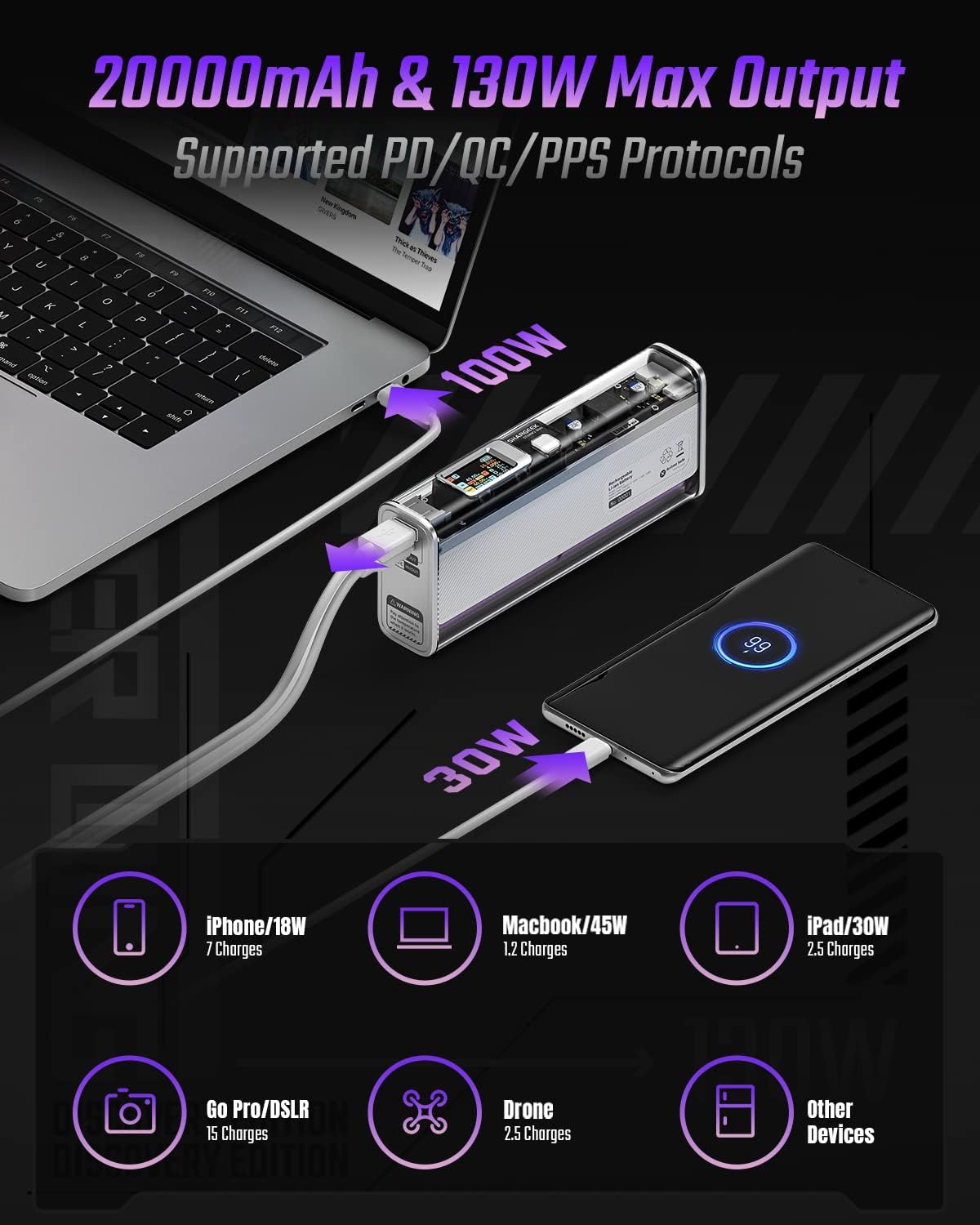
Image: The Shargeek STORM2 Slim connected via USB-C to a laptop for 100W charging and via USB-A to a smartphone for 30W charging, demonstrating its dual-port capability.
Tatūnga me te Whakamahi Tuatahi
Ihirangi mōkī:
- Shargeek STORM2 Slim Portable Charger
- USB-C ki USB-C Cable
- Pukapuka Kaiwhakamahi (tenei tuhinga)
Whakataunga Tuatahi:
- Before first use, fully charge your STORM2 Slim.
- Connect the provided USB-C to USB-C cable to the USB-C port on the STORM2 Slim.
- Connect the other end of the cable to a compatible USB-C power adapter (not included) with a minimum of 100W output for fastest charging.
- The IPS screen will display charging status and battery percentage. The device is fully charged when the screen indicates 100%.
- A full recharge typically takes approximately 90 minutes with a 100W power adapter.
Nga Tohutohu Whakahaere
Pūrere Tohutoro:
- Identify the appropriate charging cable for your device (USB-C to USB-C or USB-A to device-specific cable).
- Connect one end of the cable to your device and the other end to the corresponding port (USB-C or USB-A) on the STORM2 Slim.
- The IPS screen will automatically activate and display the charging output (watts, volts, amps) for the connected device(s).
- The STORM2 Slim can charge two devices simultaneously using both the USB-C and USB-A ports.
Understanding the IPS Screen:
The IPS screen provides detailed real-time information. Use the physical button on the side of the power bank to navigate through different display modes or access settings.
- Input/Output Dashboard: Shows power input (IN) when charging the power bank and power output (OUT) when charging devices, including wattage, voltage, and current for each port.
- Taumata Pūhiko: Ka whakaatu i te toenga pākahikotage and a visual icon.
- Voltage & o nāianei: Detailed readings for the internal battery cells.
- Te pāmahana: Shows the internal circuit board and battery temperatures.
- Wā Whakahaere: A resettable timer indicating the duration of current operation.
To access menus: Long-press the button. To navigate: Short-press. Hei whiriwhiri: Long-press.
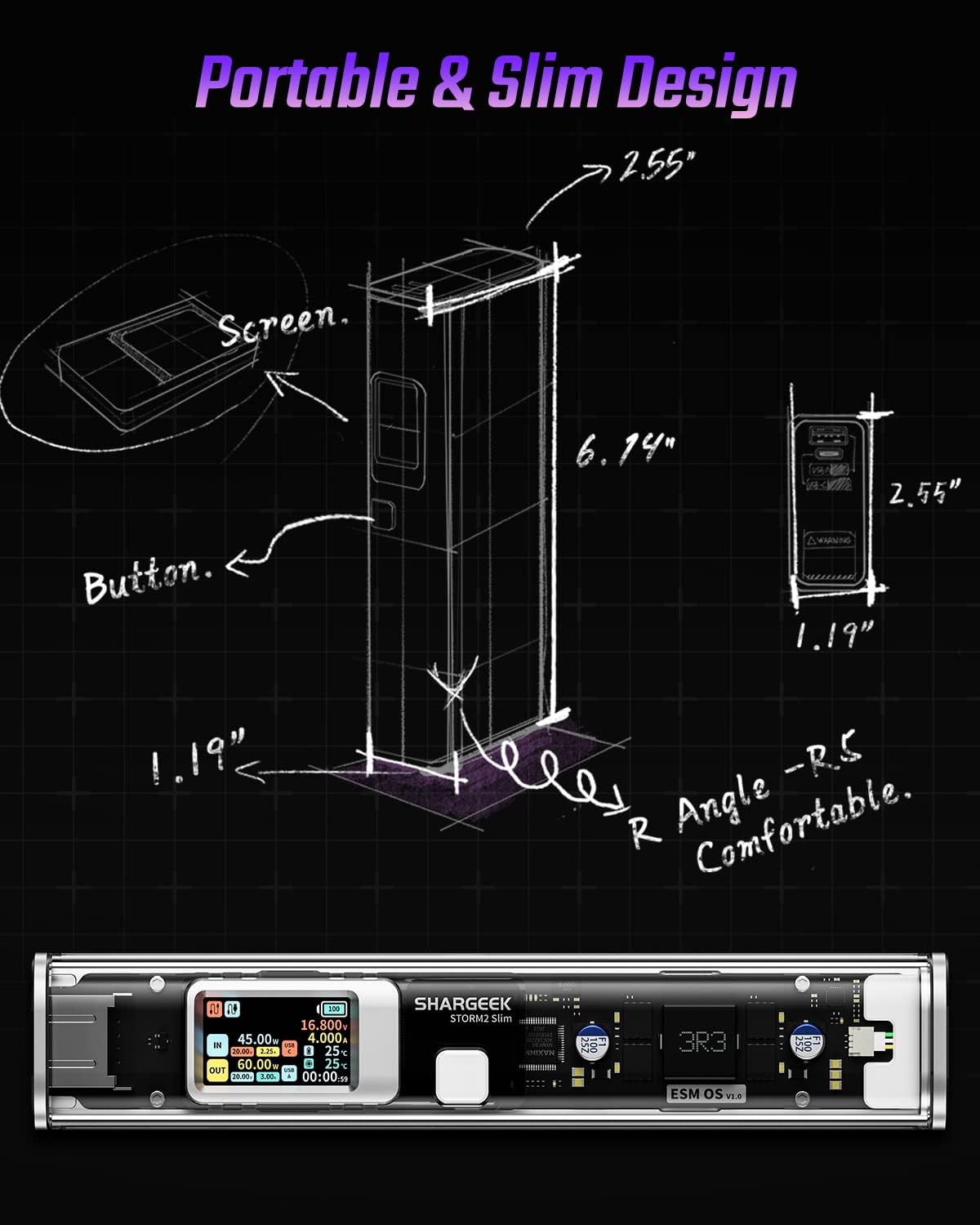
Image: A technical drawing illustrating the dimensions of the Shargeek STORM2 Slim and pointing out the screen and button locations.
Te tiaki
- Te horoi: Whakamahia he kakahu ngohengohe, maroke hei horoi i waho o te peeke hiko. A ape i te whakamahi i nga matū kino, i nga taonga abrasive ranei.
- Rokiroki: Whakaorangia te taputapu ki te waahi makariri, maroke atu i te ra tika, te wera nui, me te makuku nui.
- Tiaki Pūhiko: To prolong battery life, avoid fully discharging the power bank frequently. Recharge it when the battery level is low. If storing for extended periods, charge it to approximately 50-70% every 3-6 months.
- Aukati i nga Whakataka: While designed with an aluminum alloy frame for durability, avoid dropping the device as it may damage internal components or the transparent casing.
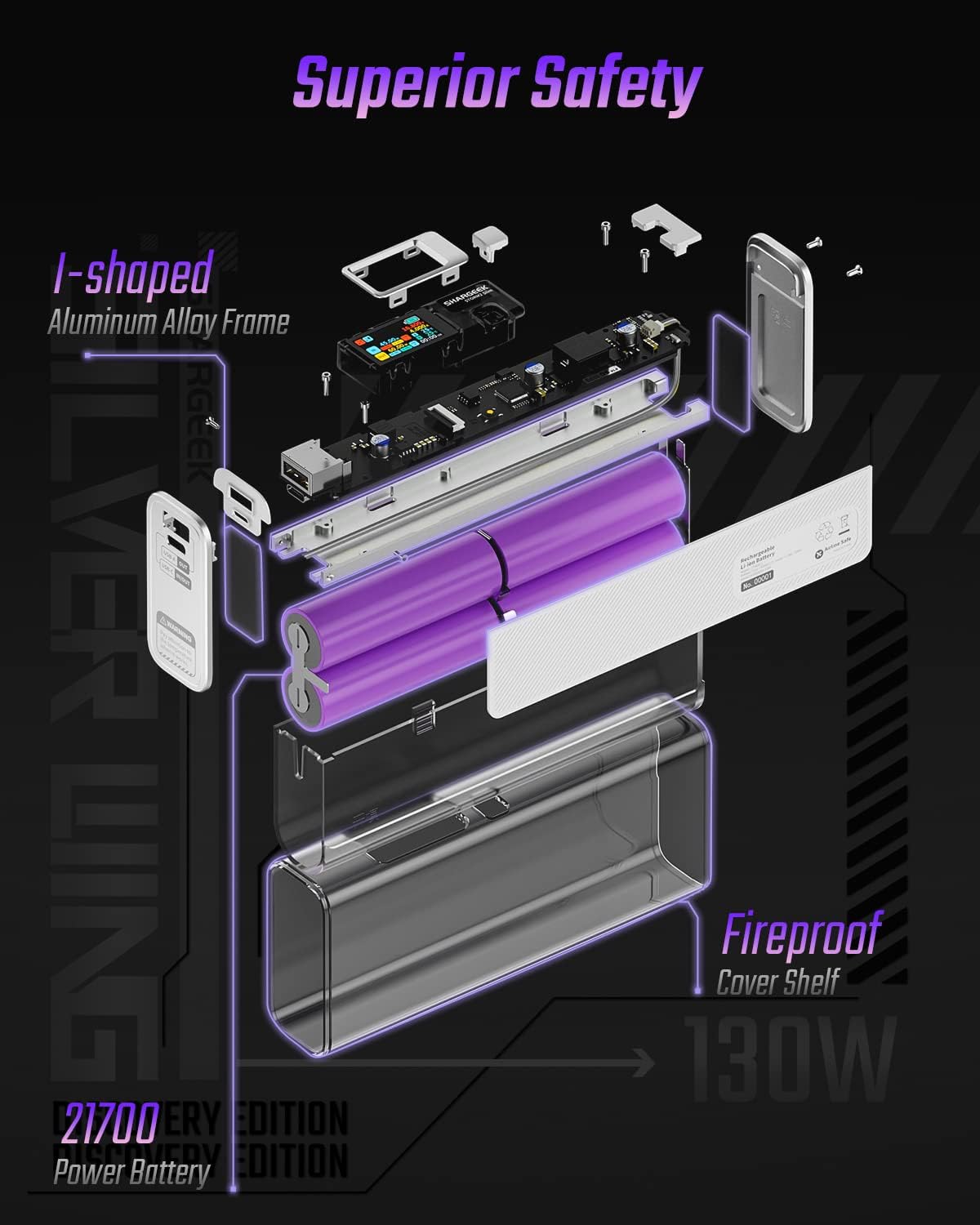
Image: An exploded diagram of the Shargeek STORM2 Slim, illustrating its internal structure including the I-shaped aluminum alloy frame, fireproof cover shelf, and 21700 power batteries, highlighting its robust construction.
Raparongoā
| Raruraru | Take pea | Rongoā |
|---|---|---|
| Kaore te taputapu e utu ana mai i te peeke hiko. | Low power bank battery; incompatible cable; device not properly connected; device requires more power than available. | Recharge the STORM2 Slim. Ensure cable is fully inserted and compatible. Check device power requirements against power bank output. Try a different cable or port. |
| Karekau te putea hiko e utu. | Charging cable or adapter faulty; power bank port damaged. | Try a different USB-C cable and power adapter. Ensure the adapter meets the recommended power output (e.g., 100W). If problem persists, contact support. |
| IPS screen is blank or unresponsive. | Power bank is off; temporary software glitch. | Press the button to activate the screen. If unresponsive, try connecting a device to charge or connecting the power bank to a charger to see if it activates. If problem persists, contact support. |
| Puturi te utu. | Ko te taura kaore i te tautoko i te utu tere; kaore te taputapu e tautoko i te utu tere; maha nga taputapu hono. | Ensure you are using a high-quality USB-C PD cable. Verify your device supports fast charging. Charging multiple devices simultaneously may reduce individual charging speeds. |
Whakatakotoranga
- Tau tauira: STM2E-1
- Raukaha Pūhiko: 20000mAh
- Putanga Max: 130W
- Putanga USB-C: Tae atu ki te 100W Tukunga Hiko (PD)
- USB-He Putanga: Tae atu ki te 30W
- Tāuru: USB-C (up to 100W PD)
- Whakaatu: Mata IPS
- Ahu: 3 x 6.5 x 15.59 cm (tata ki te 1.18 x 2.56 x 6.14 inihi)
- Taumaha: Tata ki te 689 g (1.52 lbs)
- Momo Pūhiko: Lithium Ion
Pūtāhui me te Tautoko
Mōhiohio Pūtāhui:
Shargeek products are covered by a limited warranty against defects in materials and workmanship. Please refer to the warranty card included with your purchase or visit the official Shargeek webpae mo nga tikanga me nga tikanga whakamana.
Tautoko Kiritaki:
For technical assistance, troubleshooting, or warranty claims, please contact Shargeek customer support through their official webte waahi, nga korero whakapiri ranei kei runga i to kete hua.
Official Shargeek Store Link: Shargeek Official Store
Nga korero haumaru
- Kaua e tukuna te taputapu ki te wai, te makuku, te wera nui ranei.
- Kaua e wetewete, whakarereke, ngana ranei ki te whakatika i te taputapu i a koe ano. Ma tenei ka whakakore i te raihana, ka pakaru, ka whara ranei.
- Kaua e taea e nga tamariki.
- Use only certified and compatible charging cables and adapters.
- A ape i te tuku, te tuku ranei i te taputapu ki nga paanga kaha.
- Dispose of the device responsibly according to local regulations for electronic waste.
Ask a question about this manual
Ask about setup, troubleshooting, compatibility, parts, safety, or missing instructions. Manuals+ will review the question and use this page’s manual context to help answer it.