1. Kupu Whakataki
Thank you for choosing the typecase Touch iPad Keyboard Case. This manual provides detailed instructions for setting up, operating, and maintaining your keyboard case to ensure optimal performance and longevity. Please read this manual thoroughly before use.
2. Hototahi
This keyboard case is designed for specific iPad models. Please verify your iPad model number to ensure compatibility.
- iPad 10th Generation (10.9-inch, 2022): Tauira A2696, A2757, A2777
- iPad A16 (11th Generation, 2025): Tauira A3354, A3355, A3356
To verify your iPad model:
- Tikanga 1: Check the back of your iPad for the model number (e.g., A2696).
- Tikanga 2: Go to iPad Settings > General > About > Model Number. Tap the model number to display the A-number.
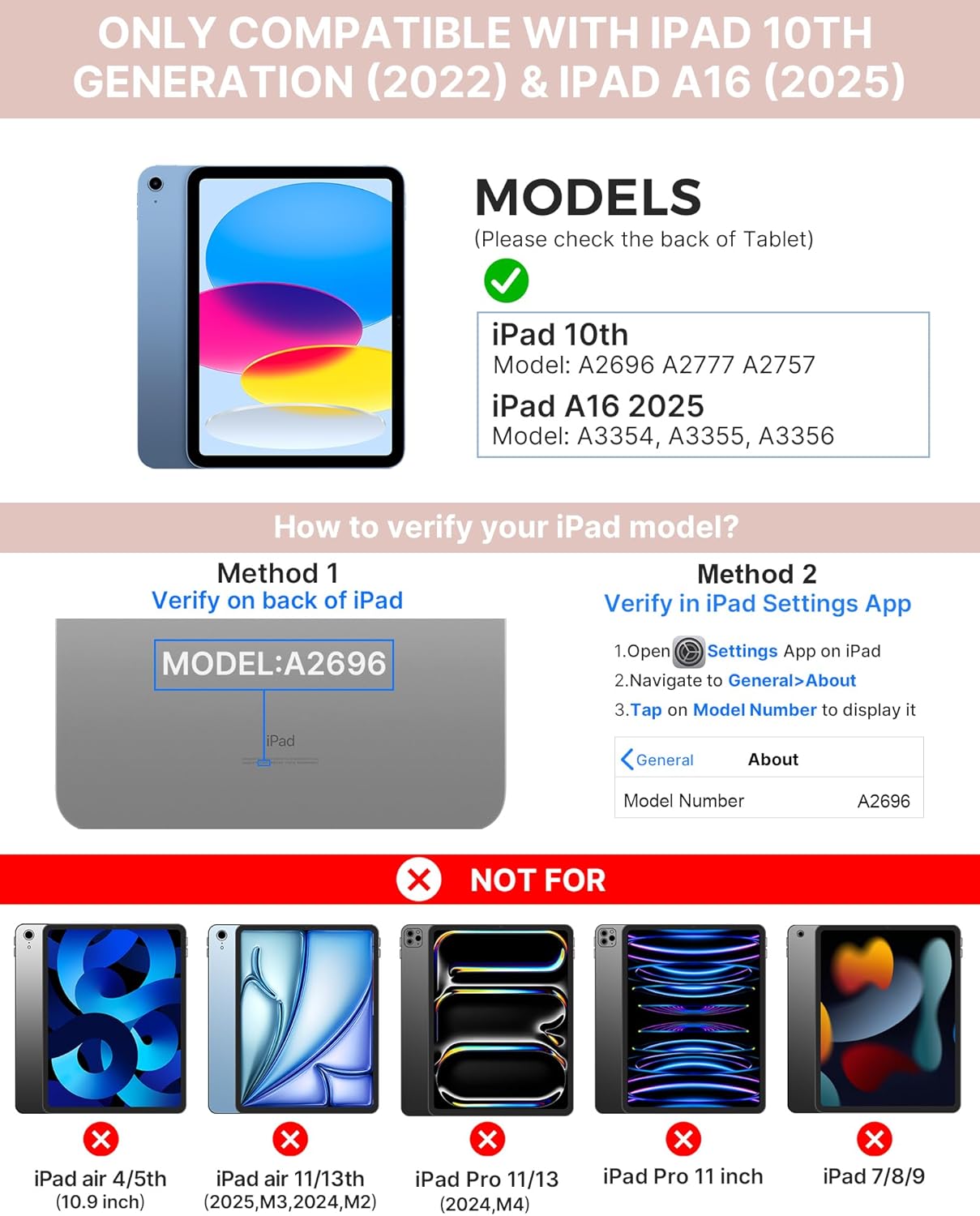
Image: Visual guide for identifying compatible iPad models and verifying the model number on the device or through settings.
3. Ihirangi mokete
Kei roto i te mōkihi:
- 1 x typecase Touch iPad Keyboard Case
- 1 x USB-C Taura Whakamaa
- 1 x Pukapuka Kaiwhakamahi
4. Tohutohu Tatūnga
4.1 Te Whakataki i te Papapātuhi
I mua i te whakamahinga tuatahi, whakakīia katoatia te papapātuhi. Honoa te taura utu USB-C kua whakaratohia ki te tauranga utu o te papapātuhi me te pūtake hiko. Mā te rama tohu utu e whakaatu te tūnga utu.
- tūtatari: Tae atu ki te 1 Tau
- Daytime use (2 hours/day with backlight off): Tae atu ki te 3 Marama
- Nighttime use (2 hours/day with backlight on): Tae atu ki te 2 wiki

Image: Close-up of the keyboard's USB-C charging port and battery life specifications.
4.2 Pairing with iPad
- Me whakarite kua utuhia te papapātuhi.
- Whakakāhia te papapātuhi mā te pēhi i te pātene mana. Ka mura te rama tohu Nihokikorangi.
- I to iPad, haere ki Tautuhinga > Nihokikorangi.
- Whakakāhia te Nihokikorangi. Ka rapu tō iPad i ngā pūrere e wātea ana.
- Select "typecase Keyboard" from the list of devices.
- Whāia ngā tohutohu kei runga i te mata hei whakaoti i te tukanga honohono. Ka huri mārō te rama tohu Nihokikorangi i runga i te papapātuhi ina honoa angitu.
5. Nga Tohutohu Whakahaere
5.1 Te Tāuta i tō iPad
Gently insert your iPad into the case, ensuring all edges are securely seated. The case provides full protection for your device.
5.2 Nga Mahi Papapātuhi
The keyboard features a standard 78-key layout with a dedicated row of iPadOS shortcut keys for enhanced productivity.

Atahanga: Overhead view of the keyboard layout, highlighting the 78-key design and iPadOS shortcuts.
Pātuhi Whakamuri
The keyboard features 11-color RGB LED backlighting with adjustable brightness levels. This allows for comfortable typing in various lighting conditions.
- Pehia te light bulb key hei huri i waenga i ngā tae o te papamuri.
- Perehi Fn + light bulb key ki te whakatika i te wherikotanga o muri.
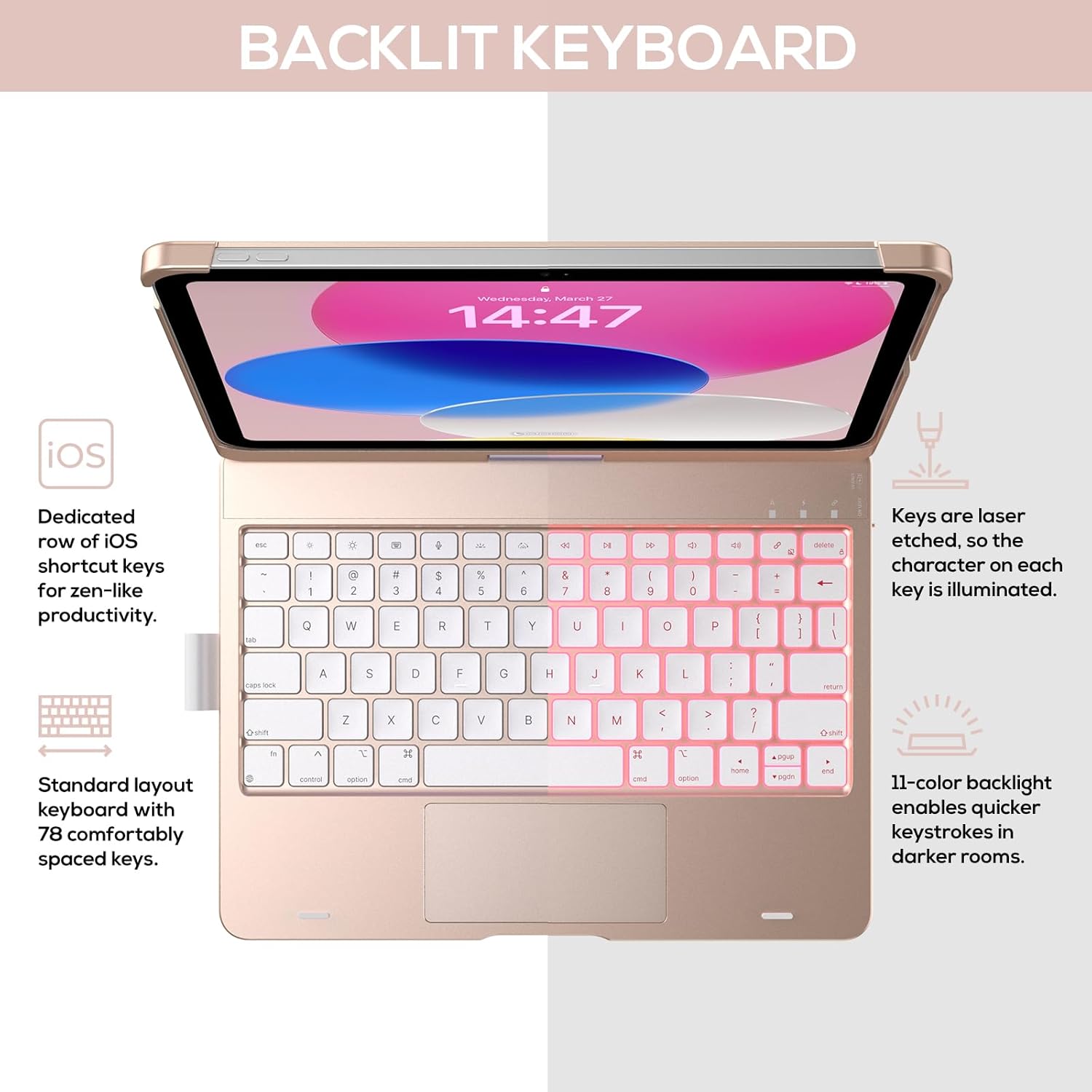
Image: The keyboard with illuminated keys, demonstrating the 11-color backlight and dedicated iOS shortcut keys.
5.3 Papapātuhi Maha-Pa
The integrated precision trackpad supports multi-gesture controls, enhancing productivity for tasks like document editing, web browsing, and presentation building.
- Pao maihao kotahi: Click/Select
- Panuku maihao-rua: Panuku ki runga/ki raro, ki maui/matau rānei
- Riwiri ki te topa: Topa roto/waho
- Pania ki runga mā te whakamahi i ngā maihao e toru: Whakatuwheratia te Whakawhiti Taupānga
- Pania ki raro mā te toru o ngā maihao: Hoki ki te Mata Kainga

Image: Diagram showing common multi-touch gestures for the trackpad, including managing files, web browsing, and app switching.
5.4 360° Rotatable Hinge and Use Modes
The patented 360° hinge allows for versatile use of your iPad in 7 unique modes, adapting to various tasks from typing to viewing.
- Aratau Pona: Traditional laptop setup for typing.
- Aratau Tū: He pai mo viewte ihirangi.
- Aratau Tēneti: Stable for touch interaction or presentations.
- Aratau Papa: Fold the keyboard behind the iPad for tablet use. Keys are protected in this mode.
- Corner Mode: Angled for comfortable drawing or writing.
- Aratau Tiri: Rotate the screen to share content with others.
- Protect Mode: Close the case to fully protect the iPad.
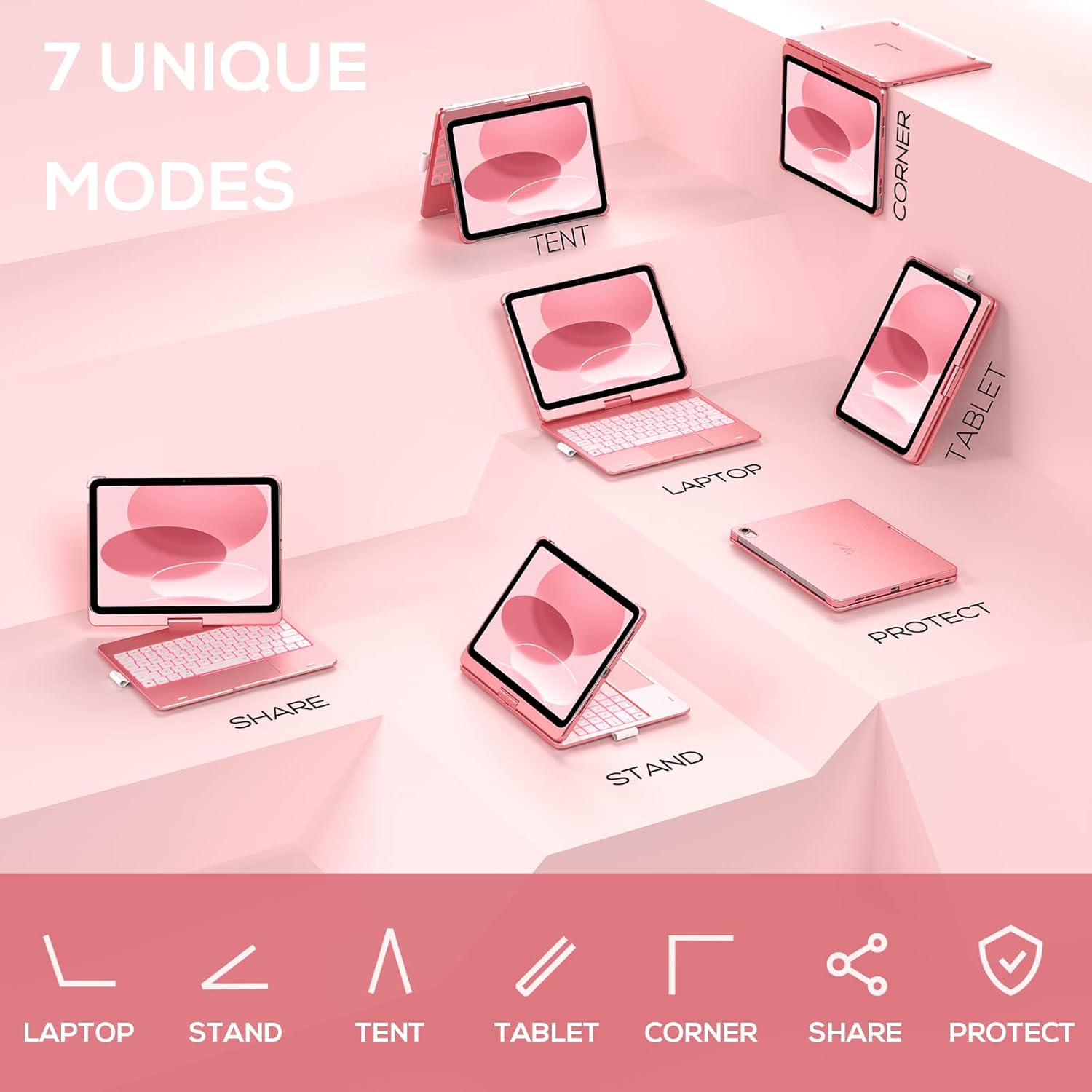
Image: A visual representation of the seven different configurations the keyboard case can be used in, including laptop, stand, and tablet modes.
5.5 Mahi Moe/Aranga Aunoa
The case features an auto sleep/wake function. Opening the case will wake your iPad, and closing it will put your iPad to sleep, helping to conserve battery life for both the iPad and the keyboard.

Image: A user's hand on the trackpad, illustrating the built-in trackpad and the auto sleep/wake feature that activates when the case is opened or closed.
5.6 Pouaka Pene Apple
An integrated holder is provided for your Apple Pencil, ensuring it is securely stored and easily accessible.
6. Tiaki
6.1 Te horoi
To clean the keyboard case, use a soft, damp cloth. Avoid using harsh chemicals or abrasive materials, as these may damage the surface. Ensure the charging port is dry before charging.
6.2 Rokiroki
Mena kāore e whakamahia ana mō te wā roa, rongoatia te pouaka papapātuhi ki te wāhi hauhautanga, maroke. He mea pai kia whakakīia katoatia te papapātuhi i mua i te rokiroki mō te wā roa hei pupuri i te hauora o te pākahiko.
7. Te Raru
7.1 Kāore te Papapātuhi e Hono Ana
- Me whakarite kei te whakakā te papapātuhi, ā, kua utua hoki.
- Tirohia kei te whakahohea te Nihokikorangi i runga i to iPad.
- Warewaretia te pūrere i ngā tautuhinga Nihokikorangi o tō iPad, ka ngana ki te hono anō.
- Tīmata anō i tō iPad me te papapātuhi.
7.2 Kī Kore Te Whakautu
- Me mohio kei te hono tika te papapātuhi ma te Nihokikorangi.
- Tirohia te taumata pākahiko o te papapātuhi.
- Horoia ngā paru katoa e karapoti ana i ngā kī.
7.3 Trackpad Not Working
- Me whakarite kua honoa te papapātuhi.
- Check iPad settings for trackpad functionality (Settings > General > Trackpad).
- Tīmata anō i te papapātuhi me te iPad.
7.4 Ko te Rarama Whakamuri Kaore i te Mahi
- Me mohio kei te kaha te papapātuhi.
- Press the backlight control keys (light bulb key, Fn + light bulb key) to activate or adjust.
- Check battery level; low battery may disable backlighting.
8. Whakatakotoranga
| Tau tauira | KB201T-100 |
| Hunga Hua | 11 x 8.6 x 1.5 inihi (11"L x 8.6"W x 1.5"H) |
| Taumaha Tūemi | 1.43 pauna |
| Hangarau Hononga | Nihokikorangi |
| Whakaahuatanga Papapātuhi | Flexible, 78-key layout with iPadOS shortcuts |
| Nga waahanga motuhake | 360° Rotatable, 11-Color Backlit, Ergonomic, Lightweight, Multi-Touch Trackpad, Auto Sleep/Wake, Apple Pencil Holder |
| Papapātuhi Whakamurirama | RGB (11 tae) |
| Momo Pūhiko | 1 pākahiko Lithium Polymer (kei roto) |
9. Pūtāhui me te Tautoko
typecase is committed to product quality and customer satisfaction. This product comes with the following support:
- Ratonga Whakakapi: Within 1 year of purchase.
- Kaupapa Whakahoki: I roto i nga ra 30 o te hoko.
For any issues or inquiries, please contact typecase customer support for quick feedback and assistance.

Image: Information on typecase's after-sales service, including replacement, refund, and customer support.