1. Kupu Whakataki
This manual provides essential information for the safe and efficient use of the Generic 550W Switching Power Supply. This power supply unit (PSU) is designed for compatibility with X3550 and X3650 M4 server systems. Please read this manual thoroughly before installation and operation to ensure proper functionality and to prevent damage to the unit or connected equipment.
2. Nga korero haumaru
- Pūmate Hiko: He nui te kaha o ngā pūhiko hikotage components. Do not open the unit. Servicing should only be performed by qualified personnel.
- Whakapapa: Always ensure the server system is properly grounded to prevent electrical shock.
- Whakahau: Ensure adequate airflow around the power supply. Do not block ventilation openings. Overheating can lead to component failure.
- Momotu Hiko: Always disconnect power from the server before installing, removing, or servicing the power supply.
- Hiko Pateko: Use anti-static precautions (e.g., anti-static wrist strap) when handling the power supply to prevent damage to sensitive electronic components.
3. Hua Neke Atuview
The 550W Switching Power Supply is a critical component for providing stable and reliable power to your server. It is designed for hot-swappable installation in compatible server chassis, allowing for replacement without system downtime in redundant configurations.
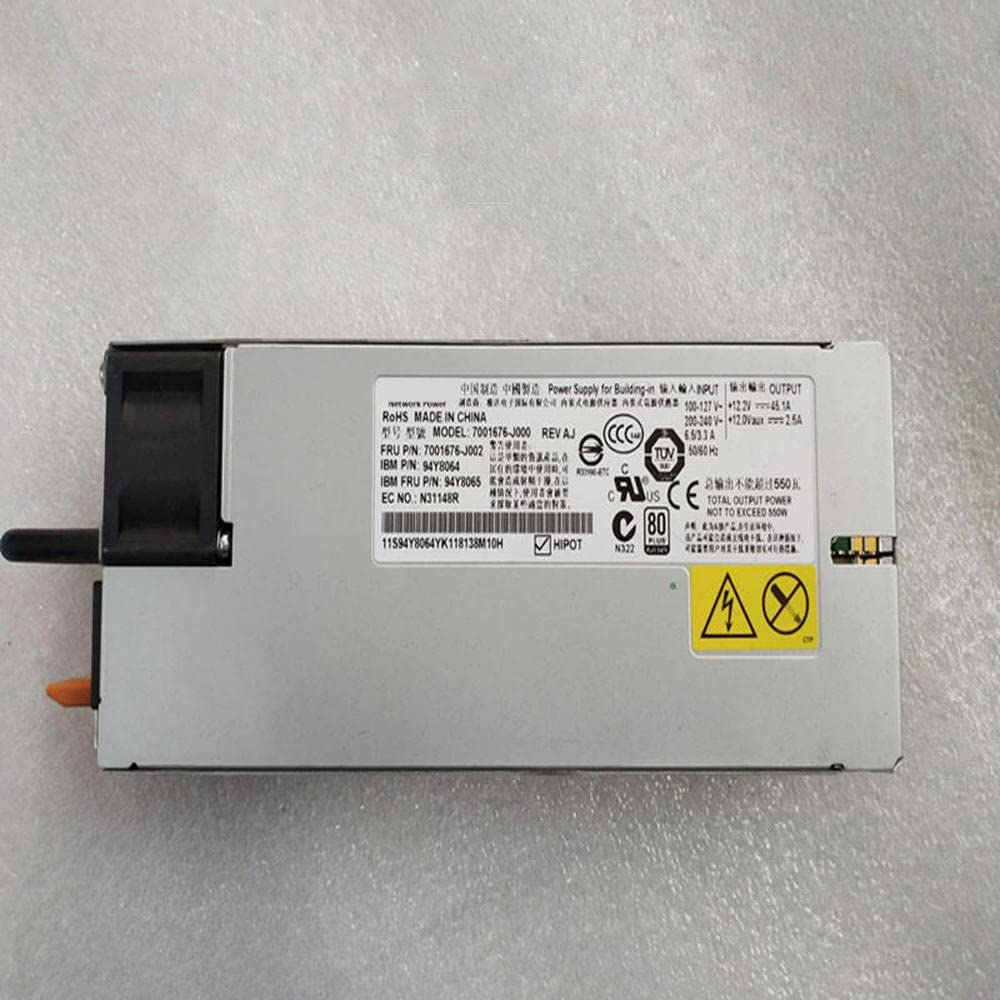
This image shows the Generic 550W Switching Power Supply, highlighting its form factor and connector edge. The unit features ventilation grilles and a label with technical specifications and safety warnings.
4. Whakatakotoranga
| Putanga Mana | 550W |
| Hototahi | X3550 M4, X3650 M4 Servers |
| Tauira Tauira | 7001676-J000, 7001676-J002, 94Y8065, 94Y8064, 94Y8112, 94Y8111 |
| Kaihanga | Whakanuia |
| Te Ra Tuatahi Wātea | Maehe 19, 2023 |
5. Tatūnga me te Tāuta
- Whakaritea te Tūmau: Ensure the server is powered off and disconnected from all power sources. If hot-swapping, follow your server's specific hot-swap procedure.
- Locate PSU Bay: Identify the power supply bay in your X3550 M4 or X3650 M4 server chassis.
- Tango PSU Tawhito (mehemea e tika ana): If replacing an existing PSU, unlatch and carefully slide the old unit out of the bay.
- Insert New PSU: Align the new 550W Switching Power Supply with the bay and gently slide it in until it clicks securely into place. Ensure the latch mechanism engages.
- Hono Hono: Reconnect the server's power cables.
- Power On Server: Power on the server and verify that the new power supply is recognized and operating correctly, typically indicated by an LED on the PSU or server front panel.
6. Nga Tohutohu Whakahaere
Once installed, the 550W Switching Power Supply operates automatically, providing power to your server components. In redundant configurations, the server will continue to operate if one power supply fails, allowing for hot-swappable replacement. Monitor server management software for power supply status and health.
7. Tiaki
- Tango Puehu: Periodically inspect the power supply's ventilation openings for dust accumulation. Use compressed air to gently clear dust, ensuring the server is powered off and unplugged before doing so.
- Mana Taiao: Ensure the server operates within recommended temperature and humidity ranges to prolong the life of the power supply and other components.
- Whakahōu Firmware: Keep your server's system firmware updated, as these updates can sometimes include improvements for power management and component compatibility.
8. Te Raru
- Kore Mana:
- Verify power cables are securely connected to both the PSU and the power outlet.
- Check the power source (e.g., wall outlet, PDU) for functionality.
- Ensure the PSU is fully seated in its bay.
- PSU Status LED Off/Amber:
- Consult your server's documentation for specific LED indicator meanings. An amber or off LED often indicates a fault.
- If in a redundant configuration, the server may still be operational. Replace the faulty PSU as soon as possible.
- System Instability/Unexpected Shutdowns:
- This could indicate a failing power supply. Check server logs for power-related errors.
- Me whakarite kia tika te hau kia kore e wera rawa.
If issues persist after basic troubleshooting, contact your server manufacturer's support or a qualified technician.
9. Pūtāhui me te Tautoko
For warranty information and technical support regarding this Generic 550W Switching Power Supply, please refer to the documentation provided by your reseller or the original equipment manufacturer of your server system. Keep your purchase receipt for warranty claims.


