
1. Kupu Whakataki
Thank you for choosing the Aigo AC SE 360 Rainbow 360mm Water Cooler. This all-in-one liquid cooling solution is designed to provide efficient thermal management for your high-performance CPU, featuring a 360mm triple radiator and vibrant ARGB lighting. This manual provides essential information for proper installation, operation, and maintenance to ensure optimal performance and longevity of your product.

Image 1.1: Aigo AC SE 360 Rainbow 360mm Water Cooler assembled view.
2. Nga korero haumaru
- Momotuhia te hiko mai i to rorohiko i mua i te whakaurunga, te tiaki ranei.
- Kia tupato ki te hapai i nga waahanga kia kore ai e pakaru.
- Me whakarite kia tika te whakatuu whenua hei aukati i nga aitua hiko.
- Tiakina te hua mai i te makuku me te wera nui.
- Kaua e ngana ki te whakatuwhera i te papu, i te radiator ranei, na te mea ka kore te whakamana, ka turuturu.
- Kaua e taea e nga tamariki.
3. Ihirangi mokete
Manatokohia kei roto i to kete nga waahanga katoa kua whakarārangihia i raro nei:
- 1x Aigo AC SE 360 Water Cooler Unit (Radiator, Pump/CPU Block, Tubing)
- 3x 120mm ARGB Fans
- Mounting Hardware for Intel Sockets (LGA 115X, 1200, 1700, 2011, 2066)
- Mounting Hardware for AMD Sockets (AM2, AM3, AM4, AM5)
- Whakapiri Weariki
- Ngā tīwiri pā me ngā tīwiri pāreti
- ARGB Controller (if included with your specific model)
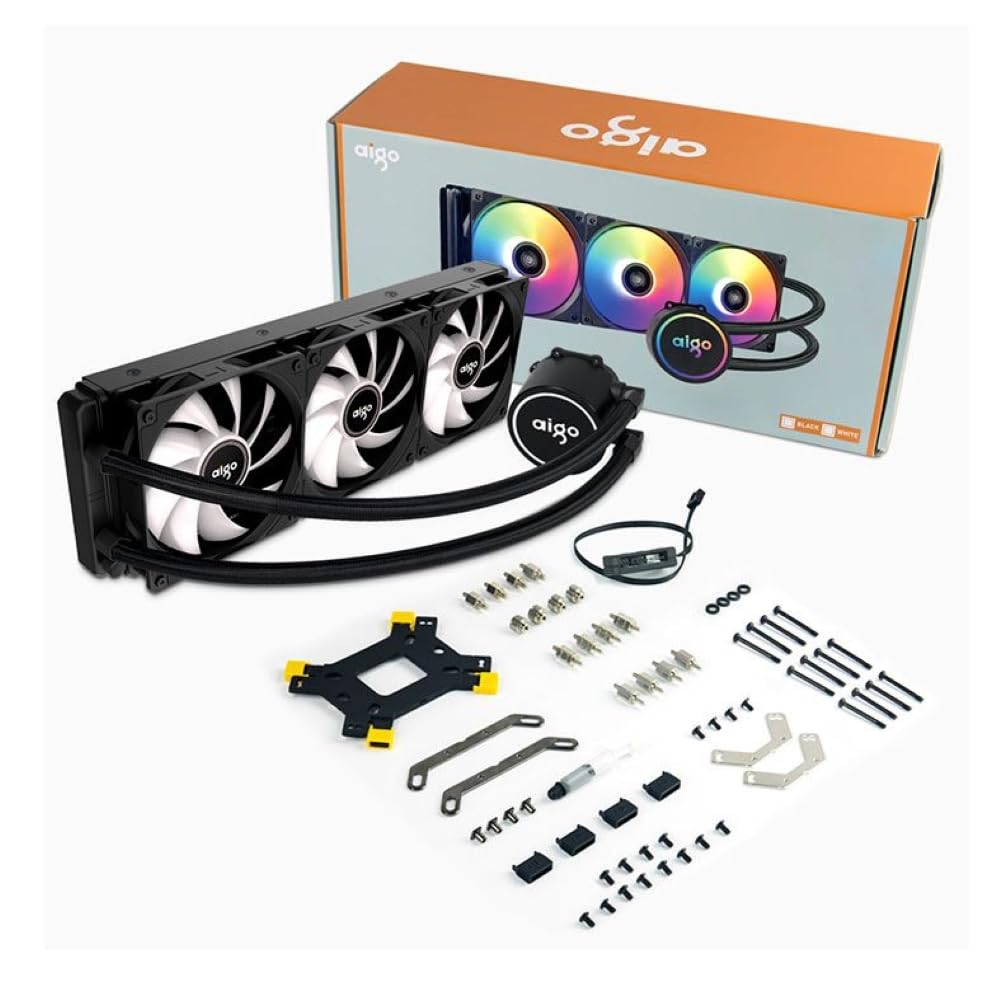
Image 3.1: All components included in the Aigo AC SE 360 package.
4. Tatūnga me te Tāuta
Follow these steps for proper installation of your Aigo AC SE 360 Water Cooler:
- Whakapaia te Papa Matua: Install the appropriate backplate and standoffs for your CPU socket (Intel: 115X, 1200, 1700, 2011, 2066; AMD: AM2, AM3, AM4, AM5). Refer to your motherboard manual for specific instructions.
- Hoatu te Whakapiri Weariki: Clean the CPU surface. Apply a small amount of thermal paste to the center of the CPU IHS (Integrated Heat Spreader).
- Mount the CPU Block/Pump: Carefully place the CPU block onto the CPU, aligning it with the standoffs. Secure it with the provided screws, tightening them in a diagonal pattern until snug. The magnetic block design allows for easy rotation to align the logo or tubing as desired.
- Install Fans to Radiator: Attach the three 120mm ARGB fans to the radiator using the longer screws provided. Ensure the fan airflow direction is correct for your case configuration (typically blowing air through the radiator).
- Maunga Radiator: Install the radiator assembly into your PC case. The 360mm radiator is compatible with most ATX cases that support this size. Secure it with the appropriate screws.
- Connect Fans (Daisy Chain): The fans feature a daisy chain connection system. Connect the fans to each other in series, then connect the final fan's cable to the motherboard's fan header or an ARGB controller. This simplifies cable management by reducing the number of cables.
- Honoa te rama ARGB: Connect the ARGB cables from the fans and pump to a 3-pin, 5V ARGB header on your motherboard or a dedicated ARGB controller. Ensure the voltage is correct (5V) to prevent damage.
- Honoa te Mana o te Papu: Connect the pump's 4-pin power connector to a dedicated AIO_PUMP or CPU_FAN header on your motherboard.
- Whakaha Uepu: Organize all cables neatly to ensure proper airflow and a clean build.
5. Nga Tohutohu Whakahaere
Once installed, the Aigo AC SE 360 Water Cooler operates automatically to maintain optimal CPU temperatures. Here are key operational aspects:
- Automatic Cooling: The pump and fans will adjust their speed based on CPU temperature, ensuring efficient cooling. The pump operates at 12V with 3200 RPM, and fans operate between 800-1800 RPM.
- Mana Rama ARGB: The Rainbow ARGB lighting can be controlled via your motherboard's ARGB software (if connected to a compatible header) or through an included ARGB controller. This allows for various lighting effects and synchronization with other ARGB components.
- Taumata Haruru: The cooler is designed for quiet operation, with a noise level of approximately 30 dB.
6. Tiaki
Regular maintenance helps ensure the longevity and performance of your water cooler:
- Whakapai puehu: Periodically clean the radiator fins and fan blades to prevent dust buildup, which can impede airflow and cooling performance. Use compressed air or a soft brush.
- Tirotiro ngongo: Check the tubing for any signs of kinks, leaks, or damage.
- Aroturuki i te Paemahana: Whakamahia he pūmanawa aroturuki hei aroturuki i ngā pāmahana o tō CPU. Tērā pea he tohu te pikinga nui me tirotiro anō, me horoi rānei.
- Whakapiri Weariki: While not frequently required, reapplying thermal paste every few years can help maintain optimal thermal transfer.
7. Te Raru
If you encounter issues with your Aigo AC SE 360 Water Cooler, refer to the following common problems and solutions:
| Raruraru | Take pea | Rongoā |
|---|---|---|
| Te Paemahana CPU teitei | Insufficient thermal paste, poor contact, dust buildup, pump failure, fan failure. | Reapply thermal paste, ensure CPU block is securely mounted, clean radiator and fans, check pump/fan connections. |
| Kaore nga Kaiwhaiwhai e Miro ana | Loose fan connection, incorrect fan header, faulty fan. | Check fan cables and connections, ensure connected to appropriate motherboard header, test fans individually if possible. |
| No ARGB Lighting | Loose ARGB connection, incorrect ARGB header (e.g., 12V instead of 5V), faulty ARGB component. | Verify ARGB cables are securely connected to a 3-pin, 5V ARGB header. Check motherboard manual for correct header. |
| Nga Haruru rereke | Air bubbles in loop, fan rubbing, pump issue. | Gently tilt the PC case to help dislodge air bubbles. Check for obstructions around fans. If pump noise persists, contact support. |
8. Whakatakotoranga
| Āhuahira | Taipitopito |
|---|---|
| Tauira | AC SE 360 |
| Rahi Radiator | 360 mm (394 x 120 x 27 mm) |
| Rahi Kaiwhaiwhai | 120 mm |
| Tere Tere | 800-1800 RPM |
| Rererangi | 64.05 CFM |
| Pēhanga Pateko | 1.85 mmH₂O |
| Taumata Haruru | 30 dB |
| Pump Voltage | 12 Volts |
| Tere Puma | 3200 RPM |
| Whakamahi Hiko | 3.24 Watts |
| Momo Kawe | Kawenga Ceramic |
| TDP Supported | 280 W |
| Nga turanga Hototahi | Intel (LGA 115X, 1200, 1700, 2011, 2066), AMD (AM2, AM3, AM4, AM5) |
| Tūhono Hiko | 4-pin |
| Hononga ARGB | 3-titi, 5V |
9. Pūtāhui me te Tautoko
The Aigo AC SE 360 Water Cooler comes with a 12-marama whakamana mai i te ra o te hokonga. Ka kapi tenei whakamana i nga hapa hangahanga i raro i nga tikanga whakamahi noa.
For technical support, warranty claims, or any questions not covered in this manual, please contact your retailer or the Aigo customer support team. Please have your proof of purchase and product model number (ACSE360) ready when contacting support.