
1. Kupu Whakataki
Thank you for choosing the Aigo AC SE 120 Water Cooler. This All-in-One (AIO) liquid cooling system is designed to provide efficient thermal management for your CPU, ensuring stable performance and extended component lifespan. This manual provides detailed instructions for installation, operation, maintenance, and troubleshooting.
Please read this manual thoroughly before installation and use to ensure proper setup and to prevent any damage to your system.
2. Nga korero haumaru
- Always disconnect power from your computer before installing or performing maintenance on any components.
- Kia tupato ki te hapai i nga waahanga kia kore ai e pakaru.
- Mauria he whitiki ringaringa ārai-pūmau hei ārai i te kino o te tukunga hiko pūmau (ESD) ki ngā wāhanga tairongo.
- Do not open the sealed liquid cooling loop. Tampering with the unit may cause leaks and void your warranty.
- Ensure all cables are properly connected and routed to avoid interference with moving parts (e.g., fan blades).
- Kaua e taea e nga tamariki.
3. Ihirangi mokete
Verify that all components are present and in good condition before proceeding with installation.
- Aigo AC SE 120 Water Cooler Unit (Pump, Radiator, Fan pre-installed)
- Mounting Hardware for Intel Sockets (LGA 2066/ 2011-v3 / 2011 / 1700 / 1366 / 1200 / 115X)
- Mounting Hardware for AMD Sockets (FM1 / FM2 / FM2+ / AM2 / AM2+ / AM3 / AM3+ / AM4)
- Whakapiri Weariki (i mua i te tono, i roto ranei i te ngongo)
- Pukapuka Kaiwhakamahi

Image: Aigo AC SE 120 Water Cooler unit with its fan, radiator, pump, and various mounting brackets and screws for different CPU sockets.
4. Whakatakotoranga
| Socket Compatibility (Intel) | LGA 2066/ 2011-v3 / 2011 / 1700 / 1366 / 1200 / 115X |
| Socket Compatibility (AMD) | FM1 / FM2 / FM2+ / AM2 / AM2+ / AM3 / AM3+ / AM4 |
| Ahu Poraka Wai | 71 x 66.5 x 45 mm |
| Radiator Dimensions | 154 x 120 x 27 mm |
| Nga Momotuhi Fan | 120 x 120 x 25 mm |
| Tere Puma | 3200 ± 10% RPM |
| Tere Tere | 800~1800RPM |
| Rererangi | 64.05 CFM |
| TDP (Mana Hoahoa Wera) | 165W |
| Taumata Haruru | 30 dBA ± 10% |
| Pēhanga Pateko | 1.85 mmH2O |
| Momo Kawe | Karakia |
| Whakatauhia Voltage | 12V |
| Tikanga whakamatao | Wai (Wai) |
| Pūrere Hototahi | Papamahi |
5. Tatūnga me te Tāuta
This section outlines the general steps for installing your Aigo AC SE 120 Water Cooler. Specific steps may vary slightly depending on your motherboard and PC case. Always refer to your motherboard and case manuals for detailed instructions.
5.1 Prepare the CPU Socket
- Pūtake Intel: Attach the correct Intel backplate to the rear of your motherboard. Secure the standoffs through the motherboard holes from the front.
- Nga turanga AMD: The cooler typically uses the existing AMD backplate. Remove the plastic retention clips from the stock AMD cooler mount, leaving the backplate in place. Install the appropriate AMD standoffs.
- Me whakarite kei te tika te whakanoho o te CPU ki roto i tōna putanga.
- Horoia te mata PTM ki te waipiro isopropyl hei tango i te whakapiri waiariki tawhito me te toenga.
- Apply a thin, even layer of thermal paste to the center of the CPU's integrated heat spreader (IHS). If thermal paste is pre-applied to the water block, skip this step.
5.2 Install the Radiator and Fan
- Determine the optimal mounting location for the 120mm radiator in your PC case. Common locations include the rear exhaust or top exhaust.
- Mount the 120mm fan to the radiator using the provided screws. Ensure the fan is oriented to push or pull air in the desired direction (e.g., exhaust air out of the case).
- Secure the radiator assembly to your PC case using the appropriate screws.

Whakaahua: Taha view of the Aigo AC SE 120 Water Cooler, showing the radiator with a white fan attached, and the pump/water block unit.
5.3 Mount the Water Block
- Attach the correct mounting brackets to the water block/pump unit.
- Whakanohoia te paraka wai ki runga i te PTM, me te whakarite i nga kohao whakapuru ki nga tuunga.
- Whakaorangia te paraka wai ki nga koromatua koromatua, nati ranei, whakamauhia i roto i te tauira hauroki tae noa ki te watea. Kaua e whakakaha rawa.
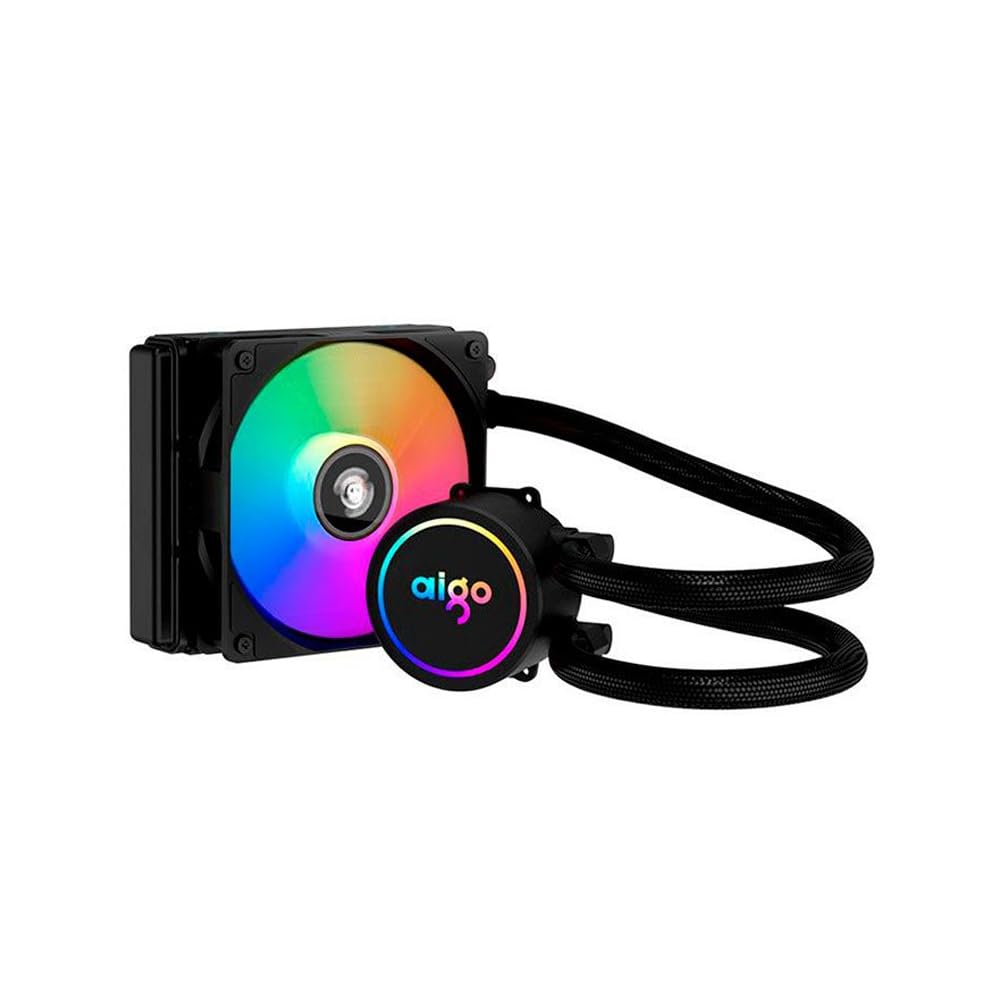
Image: The Aigo AC SE 120 Water Cooler showing the pump unit with an illuminated Aigo logo and a rainbow-colored fan on the radiator.
5.4 Hononga Tauera
- Connect the pump power cable to a dedicated AIO_PUMP or CPU_FAN header on your motherboard. If your motherboard has neither, use a SYS_FAN header and ensure it is set to run at full speed in the BIOS.
- Connect the fan power cable to the CPU_FAN header on your motherboard. If your motherboard has multiple fan headers, consult your motherboard manual for the recommended CPU fan header.
- If your cooler has RGB lighting, connect the RGB cable to a compatible RGB header on your motherboard (e.g., 3-pin ARGB or 4-pin RGB, depending on the cooler's connector type).
- Route all cables neatly to avoid obstructing airflow or interfering with other components.
6. Nga Tohutohu Whakahaere
Once installed, the Aigo AC SE 120 Water Cooler operates automatically based on your motherboard's fan control settings.
- Hiko Tuatahi: After installation, power on your computer. The pump and fan should start operating.
- Tautuhinga BIOS/UEFI: Access your motherboard's BIOS/UEFI settings to ensure the CPU_FAN and AIO_PUMP headers are configured correctly. It is recommended to set the pump header to run at full speed (100%) for optimal cooling performance. Fan speeds can be adjusted based on temperature curves for a balance of cooling and noise.
- Rarama RGB: If connected to an RGB header, the lighting effects can typically be controlled via your motherboard's RGB software (e.g., ASUS Aura Sync, MSI Mystic Light, Gigabyte RGB Fusion, ASRock Polychrome Sync).
- Aroturuki: Use system monitoring software to check CPU temperatures and ensure the cooler is functioning effectively.

Whakaahua: Runga-raro view of the Aigo AC SE 120 Water Cooler, highlighting the illuminated Aigo logo on the pump and the rainbow lighting of the fan.
7. Tiaki
Regular maintenance helps ensure optimal performance and longevity of your water cooler.
- Whakapai puehu: Me horoi i ia wa nga tara radiator me nga matatahi powhiri hei aukati i te hanga puehu, ka aukati i te rere o te hau me te whakaiti i te pai o te whakamahana. Whakamahia te hau kōpeke, te paraihe ngohengohe ranei.
- Tirohanga Kaiwhai: Check the fan for any signs of wear, damage, or excessive noise. Replace if necessary.
- Tirohanga Hose: Visually inspect the hoses for any kinks, cracks, or signs of leakage. While AIOs are sealed, regular checks are recommended.
- Whakapiri Weariki: The thermal paste typically lasts for several years. If you notice a significant increase in CPU temperatures over time, consider reapplying fresh thermal paste. This requires carefully removing the water block, cleaning both surfaces, and applying new paste.
8. Te Raru
If you encounter issues with your Aigo AC SE 120 Water Cooler, refer to the following common problems and solutions:
| Raruraru | Take pea | Rongoā |
|---|---|---|
| Te Paemahana CPU teitei |
|
|
| Kaiwhaiwhai Kaore i te Miro |
|
|
| Puma Kaore i Rere / Haruru rereke |
|
|
| Rarama RGB Kaore i te Mahi |
|
|
9. Pūtāhui me te Tautoko
The Aigo AC SE 120 Water Cooler comes with a 12-marama whakamana mai i te rā i hokona ai. Ka hipokina e tēnei pūtāhui ngā hapa hanga me ngā hapa i raro i ngā tikanga whakamahinga noa.
Karekau te raihana e kapi:
- Ko te kino i puta mai na te he o te whakaurunga, te whakamahi kino, te mahi kino, te wareware ranei.
- Ko te kino i puta mai i nga whakarereketanga kore mana, i te whakatikatika ranei.
- Te kino i puta mai i nga aitua taiao, i nga aitua ranei.
For technical support, warranty claims, or further assistance, please contact your retailer or the Aigo customer service department. Please have your proof of purchase and product model number (ACSE120-BK) ready when contacting support.