
Jectse Jectse6eao57zprw
Jectse HD 1080P WiFi Body Camera User Manual
Model: Jectse6eao57zprw
Nga Korero Haumaru Nui
Pānuihia ngā whakatūpato me ngā tohutohu haumaru katoa i mua i te whakamahinga o tēnei hua. Ki te kore e whai i ēnei tohutohu, ka pāngia pea koe e te ru hiko, te ahi, te whara kino rānei.
- Tiakina te taputapu mai i te wai me te makuku.
- Kaua e ngana ki te wetewete, ki te whakatika ranei i te taputapu. Tukuna atu nga ratonga katoa ki nga kaimahi whai tohu.
- Whakamahia anake te rahinga utu kua tohuatage (DC 5V) and Type-C cable.
- Āta tirohia te taputapu kia kore e pāngia e ngā pāmahana tino wera (wera, makariri rānei) me te rā tika rānei.
- Do not block the microphone hole or lens during operation.
- Makahia te pākahiko me te taputapu kia rite ki ngā ture ā-rohe.
Ka mutu te huaview
The Jectse HD 1080P WiFi Body Camera is a compact and versatile video recorder designed for personal security and documentation. It features a 1080P HD image sensor, 180-degree rotatable lens, built-in WiFi hotspot for real-time viewing, and one-button operation for ease of use. Its compact design with a back clip allows for convenient portability.

Image: The Jectse HD 1080P WiFi Body Camera shown alongside its USB Type-C charging cable.
Nga waahanga matua
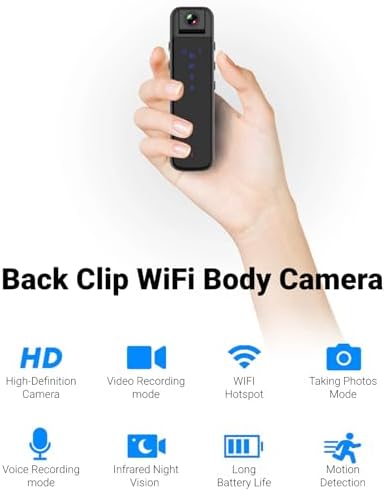
Image: Visual representation of the camera's main features including HD recording, video mode, WiFi hotspot, photo mode, voice recording, infrared night vision, long battery life, and motion detection.
- HD 1080P Image Sensor: Equipped with a high-definition sensor for clear image quality.
- Built-in WiFi Hotspot: Connect to a mobile app for real-time video playback and control.
- Compact Back Clip Design: Easily attach to clothing for portable use.
- Arotahi Hurihuri 180-Tohu: Adjust the lens angle for flexible recording.
- Mahi Kotahi-Patene: Simple controls for recording video, taking photos, and voice recording.
- HD Noise Cancelling: Advanced microphone technology for clearer audio.
- Tirohanga Po Infrared: Capable of recording in low-light conditions without auxiliary lights.
- Roa te Ora Pūhiko: Approximately 5 hours of continuous recording.
- Rokiroki Whakaroha: Supports up to 256GB small memory card (TF card, not included).
Nga Waehanga me nga Mana Whakahaere
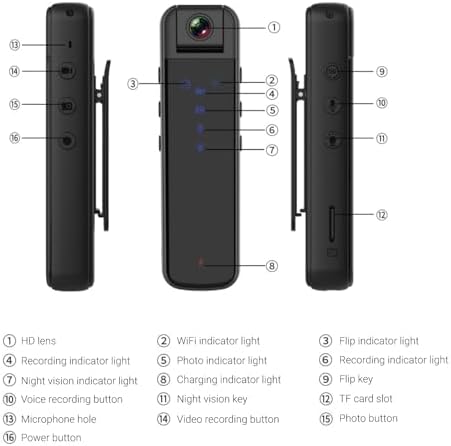
Image: Detailed diagram illustrating the various parts and controls of the body camera, including the lens, indicators, buttons, and ports.
| Kao. | Wāhanga/Mana |
|---|---|
| 1 | Karu HD |
| 2 | rama tohu WiFi |
| 3 | Flip indicator light |
| 4 | Rama tohu tuhi |
| 5 | Photo indicator light |
| 6 | Rama tohu tuhi |
| 7 | Te rama tohu tirohanga o te po |
| 8 | Rama tohu utu |
| 9 | Pore kī |
| 10 | Patene tuhi reo |
| 11 | Kī tirohanga pō |
| 12 | mokamoka kāri TF |
| 13 | Puka hopuoro |
| 14 | Patene tuhi ataata |
| 15 | Pātene whakaahua |
| 16 | Pātene hiko |
Tatūnga
1. Ka tohatohahia te Pūrere
Before first use, fully charge the body camera. Connect the provided Type-C USB cable to the camera's Type-C interface and the other end to a DC 5V power source (e.g., computer USB port, USB wall adapter). The charging indicator light (8) will illuminate during charging and turn off when fully charged. A full charge provides approximately 5 hours of continuous recording.
2. Inserting/Removing Memory Card
The camera supports small memory cards (TF cards) up to 256GB (not included). Locate the TF card slot (12) on the side of the camera. Gently insert the memory card with the gold contacts facing down until it clicks into place. To remove, push the card in slightly until it springs out.
Note: Ensure the device is powered off before inserting or removing the memory card to prevent data loss or damage.
3. Initial Setup and App Connection (WiFi)
The camera features a built-in WiFi hotspot for real-time viewing and control via a mobile application. Follow these steps to connect:
- Power on the camera by pressing and holding the Power button (16).
- On your phone or tablet, go to your WiFi settings.
- Rapua a WiFi network named "CS05" (e.g., CS05 CE01) and connect to it.
- Once connected, open the "Sports Camera" application on your mobile device.
- From the main interface of the app, enter the real-time preview interface. You can now view ora footage and control recording/photo functions from the app, or continue to use the physical buttons on the camera.
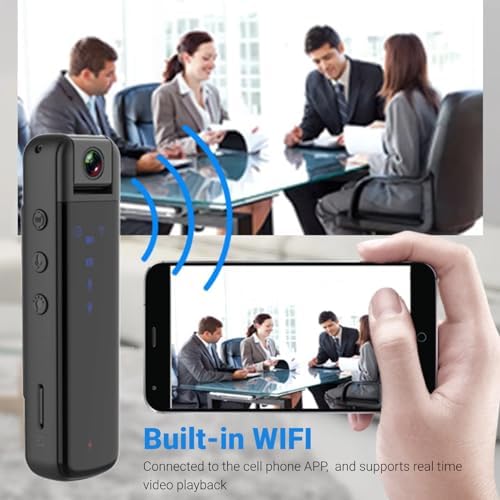
Image: Illustration of the camera's built-in WiFi functionality, allowing connection to a smartphone app for real-time video playback.
Nga Tohutohu Whakahaere
1. Te Hiko / Whakaweto
- Whakahiko: Press and hold the Power button (16) until the indicator lights illuminate.
- Weto Whakakore: Press and hold the Power button (16) again until the indicator lights turn off.
2. Hopu Ataata
The camera supports 1080P video recording.
- Tīmata te tuhi: Press the Video recording button (14) once. The recording indicator light (4) will flash to indicate recording is in progress.
- Kati te tuhi: Press the Video recording button (14) again. The recording indicator light will stop flashing.
3. Hopu Whakaahua
Capture still images with a single press.
- Tango Whakaahua: Press the Photo button (15) once. The photo indicator light (5) will flash briefly.
4. Te Tuhi reo
Record audio only using the dedicated voice recording function.
- Tīmatahia te hopu reo: Press the Voice recording button (10) once. The recording indicator light (6) will illuminate.
- Stop Voice Recording: Press the Voice recording button (10) again. The recording indicator light will turn off.

Image: Visual guide to the camera's one-key control system, highlighting the buttons for starting video recording, taking photos, and voice recording.
5. 180-Degree Lens Rotation
The camera lens can be manually rotated up to 180 degrees to capture footage from various angles (forward, backward, upward). Adjust the lens (1) to your desired orientation before recording.
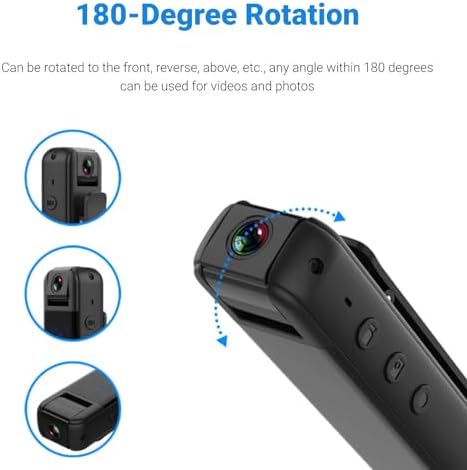
Image: Diagram demonstrating the camera's 180-degree rotatable lens, showing how it can be adjusted for different recording perspectives.
6. Matakitenga po
The camera is equipped with infrared night vision for recording in low-light or dark environments without the need for external illumination.
- Whakahohehia te Tirohanga Pō: Press the Night vision key (11) once. The night vision indicator light (7) will illuminate.
- Whakakorehia te Tirohanga Pō: Press the Night vision key (11) again. The night vision indicator light will turn off.

Image: A split image demonstrating the effectiveness of HD infrared night vision, showing a scene in normal light and the same scene clearly visible in darkness.
7. Using the Back Clip
The integrated back clip allows for convenient attachment to clothing, such as a jacket pocket, making it easy to carry and record discreetly.
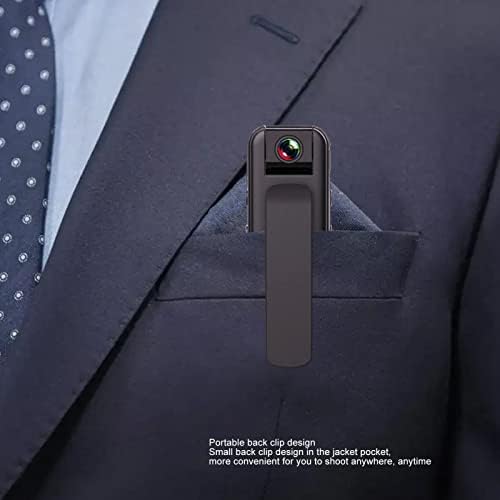
Image: The compact body camera shown clipped into the breast pocket of a suit jacket, demonstrating its portable and discreet design.
Te tiaki
Te horoi
To maintain the performance and appearance of your camera:
- Horoia te tinana o te kāmera ki te kakahu ngohengohe, maroke.
- Mo te arotahi, whakamahia he kakahu horoi mo te arotahi motuhake me te otinga kia kore e pakaru.
- Kaua e whakamahi i nga matū kino, i nga whakarewa horoi, i nga horoi kaha ranei.
Rokiroki
When not in use, store the camera in a cool, dry place, away from direct sunlight and extreme temperatures. Ensure the battery is partially charged (around 50%) if storing for extended periods to prolong battery life.
Raparongoā
| Raruraru | Take pea | Rongoā |
|---|---|---|
| Karekau te kamera i te hiko. | He iti te pākahiko. | Whakakīia katoatia te kāmera. |
| Cannot connect to WiFi hotspot. | Incorrect WiFi name selected; camera WiFi not active. | Ensure the camera is powered on and its WiFi hotspot is active. Select the correct "CS05" network. |
| Ka mutu ohorere te tuhi. | Memory card full; low battery. | Tirohia te rokiroki kāri mahara, ka muku i ngā mea kāore e hiahiatia files or replace card. Charge the camera. |
| Video playback issues. | Kua pirau file; incompatible playback software. | Try playing on a different device or using standard video playback software. Ensure memory card is not corrupted. |
| He kino te kounga o te ahua/ataata. | Dirty lens; insufficient lighting (if night vision is off). | Clean the lens. Activate night vision in low-light conditions. |
Whakatakotoranga
| Āhuahira | Whakatakotoranga |
|---|---|
| Momo Hua | WiFi Body Camera |
| Rauemi | Kirihou |
| Whakatau Ataata | 1920x1080P |
| Whakawaehere Ataata | M-JPEG |
| Hōputu Ataata | AVI |
| Tauwehenga Whakaahua | 16:9 |
| Hōputu Tuhituhi | WAV |
| Pūhiko Raukaha | 3.7V 1000mAh Lithium Battery (Built-in) |
| Wā Mahi | Approx. 5 hours continuous recording |
| Whakaritea Arotahi | 180-tohu hurihanga |
| Tautoko Rokiroki | Up to 256GB small memory card (TF card, not included) |
| Momo Atanga | Momo-C |
| Whakapae Voltage | DC 5V |
| Pūmanawa purei | System comes with conventional sound and video playback software |
| Ahu (Pake) | 13 x 9 x 5 cm |
| Taumaha (Pake) | 165 g |
| Tau tauira | Jectse6eao57zprw |
Pūtāhui me te Tautoko
Jectse is committed to providing high-quality products and customer service. While specific warranty details are not provided in this manual, please retain your proof of purchase for any warranty claims.
For further assistance, technical support, or inquiries, please visit the official Jectse brand store or contact their customer service through the platform where you purchased the product.
You can visit the Jectse store here: Jectse Official Store
Ask a question about this manual
Ask about setup, troubleshooting, compatibility, parts, safety, or missing instructions. Manuals+ will review the question and use this page’s manual context to help answer it.