
Kupu Whakataki
The DIHOOM DM-P074G is a 4G LTE solar-powered PTZ (Pan-Tilt-Zoom) security camera designed for outdoor surveillance in areas without traditional power or Wi-Fi access. This camera features 2K 4MP resolution, full-color night vision, intelligent motion detection, and two-way audio communication. Its integrated solar panel and high-capacity battery ensure continuous operation, while IP66 waterproofing provides durability in various weather conditions. This manual provides essential information for the proper setup, operation, and maintenance of your security camera.

Figure 1: The DIHOOM 4G LTE Solar PTZ Security Camera mounted with its solar panel, demonstrating wireless installation and remote monitoring via a smartphone app.
Ihirangi mokete
Tirohia koa ko nga mea katoa kei raro nei kei roto i to kete:
- Security Camera Unit
- Paewhiri Solar x 1
- Whakapuru x 1
- Mounting Sticker x 1
- Mōkī Tīwiri x 2
- Iron Bracket x 1
- Mowhiti x 2
- Quick User Manual x 1
- SIM Card (with 300 MB free data)

Figure 2: All components included in the DIHOOM DM-P074G security camera package.
Tatūnga
1. Kaari SIM me te Whakataunga Kaari SD
- Locate the SIM card slot on the camera.
- Insert the provided 4G LTE SIM card into the slot. Ensure it is correctly oriented.
- For local storage, insert a microSD card (up to 256GB, not included) into the designated slot.
2. Taupānga Tikiake me te Hononga
- Download the dedicated mobile application from your smartphone's app store.
- Open the app and follow the on-screen instructions to add your new camera. This typically involves scanning a QR code on the camera or its packaging.
- Me whakarite kei te hohe te hononga ipurangi o tō waea atamai i te wā o te tatūnga.
3. Te Whakamau i te Kāmera me te Paewhiri Rā
The camera supports wall and pole mounting. Choose a location that provides optimal surveillance coverage and receives ampte ra tika mo te panui solar.
- Use the mounting bracket and screws to securely attach the camera to a wall or pole.
- Mount the 7W solar panel in a position that maximizes sun exposure throughout the day.
- Connect the solar panel cable to the camera's charging port. The camera's battery (18000mAh) will charge via the solar panel.

Figure 3: The camera's IP66 waterproof design and simplified setup steps, including SIM card insertion and app connection.

Figure 4: Details of the 7W solar panel and 18000mAh battery, illustrating the camera's self-sustaining power system.
Nga Tohutohu Whakahaere
1. Mana Whakahaere Pan-Tītaha-Whakanui (PTZ)
Uru ki te ora view in the mobile app. Use the on-screen controls to remotely adjust the camera's viewing angle. The camera offers 350° horizontal pan and 150° vertical tilt capabilities, allowing comprehensive coverage. Digital zoom is also available to view taipitopito.

Figure 5: Illustration of the camera's 350-degree pan and 150-degree tilt rotation for wide area surveillance.
2. Te Motini me nga Matohi
The camera features intelligent PIR (Passive Infrared) human and motion detection. When motion is detected, the camera can trigger spotlights, an alarm, and send instant notifications to your smartphone. Sensitivity settings can be adjusted within the app to minimize false alarms.

Figure 6: The camera's smart PIR human detection feature, highlighting detected movement within the surveillance area.
3. Matakitenga po
The camera provides 2K 4MP resolution for clear images. It supports full-color night vision, which activates when warm lights are engaged, capturing color video even in low-light conditions. Standard infrared night vision is also available for clear black and white footage i roto i te pouri tino.
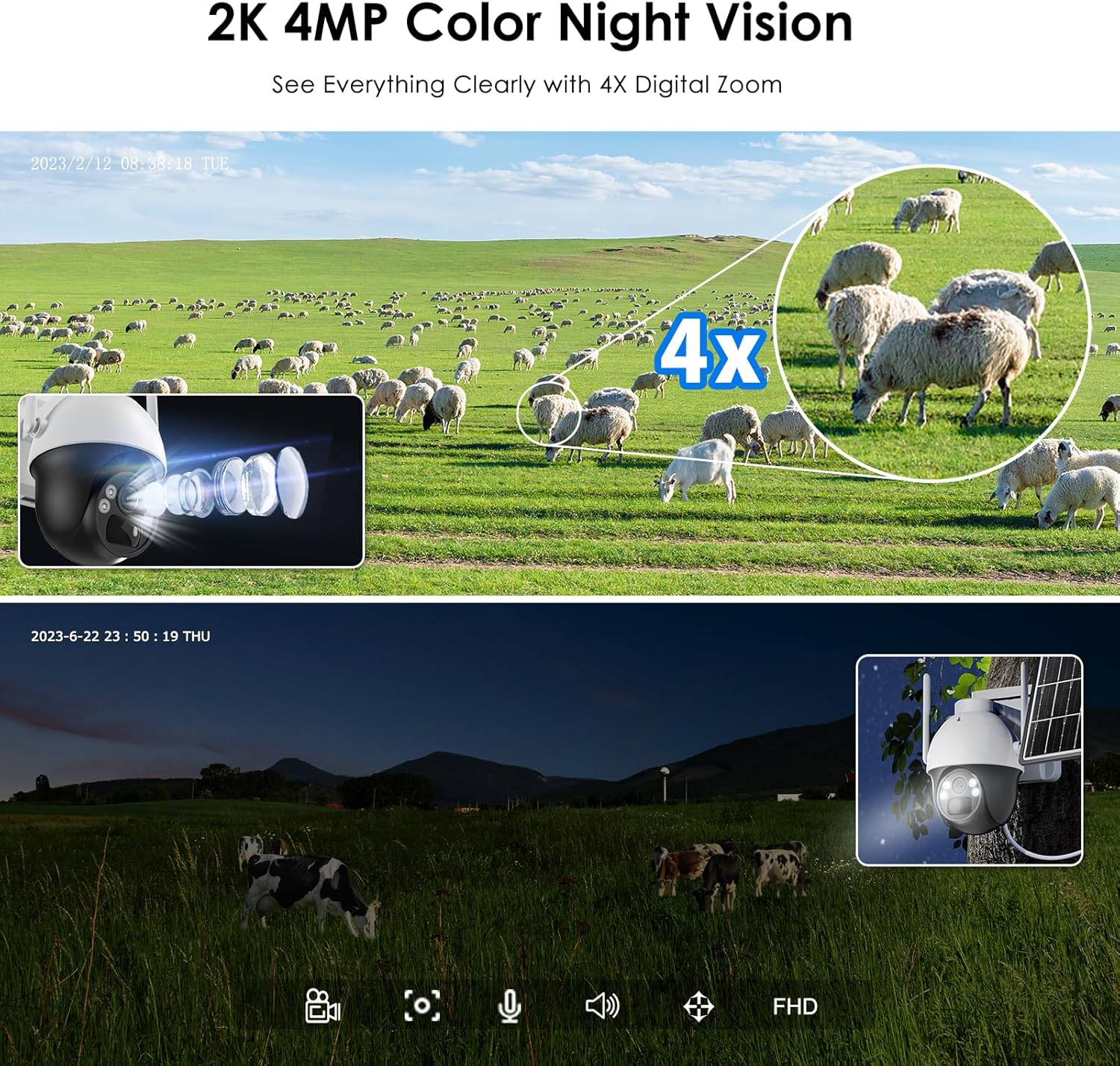
Figure 7: Comparison of daytime 2K 4MP footage with 4X digital zoom and full-color night vision capabilities.
4. Whakawhitiwhiti-rua
Utilize the built-in microphone and speaker for two-way audio communication. This allows you to speak to individuals near the camera or use the siren function for deterrence.
5. Te tuhi me te Rokiroki
The camera supports continuous recording and event-triggered recording to a local microSD card (up to 256GB). Footage can be accessed and managed through the mobile application.
Te tiaki
- Te horoi: Me horoi i ia wa te arotahi kamera me te panui solar ki te ngohengohe, damp cloth to ensure optimal image clarity and charging efficiency.
- Aroturuki Pūhiko: Monitor the battery level via the app. Ensure the solar panel is free from obstructions to maintain consistent charging.
- Whakahōu Firmware: Check the mobile app regularly for available firmware updates to ensure your camera has the latest features and security enhancements.
- Tiaki Taiao: While IP66 rated, avoid directing high-pressure water jets directly at the camera.
Raparongoā
- Camera Not Connecting/Offline:
- Ensure the 4G SIM card has an active data plan and good signal strength in the camera's location.
- Restart the camera by powering it off and on.
- Check if the camera's battery is sufficiently charged. - Kounga Atahanga Kino:
- Clean the camera lens for any dirt or smudges.
- Ensure there are no obstructions in the camera's field of view.
- Verify the camera's resolution settings in the app. - Kaore i te Mahi te Motini:
- Check the motion detection settings in the app, ensuring it is enabled and sensitivity is adjusted correctly.
- Ensure there are no physical obstructions blocking the PIR sensor. - Karekau te pākahiko i te utu:
- Ensure the solar panel is clean and free from debris.
- Verify the solar panel is positioned to receive maximum direct sunlight.
- Check the connection cable between the solar panel and the camera. - Nga take ororongo-rua:
- Kia tino mohio kei te āraia te hopuoro me te kaikorero.
- Check volume settings in the app and on your smartphone.
Whakatakotoranga
| Āhuahira | Whakatakotoranga |
|---|---|
| Waitohu | DIHOOM |
| Ingoa Tauira | 4G Solar Powered Security Camera (DM-P074G) |
| Hangarau Hononga | Wireless (4G LTE) |
| Pūrere Hototahi | Waea atamai |
| Puna Mana | Ma te Puhiko, Ma te Ra |
| Momo Whakaeke | Maunga Pouaka, Maunga Taiepa |
| Whakataunga Hopu Ataata | 4 MP (2K) |
| Tae | Mā |
| Momo Tāuta | Wall Mounted, Pole Mounted |
| Rauemi | Kirihou |
| Taumata Atete Wai | Parewai (IP66) |
| Momo Matohi | Motini anake |
| Whakatau Puoko Whakaahua | 4 MP |
| Hangarau Whakawhitiwhiti Ahokore | 4G |
| Wattage | 5 watts (Camera), 7 watts (Solar Panel) |
| Pūhiko Raukaha | 18000 mah |
| Te maha o nga hongere | 2 |
| Te Ahu o te Tuemi | 10 x 9 x 6 henimita |
| Whakatau Ataata Whaihua | 1080 Pixels (Output) |
| Viewing Koki | 120 Waeine |
| Momo Arotahi | Arotahi a-ringa |
| Hangarau Pūoko Whakaahua | CMOS |
| Whakamahinga Hua Tauwhāiti | 2K 4MP Super HD, 4G-LTE connection, IP66 waterproof, Continuous solar energy, PIR human and motion detection |
Pūtāhui me te Tautoko
The DIHOOM DM-P074G security camera comes with a 2-tau pūtāhui mai i te ra o te hokonga.
For any questions, technical assistance, or warranty claims, please contact our support team:
- Īmēra: ukdihoom@hotmail.com
- We offer online service and lifetime technical support.