
Kupu Whakataki
This manual provides comprehensive instructions for the Veho Kuzo Sports Smart Watch F1S. Please read this manual carefully before using your device to ensure proper operation and to maximize its features. Keep this manual for future reference.

Whakaahua: Mua view of the Veho Kuzo Sports Smart Watch F1S, showcasing tona whakaaturanga porowhita me te hoahoa taratara.
Nga korero haumaru
Always follow basic safety precautions when using this device to reduce the risk of injury, electric shock, fire, or damage to the product.
- Kaua e ngana ki te wetewete, ki te whakarereke ranei i te taputapu.
- Purihia te taputapu mai i nga wera nui me te ra tika.
- Āta tirohia kia kore te taputapu e pāngia e ngā pānga kaha, e ngā hinganga rānei.
- Me kōrero ki tētahi tohunga hauora i mua i te tīmatanga o tētahi tikanga whakakori tinana hou, inā koa mēnā he mate hauora tōu.
- The device is water-resistant (IP68) but not waterproof for diving or high-pressure water activities.
Ihirangi mokete
Me mohio kei roto katoa nga taonga i roto i te pouaka:
- Veho Kuzo Sports Smart Watch F1S (Black)
- Magnetic Charging Cradle (USB-A)
- Pukapuka Kaiwhakamahi reo-maha
Tatūnga
1. Ka utu i te Mataara Ataata
Before first use, fully charge your Veho Kuzo F1S Smart Watch.
- Connect the magnetic charging cradle to a USB-A power source (e.g., computer USB port, wall adapter).
- Align the magnetic pins of the cradle with the charging contacts on the back of the watch. The watch will snap into place and display a charging indicator.
- Charge for approximately 2 hours for a full charge. A full charge provides up to 15 days of typical use.

Image: Graphic illustrating the 15-day battery life of the Veho Kuzo F1S Smart Watch.
2. Te Tāuta i te Taupānga Hoa
To unlock all features and synchronize data, download the official companion app on your smartphone.
- The app is compatible with Apple iOS and Android devices.
- Rapua "Kuzo" or "Veho Kuzo" in your device's app store.
- Install the app and follow the on-screen instructions to create an account.
3. Whakahoahoa ki to Waea atamai
After installing the app, pair your watch with your phone via Bluetooth.
- Me mohio kei te whakahohea te Nihokikorangi i runga i to waea atamai.
- Open the companion app and navigate to the device pairing section.
- Turn on your Veho Kuzo F1S Smart Watch.
- Select your watch from the list of available devices in the app.
- Whakaūhia te tono takirua i runga i to mataaratanga me to waea atamai.

Image: A smartphone displaying the Veho Kuzo companion app, showing health and activity data.
Nga Tohutohu Whakahaere
Whakaterenga Taketake
The Veho Kuzo F1S features a 1.3-inch AMOLED touchscreen and physical buttons for navigation.
- Mata pa: Swipe ki runga, ki raro, ki maui, ki matau rānei hei whakatere i ngā tahua me ngā widget. Patohia hei tīpako i ngā tūemi.
- Patene taha: Use the physical buttons on the side of the watch to return to the home screen, access sports modes, or other quick functions.
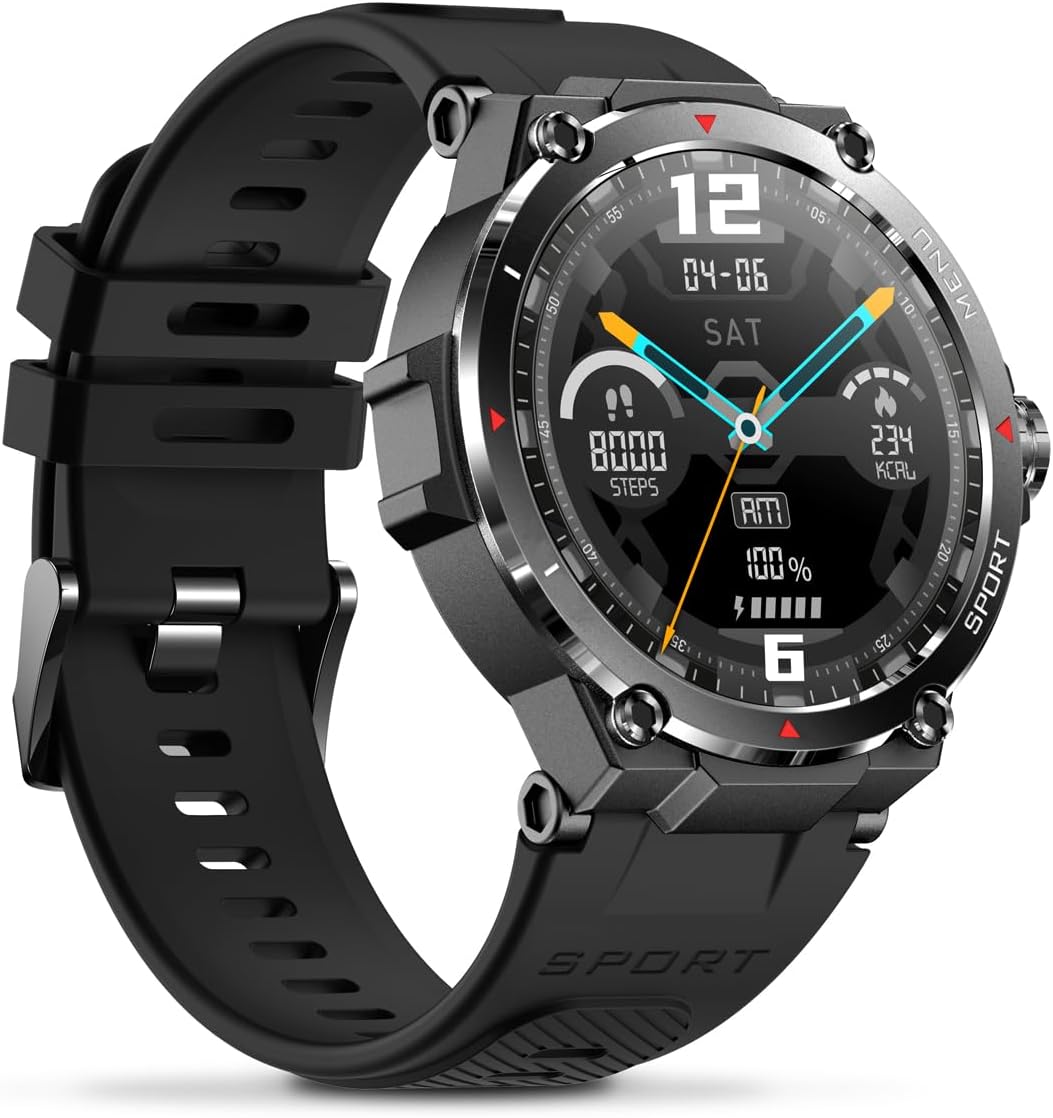
Whakaahua: Taha view of the Veho Kuzo F1S Smart Watch, highlighting the control buttons and rugged casing.
Te Aroturuki Hauora me te Hauora
The watch continuously monitors various health and fitness metrics.
- Tere Manawa: 24/7 heart rate monitoring. View nga raraunga tuuturu i runga i te mataaratanga, i nga ahuatanga taipitopito ranei i roto i te taupānga.
- Haora Toto: Inehia to taumata o te hāora toto.
- Aroturuki Mahi: Tracks steps, calories burned, and distance covered. Supports walking, running, and cycling.
- Kaupane Moe: Monitors daily, weekly, and monthly sleep patterns, detailing deep sleep, light sleep, and awake times.
- GPS: Built-in 3-mode GPS (GPS+Beidou+Glonass) and Assisted GPS (AGPS) for accurate outdoor performance tracking and live map positioning. Compatible with STRAVA.

Image: The Veho Kuzo F1S Smart Watch displaying heart rate monitoring data.
Āhuatanga Maamaa
- Whakamōhiotanga: Receive push notifications from apps like WhatsApp, Twitter, Facebook, LinkedIn, Skype, YouTube, Messenger, and Instagram directly on your watch.
- Mana Waiata: Control music playback (volume, skip tracks, play/pause) on your paired smartphone directly from the watch.
- Nga Mahi Wā: Access alarm, timer, intermittent timer, stopwatch, and countdown functions.
- Kimi Waea: Use your watch to locate your paired smartphone.
- News/Weather App: Integrated news and weather application functionality.
- Nga Kanohi Maataki Whakaritea: Choose from hundreds of different watch face designs through the companion app.
Te tiaki
Te horoi
Hei pupuri i te āhua me te mahi a te mataaratanga:
- Horoia te wati me te here i nga wa katoa ki te ngohengohe, damp kakahu.
- A ape i te whakamahi i nga matū kino, i nga horoi horoi ranei.
- Me whakarite he ma, he maroke hoki nga hoapaki utu i mua i te utu.
Ātete Wai (IP68)
The Veho Kuzo F1S Smart Watch has an IP68 rating, meaning it is water-resistant in fresh water up to a maximum depth of 1.5 meters for up to 30 minutes, and is protected from dust.
- Do not use the watch for diving, snorkeling, or high-speed water sports.
- Avoid exposing the watch to hot water, steam, or detergents.
- Whakamaroketia te mataaratanga kia tino maroke i muri i te urunga ki te wai.
Tiaki Pūhiko
- Charge the watch regularly to maintain battery health.
- A ape i te whakaheke i te pākahiko i nga wa katoa.
- Penapenahia te mātaaratanga ki te wāhi hauhautanga, maroke mēnā kāore e whakamahia mō te wā roa.
Raparongoā
If you encounter issues with your Veho Kuzo F1S Smart Watch, refer to the following common solutions:
- Kia mataara kia kaua e huri: Ensure the watch is fully charged. Connect it to the charging cradle and check for the charging indicator.
- Kaore e taea te hono ki te waea:
- Me mohio kei te whakahohea te Nihokikorangi i runga i to waea me te mataaratanga.
- Me mohio kei roto te mataaratanga i to waea.
- Tīmatahia te mataaratanga me to waea.
- Ngana ki te wetewete me te hono ano i te taputapu ma te taupānga.
- Raraunga hauora hē:
- Me whakarite kia mau te mataaratanga ki to ringaringa, engari kaua e piri rawa.
- Horoia te pūoko kei muri o te mataaratanga.
- Environmental factors and skin conditions can affect accuracy.
- Ko nga whakamohiotanga kaore e puta:
- Tirohia ngā tautuhinga whakamōhiotanga taupānga i runga i tō waea me roto i te taupānga hoa.
- Me mohio kei te hono te mataaratanga ki to waea ma te Nihokikorangi.
Mō ētahi atu āwhina, tirohia te wāhanga tautoko, whakapā atu rānei ki te ratonga kiritaki.
Whakatakotoranga
| Ingoa Tauira | F1S |
| Tau tauira | VSW-001-F1S-B (164426) |
| Whakaatu | 1.3" Mata Paa AMOLED |
| Whakatau | 360 x 360 pika |
| Tiwhikete | Dialogue14695, PPGHX3690 |
| Maharahara | ROM 128MB + RAM 2MB |
| Nihokikorangi | v5.1 |
| Pūhiko Raukaha | Rithium-polymer 300mAh |
| Wā Mahi | Tae atu ki te 15 ra |
| Wā tūtatari | Tae atu ki te 21 ra |
| Waa Whakatau | Approx. 2 haora |
| Momo utu | USB-A to Magnetic Charging Cradle |
| Ātete wai | IP68 (up to 1.5 meters for 30 minutes in fresh water) |
| Pūnaha GPS | 3-mode (GPS+Beidou+Glonass) |
| Ahu | 46 mm x 12.9 mm |
| Taumaha | 51g |
| Whanui Whanui | 22mm |
| Te Taapiri | 260mm |
| OS Hototahi | Android, iOS |
| Nga Reo Tautokona | All major languages (replicates paired smartphone language) |
Pūtāhui me te Tautoko
The Veho Kuzo Sports Smart Watch F1S comes with a limited warranty. Please refer to the warranty card included in your package or visit the official Veho webpae mo nga tikanga me nga tikanga whakamana.
Tautoko Kiritaki
For technical support, troubleshooting, or warranty claims, please contact Veho customer service through their official webpae, nga korero whakapā ranei e whakaratohia ana i roto i to tuhinga hua.
- Tautoko Aipurangi: www.veho-world.com/support (Exoampte hono, ka rereke pea te hono pono)
- Īmēra: support@veho-world.com (Example email, actual email may vary)