
Kupu Whakataki
This manual provides detailed instructions for the UGREEN Nexode Mini 5000mAh 15W MagSafe Power Bank, model PB560. It covers setup, operation, maintenance, troubleshooting, and product specifications to ensure safe and efficient use of your portable magnetic wireless charger.
Ihirangi mokete
- 1 x UGREEN Nexode Mini 5000mAh 15W MagSafe Power Bank
- 1 x USB-C to USB-C Cable (0.6 m)
- 1 x Pukapuka Kaiwhakamahi
Ka mutu te huaview
The UGREEN Nexode Mini Power Bank is a compact and portable charging solution designed for MagSafe-compatible devices. It features both wireless magnetic charging and wired USB-C charging capabilities.

Atahanga: UGREEN Nexode Mini Power Bank showing its non-slip silicone surface for secure attachment and comfortable handling.

Atahanga: A hand holding an iPhone with the UGREEN Nexode Mini Power Bank attached, highlighting its ultra-mini size (approximately 10.6 x 6.9 x 1.3 cm) for portability.

Atahanga: Diagram illustrating the UGREEN Nexode Mini Power Bank's safety features, including Over-Voltage, Over-Current, Short-Circuit, and High-Temperature Protection, ensuring safe charging with 15W Power Delivery and 5000mAh battery capacity.
Tatūnga
Whakataunga Tuatahi
Before first use, fully charge the power bank using the provided USB-C to USB-C cable and a compatible USB power adapter (not included). The LED indicators will show the charging status and battery level.
Nga Tohutohu Whakahaere
Whakakahuria/Weto
- Hei Whakakā: Short press the power button. The power bank will automatically turn off after a period of inactivity if no device is charging.
Ukume Whakatau Ahokore
Align the power bank with the back of your MagSafe-compatible iPhone or a phone equipped with a MagSafe-compatible case. The magnets will securely attach, and charging will begin automatically. The power bank provides up to 7.5W wireless charging.

Atahanga: Illustration showing the UGREEN Nexode Mini Power Bank's magnetic charging compatibility with MagSafe cases and incompatibility with non-magnetic cases. Ensure your device or case supports MagSafe for optimal magnetic attachment and charging.
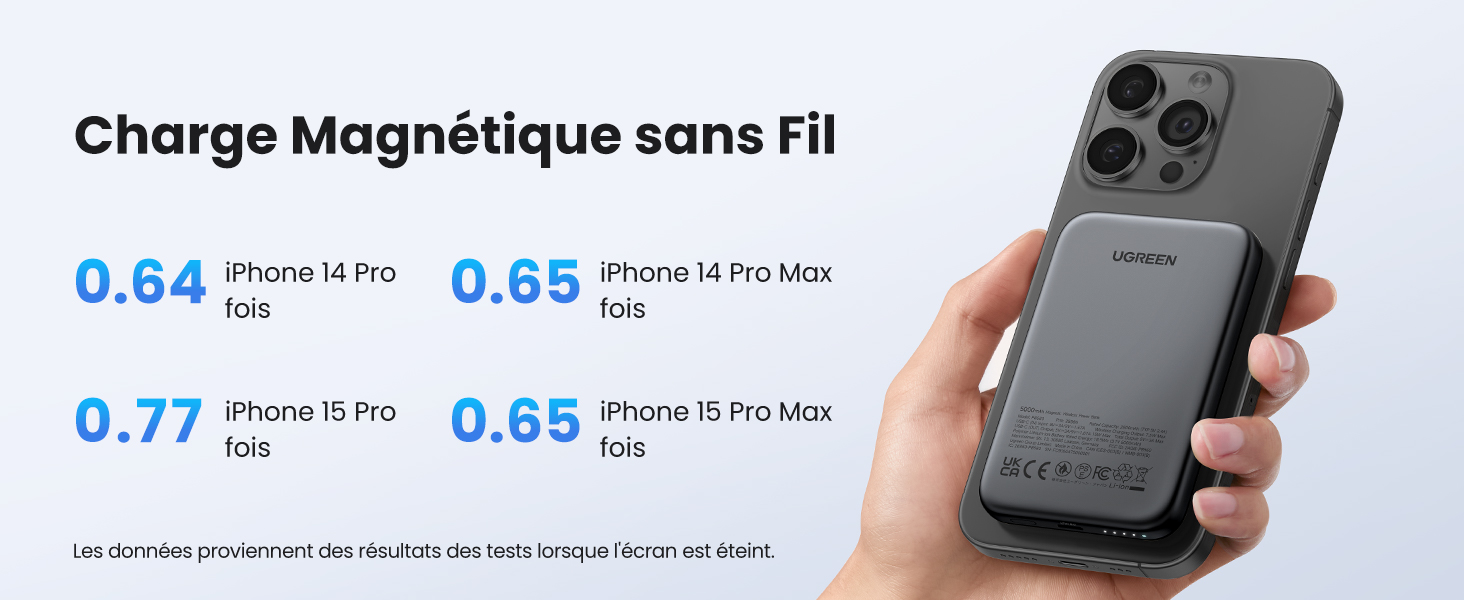
Atahanga: Chart detailing wireless magnetic charging performance for various iPhone models (iPhone 14 Pro, 14 Pro Max, 15 Pro, 15 Pro Max) with the UGREEN Nexode Mini Power Bank. Data is based on tests with the screen off.
Wired USB-C Charging
Connect your device to the power bank's USB-C port using a compatible USB-C cable. The power bank supports up to 15W wired fast charging.

Atahanga: UGREEN Nexode Mini Power Bank simultaneously charging an iPhone wirelessly (7.5W) and an AirPods case via wired USB-C (15W).
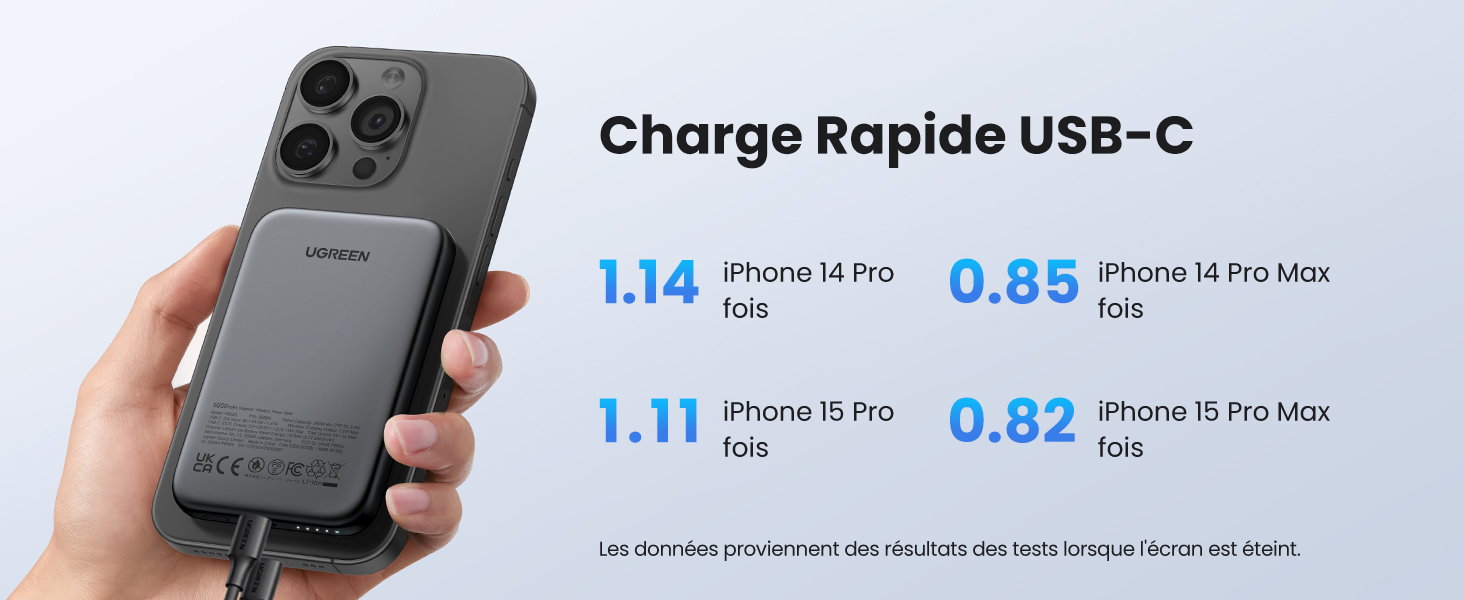
Atahanga: Chart detailing wired USB-C fast charging performance for various iPhone models (iPhone 14 Pro, 14 Pro Max, 15 Pro, 15 Pro Max) with the UGREEN Nexode Mini Power Bank. Data is based on tests with the screen off.
Aratau Whakataunga iti o naianei
- Whakahohe: Long press the power button for 3 seconds. This mode is suitable for charging low-power devices such as wireless earbuds (e.g., AirPods) or smartwatches.
- Whakawetohia: Long press the power button again for 3 seconds, or the mode will automatically deactivate after 3 hours.
Te tiaki
- Kia maroke te peeke hiko me te makuku.
- Horoia te mata ki te kakahu ngohengohe, maroke. Kaua e whakamahi i nga matū kino, i nga mea awhiowhio ranei.
- Whakaorangia ki te waahi makariri, maroke ka kore e whakamahia.
- A ape i te wera nui me te ra tika.
Raparongoā
| Putanga | Take pea | Rongoā |
|---|---|---|
| Kaore te taputapu e utu ahokore. | Not MagSafe compatible; improper alignment; power bank off. | Ensure device/case is MagSafe compatible. Realign the power bank. Short press power button to turn on. |
| Kaore te taputapu e utu ana ma te USB-C. | He raruraru taura; kua weto te pēke hiko; kāore te taputapu e hototahi. | Try a different USB-C cable. Short press power button to turn on. Ensure device is compatible. |
| Karekau te putea hiko e utu. | Charging cable issue; power adapter issue. | Try a different USB-C cable and power adapter. Ensure power adapter meets specifications. |
| Ka mahana te pēke hiko i te wā e utu ana. | Normal operation; excessive load. | Slight warmth is normal. If excessively hot, disconnect and allow to cool. Ensure proper ventilation. |
Whakatakotoranga
| Āhuahira | Taipitopito |
|---|---|
| Waitohu | UGREEN |
| Tau tauira | PB560 (25207) |
| Pūhiko Raukaha | 5000 mah |
| Momo Tuhono | Momo USB C |
| Tae | Kohuru |
| Āhuahira Motuhake | Whakatau Tere |
| Voltage | 5 Volts |
| Hanganga Pūhiko | Lithium-polymer |
| Whakamahi Manakohia | Waea atamai |
| Puna Mana | Tauera Hiko |
| Te Kaha o naianei | 3 A |
| Te maha o nga Tauranga | 1 |
| Waa Whakatau | 1.5 haora |
| Pūrere Hototahi | iPhone 15 Pro Max, Pro, 15, 14 Pro Max, 14 Pro, 14 Plus, 13, 13 Mini, 13 Pro, 12, 11, SE 2022, XS, XS Max; iPad Pro, Air, mini, AirPods 3, 2, Pro, MagSafe, Watch 8, 7, Watch SE, Galaxy S24, S24+, S24 Ultra, S23, S23+, S23 Ultra, S22, S22+, S22 Ultra, S21 FE, S20FE, S10, S9, S8+, S8; Z Flip; Note 10, Note 9, A72, A71, A53, A52, A50, A40, A21, A20, M43, Tab A8, A8.7, S8, S7, S6, Galaxy Fold 2, Redmi Note 11, 10, Note 9, Note 8; Poco F3, X3, M3, Pixel 7, 6, Pixel 6 Pro, Pixel 5, 4 |
| Paerewa Utu Ahokore | MagSafe |
| Te whakamahi ano | Ka taea te utu |
| Momo Rarangi | He iti |
| Waehere Tuhinga o te Ao | 06941876222070 |
| Taumaha Tūemi | 140 Karamu |
| Te Ahu o te Tuemi | 10.6 x 6.9 x 1.3 henimita |
Nga korero haumaru
- Kaua e tukuna te peeke hiko ki te ahi, ki te wai, ki te wera nui ranei.
- Kaua e wetewete, whakarereke, whakatikahia ranei te taputapu maau ano.
- Kaua e taea e nga tamariki.
- A ape i te tuku, te tuku ranei i te peeke hiko ki nga paanga kaha.
- Whakamahia anake nga taura utu whaimana me nga urutau.
Pūtāhui me te Tautoko
This UGREEN product comes with a limited warranty. For detailed warranty terms and conditions, please refer to the warranty card included in your package or visit the official UGREEN website. For technical support or customer service, please contact UGREEN customer support through their official channels.