1. Kupu Whakataki
This document provides essential information for the use and care of your Generic replacement infrared remote control. This remote is designed to function with specific projector models, including Toumei Cocar C800S, C800W, C800A, C800, C900, and Missyee C900. It operates using infrared (IR) technology and requires two AAA batteries (not included).
Please note that this is a replacement remote control and may not offer all the functionalities or an identical user experience as the original remote. It is crucial to verify your projector's model number against the listed compatible models before use.
2. Tatūnga: Tāuta Pūhiko
The remote control requires two AAA batteries for operation. Batteries are not included with this product.
- Rapua te wahanga pākahiko kei muri o te mana mamao.
- Peia te uhi o te wahanga pākahiko ki raro, ki te ahunga ranei e tohuhia ana e te pere hei whakatuwhera.
- Whakauruhia kia rua ngā pākahiko AAA, me te whakarite kia tika te tūnga o ngā pito pai (+) me te pito kino (-) ki ngā tohu kei roto i te wāhanga. Mēnā he te whakaurunga, ka kore pea e mahi te mana mamao.
- Whakahokia te taupoki o te wāhanga pākahiko mā te neke whakamuri ki tōna tūranga kia pāwhiri pai rā anō.

Whakaahua: Rear view of the remote control with the battery cover removed, revealing the slots for two AAA batteries. Ensure correct polarity when inserting batteries.
3. Nga Tohutohu Whakahaere
Point the remote control directly at the projector's IR receiver for optimal performance. Obstructions between the remote and the projector may interfere with the signal.
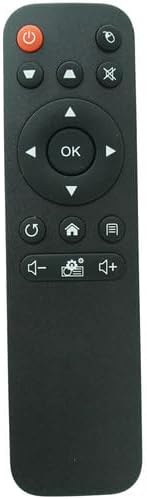
Whakaahua: Mua view o te mana mamao, e whakaatu ana i te tahora o tōna pātene.
Nga Mahi Patene:
- Pātene Hiko (⏻): Ka whakakā, ka whakaweto rānei i te pūwhakaata.
- Pātene Pūtake/Whakauru (⌖): Selects the input source (e.g., HDMI, USB).
- Patene Wahangu (🔇): Mutes or unmutes the audio output.
- Papa Aronga (Runga, Raro, Maui, Matau): Ka whakatere i roto i nga tahua me nga whiringa.
- Patene OK: Confirms selections or enters menus.
- Patene Whakahoki/Hoki (↺): Returns to the previous menu or screen.
- Pātene Kāinga (⌂): Accesses the projector's main home screen.
- Menu/Settings Button (☰): Opens the projector's settings or options menu.
- Pātene Raro Raro (🔉): Ka whakaiti i te rōrahi oro.
- Paatene Ringa Runga (🔊): Ka whakanui ake i te rōrahi oro.
- Settings/Gear Button (⚙): Likely provides quick access to specific settings or modes.
4. Tiaki
- Te horoi: Horoia te mana mamao ki te kakahu ngohengohe, maroke. Kaua e whakamahi i ngā wai horoi, i ngā rauemi whakakoi rānei, nā te mea ka kino pea te mata, ngā wāhanga rānei o roto.
- Whakakapinga Pūhiko: Whakakapia ngā pākahiko ina puhoi te urupare a te mana mamao, ina mutu rānei te mahi. Whakakapia ngā pākahiko e rua i te wā kotahi ki ngā pākahiko AAA hou.
- Rokiroki: If the remote control will not be used for an extended period, remove the batteries to prevent leakage and potential damage to the device. Store in a cool, dry place.
- Aukati i te Whakaaturanga: Keep the remote away from direct sunlight, extreme temperatures, and moisture.
5. Te Raru
- Mamao kaore i te whakautu:
- Me whakarite kia tika te whakaurunga o ngā pākahiko, ā, kia tika hoki te polarity.
- Whakakapihia nga pākahiko tawhito ki nga pākahiko AAA hou.
- Tirohia mēnā he arai kei waenganui i te mana mamao me te kaiwhiwhi IR o te pūwhakaata.
- Ensure you are within the effective range and pointing the remote directly at the projector.
- Kāore ētahi mahi e mahi ana:
- This is a replacement remote; some advanced or specific functions of your original projector remote may not be supported.
- Verify that your projector model is listed as compatible.
6. Whakatakotoranga
| Waitohu | Whakanuia |
| Pūrere Hototahi | Toumei Cocar C800S, C800W, C800A, C800, C900 & Missyee C900 Projectors |
| Hangarau Hononga | Infrared (IR) |
| Momo Kaiwhakahaere | Mana Patene |
| Nga Pikohiko e hiahiatia ana | 2 x AAA (kaore i whakauruhia) |
7. He Tuhipoka Nui
- This remote control is a replacement unit and is specifically designed for the listed projector models. It may not be compatible with other devices.
- No batteries or additional instructions are included with the product. Please refer to this manual for setup and operation.
- The functionality of this replacement remote may differ slightly from the original remote control that came with your projector.
- I mua i te hokoasing or using, ensure your projector's model number is explicitly mentioned in the compatibility list to avoid issues.


