
1. Kupu Whakataki
Mauruuru koe mo te hokoasing the radius SOUND BUMP SP-S15BTW Portable Bluetooth Speaker. This manual provides essential information for setting up, operating, and maintaining your speaker. Please read it thoroughly before use to ensure optimal performance and safety.
The SOUND BUMP SP-S15BTW is a compact, versatile portable speaker designed for various audio needs. It features Bluetooth connectivity, microSD card playback, Wide FM radio, and IPX5 water resistance, making it suitable for both indoor and outdoor use.
2. Hua Neke Atuview
2.1 Ihirangi mokete
- radius SOUND BUMP SP-S15BTW Speaker
- Tauira Whakatau USB
- here
- Pukapuka Kaiwhakamahi
2.2 Speaker Components and Controls
Familiarize yourself with the speaker's layout:

Image: Side panel with ports (microSD, AUX-IN, USB-C)
- Pātene Hiko: Pēhia me te pupuri kia whakakā, whakaweto rānei te kaikōrero.
- Pātene Aratau (M): Press to switch between Bluetooth, microSD, FM Radio, and AUX modes.
- Pātene Purei/Tatari (►▮▮): Pēhia hei purei, hei whakamutu rānei i te oro. I te aratau waea, pēhia hei whakautu/whakamutu i tētahi waea.
- Rōrahi Whakarunga / Pātene Aroturuki Panuku (+): Pēhia poto hei whakanui i te oro. Pēhia roa hei peke atu ki te ara e whai ake nei.
- Rōrahi Whakararo / Pātene Riu Mua (-): Pēhi poto hei whakaiti i te rōrahi. Paa roa kia haere ki te riu o mua.
- Miihini Kaari microSD: Insert a microSD card for local music playback.
- Tauranga AUX-IN: Honoa nga taputapu oro o waho ma te taura ororongo 3.5mm.
- Tauranga Whakatau USB-C: Connect the USB cable for charging.
- Tohu LED: E whakaatu ana i te tūnga hiko, te tūnga utu, me te tūnga hononga Nihokikorangi.
- Whakamaramatanga LED: Located on the side, provides visual effects.
3. Tatūnga
3.1 Whakataki Tuatahi
Before first use, fully charge the speaker. Connect the provided USB charging cable to the speaker's USB-C port and the other end to a USB power adapter (not included) or a computer's USB port. The LED indicator will show charging status (e.g., red while charging, off when fully charged).
3.2 Kei te Hiko / Weto
- Hei Whakahiko: Patohia me te pupuri i te paatene Hiko mo te 3 hēkona kia whiti te tohu LED ka rongo koe i te tangi hiko.
- Hei Whakaweto: Pēhia me te pupuri i te paatene Hiko mo te 3 hēkona kia weto te tohu LED ka rongo koe i te tangi whakaweto.
4. Nga Tohutohu Whakahaere
4.1 Takirua Nihokikorangi
- Whakakāhia te kaikorero. Ka uru aunoa ki te aratau takirua Nihokikorangi, e tohuhia ana e te rama rama kikorangi e mura ana.
- I runga i to taputapu (smartphone, tablet, etc.), whakahohea te Nihokikorangi me te rapu mo nga taputapu e waatea ana.
- Select "SOUND BUMP SP-S15BTW" from the list.
- Kia honoa, ka huri te tohu LED ki te kikorangi mārō, ā, ka rangona he oro whakaū.
- Ki te kore e taea te hono atu, whakawetohia te kaikorero me te Nihokikorangi o tō pūrere, kātahi ka whakahoki anō i ngā mahi.
4.2 microSD Card Playback
- Insert a microSD card (up to 128GB, formatted with MP3/WAV files) into the microSD card slot.
- Press the Mode (M) button until the speaker enters microSD mode.
- Music playback will start automatically. Use the Play/Pause, Volume Up/Next Track, and Volume Down/Previous Track buttons to control playback.
4.3 Wide FM Radio

Image: Speaker in an indoor setting, suitable for FM radio
- Press the Mode (M) button until the speaker enters FM Radio mode.
- Automatic Station Scan: Long press the Play/Pause button to automatically scan and save available FM stations. The speaker will then play the first saved station.
- Whakatika ā-ringa: Short press the Volume Up (+) or Volume Down (-) buttons to switch between saved stations.
Note: As the speaker does not have an external antenna, FM reception may vary depending on location and environment.
4.4 Aratau AUX-IN
- Connect one end of a 3.5mm audio cable (not included) to the speaker's AUX-IN port and the other end to the audio output of your external device.
- Press the Mode (M) button until the speaker enters AUX mode.
- Whakahaerehia te purei me te oro tika mai i tō pūrere o waho e hono ana.
4.5 rama rama
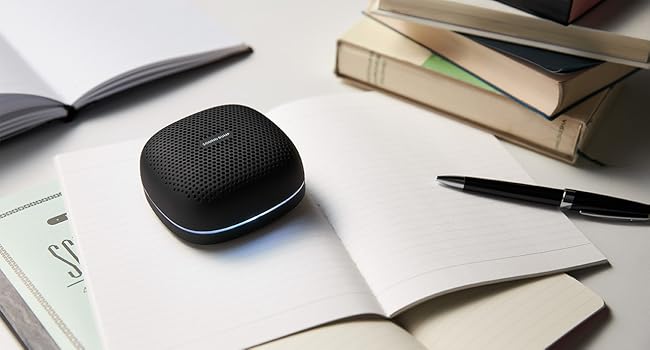
Image: Speakers displaying LED illumination
The speaker features LED illumination with 7 colors and various modes. To change the illumination mode or color, refer to the specific instructions in the full product manual (if available). Typically, a dedicated button or a combination of existing buttons controls this feature.
5. Te utu
When the battery is low, the speaker will indicate this (e.g., flashing red LED, audible prompt). Connect the USB charging cable to the speaker's USB-C port and a power source. The LED indicator will show red during charging and turn off when fully charged. A full charge provides up to 20 hours of continuous playback.

Image: Speaker used outdoors, highlighting long battery life
6. Tiaki
- Te horoi: Horoia te kaikorero ki te kakahu ngohengohe, maroke. Kaua e whakamahi i nga kai horoi me nga whakarewa.
- Ātete Wai (IPX5): The speaker is IPX5 splash-proof, meaning it can withstand water splashes from any direction. However, it is not designed for submersion. Do not use it in the bath or submerge it in water. Ensure the port cover is securely closed to maintain water resistance.
- Rokiroki: Whakaorangia te kaikorero ki te waahi makariri, maroke atu i te ra tika me te wera nui.
- Tiaki Pūhiko: To prolong battery life, charge the speaker periodically even if not in use for extended periods.

Image: Speaker with water droplets, illustrating IPX5 water resistance
7. Te Raru
| Raruraru | Take pea | Rongoā |
|---|---|---|
| Kare te kaikorero e ka ana. | Kua pau te pākahiko. | Me utu katoa te kaikōrero. |
| Karekau he tangi. | He iti rawa te rōrahi; te taputapu kaore i te hono; aratau hē. | Increase volume on speaker and connected device. Ensure proper Bluetooth pairing or AUX cable connection. Switch to correct mode (Bluetooth, microSD, AUX, FM). |
| Kua rahua te takirua Nihokikorangi. | Speaker is not in pairing mode; device Bluetooth is off; too far from device. | Ensure speaker is in pairing mode (flashing blue LED). Turn on Bluetooth on your device. Move speaker closer to your device (within 10 meters). |
| He pai te manaaki reo irirangi FM. | Environmental interference; weak signal. | Move the speaker to a different location. Perform an automatic station scan again. |
| Audio/video synchronization issues (Bluetooth). | Bluetooth latency. | Bluetooth audio can have latency. For critical synchronization, use the AUX-IN connection if your device supports it. Some apps may offer audio delay compensation. |
8. Whakatakotoranga
- Tauira: SP-S15BTW
- Waitohu: pūtoro
- Hononga: Bluetooth, USB (for charging), AUX-IN (3.5mm), microSD
- Hangarau Ahokore: Nihokikorangi
- Momo Kaikorero: Waho / Kawe
- Taone Woofer: 66 mm
- Ātete wai: IPX5 (Riwhi-awhi)
- Wā Whakahoki Tonu: Tae atu ki te 20 haora
- microSD Card Support: Up to 128GB (MP3/WAV files)
- Ahu (L x W x H): Tata ki te 9 x 9 x 4 cm
- Puna Hiko: Pūhiko (ka taea te utu)
- Whakamahi Manakohia: Pūoro puoro
9. Nga korero haumaru
- Kaua e tukuna te kaikorero ki te wera nui, te ra tika, te makuku nui ranei.
- A ape i te tuku, te tuku ranei i te kaikorero ki nga paanga kaha.
- Kaua e ngana ki te wetewete, ki te whakatika, ki te whakarerekē rānei i te kaikorero māu ake. Whakapā atu ki ngā kaimahi ratonga whai tohu mō te āwhina.
- Puritia te kaikorero kia matara atu i ngā taputapu hauora, kei roto hoki he aukume.
- Dispose of the battery according to local regulations. Do not dispose of it in fire.
- Whakatupato: Despite IPX5 rating, this product is not designed for use while submerged or in environments like a bath where it could be fully immersed.
10. Pūtāhui me te Tautoko
This radius product is covered by a warranty. For warranty service, please ensure your purchase was made from an authorized radius retailer. Products purchased from unauthorized sellers may not be eligible for warranty support.
For detailed warranty terms, product registration, and technical support, please visit the official radius webpaetukutuku, whakapā atu ranei ki ta raatau tari ratonga kaihoko. Puritia to tohu hoko mo nga kereme whakamana.