
Kupu Whakataki
This manual provides detailed instructions for the safe and efficient use of your Blow Portable Bluetooth Speaker, Model 30-391. Please read this manual thoroughly before operating the device and retain it for future reference.
The Blow 30-391 is a versatile portable Bluetooth speaker designed for universal use with smartphones, tablets, computers, and other audio devices. It features Bluetooth 5.0 connectivity, AUX input, Micro USB port, and an integrated microphone for various audio applications.
Ihirangi mokete
Manatokohia kei roto i to kete nga mea katoa kua whakarārangihia i raro nei:
- Blow Portable Bluetooth Speaker (Model 30-391)
- Tauira Whakatau USB
- Waea hopuoro
- Pukapuka Kaiwhakamahi (tenei tuhinga)
- Mana Mamao

Whakaahua: Mua view of the Blow Portable Bluetooth Speaker 30-391, showcasing its RGB lighting, included remote control, and wired microphone.

Image: The USB charging cable and the microphone cable that come with the speaker.
Nga waahanga hua
- Hononga: Bluetooth 5.0, AUX-in (3.5mm), Micro USB, USB port, MicroSD card slot.
- Putanga Ororongo: 10 Watts maximum speaker output.
- Pūhiko: Integrated 4500 mAh rechargeable battery.
- Nga waahanga motuhake: Integrated microphone, RGB lighting effects, voice control capability.
- Te kawe: Compact design with a handle for easy transport.
- Hototahi: Universal compatibility with desktop computers, laptops, smartphones, and tablets.
Tatūnga
1. Whakakii i te Tukuoro
Before first use, fully charge the speaker. Connect the supplied USB charging cable to the Micro USB port on the speaker and the other end to a standard USB power adapter (not included) or a computer's USB port. The charging indicator light will illuminate during charging and turn off when fully charged.
2. Te Whakakaha/Weto
Locate the power switch on the top panel of the speaker. Slide the switch to the "ON" position to power on the speaker. Slide it to the "OFF" position to power off the speaker.

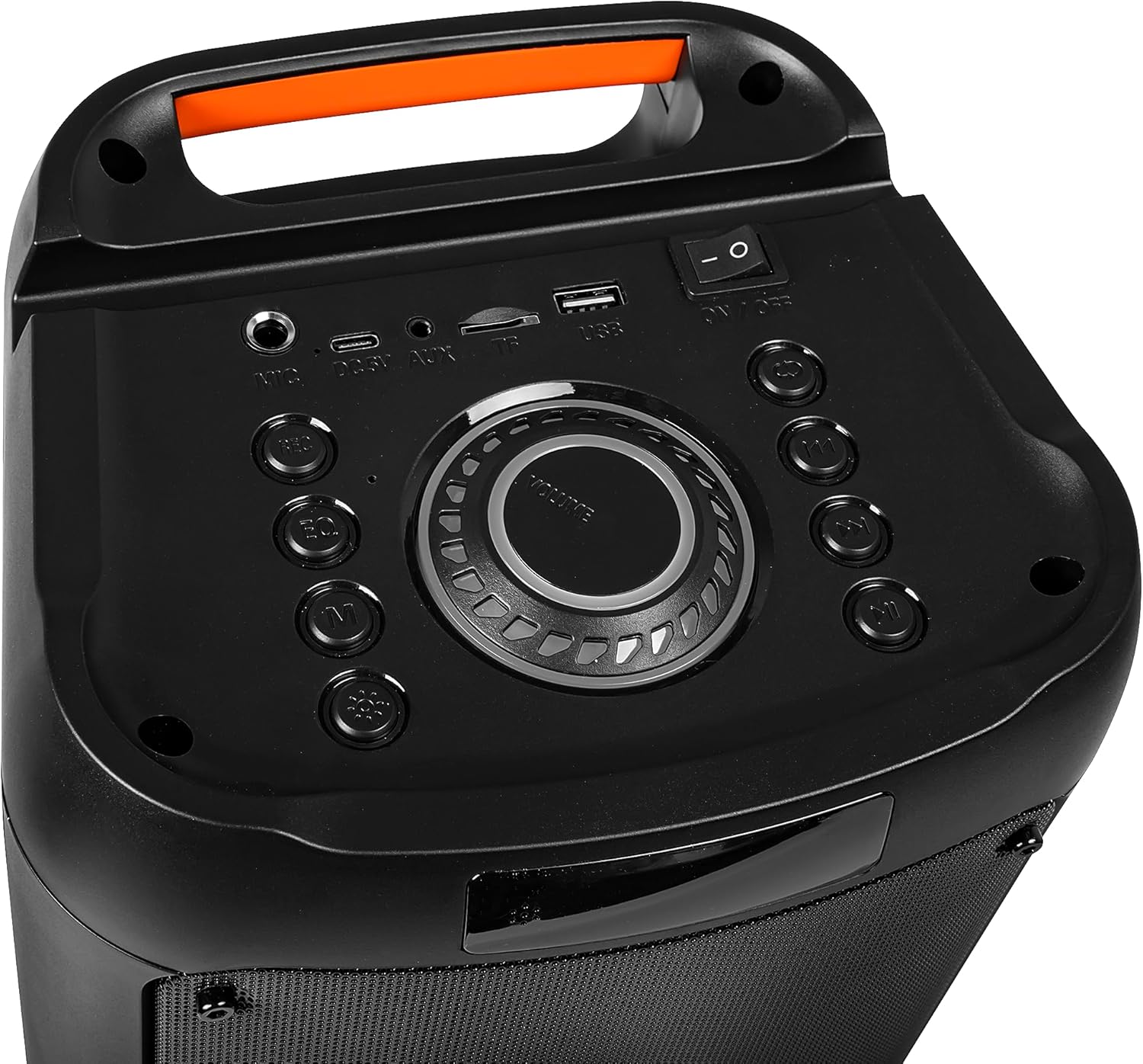
Image: Close-up of the speaker's top control panel, showing the power switch, volume knob, and various input ports.
3. Takirua Nihokikorangi
- Whakakāhia te kaikorero. Ka uru aunoa ki te aratau takirua Nihokikorangi, e tohuhia ana e te rama LED e mura ana.
- I runga i to taputapu pūkoro (smartphone, tablet, etc.), whakahohea te Nihokikorangi me te rapu mo nga taputapu e waatea ana.
- Select "Blow 30-391" from the list of devices.
- Kia honoa, ka tukuna he oro whakaū mai e te kaikorero, ā, ka mutu te mura o te rama LED.
- Ka hono aunoa te kaikorero ki te taputapu takirua whakamutunga ina ka whakahikohia, mena kei roto te taputapu ka taea te Nihokikorangi.
4. Hononga AUX
To connect an external audio device via AUX, use a 3.5mm audio cable (not included). Plug one end into the AUX-in port on the speaker and the other end into the headphone jack or audio output of your device. The speaker will automatically switch to AUX mode.
5. Whakahoki USB/MicroSD
Insert a USB flash drive or a MicroSD card (up to 32GB) containing MP3 audio files into the respective port on the speaker. The speaker will automatically detect the storage device and begin playing music. Use the control buttons to navigate tracks.
Nga Tohutohu Whakahaere
1. Mana Whakahaereview
The speaker features a control panel on the top for easy operation. Refer to the image in the "Setup" section for button layout.
- Whakawhiti Kaha: ON/OFF.
- Matapihi Rōrahi: Rotate to adjust master volume.
- Patene Aratau: Press to switch between Bluetooth, AUX, USB, and MicroSD modes.
- Pātene Purei/Tatari: Pēhia ki te purei, ki te whakataa ororongo.
- Patene Aroturuki o mua/panuku: Patohia ki te peke ki te ara o mua, o muri ranei.
- Pātene EQ: Press to cycle through equalizer presets.
- Pātene Aratau Maama: Press to change RGB lighting effects.
- Whakauru Whakaoho: Connect the wired microphone here.
2. Te whakamahi i te hopuoro
Connect the supplied wired microphone to the microphone input port on the speaker. Adjust the microphone volume using the dedicated control (if available) or the main volume knob. The integrated microphone allows for voice control and hands-free calling when connected via Bluetooth.
3. Ngā Pānga Rama RGB
The speaker features dynamic RGB lighting. Press the "Light Mode" button on the control panel or remote control to cycle through different lighting patterns or to turn the lights off.
Te tiaki
- Te horoi: Whakamahia he kakahu ngohengohe, maroke hei horoi i waho o te kaikōrero. Kaua e whakamahi i nga kai horoi me nga whakarewa.
- Tiaki Pūhiko: Hei whakaroa i te ora o te pākahiko, karohia te tuku katoa i te pākahiko. Whakatakihia te kaikorero i nga wa katoa, ahakoa kaore i te whakamahia mo nga wa roa.
- Rokiroki: Whakaorangia te kaikorero ki te waahi makariri, maroke atu i te ra tika me te wera nui.
- Ātete wai: Kāore tēnei kaikorero e ārai i te wai. Āraia te pānga o te wai, te makuku nui rānei.
Raparongoā
| Raruraru | Rongoa pea |
|---|---|
| Karekau te kaikorero e kaha ana. | Ensure the battery is charged. Connect the speaker to a power source using the USB cable. Check the power switch position. |
| Kaore e taea te hono ma te Nihokikorangi. | Ensure the speaker is in pairing mode (flashing LED). Make sure your device's Bluetooth is enabled and within range (up to 10 meters). Forget previous pairings on your device and try again. |
| Karekau he tangi. | Check the volume level on both the speaker and your connected device. Ensure the correct input mode (Bluetooth, AUX, USB, MicroSD) is selected. Check cable connections for AUX mode. |
| He iti te kounga tangi. | Ensure the speaker is not too far from the Bluetooth device. Avoid obstacles between the speaker and the device. Try a different audio source or file. |
| Kaore e mahi ana te hopuoro. | Ensure the microphone is securely connected to the input port. Check microphone volume settings. |
Whakatakotoranga
| Tau tauira | 30-391 |
| Waitohu | Pupuhi |
| Hangarau Hononga | Bluetooth 5.0, Auxiliary (3.5mm), Micro USB, USB |
| Aratau Putanga Ororongo | AUX, Nihokikorangi |
| Te Mana Huaputa Tukuoro Morahi | 10 Watts |
| Pūhiko Raukaha | 4500 mah |
| Rahi Kāri Mahara Mōrahi | 32 GB (MicroSD) |
| Nga waahanga motuhake | Integrated Microphone, RGB Lighting, Voice Control |
| Puna Mana | Pūhiko Powered |
| Rahi Hua (L x W x H) | 26 x 46 x 24 cm (tata) |
| Taumaha Hua | 3.67 kg (tata) |
| Tae | Black (with multicolor RGB lighting) |

Whakaahua: Taha view of the Blow Portable Bluetooth Speaker 30-391, showing its vertical orientation.
Whakaahua: Hoki view of the Blow Portable Bluetooth Speaker 30-391, highlighting the integrated carrying handle.
Whakaahua: Taipitopito view of the top control panel, including the power switch, volume knob, and various input ports.

Image: The retail packaging for the Blow Portable Bluetooth Speaker 30-391, showing product features and accessories.
Pūtāhui me te Tautoko
The Blow Portable Bluetooth Speaker 30-391 comes with a limited warranty. Please refer to the warranty card included in your package for specific terms and conditions. For technical support, troubleshooting assistance, or warranty claims, please contact your retailer or the manufacturer directly. Contact information can typically be found on the product packaging or the manufacturer's official webpae.
Kaihanga: Pupuhi
ASIN: B0CDXQRT9Q