
1. Kupu Whakataki
Mauruuru koe mo te hokoasing the BLOW 4625FHD DVB-T2 H.265 Digital Terrestrial TV Tuner. This device allows you to receive digital terrestrial television broadcasts (DVB-T2) with H.265 (HEVC) compression, offering high-definition video quality. This manual provides essential information for the safe and efficient setup, operation, and maintenance of your new tuner. Please read it thoroughly before use and retain it for future reference.
2. Nga korero haumaru
- Haumaru Hiko: Hei ārai i te ru hiko, kaua e whakatuwhera i te pouaka hiko.asing. Tukuna atu nga ratonga katoa ki nga kaimahi whai tohu.
- Puna Hiko: Whakamahia anake te urutau hiko kua tohua. Kia tino tika te orotage rite ana ki nga whakaritenga o te taputapu.
- Whakahau: Do not block ventilation openings. Ensure adequate airflow around the device to prevent overheating.
- makuku: Keep the device away from water, rain, and excessive humidity.
- Te horoi: Momotuhia te hiko i mua i te horoinga. Whakamahia he kakahu ngohengohe, maroke. Kaua e whakamahi i ngā wai horoi, i ngā wai rānei hei horoi.
- Turanga: Whakatakotoria te taputapu ki runga i tētahi mata pūmau, papatahi. Kaua e waiho tata ki ngā pūtake wera, ki te rā tika rānei.
3. Ihirangi mokete
Ina whakatuwheratia te kete, me tirotiro kei te pai katoa ngā wāhanga, ā, kei te pai tonu te āhua:
- BLOW 4625FHD DVB-T2 Tuner Unit
- Mana Mamao
- Power Adapter (integrated cable)
- Pukapuka Kaiwhakamahi (tenei tuhinga)

Image 3.1: Retail packaging of the BLOW 4625FHD DVB-T2 Tuner, showing the tuner unit and remote control.
4. Hua Neke Atuview
4.1. Paewhiri Mua
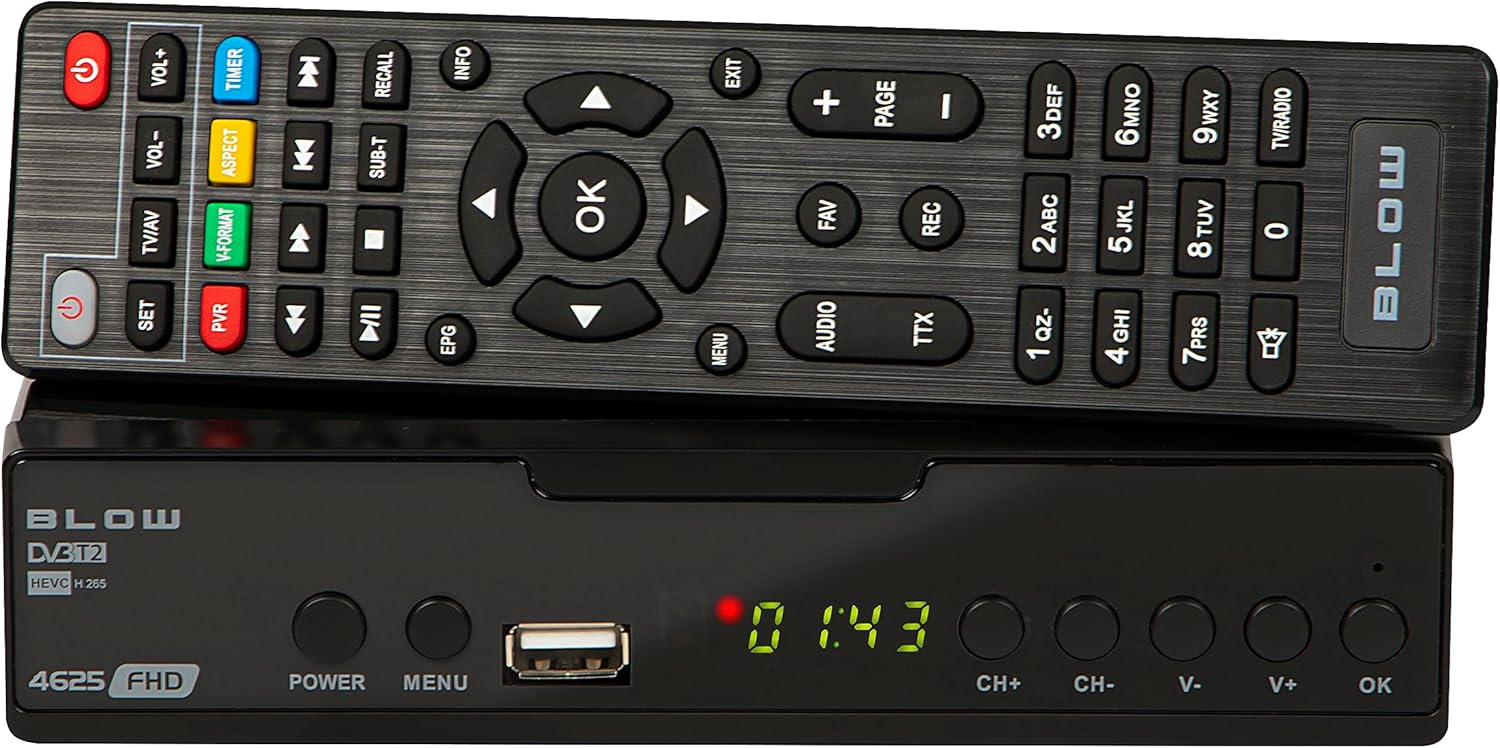
Whakaahua 4.1: Mua view of the BLOW 4625FHD DVB-T2 Tuner with its remote control.
The front panel features a digital display, a USB port for media playback and PVR functions, and essential control buttons:
- Whakaatu: Shows channel number, time, or menu information.
- MANA: Ka whakakā, ka whakaweto rānei i te pūrere (tūtatari).
- MENU: Ka uru ki te tahua matua.
- Tauranga USB: Mo te hono i nga taputapu rokiroki USB.
- CH+/CH-: Ka huri i nga hongere ki runga, ki raro ranei.
- V+/V-: Ka whakatika i te rōrahi ki runga, ki raro ranei.
- OK: Whakaū i ngā kōwhiringa i te tahua.
4.2. Paewhiri Whakamuri

Image 4.2: Rear panel of the BLOW 4625FHD DVB-T2 Tuner, showing various input and output ports.
Kei te papa o muri ngā tauranga hononga katoa e tika ana:
- RF IN: Ka hono atu ki tō pūihi whenua.
- RF KI WAHO: For looping the antenna signal to another device (e.g., another TV or tuner).
- COAXIAL: Putanga ororongo matihiko.
- HDMI: High-Definition Multimedia Interface output for connecting to modern TVs.
- SCART: Analog video and audio output for connecting to older TVs.
- AC IN: Whakauru hiko mo te taputapu.
4.3. Mana Mamao
The remote control provides full functionality for operating the tuner. Familiarize yourself with its buttons for easy navigation and control.
- MANA: Ka whakakā/whakaweto i te tangi.
- VOL + / VOL-: Te whakatika i te rahinga.
- CH+/CH-: Huri hongere.
- OK: Ka whakamana i nga whiringa.
- Patene Whakaterenga (Runga/Raro/Maui/Matau): Ka whakatere i nga tahua.
- MENU: Ka whakatuwhera i te tahua matua.
- EXIT: Puta atu i te tahua, i te mata rānei o nāianei.
- EPG: Ka whakaatu i te Aratohu Papatono Hiko.
- PVR: Accesses Personal Video Recorder functions.
- REKE: Starts recording the current program.
- FAV: Accesses favorite channel list.
- TV/AV: Switches between TV and AV input modes on the tuner.
- HUA-V: Changes video output format.
- Ororongo: Selects audio track (if available).
- TTX: Mahi Teletext.
- Patene Tau (0-9): Te whiriwhiri hongere tika.
5. Tatūnga
5.1. Connecting the Tuner
- Hononga Antenna: Honoa tō taura pūihi whenua ki te RF IN port on the rear panel of the tuner.
- Hononga Pouaka Whakaata (HDMI): For best picture quality, connect an HDMI cable from the HDMI port on the tuner to an available HDMI input on your television.
- Hononga Pouaka Whakaata (SCART): If your TV does not have an HDMI input, connect a SCART cable from the SCART port on the tuner to the SCART input on your television.
- Hononga Hiko: Tūhono i te pūurutau hiko ki te AC IN port on the tuner, then plug the adapter into a wall outlet.
5.2. First Time Installation and Channel Scan
- Turn on your television and select the correct input source (HDMI or SCART) corresponding to where you connected the tuner.
- Pehia te MANA button on the tuner or remote control to turn on the device.
- The first time you power on the tuner, a "First Time Installation" wizard will appear. Follow the on-screen prompts.
- Select your preferred language, country, and other initial settings.
- Initiate the "Auto Scan" or "Channel Search" function. The tuner will automatically search for available DVB-T2 channels in your area. This process may take several minutes.
- Once the scan is complete, the tuner will save the channels and display the first available channel.
6. Mahi
6.1. Pouaka Whakaata Taketake Viewing
- Te huri i nga hongere: Whakamahia te CH + / CH- buttons on the remote or front panel, or enter the channel number directly using the number buttons.
- Whakatika Rōrahi: Whakamahia te VOL + / VOL- pātene i runga i te mamao.
- Wahangu: Pehia te Wahangu button on the remote to mute/unmute audio.
- Pae Mōhiohio: Pehia te INFO button on the remote to display current program information.
6.2. Aratohu Hōtaka Hiko (EPG)
Pehia te EPG button on the remote control to access the Electronic Program Guide. This displays program schedules for all available channels. Use the navigation buttons to browse through channels and programs. Press OK ki view details or set a reminder/recording.
6.3. Te Purei Pāpāho (USB)
The BLOW 4625FHD supports media playback from a USB storage device. Insert a USB drive into the front USB port. Navigate to the "Multimedia" or "USB" section in the main menu to browse and play supported audio (MP3, WMA) and video files.
6.4. Pūrere Hopu Ataata Whaiaro (PVR)
To use the PVR function, connect a USB storage device (e.g., USB flash drive or external hard drive) to the USB port. The device must be formatted correctly (usually FAT32 or NTFS). You can record live TV programs by pressing the REC button on the remote. Scheduled recordings can be set via the EPG or the PVR menu.
- Te Hopu Inamata: I a koe e mātaki ana i tētahi hōtaka, pēhi REC kia timata te tuhi. Perehi KATI ki te mutu.
- Hopu Tono: In the EPG, select a program and press OK, then choose the option to schedule a recording.
- Purei Whakahoki: Access recorded content through the PVR or Multimedia menu.
7. Tiaki
- Te horoi: Ensure the device is unplugged before cleaning. Use a soft, dry, lint-free cloth to wipe the exterior. Do not use abrasive cleaners, waxes, or solvents.
- Whakahau: Regularly check that the ventilation slots are not obstructed by dust or debris.
- Whakahōu Pūmanawa: Tirohia i ia wa i te kaihanga website for any available software updates. Follow the instructions provided with the update carefully.
8. Te Raru
| Raruraru | Te Take Taea / Rongoa |
|---|---|
| Kaore he pikitia, he tangi ranei |
|
| Karere "Kāore he Tohu" |
|
| Ko te mana mamao kaore e mahi |
|
| Picture freezes or pixelates |
|
9. Whakatakotoranga
| Tauira | BLOW 4625FHD (77-048) |
| Ahu (L x W x H) | 9D x 9B x 2.5H cm |
| Taumaha | 428 Karamu |
| Hononga | HDMI, USB, SCART, Coaxial, RF IN/OUT |
| Whakatau Putanga Ataata | 1080p |
| Paerewa Tautoko | DVB-T2, H.265 (HEVC), H.264 |
| Awhe Auautanga | VHF: 170-230MHz, UHF: 470-860MHz |
| Hōputu Ororongo | MP3, WMA |
| Aratau Putanga Ororongo | Stereo, Hurihuri |
| Tuku Hiko | 12 Volt, 43 Milliampere (Operating) |
| Te Whakamahi Hiko Tiaki | <0.5W |
| Whakamahi Manakohia | Digital terrestrial TV viewte tuhi me te tuhi |
| Kaihanga | Pupuhi |
10. Pūtāhui
The BLOW 4625FHD DVB-T2 H.265 Digital Terrestrial TV Tuner comes with a 2 tau te whakamana a te kaiwhakanao from the date of purchase. This warranty covers defects in materials and workmanship under normal use. It does not cover damage caused by misuse, accident, unauthorized modification, or external causes. Please retain your proof of purchase for warranty claims.
11. Tautoko
If you encounter any issues that cannot be resolved using the troubleshooting guide, or if you require further assistance, please contact your retailer or the manufacturer's customer support. Refer to the product packaging or the manufacturer's official webpae mo nga korero whakapiri.