1. Kupu Whakataki
This document provides essential instructions for the Generic IR replacement remote control, designed for use with Wimius W1 K5 and Yaber Y61 5G Mini DLP Portable 1080P WiFi Movie Projectors. This remote functions as a direct infrared replacement. For optimal compatibility, ensure that the button layout on this remote matches your original remote control.
Tuhipoka Nui: This remote control does not include batteries or a separate instruction manual in its packaging. Please refer to this guide for all operational details.
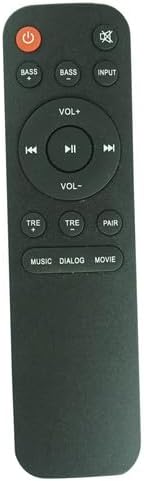
Whakaahua 1.1: Mua view o te mana mamao, e whakaatu ana i te tahora o tōna pātene.
2. Tatūnga
2.1 Tāuta Pūhiko
Me whakamahi te mana mamao one (1) AAA battery for operation. Follow these steps to install the battery:
- Rapua te wahanga pākahiko kei muri o te mana mamao.
- Pēhia te pūmau ka paheke te taupoki pākahiko ki raro hei whakatuwhera.
- Insert one AAA battery, ensuring the positive (+) and negative (-) terminals align correctly with the markings inside the compartment.
- Whakahokia te uhi o te pākahiko ki tona waahi kia paoho pai.

Whakaahua 2.1: Hoki view o te mana mamao me te wāhanga pākahiko e tuwhera ana.
2.2 Whakamahi Tuatahi
This is an infrared (IR) replacement remote. No pairing is typically required. Ensure there is a clear line of sight between the remote control and the IR receiver on your projector for proper function.
3. Nga Tohutohu Whakahaere
Kia mōhio koe ki ngā mahi o ia pātene i runga i tō mana mamao:
- Pātene Mana (Porowhita Whero me te Raina): Ka whakakā, whakaweto rānei te pūwhiti.
- Pātene Whakangū (Kaikōrero me te X): Mutes or unmutes the projector's audio.
- BASS+ / BASS- Buttons: Adjust the bass level of the audio output.
- Pātene INPUT: Ka huri haere i roto i ngā pūtake tāuru e wātea ana (hei tauira, HDMI, USB).
- VOL+ / VOL- Pātene: Whakanuia, whakahekehia ranei te taumata o te rōrahi.
- Playback Controls (Previous, Play/Pause, Next): Control media playback (e.g., for content played from USB).
- TRE+ / TRE- Buttons: Adjust the treble level of the audio output.
- Pātene PAIR: (If applicable) Initiates pairing mode for certain projector models or features. Refer to your projector's manual for specific pairing instructions.
- Sound Mode Buttons (MUSIC, DIALOG, MOVIE): Select preset audio equalization modes for different content types.
4. Tiaki
4.1 Whakakapinga Pūhiko
Replace the AAA battery when the remote control's response becomes inconsistent or stops working. Always use a new, high-quality AAA battery. Do not mix old and new batteries or different types of batteries.
4.2 Te horoi
To clean the remote control, gently wipe it with a soft, dry cloth. Do not use liquid cleaners, abrasive pads, or chemical solvents, as these can damage the remote's surface or internal components.
4.3 Rokiroki
Store the remote control in a cool, dry place away from direct sunlight and extreme temperatures. If the remote will not be used for an extended period, it is recommended to remove the battery to prevent leakage.
5. Te Raru
- Mamao kaore i te whakautu:
- Check if the battery is correctly installed and has sufficient charge. Replace with a new AAA battery if necessary.
- Ensure there is a clear line of sight between the remote's IR emitter and the projector's IR receiver. Remove any obstructions.
- Verify that the remote control is compatible with your specific projector model (Wimius W1 K5 or Yaber Y61 5G). The button layout should match your original remote.
- Kāore ētahi mahi e mahi:
- While this remote is a replacement, it may not offer all identical functions as your original remote. Functionality is generally limited to the buttons present on this replacement unit.
- Ensure your projector's firmware is up to date, as this can sometimes affect remote compatibility.
- Ka mahi ā-wā te mamao:
- This could indicate a low battery. Replace the AAA battery.
- Me whakarite kei roto koe i te awhe whai hua o te kaiwhiwhi IR o te pūwhakaata.
Mena ka puta tonu ngā raruraru i muri i te whai i ēnei mahi, whakapā atu ki te kaihoko mō ētahi atu āwhina.
6. Whakatakotoranga
| Āhuahira | Taipitopito |
|---|---|
| Waitohu | Whakanuia |
| Kaihanga | Ngāwari |
| Pūrere Hototahi | Wimius W1 K5, Yaber Y61 5G Projectors (Home Theater) |
| Hangarau Hononga | Infrared (IR) |
| Puna Mana | 1 x Pūhiko AAA (kaore i whakauruhia) |
| Tae | Pango |
| Āhuahira Motuhake | Ergonomic design. Requires matching button layout to original remote for full compatibility. |
7. Pūtāhui me te Tautoko
Information regarding specific warranty terms for this Generic replacement remote control is not provided in the product details. For any warranty inquiries, technical support, or assistance with product functionality, please contact the seller directly through your purchase platform.


