
ngā tūru noho
Generic Smart Multifunction Recliner Chair User Manual
Tauira: tūru-rūma-noho
1. Kupu Whakataki
Thank you for choosing the Generic Smart Multifunction Recliner Chair. This manual provides essential information for the safe assembly, operation, maintenance, and troubleshooting of your new recliner. Please read this manual thoroughly before use and retain it for future reference.

A blue upholstered recliner chair, featuring a plush design and a visible cable connection on the side, likely for a USB charging port or control.
2. Nga Tohutohu Haumaru
Hei whakarite i te haumaru o te mahi, me te ārai i ngā whara, ngā pakaru rānei, me whai i ngā aratohu haumaru e whai ake nei:
- Kaua e neke ake i te kaha o te taumaha o te 120 kg (265 lbs).
- Tiakina nga tamariki me nga kararehe mai i nga waahanga neke o te tuuru.
- Ensure adequate space around the chair for reclining to avoid obstruction or damage.
- Avoid placing liquids directly on the chair, especially near electrical components.
- Kaua e tu ki runga i te tuuru, kaua ranei e whakamahia hei turanga hikoi.
- If the chair includes electrical components (e.g., USB port), ensure the power cord is not pinched or damaged. Disconnect from power when not in use or during cleaning.
- Do not attempt to disassemble or repair the chair yourself. Contact qualified personnel for service.
3. Ihirangi mokete
Tena koa tirohia kei te noho nga waahanga katoa i mua i te tiimata o te huihuinga:
- Recliner Seat Base
- Pūkana
- Armrests (if separate)
- Power Adapter (for USB port, if applicable)
- Pūmārō Huinga (ngā tīwiri, ngā kaihoroi, te kuihi Allen)
- Pukapuka Kaiwhakamahi
4. Tatūnga me te Runanga
Follow these steps to assemble your recliner chair:
- Wewete Waenga: Tangohia marietia ngā wāhanga katoa i roto i te takai. Whakatakotoria ki runga i tētahi mata ngohengohe, ma, kia kore ai e rakuraku.
- Āpiti Tautokonga: Align the metal brackets on the backrest with the receivers on the seat base. Slide the backrest down firmly until it locks into place. You may hear a click.
- Attach Armrests (if separate): If your model has separate armrests, attach them to the seat base using the provided hardware. Ensure all screws are tightened securely.
- Tūhono Hiko (mēnā e hāngai ana): If your chair includes a USB charging port or other electrical features, connect the power adapter to the chair's power input and then plug it into a wall outlet.
- Taki Whakamutunga: Me whakarite kia mau ngā hononga katoa, kia pumau hoki te tūru i mua i te whakamahinga.
5. Nga Tohutohu Whakahaere
5.1 Mahi Whakanoho
This recliner features a manual reclining mechanism. To recline:
- Hei Whakanoho: Lean back into the chair and push firmly on the backrest. The footrest will extend, and the backrest will recline.
- Hei Hoki Tūtika: Push down on the footrest with your legs while leaning forward. The footrest will retract, and the backrest will return to its upright position.
5.2 USB Charging Port (if applicable)
If your chair is equipped with a USB charging port:
- Locate the USB port, typically on the side of the chair.
- Plug your USB charging cable into the port to charge compatible devices.
- Ensure the chair is connected to a power source for the USB port to function.
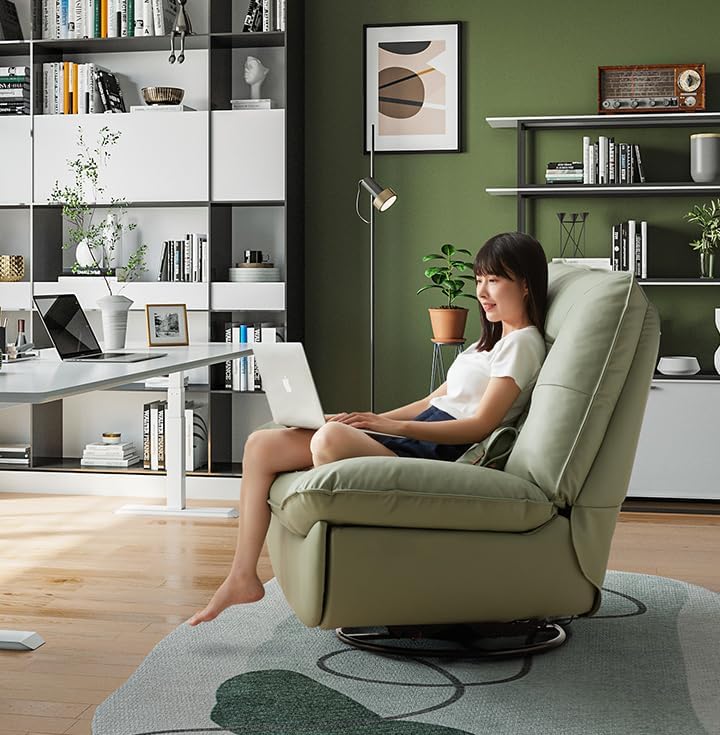
A person seated comfortably in the green recliner chair, using a laptop, highlighting the chair's ergonomic design suitable for work or leisure.

Two individuals relaxing together on the green recliner chair, showcasing its spaciousness and comfort for shared leisure.
6. Tiaki
Proper care will extend the life and appearance of your recliner chair:
- Te horoi: For textile upholstery, vacuum regularly to remove dust and debris. For spills, blot immediately with a clean, dry cloth. For stubborn stains, use a mild fabric cleaner according to the product instructions, testing on an inconspicuous area first.
- Tāpare: Takitaki ia ia nga wa katoa nga tutaki me nga wiri kia mau tonu. Whakapikihia ano e tika ana.
- Nga Waahanga Nuku: The reclining mechanism is designed for smooth operation. Avoid forcing the mechanism. If it becomes stiff, a small amount of silicone-based lubricant can be applied to pivot points, avoiding contact with upholstery.
- Aukati i te Maramatanga o te ra: Prolonged exposure to direct sunlight can cause fading of the upholstery.
7. Te Raru
If you encounter issues with your recliner, refer to the following common problems and solutions:
- Kāore te tūru e takoto mārie ana:
- Check for any obstructions around or under the chair.
- Me whakarite kia mau te whakau o ngā taputapu katoa o te huihuinga.
- Apply a small amount of silicone lubricant to the reclining mechanism's pivot points.
- USB port not charging:
- Verify that the chair's power adapter is securely plugged into both the chair and a working wall outlet.
- Test the USB port with a different device and cable to rule out device/cable issues.
- Check for any visible damage to the power cord or USB port.
- He wiri te turu:
- Ensure all assembly bolts and screws are tightened.
- Check that the chair is placed on a flat, even surface.
8. Whakatakotoranga
| Āhuahira | Whakatakotoranga |
|---|---|
| Waitohu | Whakanuia |
| Ingoa Tauira | ngā tūru noho |
| Tae | Navy Blue |
| Rauemi | Kakano |
| Rahi Hua (D x W x H) | 43.3"D x 39.3"W x 39"H |
| Taumaha Tūemi | 119 pauna |
| Taumaha Taumaha | 120 kg / 265 lbs |

An infographic displaying the chair's dimensions and the recommended floor area for its placement, including examples for different room types like small apartments, study rooms, balconies, and game rooms.
9. Pūtāhui me te Tautoko
For warranty information and customer support, please refer to the documentation provided at the time of purchase or contact your retailer directly. Keep your purchase receipt as proof of purchase.
Ask a question about this manual
Ask about setup, troubleshooting, compatibility, parts, safety, or missing instructions. Manuals+ will review the question and use this page’s manual context to help answer it.