
1. Kupu Whakataki
The Sygonix SY-5044422 Digital Timer Switch is designed for easy programming and operation, helping to manage power consumption for various appliances. This device features 20 ON/OFF programs, 3 random settings, and a countdown function, with switching intervals as short as 1 minute. Programs can be set for specific days, combinations of days, or daily. Its IP44 splash-proof rating allows for outdoor use, and an integrated battery retains settings during power outages. The timer supports a maximum switching capacity of 1800 W and includes enhanced touch protection.
2. Nga Tohutohu Haumaru
- Me ata panui nga tohutohu katoa i mua i te whakamahi.
- This device is rated IP44, making it splash-proof for outdoor use. However, do not immerse it in water or expose it to direct jets of water.
- Ensure the total load of connected appliances does not exceed 1800 W.
- Do not open the device housing. Repairs should only be performed by qualified personnel.
- Keep out of reach of children. The device features enhanced touch protection.
- Always unplug the timer from the power outlet before cleaning.
3. Ihirangi mokete
- Sygonix SY-5044422 Digital Timer Switch
- Pukapuka Tohutohu
- Nga korero Whakaputanga
4. Hua Neke Atuview
Familiarize yourself with the components and controls of your digital timer switch.
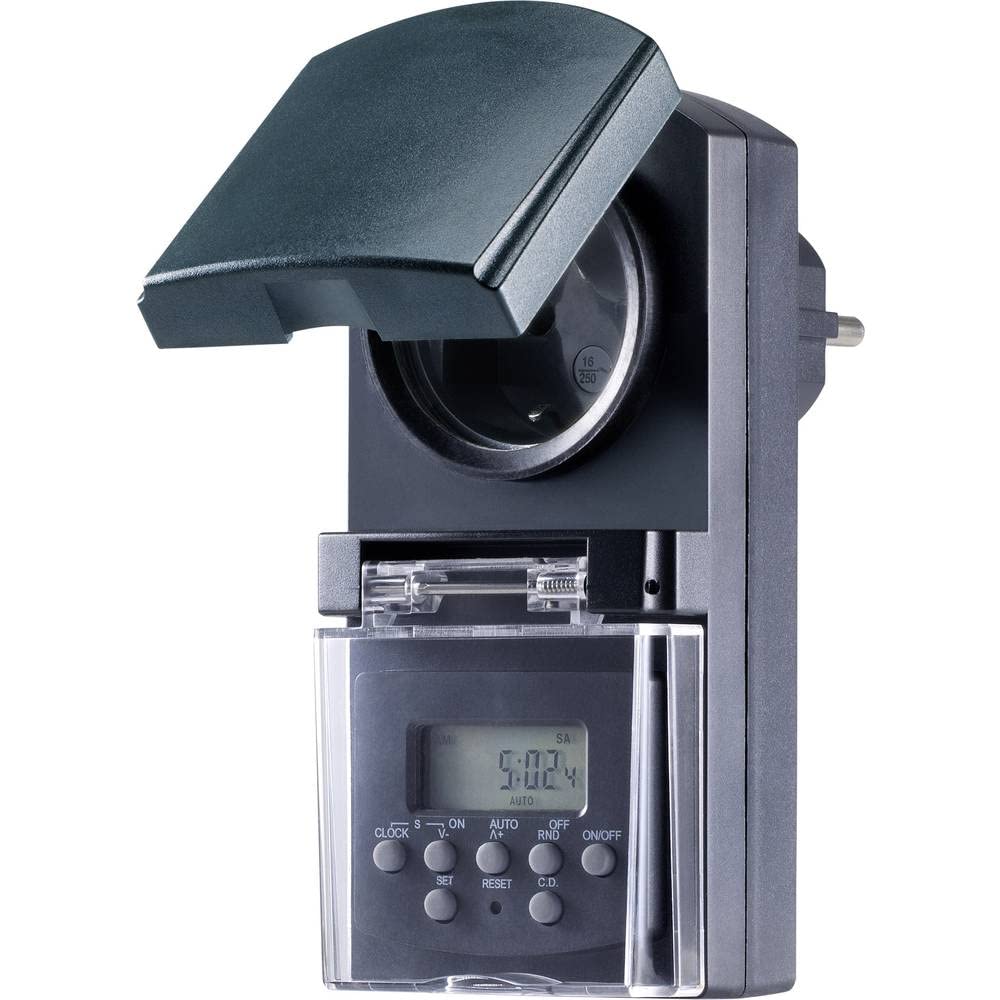
Whakaahua 1: Mua view of the Sygonix SY-5044422 Digital Timer Switch. This image displays the LCD screen, which shows the current time and day, along with various control buttons including CLOCK, ON/OFF, SET, RESET, AUTO/A+, OFF/RND, and C.D. (Countdown).

Whakaahua 2: Mua view of the timer with the protective cover opened, showing the integrated power socket. The display and control buttons are visible below the socket.
Patene Mana:
- KAraka: Used to set the current time and day.
- KIA/WATA: Manually switches the timer output ON or OFF.
- ROHE: Enters programming mode and confirms settings.
- Tautuhi Anō: Clears all settings and resets the timer to factory defaults.
- AUTO/A+: Cycles through automatic mode, program settings, and adjusts values.
- OFF/RND: Activates or deactivates the Random function.
- C.D. (Countdown): Activates or deactivates the Countdown function.
5. Tatūnga
5.1 Whakataki Tuatahi
Before first use, plug the timer into a power outlet for approximately 30 minutes to charge the internal battery. This ensures the display is active and settings are retained during power outages or when unplugged.
5.2 Te Whakatakoto i te Wā me te Rā o Nāianei
- Patohia me te pupuri i te KARAKA pātene.
- I te wa e mau ana KARAKA, perehi AUTO/A+ repeatedly to set the current day (MO, TU, WE, TH, FR, SA, SU).
- I te wa e mau ana KARAKA, perehi SET repeatedly to set the current hour.
- I te wa e mau ana KARAKA, perehi OFF/RND kia maha ngā wā hei whakarite i te meneti o nāianei.
- Tukua te KARAKA paatene hei whakaora i nga waahi.
5.3 Summer Time Adjustment
The timer supports a summer time function. To activate or deactivate:
- Patohia me te pupuri i te KARAKA pātene me te ON/OFF button simultaneously for 3 seconds. The display will show "SUMMER" or "WINTER" to indicate the mode.
6. Nga Tohutohu Whakahaere
6.1 Programming ON/OFF Times (Weekly Program)
The timer allows for up to 20 ON/OFF programs. Each program can be set for specific days or combinations of days.
- Pehia te SET button once to enter program mode. The display will show "1 ON".
- Perehi AUTO/A+ to select the desired day(s) for the program (e.g., MO, TU, WE, TH, FR, SA, SU, MO-FR, SA-SU, MO-SA, etc.).
- Perehi SET to confirm the day selection.
- Perehi AUTO/A+ to set the desired ON hour.
- Perehi OFF/RND to set the desired ON minute.
- Perehi SET again. The display will now show "1 OFF".
- Whakahokia ngā taahiraa 2-5 hei whakatakoto i te wā OFF mō taua hōtaka anō.
- Me pehi tonu SET to cycle through all 20 ON/OFF programs. To exit program mode at any time, press the KARAKA pātene.
Tuhipoka: After programming, ensure the timer is in AUTO mode for the programs to execute. Press ON/OFF repeatedly until "AUTO" is displayed.
6.2 Countdown Function
The countdown function allows you to switch the connected appliance ON or OFF after a set duration.
- Pehia te CD button once. The display will show "CD ON" or "CD OFF".
- Perehi AUTO/A+ to set the desired countdown hour.
- Perehi OFF/RND to set the desired countdown minute.
- Perehi CD again to start the countdown. The display will show the remaining time.
- Hei whakakore i te tatau iho, pēhi CD kotahi ano.
6.3 Random Function (Presence Simulation)
The random function simulates presence by randomly switching the connected appliance ON and OFF within a set time window, deterring potential intruders.
- Me whakarite kei roto te matawā AUTO aratau.
- Pehia te OFF/RND button. The display will show "RND" to indicate the random function is active.
- The timer will now randomly switch the output ON and OFF for short periods within the programmed ON/OFF times.
- To deactivate the random function, press OFF/RND again. "RND" will disappear from the display.
6.4 Manual ON/OFF Override
You can manually override the programmed settings at any time.
- Pehia te ON/OFF button repeatedly to cycle through "ON", "OFF", and "AUTO" modes.
- "ON" means the output is continuously ON.
- "OFF" means the output is continuously OFF.
- "AUTO" means the timer will follow the programmed settings.
7. Tiaki
- Before cleaning, always unplug the timer from the power outlet.
- Horoia te taputapu ki te kakahu ngohengohe, maroke. Kaua e whakamahi i nga kai horoi me nga whakarewa.
- Ensure no liquids enter the device.
8. Te Raru
| Raruraru | Take pea | Rongoā |
|---|---|---|
| He putea, he atarua ranei te whakaaturanga. | Kua tukuna te pākahiko o roto. | Plug the timer into a live power outlet for at least 30 minutes to charge the battery. |
| Kāore ngā kaupapa e whakahaerehia ana. | Karekau te taima i te aratau AUTO. | Pehia te ON/OFF button repeatedly until "AUTO" is displayed. |
| I hē te wa, te ra ranei i whakaatuhia. | Ko te wa/ra kaore i tika te tautuhi, te tautuhi ano ranei. | Refer to Section 5.2 "Setting Current Time and Day" to re-set. |
| All settings lost after power outage. | Internal battery not charged or faulty. | Ensure the timer is regularly plugged in to keep the internal battery charged. If the issue persists, contact support. |
9. Whakatakotoranga
| Tau tauira: | SY-5044422 |
| Max. Switching Capacity: | 1800 W |
| Karaehe Tiaki: | IP44 (Riwhi-awhi) |
| Momo Whakaatu: | Mamati |
| Papatono: | 20 nga kaupapa ON/OFF |
| Minimum Switching Interval: | 1 meneti |
| Nga waahanga motuhake: | Countdown function, Random function (presence simulation), Summer time, Integrated battery for settings retention, Enhanced touch protection. |
| Rahi Hua: | 14 x 10 x 6 cm |
| Kaihanga: | Sygonix |
| Whenua Taketake: | Haina |
10. Pūtāhui me te Tautoko
This product comes with a minimum 2-year warranty from the date of purchase. In case of any issues or defects, please contact your retailer or Sygonix customer support for assistance. Keep your proof of purchase for warranty claims.