
Sharp KC-35T7
Sharp Plasmacluster Humidifying Air Purifier
Model: KC-35T7
1. Kupu Whakataki
Mauruuru koe mo te hokoasing the Sharp Plasmacluster Humidifying Air Purifier, Model KC-35T7. This manual provides essential information for the safe and efficient operation, maintenance, and troubleshooting of your new appliance. Please read this manual thoroughly before use and keep it for future reference.
This advanced air purifier is designed to improve your indoor air quality by reducing harmful gases such as formaldehyde and other Volatile Organic Compounds (VOCs). It features a powerful purification function, integrated humidification, and a convenient display for humidity and temperature.
2. Nga korero haumaru
To ensure safe operation and prevent damage to the product or injury to yourself and others, please observe the following safety precautions:
- Always use the appliance with the correct voltage as specified on the rating label.
- Kaua e aukati i ngā pūhau e tomo ana, e puta ana rānei te hau.
- Do not insert fingers or objects into any openings.
- Unplug the appliance before cleaning, performing maintenance, or when not in use for extended periods.
- Do not operate the appliance near flammable gases or combustible materials.
- Tiakina te taputapu mai i te wai me te makuku. Kaua e rukuhia te waeine ki te wai.
- Ensure the water tank is properly installed before operating the humidification function. Use only clean tap water in the water tank.
- Ko tenei taputapu ehara i te mea mo te whakamahi ma te hunga (tae atu ki nga tamariki) he iti te kaha o te tinana, te tairongo, te hinengaro, te kore wheako me te mohiotanga, mena ka tukuna atu ki a raatau te tirotiro, te tohutohu ranei mo te whakamahi i te taputapu e te tangata whai mana mo to raatau haumaru.
3. Nga Wahanga Tohu
Familiarize yourself with the main components of your Sharp Plasmacluster Humidifying Air Purifier:

Whakaahua 3.1: Mua View o te Pūwhakamāori Hau. This image displays the main body of the Sharp KC-35T7 air purifier, highlighting the control panel at the top, the air intake grille, and the Plasmacluster logo. The unit is white with black accents on the sides.
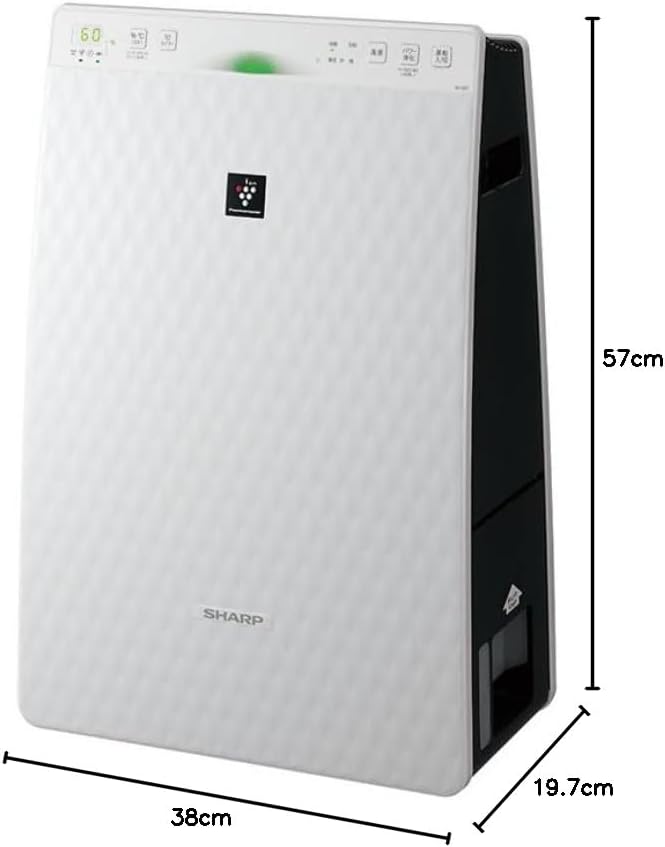
Figure 3.2: Air Purifier with Dimensions. Ka whakaratohia e tēnei whakaahua he tirohanga whānui view of the Sharp KC-35T7, illustrating its approximate dimensions: 38 cm (width), 19.7 cm (depth), and 57 cm (height). These measurements are crucial for proper placement and space planning.
Wae matua:
- Paewhiri Mana: Located on the top, with buttons for power, mode selection, fan speed, and display.
- Hunga hau: Located on the front and sides, where air is drawn into the unit.
- Putanga Hau: Located at the top, where purified and humidified air is released.
- Tāke Wai: Removable tank for humidification, typically located on the side or back.
- Tātari: Internal filters (e.g., HEPA, deodorizing) for air purification.
4. Tatūnga
Follow these steps for the initial setup of your air purifier:
- Wewete ana: Carefully remove the air purifier from its packaging. Retain the packaging materials for future transport or storage.
- Whakanoho Tātari: Open the rear panel of the unit. Remove all protective plastic bags from the filters (e.g., HEPA filter, deodorizing filter) and install them according to the markings inside the unit. Ensure they are securely in place. Close the rear panel.
- Fill Water Tank (for Humidification): Remove the water tank from the unit. Open the water tank cap and fill it with clean tap water up to the maximum fill line. Close the cap securely and reinsert the water tank into the unit until it clicks into place.
- Turanga: Place the air purifier on a flat, stable surface, ensuring there is adequate space (at least 20 cm) around the air intake and outlet for optimal airflow. Avoid placing it directly against a wall or near heat sources.
- Hononga Hiko: Monohia te taura hiko ki tetahi putanga hiko pai.
5. Nga Tohutohu Whakahaere
Learn how to operate your Sharp Plasmacluster Humidifying Air Purifier:
Hiko Whakaka/Weto:
- Pehia te Mana te paatene i te paewhiri mana hei whakakā, whakaweto rānei i te kōwae.
Kōwhiringa Aratau:
The unit typically offers several operating modes:
- Aratau Auto: The unit automatically adjusts fan speed and humidification based on detected air quality and humidity levels.
- Aratau Purihanga Air: Operates solely as an air purifier.
- Aratau Whakamakuku: Operates with humidification function active.
- Plasmacluster Spot Mode: Concentrates Plasmacluster ions for targeted deodorization or purification.
Pehia te Aratau button repeatedly to cycle through available modes.
Whakaritenga Tere Kiriata:
Adjust the fan speed to your preference:
- Pehia te Tere Tere button to select between Low, Medium, High, or Silent settings.
Humidity/Temperature Display:
The display shows current room humidity and temperature. This information helps you monitor your indoor environment and adjust settings as needed.
6. Tiaki
Regular maintenance ensures optimal performance and extends the lifespan of your air purifier. Always unplug the unit before cleaning.
Te Horoi me te Whakakapinga Tātari:
- Tātari-mua: Clean the pre-filter (mesh filter) regularly, approximately once a month, or more often if used in a dusty environment. Use a vacuum cleaner to remove dust or wash it with water and mild detergent. Ensure it is completely dry before reinstallation.
- Tātari HEPA: The HEPA filter cannot be washed. Replace it approximately every 2-5 years, depending on usage and air quality. Refer to the indicator light on the control panel for replacement timing.
- Tātari Whakakore: The deodorizing filter also cannot be washed. Replace it at the same interval as the HEPA filter.
Water Tank and Humidifying Filter Cleaning:
- Tāke Wai: Clean the water tank weekly to prevent mold and bacteria growth. Rinse with clean water and use a soft brush or cloth to remove any residue.
- Humidifying Filter/Tray: Clean the humidifying filter and tray monthly. Remove any mineral deposits or slime using a soft brush and a mild descaling solution (e.g., citric acid solution) if necessary. Rinse thoroughly with clean water and ensure all parts are dry before reassembly.
Horoi o waho:
- Horoia te taha waho o te waeine ki te kakahu ngohengohe, maroke. Mō ngā paru uaua, whakamahia heamp cloth with a mild detergent, then wipe dry. Do not use abrasive cleaners or solvents.
7. Te Raru
Mena ka pa ki a koe nga raru o to para rangi, tirohia nga raru me nga otinga e whai ake nei:
| Raruraru | Take pea | Rongoā |
|---|---|---|
| Karekau te waeine i te hiko. | Kāore i te mau te mono i te taura hiko. Kāore he hiko mai i te putanga hiko. | Tirohia te hononga taura hiko. Whakamatau te putanga me tetahi atu taputapu. |
| Karekau he whakamakuku. | Water tank empty. Water tank not properly installed. Humidifying filter dirty. | Refill water tank. Reinstall water tank correctly. Clean humidifying filter. |
| Haruru ohorere. | Filters not properly installed. Foreign object in unit. | Check filter installation. Unplug and inspect for foreign objects. |
| Te horoinga hau ngoikore. | Filters are dirty or clogged. Unit placed in an obstructed area. | Clean or replace filters. Ensure proper clearance around the unit. |
| Te kakara e puta mai ana i te waeine. | Deodorizing filter saturated. Water tank/humidifying filter dirty. | Replace deodorizing filter. Clean water tank and humidifying filter. |
Mena kei te haere tonu te raru i muri i te whakamatau i enei otinga, tena koa whakapā atu ki te tautoko a te kaihoko.
8. Whakatakotoranga
Detailed technical specifications for the Sharp Plasmacluster Humidifying Air Purifier KC-35T7:
| Āhuahira | Whakatakotoranga |
|---|---|
| Waitohu | koi |
| Tau tauira | KC-35T7 |
| Tae | Mā |
| Rahi Hua (D x W x H) | 19.7 cm x 38 cm x 57 cm |
| Rahi Mokete (L x W x H) | 63 cm x 43 cm x 26 cm |
| Taumaha mōkihi | 7.88 kg |
| Ētahi atu Mahi | Humidification function, Plasmacluster technology, Humidity/Temperature display |
| Nga Pikohiko e hiahiatia ana | Kao |
9. Pūtāhui me te Tautoko
Your Sharp Plasmacluster Humidifying Air Purifier is covered by a manufacturer's warranty. Please refer to the warranty card included in your product packaging for specific terms and conditions, including the warranty period and coverage details.
For technical assistance, service, or to inquire about replacement parts and filters, please contact Sharp customer support. Contact information can typically be found on the manufacturer's official webpae, i runga ranei i to riirii hoko.
When contacting support, please have your product model number (KC-35T7) and serial number (if applicable) ready.